If your business website has been hacked, redirecting visitors to suspicious pages, displaying malware warnings, or showing unauthorized content, a basic WordPress repair may not be enough. Proper recovery requires identifying the infection, removing malicious code, restoring website functionality, and addressing the security weaknesses that allowed the attack.
At DesignerPK, we provide WordPress security assessments, malware cleanup, technical troubleshooting, and website recovery services. We help business owners investigate compromised websites, remove unauthorized access, restore affected files, and improve security after an incident.
Our WordPress security and malware removal service is intended for business owners, website operators, and WooCommerce store owners who need professional assistance with website security problems.
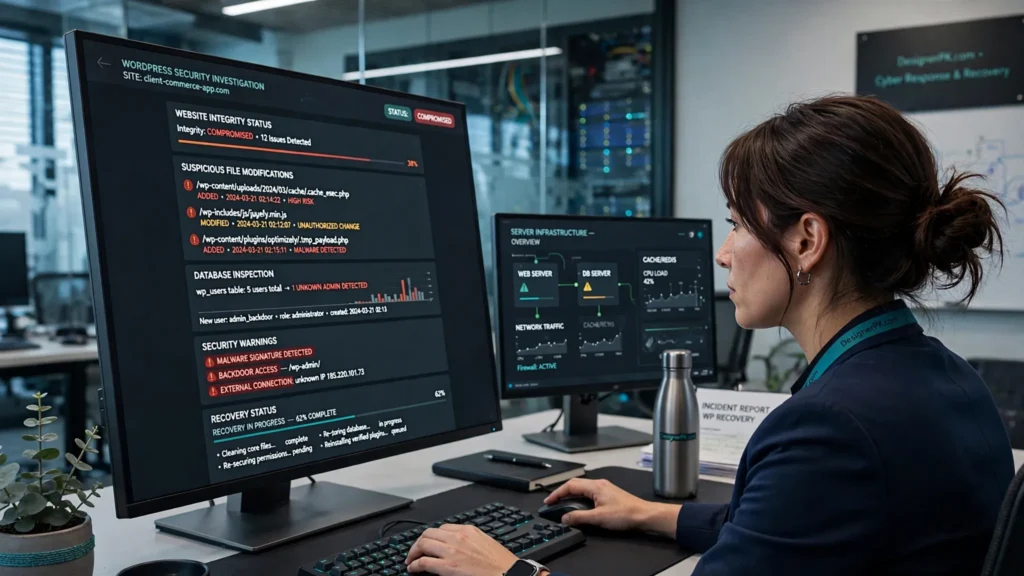
Need a Hacked Site Recovery Specialist in Karachi?
DesignerPK provides assistance with hacked WordPress website recovery, malware identification, infected file cleanup, backdoor removal, database inspection, and post-recovery security hardening.
We start by assessing the website to determine the likely source and extent of the compromise. The appropriate recovery approach depends on the infection, hosting environment, available backups, and affected website functionality.
Depending on the incident, recovery may include:
- WordPress malware scanning and manual file inspection.
- Malicious script and infected file removal.
- Identification and removal of WordPress backdoors.
- Database inspection for injected content and unauthorized changes.
- Review of suspicious administrator accounts and compromised credentials.
- WordPress core, theme, and plugin integrity checks.
- Website functionality restoration and security verification.
- Google Safe Browsing review assistance, where applicable.
- Post-recovery security recommendations.
Dealing with a compromised website? Contact DesignerPK to discuss the issue and request recovery assistance.
What Is Hacked Website Recovery?
Hacked website recovery involves investigating a security compromise, removing unauthorized code or access, restoring legitimate website functionality, and fixing vulnerabilities that could allow another attack.
A compromised WordPress website may contain malicious PHP files, injected JavaScript, unauthorized administrator accounts, modified configuration files, or database entries designed to redirect visitors or display unwanted content. Some attacks also leave hidden backdoors that allow attackers to regain access even after visible malware has been removed.
Deleting one suspicious file or reinstalling a plugin does not necessarily resolve the problem. Other infected files, database injections, compromised credentials, or hidden access mechanisms may remain.
Common Types of WordPress Website Compromise
- Malware injection: Malicious code inserted into website files or database records.
- SEO spam injection: Unauthorized pages, pharmaceutical links, gambling content, or hidden spam targeting search engines.
- Malicious redirects: Visitors are sent to suspicious or unrelated websites without authorization.
- Backdoor installation: Hidden scripts or access mechanisms that allow attackers to regain control.
- Administrator account compromise: Attackers gain control through unauthorized WordPress user accounts.
- File modification: WordPress core, theme, plugin, or configuration files are changed without permission.
- Database injection: Malicious content, scripts, or links are added to website database records.
WordPress provides practical guidance on what to do when a WordPress website is hacked. Its recommendations emphasize investigating the compromise rather than assuming the first visible symptom represents the full extent of the problem.
Signs Your WordPress Website Has Been Hacked
Website infections are not always obvious. Some attacks target visitors, search engines, or administrator accounts without making immediate changes to the homepage.
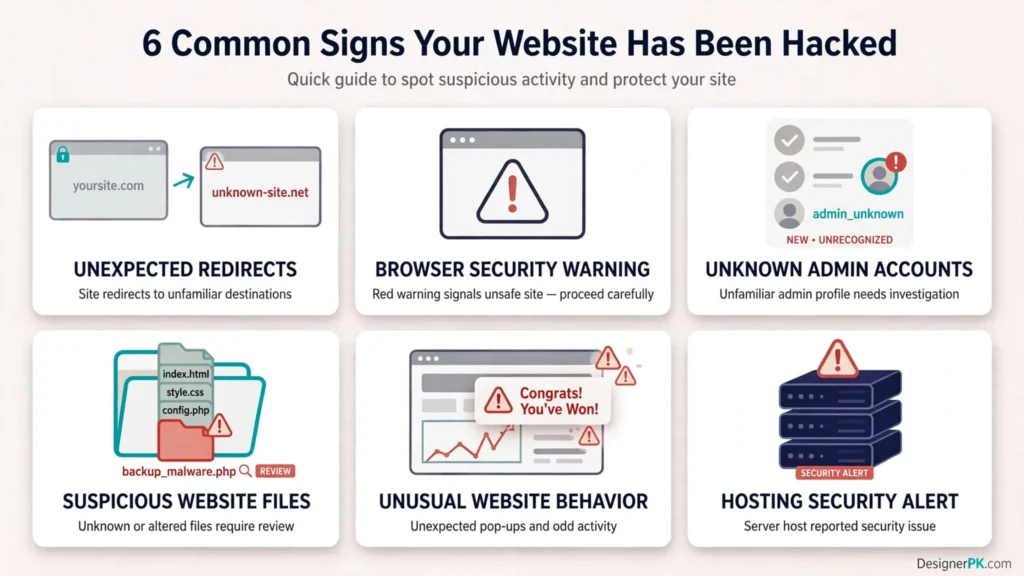
Look for these warning signs when investigating a potentially compromised website:
1. Unexpected Redirects
Your website sends visitors to unfamiliar domains, advertising pages, suspicious downloads, or unrelated websites. These redirects may appear only on mobile devices, selected pages, or visits coming from search engines.
2. Google Security Warnings
Google Chrome or another browser may warn visitors that your website contains deceptive content or malware. These warnings can discourage potential customers and prevent normal access to your website.
3. Unknown WordPress Administrator Accounts
You discover administrator accounts that your team did not create, unexpected password changes, or unfamiliar login activity.
4. Suspicious Website Files
Your hosting account contains unfamiliar PHP files, modified WordPress core components, unexpected scripts, or files that reappear after deletion.
5. Unusual Website Behavior
Your website becomes unexpectedly slow, displays unfamiliar pop-ups, shows spam content, or behaves differently for visitors and administrators.
6. Hosting Provider Security Notifications
Your hosting provider reports malware, suspicious resource usage, unauthorized file changes, or other security concerns. Depending on the severity, the provider may temporarily restrict website access.
Important: Unusual website behavior does not always mean your website has been hacked. Plugin conflicts, configuration errors, expired services, and server problems can produce similar symptoms. A proper investigation should confirm whether malicious activity is involved before cleanup begins.
Professional WordPress Malware Removal and Hacked Website Recovery Services in Karachi
Every website compromise is different. The recovery work depends on the type of infection, website architecture, hosting environment, available backups, and extent of the damage. Our focus is on identifying affected components and choosing an appropriate remediation approach.
WordPress Malware Scanning and Manual Inspection
We examine suspicious website files, WordPress core components, installed plugins, active themes, and uploaded content. Automated scanners can identify known malware patterns, while manual inspection helps investigate modified or concealed code that requires further analysis.
WordPress Backdoor Removal
Backdoors can allow attackers to regain access even after visible malware has been removed. We investigate suspicious files and unauthorized access mechanisms, remove confirmed malicious components, and identify related security weaknesses that could cause reinfection.
Database Malware and Spam Cleanup
Infections can also affect the WordPress database. An assessment may include suspicious administrator accounts, injected content, unauthorized links, modified website settings, and other unexpected database changes.
Infected File Cleanup and Website Restoration
We remove confirmed malicious modifications and restore legitimate website components where possible. Depending on the situation, this may involve replacing affected files with verified WordPress distributions or restoring clean backups. Existing customizations and essential website functionality must be considered before replacing any components.
Security Hardening After Recovery
Removing malware addresses the existing infection, but it does not automatically prevent another attack. We review relevant security controls, including administrator permissions, passwords, software updates, backup arrangements, and available website protection measures.
Learn more about our WordPress security audit and malware removal services.
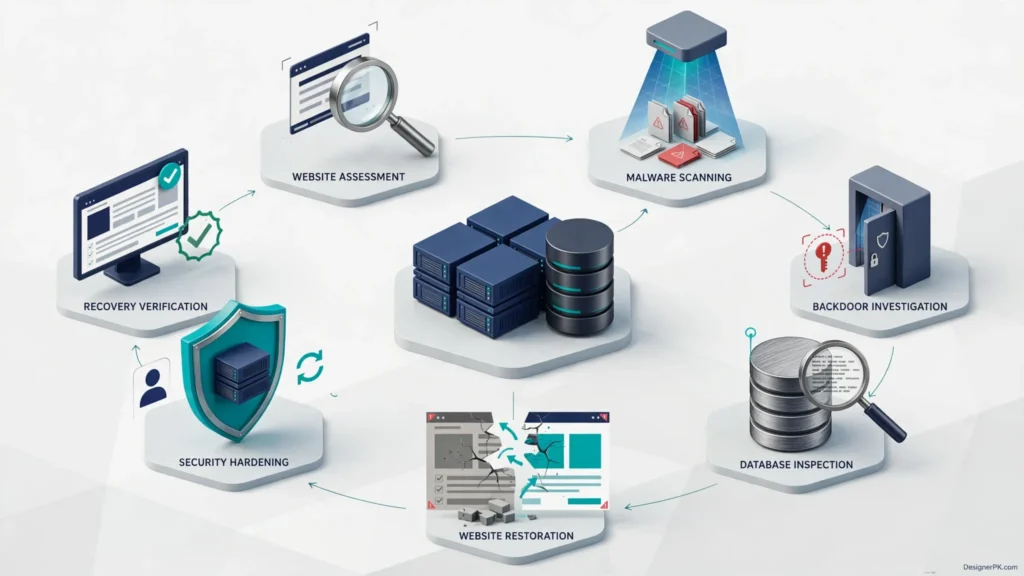
How We Recover a Hacked WordPress Website
Recovering a compromised website requires more than deleting suspicious files. The process should establish how the compromise occurred, identify unauthorized access, remove malicious components, and confirm that essential website functions work after cleanup.
-
1
Assess the Website and Secure Available Access
We review the reported symptoms, website configuration, hosting environment, and available access. Where possible, we preserve a copy of the compromised website before making significant changes so it remains available for investigation.
We also check whether the attack is ongoing, whether the hosting provider has restricted access, and whether other websites within the same hosting account may be affected.
-
2
Scan WordPress Files and Identify Malware
We examine WordPress core files, plugins, themes, uploads, configuration files, and suspicious PHP scripts. Automated scanning helps locate known malware signatures, while manual inspection provides context for unexpected file modifications.
Where appropriate, WordPress core files are compared against clean official distributions to identify unauthorized changes.
-
3
Identify and Remove Malicious Backdoors
We investigate confirmed malicious scripts, unauthorized file modifications, hidden access mechanisms, and suspicious code that could allow an attacker to regain control.
Removing one suspicious file may not be enough if related components or compromised credentials remain. The wider infection must be considered during remediation.
-
4
Inspect the WordPress Database
We review relevant database records for injected spam, unauthorized administrator accounts, suspicious content, unexpected configuration changes, and malicious links.
Database cleanup must account for legitimate website content, customer information, product data, and business records. Changes should be handled carefully to avoid unnecessary data loss.
-
5
Restore Website Functionality
After addressing confirmed malicious components, we check important website functions. These may include page loading, administrator access, navigation, contact forms, plugin functionality, and other business-critical features.
A clean backup may help restore legitimate components when available and appropriate. However, restoring an infected backup without investigating the original compromise can reintroduce malware.
-
6
Secure Accounts and Strengthen Website Protection
We review administrator permissions, recommend credential resets, remove unauthorized access, and assess existing security controls. Software updates and additional protective measures are considered according to the website’s configuration and compatibility requirements.
-
7
Verify Recovery and Review Security Warnings
We perform post-cleanup checks and investigate any remaining security warnings. If Google has flagged the website, we can assist with the relevant Google Search Console review process after the reported issues have been addressed.
The scope of recovery depends on the infection, website complexity, available access, and hosting restrictions. We assess these factors before confirming the proposed work and recovery requirements.
Hacked WooCommerce Website Recovery for Online Stores
A compromised WooCommerce website can affect more than storefront availability. Online stores may contain customer information, order records, product data, payment gateway integrations, and other business-critical information that requires careful handling during recovery.
For e-commerce businesses in Karachi, restoring the storefront without checking its database and checkout functionality can leave important security and operational problems unresolved.
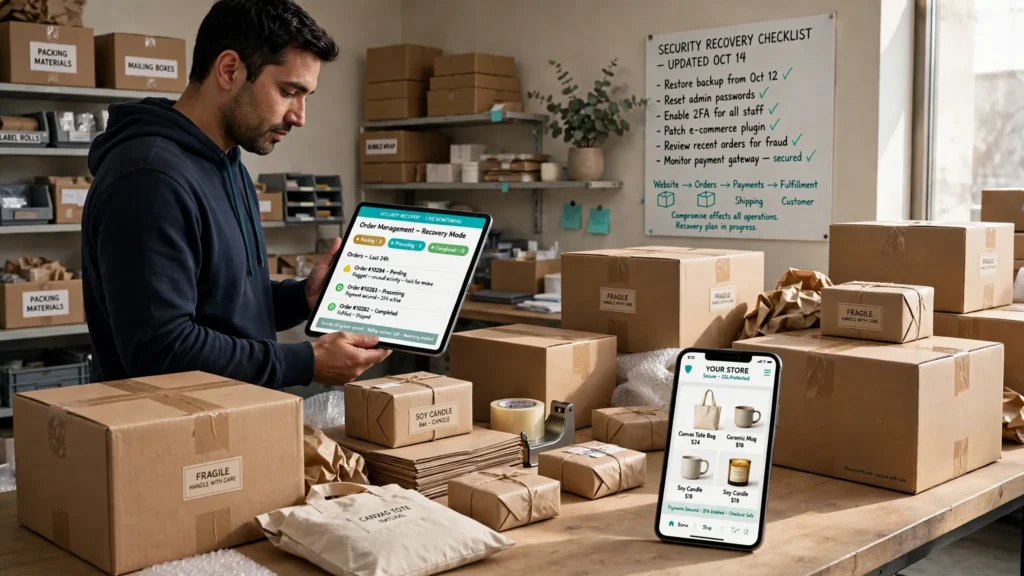
WooCommerce Security and Malware Inspection
Our assessment can include:
- Suspicious changes to WooCommerce files and related plugins.
- Unauthorized administrator and shop manager accounts.
- Unexpected modifications to product pages and checkout content.
- Suspicious scripts affecting customer-facing pages.
- Database changes involving products, orders, and website settings.
- Payment gateway configuration and integration checks.
- Checkout functionality and essential store workflow verification.
Protecting Customer and Order Data
During WooCommerce recovery, we aim to preserve legitimate business records and avoid unnecessary database changes. Backup selection requires particular care because restoring an older database may remove legitimate orders, customer updates, or transactions recorded after the backup date.
If payment information or customer data may have been exposed, website cleanup alone may not be sufficient. The store owner should contact the relevant hosting provider, payment processor, or qualified security professionals to assess possible data exposure and applicable notification obligations.
Post-Recovery WooCommerce Testing
After cleanup, important store functions should be tested, including product pages, cart operations, checkout functionality, payment gateway connections, order notifications, and customer account features.
If your store also needs technical improvements or functionality fixes, our WordPress and WooCommerce development services provide additional development assistance.
Google Safe Browsing Blacklist Removal and Security Warning Assistance
A Google security warning can prevent visitors from accessing your website normally. It may also affect customer confidence, lead generation, and online sales.
Submitting a security review request before fixing the underlying problem is unlikely to resolve the issue. The website should first be investigated, cleaned, and checked for remaining malicious content.
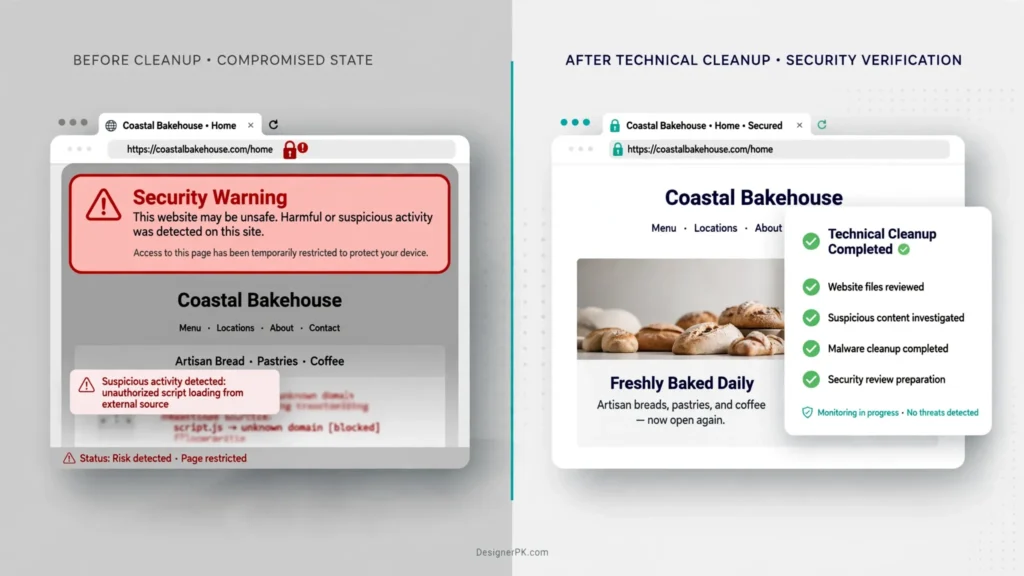
How the Google Security Review Process Works
- Verify website ownership in Google Search Console.
- Open the Security Issues report and review the reported problems.
- Investigate affected pages, files, and reported security issues.
- Complete the necessary malware removal and website cleanup.
- Verify that the reported problems have been addressed.
- Submit a review request through the appropriate Search Console interface.
- Monitor the review status and investigate any additional findings.
Google explains this process in its official Security Issues report documentation.
DesignerPK can assist with technical cleanup, review preparation, and submission through the relevant Google Search Console process where included in the agreed service scope.
Important: Google controls its security review decisions and timelines. We cannot guarantee approval, a specific removal date, or the immediate disappearance of every browser warning. Further investigation may be required if Google identifies unresolved security issues.
Emergency Website Malware Removal in Karachi
Some website security incidents require prompt attention, particularly when they affect business operations, customer access, or online transactions.
Common situations include:
- A business website displaying a malware or deceptive-site warning.
- A WooCommerce store redirecting customers to suspicious websites.
- An administrator losing access to WordPress after an attack.
- A hosting provider suspending a website because of detected malware.
- Malicious content appearing on important landing pages.
- A previously cleaned website becoming infected again.
When requesting emergency assistance, provide your website URL, a description of the incident, available hosting access, recent website changes, and any security notifications you have received.
We assess the severity and scope of the incident before confirming availability, recovery requirements, and an estimated turnaround time. Not every compromised website can be restored immediately, particularly when the infection involves multiple components or restricted hosting access.
Experiencing an active website security incident? Contact DesignerPK for hacked website recovery assistance.
Hacked Website Recovery vs. Ongoing Website Maintenance
Hacked website recovery and routine maintenance serve different purposes. Recovery addresses an existing security compromise, while maintenance helps keep a functioning website updated, monitored, and supported.
| Area | Hacked Website Recovery | Ongoing Maintenance |
|---|---|---|
| Primary purpose | Resolve an existing security compromise. | Maintain website health and reliability. |
| Malware cleanup | Core recovery activity when infection is confirmed. | Investigated when a security issue is detected. |
| Backdoor investigation | Part of compromised website remediation. | Addressed if suspicious activity is identified. |
| Software updates | Applied where appropriate to secure the recovered website. | Part of routine maintenance. |
| Backups | Used to support investigation and restoration. | Maintained as part of a preventive strategy. |
| Security monitoring | Post-cleanup checks and agreed follow-up. | Ongoing monitoring according to the maintenance scope. |
Once recovery is complete, regular maintenance can help reduce preventable security problems. Explore our WordPress website maintenance services or read our guide on how to maintain a WordPress website.
Website Security and Recovery Service Options
The appropriate service depends on whether your website has an active infection, significant damage, suspected vulnerabilities, or additional security needs after cleanup.
WordPress Malware Removal
For websites affected by malicious scripts, infected files, spam injections, suspicious redirects, or unauthorized modifications.
Includes: Malware investigation, infected file cleanup, suspicious code inspection, and post-cleanup checks.
Hacked Website Restoration
For business websites experiencing compromised administrator access, modified website files, defacement, or significant functionality problems following an attack.
Includes: Recovery assessment, malicious component removal, restoration assistance, and functionality verification.
WordPress Security Assessment
For website owners who suspect a compromise or want to identify security weaknesses before they develop into larger problems.
Includes: Security configuration review, suspicious activity investigation, and prioritized recommendations.
Post-Recovery Security Hardening
For websites that have been cleaned and need additional measures to reduce the likelihood of another compromise.
Includes: Access review, credential security recommendations, software updates, backup guidance, and suitable protection measures.
For a complete overview of the available services, visit the DesignerPK Security Audit page.
Who Needs Professional Hacked Website Recovery?
Website security incidents can affect businesses of all sizes. Professional recovery is particularly relevant to organizations that rely on WordPress for customer communication, lead generation, online sales, or daily operations.
Small and Medium-Sized Businesses
A compromised business website can interrupt customer inquiries, damage visitor confidence, and affect the company’s online presence. Professional recovery helps address the security problem and restore normal website operations.
WooCommerce Store Owners
Online stores need careful recovery because customer accounts, orders, product information, payment integrations, and checkout functionality may be affected by a security incident.
Marketing and SEO Teams
Malware injections, unauthorized spam pages, and suspicious redirects can interfere with search visibility and website reputation. Removing malicious content is an important step toward resolving these issues.
Website Owners With Recurring Infections
If malware returns after cleanup, a remaining backdoor, compromised credential, vulnerable component, or another affected website within the hosting environment may be responsible. A broader investigation can help identify the source.
How to Protect Your WordPress Website After Malware Removal
Cleaning an infected website does not automatically prevent future attacks. After recovery, review your security practices, access permissions, installed software, and backup arrangements.
1. Keep WordPress Core, Themes, and Plugins Updated
Use actively maintained software and apply security updates promptly. Remove unused plugins and themes rather than leaving unnecessary components installed.
2. Secure Administrator Accounts
Use unique passwords, enable two-factor authentication where available, and restrict administrator privileges to people who genuinely need them. Remove accounts belonging to former employees or unauthorized users.
3. Maintain Reliable Website Backups
Back up website files and databases regularly. Where practical, store copies separately from the live hosting environment and periodically test whether they can be restored successfully.
4. Use Secure Hosting and File Access
Choose a hosting environment with appropriate security controls. Protect hosting control panel accounts, use secure file transfer methods, and restrict access according to your business requirements.
5. Review Website Security Regularly
Monitor unfamiliar account activity, unexpected file changes, security notifications, and unusual website behavior. Periodic security assessments can help identify weaknesses before they cause greater disruption.
6. Remove Unnecessary Access and Software
Review third-party integrations, abandoned plugins, unused themes, and external accounts connected to your website. Removing components and access that are no longer needed can reduce potential entry points.
For additional technical guidance, consult the official WordPress security hardening documentation.
When Should You Hire a Hacked Website Recovery Specialist?
Ordinary configuration problems can often be resolved through routine maintenance and troubleshooting. Confirmed malware infections, unauthorized access, and recurring security incidents require a more thorough investigation.
Consider professional recovery assistance when:
- Your website contains confirmed malicious code or unauthorized files.
- Unknown administrator accounts appear in WordPress.
- Your website repeatedly redirects visitors to suspicious domains.
- Google or your hosting provider reports a security problem.
- A previous malware cleanup did not prevent reinfection.
- Your WooCommerce store shows suspicious activity or compromised functionality.
- You cannot determine which files or database records have been affected.
- Your business depends on the website and prolonged downtime creates operational problems.
If the problem involves ordinary website functionality rather than malware or unauthorized access, our WordPress bug fixing and technical troubleshooting service may be a better fit.
Website Access, Privacy, and Data Protection During Recovery
Website recovery may require access to WordPress administration, hosting control panels, website files, or databases. These resources can contain sensitive business information, customer records, and operational data, so access must be handled carefully.
Before starting recovery work, website owners should consider the following precautions:
- Provide access only through authorized channels.
- Create backups of important website files and database records where possible.
- Use temporary or limited-access accounts when practical.
- Avoid sharing payment information or unrelated personal credentials.
- Review access permissions and remove temporary accounts after the work is completed.
- Notify the appropriate hosting provider or payment processor if sensitive information may have been exposed.
All recovery activities should respect legitimate website ownership and authorization. The website owner or an authorized representative must approve access and remediation work.
Learn more about the company through the DesignerPK About Us page.
Why Choose DesignerPK for WordPress Website Recovery?
Website recovery requires more than removing suspicious code. It also involves understanding WordPress functionality, investigating technical problems, and considering how the website supports business operations.
DesignerPK provides WordPress and WooCommerce development, technical troubleshooting, security assessments, and website maintenance. This technical background is relevant when recovery involves damaged functionality or website components that need restoration.
- Technical investigation: We assess website problems and look beyond visible symptoms to investigate their underlying causes.
- WordPress knowledge: Our development services cover WordPress websites and WooCommerce environments.
- Careful restoration: Recovery work considers legitimate website content, customizations, and essential business functionality.
- Security-focused recommendations: We review relevant areas such as account protection, software updates, backups, and post-recovery security.
- Related technical support: Website maintenance and bug fixing services are available for additional technical requirements.
- Clear communication: We explain the identified problem, proposed work, and relevant limitations before proceeding.
Explore our website development and digital solutions through the DesignerPK services overview.
Frequently Asked Questions About Hacked Website Recovery in Karachi
How much does hacked website recovery cost in Karachi?
The cost depends on the severity of the infection, website size, number of affected files, database condition, hosting environment, and restoration requirements. A straightforward malware cleanup may involve less work than a website with multiple backdoors, database injections, or recurring infections. Contact DesignerPK for an assessment and a project-specific estimate.
How long does WordPress malware removal take?
Recovery time varies depending on the complexity of the infection, available hosting access, website architecture, and availability of clean backups. We assess these factors before providing an estimated turnaround. Complicated infections and compromised WooCommerce databases may require additional investigation and testing.
Can you recover a WordPress website without a backup?
In many cases, a compromised WordPress website can still be investigated and cleaned without a backup. Restoration options depend on the condition of its files and database. We assess what can be recovered safely and identify missing or damaged content before proceeding.
Can you remove malware from a WooCommerce website?
Yes. WooCommerce recovery can involve inspecting infected files, suspicious scripts, unauthorized accounts, database changes, checkout functionality, and relevant payment integrations. Customer information and order records must be handled carefully throughout the process.
Can you remove Google Safe Browsing warnings after malware cleanup?
We can help resolve the underlying technical issues and submit an appropriate Google Search Console security review request. Google makes the final decision, so warning removal and review approval cannot be guaranteed.
Why does my WordPress website keep getting hacked after cleanup?
Recurring infections may indicate that a backdoor remains, compromised credentials have not been secured, vulnerable software is still installed, or another website within the hosting environment is affected. A broader investigation is needed to identify the likely source of reinfection.
Can you recover a hacked website if I cannot access WordPress admin?
Potentially, yes. Depending on the situation, recovery may be possible through authorized hosting, file, or database access. The available options depend on the hosting provider’s restrictions and the level of access the website owner can provide.
Do you provide emergency website malware removal in Karachi?
Emergency recovery assistance can be discussed for websites experiencing active infections, suspicious redirects, hosting restrictions, or significant business disruption. Availability and turnaround depend on the incident and current project capacity. Contact us with your website URL and a description of the problem.
Will my website be completely protected after malware removal?
No malware cleanup can guarantee permanent protection against future attacks. Security hardening, software updates, reliable backups, account protection, and regular maintenance can help reduce the risk of another compromise.
Do I need malware removal or a regular website security audit?
If your website has a confirmed infection, malware removal and recovery should take priority. If there is no known infection but you want to identify security weaknesses, a security assessment may be more appropriate. DesignerPK can help determine which service is relevant after reviewing your website’s condition.
Get Your Hacked Website Recovered – Professional Malware Removal in Karachi
A compromised website can affect your business reputation, customer confidence, search visibility, and daily operations. Effective recovery starts with identifying the infection, understanding its impact, and determining which website components need attention.
Contact DesignerPK to discuss your hacked WordPress or WooCommerce website. We can review the reported symptoms, explain the available recovery options, and outline the next steps for malware removal and website security assistance.
Request professional help with:
- WordPress malware removal and infected file cleanup.
- Hacked website restoration and backdoor removal.
- Database inspection and unauthorized account investigation.
- WooCommerce website recovery.
- Google Safe Browsing security review assistance.
- Post-recovery website security hardening.
Get Your Hacked Website Recovered
Want to understand your website’s security condition before proceeding? Explore our Website Security Assessment service.
For ongoing protection after recovery, visit our WordPress Website Maintenance services.