Common Problems and How to Fix Them
E-commerce websites lose customers during checkout when shoppers encounter unexpected costs, complicated forms, limited payment options, payment failures, slow-loading pages, or unclear delivery information. Even customers ready to buy may leave when the purchasing process creates unnecessary friction or uncertainty.
Improving checkout performance involves more than simplifying the buying process. Online stores also need transparent pricing, convenient payment methods, responsive layouts, and reliable payment processing.
The right improvements depend on your products, customers, payment providers, shipping arrangements, and e-commerce platform. This guide covers common causes of checkout abandonment, ways to identify underlying problems, and practical improvements for WooCommerce and Shopify stores.
What Is Checkout Abandonment in E-commerce?
Checkout abandonment occurs when a customer starts the purchasing process but leaves before placing an order. For example, a shopper may add a product to their cart, enter delivery information, and reach the payment stage without completing the transaction.
Checkout abandonment is different from shopping cart abandonment. Both behaviors occur at separate stages of the customer journey and can point to different problems.
Shopping Cart Abandonment vs. Checkout Abandonment
| Comparison | Shopping Cart Abandonment | Checkout Abandonment |
|---|---|---|
| Meaning | A customer adds products to a cart but does not proceed to checkout. | A customer begins checkout but does not complete the purchase. |
| Possible causes | Product research, price comparison, unexpected pricing, or low purchase intent. | Payment problems, shipping costs, lengthy forms, or technical errors. |
| Customer journey | Before checkout begins. | During the checkout process. |
| Improvement focus | Product information, pricing, cart usability, and purchase motivation. | Payment reliability, checkout usability, transparency, and technical performance. |
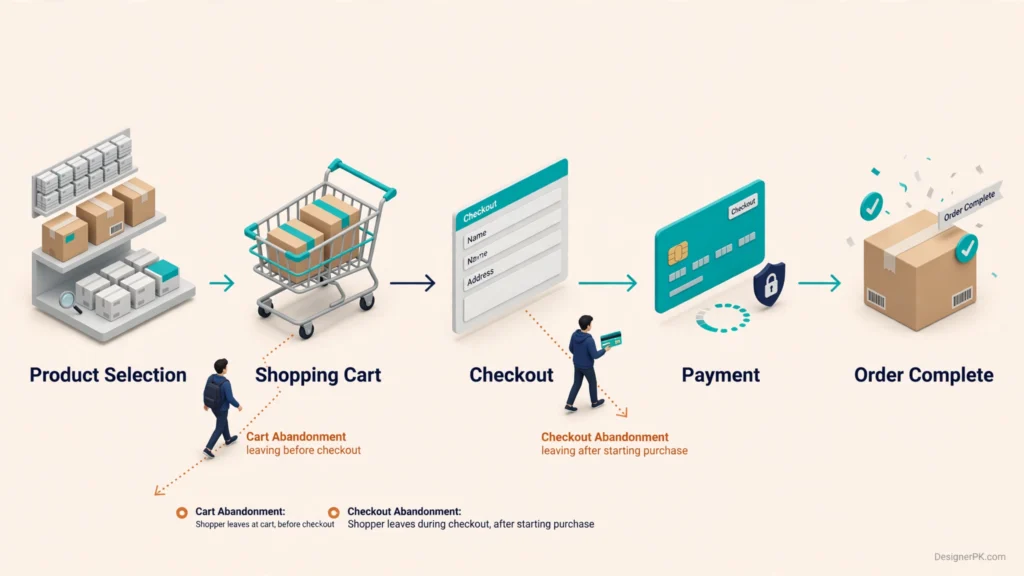
Tracking these behaviors separately helps identify where customers encounter friction. Someone comparing products before checkout has a different problem from someone who encounters a payment error after entering their information.
Why Does Checkout Experience Matter?
Checkout is where customer interest turns into a financial transaction. Shoppers want to know exactly what they will pay, when their products will arrive, and whether their payment will be processed securely.
Uncertainty at this stage can cause customers to postpone a purchase, compare another retailer, or leave the website altogether.
According to Baymard Institute’s cart abandonment research, aggregated research has reported an average cart abandonment rate of approximately 70%. This is a broad industry benchmark, not a target or expected result for every online store.
Use your own ecommerce analytics to evaluate customer behavior rather than assuming an industry average means your checkout is underperforming.
Store owners can also explore discussions in the WooCommerce community and WordPress community for practical troubleshooting insights. However, verify technical recommendations against official documentation before implementing them.
Common E-commerce Checkout Problems That Make Customers Leave
Checkout abandonment rarely has a single cause. One store may struggle with unexpected shipping costs, while another experiences payment gateway errors or mobile usability issues.
Distinguishing customer experience problems from technical failures helps identify the right solution without changing unrelated checkout settings.
1. Unexpected Shipping Costs, Taxes, and Additional Fees
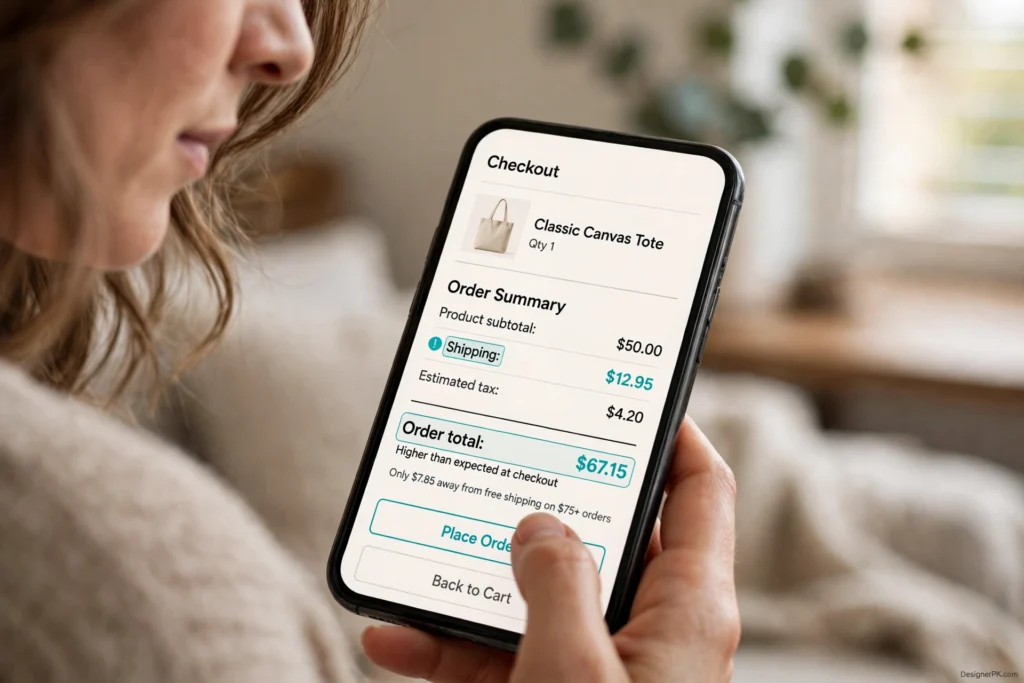
Unexpected costs are a common source of checkout friction. Customers may decide to purchase based on a product’s listed price, only to discover additional shipping charges, taxes, handling fees, or other costs later in the process.
For example, a shopper may add a $50 product to their cart but discover a substantial shipping charge after entering a delivery address. Even if the shipping price is reasonable, revealing it late can undermine purchase confidence.
How to fix it:
- Display available shipping charges as early as practical.
- Show estimated taxes and additional fees before the final payment stage when possible.
- Explain free-shipping thresholds and eligibility requirements.
- Provide a shipping calculator when delivery costs depend on location or order weight.
- Avoid introducing unexpected handling fees near order submission.
For US-based stores, sales tax calculations may depend on the customer’s location and applicable tax obligations. Review your store’s tax configuration rather than applying the same tax assumption to every order.
2. Mandatory Account Creation
Requiring customers to create an account before purchasing adds another step to checkout. First-time shoppers may not want another password, registration process, or marketing subscription just to buy a product.
This can be particularly inconvenient for one-time purchases, gifts, everyday consumer products, and shoppers who are still deciding whether they trust the retailer.
How to fix it:
- Offer guest checkout when the business model permits it.
- Make registration optional rather than mandatory.
- Allow customers to create an account after completing an order.
- Explain practical account benefits, such as order tracking and saved addresses.
- Avoid collecting registration information that is unnecessary for the purchase.
Guest checkout is not suitable for every business. Subscription services and account-dependent purchasing systems may require registration for recurring billing, customer access, or order management.
For standard retail purchases, however, allowing customers to buy without registering can remove an unnecessary barrier.
3. Complicated or Lengthy Checkout Forms
Checkout forms that request too much information make purchasing unnecessarily difficult, especially on smartphones. Asking customers to enter the same address twice or complete irrelevant fields increases effort and creates more opportunities for errors.
Review every field to determine whether it is genuinely needed to process the order, calculate delivery, meet legal requirements, or provide the requested service.
How to fix it:
- Remove fields that are not required to complete the transaction.
- Enable browser autofill using appropriate autocomplete attributes.
- Use visible labels instead of relying exclusively on placeholder text.
- Make billing and shipping address reuse straightforward.
- Display helpful validation messages beside the relevant fields.
- Group related information into logical sections.
- Preserve previously entered information when validation fails.
For example, customers should not have to enter their billing address separately when it matches their shipping address, unless payment processing or the business model genuinely requires it.
Google’s payment and address form best practices explain how meaningful HTML labels, browser autofill, appropriate input types, and flexible address fields improve form usability.
Custom checkout fields should also work correctly with browser autofill, mobile keyboards, and assistive technologies.
4. Limited Payment Methods
Customers have different payment preferences. Some prefer traditional credit or debit cards, while others use digital wallets or supported installment payment services.
If a store does not offer a convenient payment method that customers can use, some shoppers may decide not to complete their purchases.
Payment preferences vary by target audience, product category, order value, location, and payment provider availability.
How to fix it:
- Identify the payment methods most relevant to your target customers.
- Offer suitable credit and debit card payment options.
- Evaluate supported digital wallets such as Apple Pay and Google Pay.
- Consider express checkout options when they fit the business model.
- Communicate accepted payment methods before customers reach the final stage.
- Test each payment integration across supported browsers and devices.
Adding more payment gateways does not automatically improve checkout. Each integration introduces configuration, maintenance, compatibility, and testing requirements.
Choose payment methods based on customer demand, provider availability, transaction costs, security requirements, and compatibility with your existing store.
5. Payment Processing Errors and Declined Transactions
Payment failures are particularly frustrating because customers may have already entered their contact and delivery information before discovering that their transaction cannot be completed.
Possible causes include incorrect card details, insufficient funds, expired cards, bank restrictions, additional authentication requirements, payment provider outages, and communication problems between the gateway and the store.
Not every payment failure is a website bug. Some transactions are legitimately declined by the issuing bank or payment provider.
A more serious situation occurs when a customer sees an error message even though the payment has already been authorized. If the store does not update the order status correctly, the customer may attempt another payment and risk creating a duplicate transaction.
How to fix it:
- Review payment gateway logs and transaction records to identify the actual failure reason.
- Verify API credentials, webhook configuration, and provider settings.
- Provide clear error messages explaining the next appropriate action.
- Allow customers to retry failed payments safely.
- Check transaction status before encouraging another payment attempt.
- Verify that successful payments update the corresponding order correctly.
- Test authentication, authorization, and payment confirmation scenarios.
For WooCommerce stores, investigate gateway configuration, plugin compatibility, webhook communication, and server-side errors when transactions fail unexpectedly.
WooCommerce provides an official payment error troubleshooting guide covering payment logs and common integration conflicts.
Shopify merchants can follow the platform’s checkout payment troubleshooting documentation to investigate provider-specific failures, payment loops, and store-wide payment issues.
Check the actual transaction status before changing payment settings. Blindly retrying payments or modifying gateway configuration can introduce additional problems.
6. Slow-Loading Checkout Pages
A slow checkout page creates unnecessary delays when customers are trying to complete a purchase. If shipping calculations, payment forms, or address fields take too long to load, shoppers may assume the website is not working correctly.
Several technical factors can affect checkout performance, including:
- Excessive JavaScript and third-party scripts.
- Slow server response times.
- Inefficient database queries.
- Unnecessary WordPress plugins and extensions.
- Slow payment gateway communication.
- External shipping and tax calculation requests.
- Hosting resources that cannot handle the store’s workload.
In WooCommerce stores, poorly optimized extensions and expensive checkout-related database operations can add processing overhead. Identify the actual bottleneck before removing plugins or changing the checkout architecture.
How to fix it:
- Measure checkout loading and interaction performance on desktop and mobile.
- Identify slow server responses and expensive database queries.
- Review scripts and third-party integrations loaded during checkout.
- Remove unnecessary checkout functionality.
- Investigate hosting and server configuration.
- Optimize database operations and frontend resources where appropriate.
- Retest cart sessions, payment authentication, and order processing after optimization.
Checkout pages need special attention when configuring caching. Exclude personalized cart, checkout, and account pages from inappropriate full-page caching rules. Incorrect caching can expose stale session information, display incorrect cart contents, or interfere with order processing.
For more detailed performance troubleshooting, explore our website speed optimization services and guide on how to fix a slow WordPress website.
7. Poor Mobile Checkout Experience
Many customers browse and purchase products using smartphones. If an online store’s checkout is designed primarily for desktop users, mobile shoppers may struggle to complete their orders.
Small input fields, difficult navigation, poorly positioned buttons, horizontal scrolling, and payment forms that do not adapt to smaller screens can make checkout frustrating.
Third-party payment interfaces, address suggestions, and promotional popups can also interfere with the mobile layout.
How to fix it:
- Use responsive checkout layouts that adapt to different screen sizes.
- Make form fields comfortable to use with touch input.
- Use appropriate input types for email addresses, phone numbers, and payment details.
- Enable browser autofill and address autocomplete where supported.
- Keep important checkout buttons visible and easy to select.
- Test the complete purchasing process on actual mobile devices.
- Avoid unnecessary popups and elements that interrupt checkout.
A checkout is not mobile-friendly simply because its layout fits a smaller screen. The entire purchasing journey must work, including address entry, shipping calculations, payment authentication, and order confirmation.
8. Missing Trust Signals and Unclear Security Information
Customers need confidence before sharing personal information and making payments online. An outdated checkout page, broken elements, or unclear payment information can make shoppers question whether a transaction is safe.
Missing business contact details, suspicious redirects, and inconsistent branding can create further uncertainty.
How to fix it:
- Use HTTPS throughout the website.
- Display recognizable payment provider information where appropriate.
- Provide accessible customer support and contact information.
- Link to clear privacy, shipping, return, and refund policies.
- Keep branding consistent across product, cart, and checkout pages.
- Use genuine security certifications or trust badges only when they represent actual credentials or services.
An SSL certificate alone does not establish that an online store is trustworthy. Customers also need transparent business information, understandable policies, and dependable payment processing.
Build trust throughout the purchasing journey rather than relying on decorative security badges.
9. Unexpected Delivery Times
Shipping costs are not the only delivery-related concern. Customers may also abandon checkout when they discover that delivery will take longer than expected.
For example, someone purchasing a birthday gift may need it within a few days. If checkout reveals a much longer delivery window, the shopper may choose another retailer.
Unclear delivery estimates can also affect customers ordering products for business use, special events, or other time-sensitive requirements.
How to fix it:
- Display estimated delivery dates or realistic delivery windows.
- Explain standard, express, and other available shipping options.
- Show shipping restrictions before customers reach the payment stage.
- Keep delivery estimates consistent with actual fulfillment capabilities.
- Explain delays caused by product availability, customer location, or shipping restrictions.
For US e-commerce stores, delivery estimates should account for customer location, warehouse availability, carrier services, and fulfillment schedules. Avoid promising dates that the business cannot reliably meet.
10. Confusing Return and Refund Policies
Customers may hesitate to purchase when they cannot understand what happens if a product arrives damaged, differs from its description, or is no longer needed.
Unclear return periods, complicated refund procedures, hidden restocking fees, and missing information about return shipping can create uncertainty before an order is placed.
This is particularly relevant for clothing, electronics, accessories, and other product categories where customers may have questions about fit, compatibility, or product condition.
How to fix it:
- Make return and refund policies easy to find.
- Explain return eligibility and time limits in plain language.
- Clearly identify any restocking fees or return shipping charges.
- Explain how customers can request refunds or exchanges.
- Provide a direct link to the complete policy near checkout.
Published policies should comply with applicable consumer protection requirements and accurately describe the business’s actual practices.
11. Coupon Code Problems
Promotional codes can encourage purchases, but poorly implemented coupon functionality can have the opposite effect.
Customers may leave when a code does not work, a discount is calculated incorrectly, or eligibility messages are confusing. Some shoppers may also leave the website to search for another discount after seeing a coupon field.
How to fix it:
- Make coupon eligibility requirements clear.
- Display specific messages for expired or invalid codes.
- Automatically apply eligible promotional discounts when appropriate.
- Prevent incompatible discounts from being applied together.
- Test coupon functionality with different cart values and product combinations.
- Verify that shipping promotions and product discounts calculate correctly.
Instead of displaying only “Invalid coupon,” explain whether the code has expired, does not apply to selected products, or requires a minimum order value.
12. Address Validation and Form Errors
Address validation problems can prevent customers from completing checkout even when they enter otherwise correct information.
These issues may occur when the checkout system rejects valid address formats, mishandles apartment numbers, or fails to recognize postal codes and regional address variations.
Overly strict validation can frustrate customers, while insufficient validation may result in incorrect shipping information and delivery problems.
How to fix it:
- Use address validation tools that support your target delivery regions.
- Allow apartment, suite, and unit numbers where relevant.
- Provide useful examples of accepted address formats.
- Avoid rejecting valid addresses simply because they do not match one formatting pattern.
- Allow customers to review and correct suggested addresses.
- Validate required fields without clearing previously entered information.
For stores serving customers across the United States, address handling should support common variations in street names, ZIP codes, apartment numbers, and state abbreviations.
Test address validation with realistic examples rather than assuming one standard format will work for every customer.
13. Checkout Plugin and Third-Party Integration Conflicts
Checkout functionality often depends on connected systems such as payment gateways, shipping calculators, tax services, inventory management tools, analytics scripts, and checkout extensions.
If one integration stops working correctly, checkout may become unreliable even when the rest of the website appears normal.
For example, a payment gateway update may introduce compatibility issues with an existing checkout extension. A shipping integration may also fail to return delivery rates, preventing customers from proceeding to payment.
How to fix it:
- Check recent plugin, theme, and platform updates.
- Review payment gateway and shipping integration logs.
- Investigate JavaScript errors and failed network requests.
- Test suspected plugin conflicts in a staging environment.
- Keep integrations updated and remove extensions that are no longer needed.
- Test the complete checkout process after making technical changes.
Avoid disabling payment or checkout extensions directly on a live store without a suitable testing and recovery plan. Uncontrolled troubleshooting can interrupt active orders or create additional transaction problems.
For WooCommerce stores, the official WooCommerce conflict testing guidance provides a useful starting point for investigating extension and theme compatibility issues.
How to Reduce Checkout Abandonment and Improve the Buying Experience
Identifying checkout problems is only the first step. Store owners also need an improvement plan based on customer behavior, technical performance, and transaction data.
Prioritize changes according to their potential customer impact, technical risk, and the evidence available from analytics and payment records.
-
1
Make Guest Checkout Available
Allow customers to complete purchases without creating an account when registration is not essential to the business model.
Offer optional account creation after the order is placed so customers can access order history and other account features without adding registration steps to checkout.
-
2
Simplify Checkout Forms
Remove fields that are not required to process orders or deliver products. Use browser autofill, address autocomplete, clear labels, and inline validation to reduce unnecessary typing and prevent avoidable mistakes.
-
3
Display Complete Pricing Before Payment
Show product prices, shipping charges, applicable taxes, and other fees as early as practical.
If shipping or tax calculations depend on customer location, explain when the final amount will be available. Customers should not discover major additional charges only after entering payment information.
-
4
Offer Convenient Payment Options
Select payment methods according to customer preferences and supported regions. Consider suitable card payments, digital wallets, and express checkout options.
Test each integration across the devices and browsers your customers use.
-
5
Improve Checkout Performance
Measure checkout loading and interaction performance, then identify scripts, plugins, database operations, or third-party requests that delay the purchasing process.
Optimize performance without disrupting cart sessions, customer-specific pricing, payment authentication, or order processing.
-
6
Optimize the Mobile Checkout Experience
Test the complete checkout journey on smartphones and tablets. Make buttons easy to tap, forms easy to complete, and payment interfaces compatible with smaller screens.
Pay particular attention to address entry, digital wallet payments, and authentication steps.
-
7
Improve Payment Error Handling
Display understandable messages when payments fail and give customers safe options to correct their information or retry a transaction.
Check transaction status before suggesting another payment attempt to reduce duplicate charges and orders.
Choosing the Right Checkout Improvements
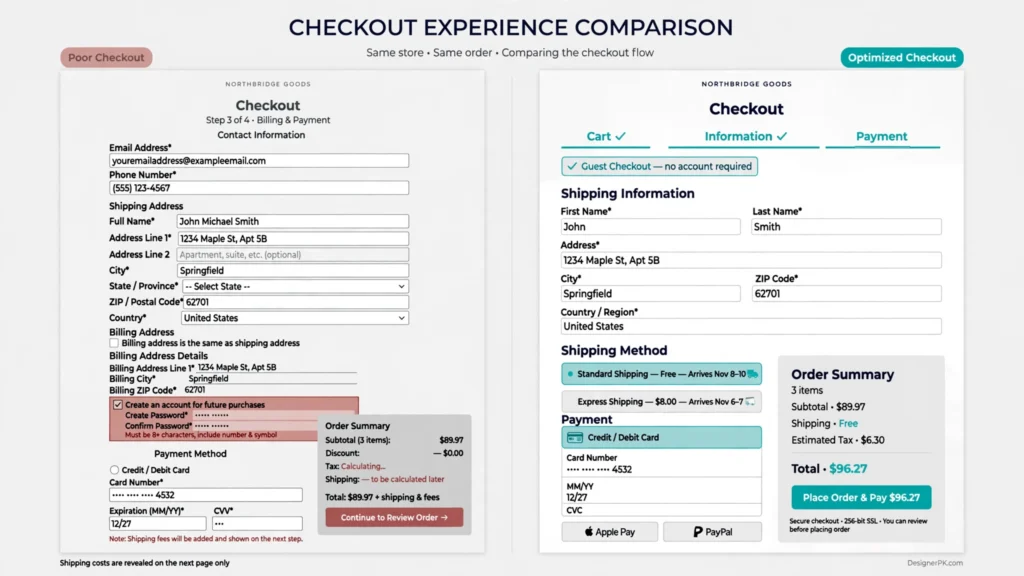
Different businesses need different checkout configurations. A subscription service may require account management and recurring payments, while a retailer selling everyday consumer products may benefit more from guest checkout and express payments.
Prioritize changes according to actual customer behavior rather than copying another store’s checkout design.
For example, if analytics show that customers leave after being asked for shipping information, reviewing shipping rates and address usability may be more useful than redesigning the payment section.
WooCommerce and Shopify Checkout Optimization
WooCommerce and Shopify offer different checkout environments, customization options, and troubleshooting methods. Understanding these differences helps store owners select appropriate improvements without adding unnecessary extensions or functionality.
WooCommerce Checkout Optimization
WooCommerce offers flexibility through WordPress themes, plugins, payment gateways, and checkout customization options.
However, plugin conflicts, theme modifications, server performance, and third-party integrations can affect checkout reliability.
Recommended checks:
- Review payment gateway configuration and transaction logs.
- Check compatibility between checkout plugins and the active theme.
- Test checkout functionality after updates.
- Review shipping and tax configuration.
- Investigate PHP errors, JavaScript errors, and failed API requests.
- Test custom checkout fields and payment integrations in staging.
Official guidance: WooCommerce documentation.
Shopify Checkout Optimization
Shopify provides a managed commerce platform with a more controlled checkout environment. Merchants can configure supported payment methods, checkout settings, shipping options, and eligible checkout customizations.
Available changes depend on the Shopify plan, supported features, installed apps, and available integrations.
Recommended checks:
- Review payment provider settings and failed transaction details.
- Check shipping zones, rates, and delivery configurations.
- Review discount code eligibility and promotional settings.
- Test available express checkout methods.
- Investigate app-related errors and third-party integrations.
- Use supported checkout customization options.
Official guidance: Shopify checkout settings documentation.
Important platform difference: WooCommerce merchants generally have greater responsibility for hosting, plugin compatibility, and server-side troubleshooting. Shopify merchants work within the platform’s supported checkout architecture and customization restrictions.
If your WooCommerce store has persistent checkout errors, explore our WordPress and e-commerce development services for development and integration support.
For broken functionality, you can also explore our website bug fixing services.
How to Identify Where Customers Abandon Checkout
Understanding where customers leave the purchasing process helps store owners choose effective improvements. Instead of redesigning checkout based on assumptions, examine customer behavior, conversion data, payment records, and technical errors.
Analytics can reveal where customers stop progressing, while technical logs help explain why specific operations fail.
1. Use Google Analytics 4 Checkout Funnel Reports
Google Analytics 4 provides ecommerce measurement capabilities that help businesses understand how customers move through the purchasing journey.
With correctly implemented ecommerce tracking, stores can monitor events such as:
- view_item: A customer views a product.
- add_to_cart: A customer adds a product to their cart.
- view_cart: A customer views their shopping cart.
- begin_checkout: A customer starts checkout.
- add_shipping_info: A customer submits shipping information.
- add_payment_info: A customer submits payment information.
- purchase: A purchase is recorded.
These events help identify where customers stop progressing through the buying process.
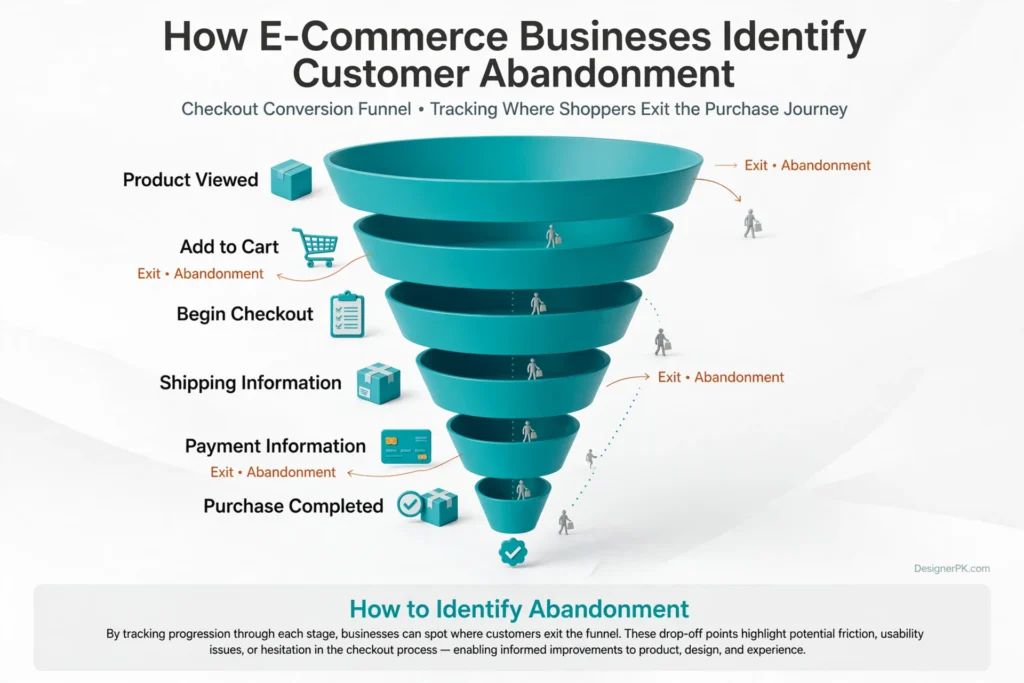
For example, if many customers start checkout but relatively few reach the payment stage, the problem may involve shipping information, form usability, or checkout navigation.
If customers reach the payment stage but purchases are not recorded, investigate payment processing, authentication, transaction handling, and analytics implementation.
Important: A missing purchase event does not automatically mean a payment failed. Tracking problems, blocked scripts, consent settings, and delayed event processing can also affect reporting.
Check whether the payment provider confirms successful transactions before concluding that checkout has failed.
Official reference: Google Analytics ecommerce measurement documentation.
2. Review Session Recordings and Customer Behavior
Session recording tools can help businesses understand how visitors interact with checkout pages. Depending on the tool and its configuration, recordings may reveal repeated form errors, confusing navigation, unsuccessful button clicks, or unexpected page behavior.
For example, customers may repeatedly attempt to submit an address because the validation message is unclear. Others may click a payment button multiple times because the page provides no visible confirmation.
These patterns can reveal usability problems that standard conversion reports do not fully explain.
Look for recurring behavior rather than drawing conclusions from individual recordings.
Configure session recordings carefully to protect customer information. Sensitive fields, payment details, passwords, and personal information should not be unnecessarily captured.
3. Monitor Payment Logs and Technical Errors
When checkout abandonment coincides with payment failures or technical issues, investigate the systems responsible for completing transactions.
For WooCommerce stores, useful troubleshooting sources include:
- WooCommerce status and system reports.
- Payment gateway logs.
- WordPress and PHP error logs.
- Browser developer console errors.
- Failed API requests and webhook responses.
- Plugin and theme compatibility records.
Shopify merchants can review available payment information, order timelines, checkout-related reports, shipping configuration, and relevant app or payment provider diagnostics.
Look for recurring patterns rather than treating every failed transaction as an isolated problem. Errors associated with a particular payment method, browser, device, or shipping region may reveal the underlying issue.
For example, if payment failures begin after a specific plugin update, investigating compatibility is more useful than changing unrelated checkout design elements.
Before making technical changes, document the affected checkout stage, error message, payment method, and relevant transaction status.
How to Test Checkout Improvements and Measure Their Impact
Checkout optimization should be an ongoing improvement process. A change that appears useful during development may not necessarily improve the purchasing experience for actual customers.
Establish a performance baseline before making significant changes. Then test the updated checkout process and compare results over a suitable period.
1. Establish Your Current Checkout Performance
Record the current performance of important ecommerce metrics before introducing changes.
Useful measurements include:
- Checkout initiation rate: The proportion of eligible shopping sessions that begin checkout.
- Checkout completion rate: The proportion of checkout starts that result in completed purchases.
- Checkout abandonment rate: The proportion of checkout starts that do not result in completed purchases within the defined measurement window.
- Payment failure rate: The proportion of attempted transactions that fail, based on clearly defined payment reporting.
- Purchase conversion rate: The proportion of eligible sessions that result in a recorded purchase.
- Average order value: The average revenue generated per completed order.
Use consistent definitions and reporting windows when comparing these metrics.
For example, GA4 session-based conversion rates and payment provider transaction rates measure different things and should not be treated as interchangeable.
2. Test One Meaningful Change at a Time
Changing several checkout elements simultaneously makes it difficult to determine which modification influenced the results.
Consider testing improvements such as:
- Guest checkout versus mandatory registration.
- Shorter checkout forms versus the existing form.
- Earlier shipping cost visibility versus late cost disclosure.
- Different payment method presentations.
- Improved mobile button placement and form layouts.
- Clearer payment error messages.
Where sufficient traffic is available, controlled A/B testing can help compare different checkout experiences.
For lower-traffic stores, usability testing and carefully monitored before-and-after comparisons may be more practical.
3. Test the Complete Purchase Journey

Before releasing checkout changes, complete test purchases using the payment provider’s approved test environment or test mode whenever possible.
Check the following:
- Products can be added to and removed from the cart.
- Shipping rates and tax calculations are correct.
- Discount codes work as expected.
- Required fields display helpful validation messages.
- Payment authorization and failure scenarios behave correctly.
- Customers receive accurate order confirmation messages.
- Order status updates correctly after payment.
- Inventory and fulfillment integrations work properly.
Also test relevant mobile browsers, desktop browsers, and supported payment methods.
A checkout update should not be considered successful simply because the page loads without visible errors.
4. Compare Business Results, Not Just Clicks
A checkout change may increase button clicks without increasing completed purchases. Similarly, a new payment option may improve convenience while introducing additional transaction costs.
Evaluate completed orders, payment success, revenue, average order value, customer support issues, and operational costs associated with the change.
The objective is not simply to shorten checkout. It is to make purchasing more reliable and convenient for the customers your business actually serves.
Practical E-commerce Checkout Optimization Checklist
Use this checklist to review your current checkout process and identify improvements worth prioritizing.
- Display shipping charges and additional fees before the final payment stage.
- Show realistic delivery estimates.
- Offer guest checkout when appropriate.
- Remove unnecessary checkout fields.
- Enable browser autofill and suitable address autocomplete.
- Use clear labels and understandable validation messages.
- Support payment methods relevant to your target customers.
- Provide useful payment failure messages.
- Prevent duplicate payment submissions and duplicate order creation.
- Make checkout layouts responsive on mobile devices.
- Keep checkout buttons visible and easy to use.
- Provide accessible privacy, shipping, return, and refund policies.
- Review coupon functionality and discount calculations.
- Check payment gateway and shipping integration logs.
- Monitor checkout performance and server response times.
- Exclude sensitive checkout information from analytics and session recordings.
- Test the complete purchase journey after website updates.
- Review checkout funnel performance regularly.
When Should You Get Professional Checkout Optimization Help?
Some checkout improvements are straightforward. Updating shipping information, clarifying return policies, or removing unnecessary form fields may not require extensive development work.
Persistent technical problems, however, often need a more detailed investigation.
Consider professional assistance when:
- Customers report recurring payment failures.
- Checkout stops working after plugin or theme updates.
- Shipping and tax calculations produce incorrect results.
- Payment integrations fail intermittently.
- WooCommerce checkout pages load slowly.
- Mobile checkout behaves differently from desktop checkout.
- Orders are duplicated or payment statuses do not update correctly.
- Custom checkout functionality needs to be developed or repaired.
Why Technical Diagnosis Matters
A checkout problem does not always require a complete redesign. The underlying cause may be a payment gateway configuration issue, an incompatible plugin, an incorrect shipping rule, or a server-side error.
Identify the source of the problem before changing the checkout architecture or installing additional extensions.
At DesignerPK, relevant development services include:
- WordPress and e-commerce development for checkout customization, store functionality, and integrations.
- Website bug fixing for broken functionality, plugin conflicts, and technical troubleshooting.
- Website speed optimization for performance problems affecting the purchasing experience.
These services address different technical needs, from checkout functionality and integration troubleshooting to website performance improvements.
A targeted technical fix may be more appropriate than rebuilding an otherwise functional checkout system.
Protect Customer Privacy During Checkout Analysis
Analytics and session recordings can help identify checkout problems, but collecting customer information requires careful handling.
Checkout pages may contain names, email addresses, phone numbers, delivery addresses, payment-related information, and other sensitive customer data. Configure monitoring tools to avoid unnecessary collection or exposure of these details.
- Do not record full payment card numbers or security codes.
- Mask sensitive form fields in session recording tools.
- Avoid collecting personal information that is not needed for analytics.
- Configure analytics consent and tracking according to applicable privacy requirements.
- Restrict access to transaction logs and customer information.
- Use secure connections and appropriate data retention policies.
- Review third-party analytics and monitoring providers before enabling them.
Payment Data Security
Payment card information requires particular attention. Avoid collecting or storing sensitive card data unless your payment architecture and compliance obligations explicitly support it.
Using a reputable payment provider can reduce the amount of sensitive payment information handled directly by your website. However, an external payment provider does not automatically eliminate every PCI compliance responsibility.
US businesses should also consider applicable federal and state privacy requirements based on their business activities and the locations of their customers.
For payment card data, consult the applicable PCI Security Standards Council requirements and your payment provider’s guidance.
Checkout monitoring should improve the purchasing experience without unnecessarily exposing private information.
Frequently Asked Questions About E-commerce Checkout Abandonment
Why do customers abandon online shopping carts?
Customers abandon online shopping carts for several reasons, including unexpected shipping costs, high prices, product comparisons, complicated checkout forms, mandatory account creation, limited payment options, and technical problems. Some abandonment is normal browsing behavior, while other cases indicate problems that store owners can address.
How can I reduce checkout abandonment on my e-commerce website?
Start by identifying where customers leave the purchasing process. Offer guest checkout, simplify forms, display shipping costs early, support suitable payment methods, and improve mobile usability. Investigate payment errors and use analytics to determine which changes make a meaningful difference.
Does mandatory account creation increase checkout abandonment?
Mandatory account creation can create unnecessary friction, particularly for first-time shoppers and customers making one-time purchases. Guest checkout allows customers to complete orders without registering, although subscription businesses and other account-dependent services may have different requirements.
Why do customers experience payment failures during checkout?
Payment failures can result from incorrect card details, insufficient funds, bank restrictions, expired cards, authentication problems, payment gateway errors, or technical integration issues. Review payment provider records and website logs to identify the actual cause.
How can I improve mobile checkout optimization?
Use responsive layouts, touch-friendly buttons, readable form labels, browser autofill, appropriate input types, and convenient payment options. Test the complete purchase journey on real mobile devices, including address entry, shipping calculations, payment authentication, and order confirmation.
How do I fix WooCommerce checkout problems?
Check WooCommerce system status, payment gateway settings, plugin compatibility, theme modifications, server logs, and browser console errors. Test suspected conflicts in a staging environment before changing the live store. Also verify that payment statuses and order updates work correctly.
How can Shopify merchants improve checkout conversions?
Shopify merchants can review payment methods, shipping rates, discount settings, checkout configuration, mobile usability, and available checkout customization options. Investigate payment errors and app-related problems using Shopify’s administrative tools and relevant provider documentation.
What is a good checkout completion rate?
There is no universal checkout completion rate that applies to every online store. Results vary by industry, product pricing, customer acquisition channels, device usage, payment options, and measurement methods. Compare your performance with historical store data and relevant industry benchmarks.
Should I redesign my entire checkout page to reduce abandonment?
Not necessarily. A complete redesign may be unnecessary if the underlying problem is a payment integration error, incorrect shipping calculation, or form validation issue. Diagnose the cause first, then choose the smallest effective improvement.
Conclusion: Why E-commerce Websites Lose Customers During Checkout
Understanding why e-commerce websites lose customers during checkout helps identify the changes needed to create a more reliable purchasing experience.
Unexpected costs, complicated forms, limited payment methods, slow-loading pages, mobile usability problems, and technical integration failures can all prevent customers from completing purchases.
Start by reviewing your checkout funnel, monitoring payment failures, testing the purchasing process on mobile devices, and making sure pricing and delivery information are clear.
Not every abandoned checkout requires a complete redesign or another plugin. Sometimes, correcting a payment configuration, simplifying a form, or resolving a performance issue is the more effective solution.
Regular testing and appropriate technical maintenance can help prevent these problems from returning after website updates or integration changes.
Losing Customers at Checkout?
Let our team identify checkout issues and help improve your online store’s purchasing experience. Whether you need WooCommerce troubleshooting, e-commerce development, payment integration support, or website speed optimization, we can help identify the right next steps.
Request a Checkout Review