
Fixing WordPress Custom REST Routes That Return 404
A custom WordPress REST endpoint can return HTTP 404 for several reasons.
The web server may reject /wp-json/ before WordPress runs,
WordPress may not have registered the route, the HTTP method may not match,
or a route parameter may fail its pattern.
The fastest way to fix the problem is to first identify which component generated the 404. Once you know where the failure occurs, the fix is usually much more specific.
Start by identifying the type of 404
Run the API request from the same machine or network that normally calls the endpoint. Start with the REST API index:
curl -i https://example.com/wp-json/Then test the custom endpoint:
curl -i https://example.com/wp-json/myplugin/v1/orders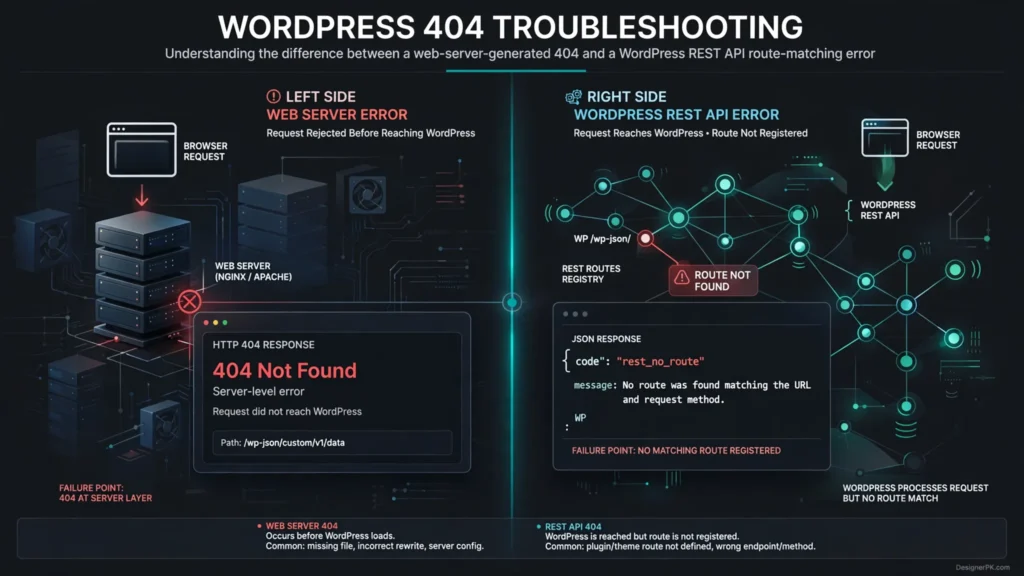
The response body is an important diagnostic signal.
| Response | Likely Failure Layer | First Thing to Inspect |
|---|---|---|
| Apache/Nginx HTML 404 | Web server or rewrite routing | VirtualHost, location rules, and rewrite configuration |
WordPress JSON with rest_no_route |
REST route matching | Namespace, path, HTTP method, and route registration |
rest_forbidden |
Authorization | permission_callback, user capabilities, and authentication |
| 401 or 403 from infrastructure | Authentication, WAF, or server policy | Authorization headers, firewall, and security rules |
| 301/302 to homepage | Redirect or rewrite interference | Redirect rules, canonicalization, proxy, or CDN configuration |
This distinction prevents a common troubleshooting mistake: changing WordPress permalinks when the request is actually being rejected by Apache, Nginx, a reverse proxy, or a WAF.
Check Whether WordPress Knows the Route
A healthy REST API exposes an index at /wp-json/. The index
lists the routes registered for that WordPress installation.
curl -s https://example.com/wp-json/ | jq '.routes | keys[]'Search the output for your namespace:
curl -s https://example.com/wp-json/ \
  | jq '.routes | keys[]' \
  | grep myplugin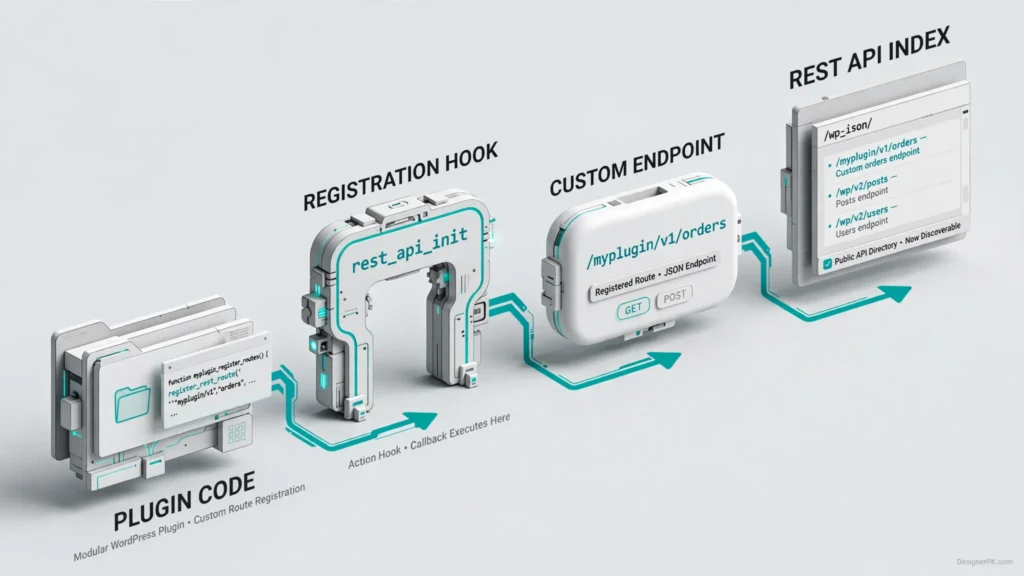
If your route is absent, stop debugging Apache and authentication for the moment. WordPress does not have the route registered in the current request lifecycle.
Common causes include:
- The plugin containing the route is inactive.
- The file containing the registration code is never loaded.
- The registration code is inside a class that is never instantiated.
- The registration is attached to the wrong hook.
- A conditional prevents registration.
- The namespace or route string differs from the URL being requested.
- A route parameter pattern does not match the requested value.
Register the Custom Route on rest_api_init
Custom REST routes should be registered from the
rest_api_init action. The registration should also include a
permission callback.
  WP_REST_Server::READABLE,
                'callback'            => 'myplugin_get_orders',
                'permission_callback' => '__return_true',
            ),
            array(
                'methods'             => WP_REST_Server::CREATABLE,
                'callback'            => 'myplugin_create_order',
                'permission_callback' => 'myplugin_can_create_order',
            ),
        )
    );
} );

function myplugin_get_orders( WP_REST_Request $request ) {
    return rest_ensure_response(
        array(
            'status' => 'ok',
            'orders' => array(),
        )
    );
}

function myplugin_create_order( WP_REST_Request $request ) {
  $raw_customer_id = $request->get_param( 'customer_id' );

$customer_id = filter_var(
    $raw_customer_id,
    FILTER_VALIDATE_INT,
    array( 'options' => array( 'min_range' => 1 ) )
);

if ( false === $customer_id ) {
    return new WP_Error(
        'invalid_customer_id',
        'A positive integer customer ID is required.',
        array( 'status' => 400 )
    );
}

    $response = rest_ensure_response(
    array(
        'status'      => 'created',
        'message'     => 'Order created successfully.',
        'customer_id' => $customer_id,
    )
);

$response->set_status( 201 );

return $response;
}

function myplugin_can_create_order( WP_REST_Request $request ) {
    return current_user_can( 'edit_posts' );
}
This example uses edit_posts as a simplified capability check. It does not establish whether the current user is authorized to create an order for the specified customer. In production, implement the capabilities and resource-level authorization appropriate to your application. For WooCommerce integrations, use the relevant order-management permissions and validate access to the associated customer and order data.
This callback demonstrates how WordPress handles a POST request and returns a REST API response. It does not create an actual order. A production order-creation endpoint must validate the submitted data, enforce customer and resource-level permissions, and implement the appropriate order-creation logic.
Security note: The
__return_true permission callback makes an endpoint publicly
accessible. Use it only when the returned information is intentionally
public. Endpoints that expose customer orders, account information, or
other private data must enforce appropriate authentication and
authorization checks using the relevant WordPress capabilities or
resource-level permissions.
The resulting URL is:
Both HTTP methods use the same endpoint URL:
GET /wp-json/myplugin/v1/ordersPOST /wp-json/myplugin/v1/ordersHow to Test a Custom REST Route
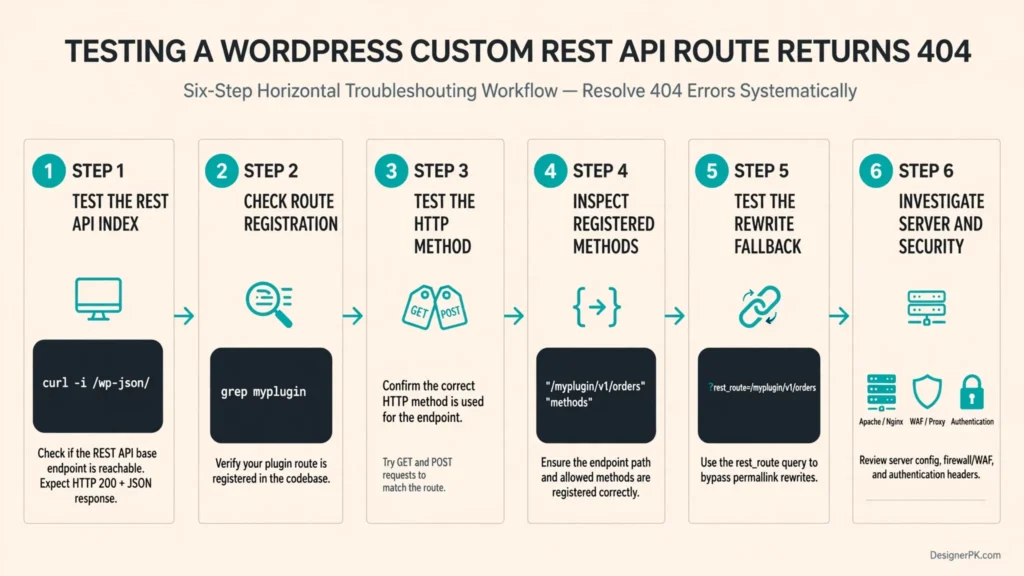
Test the REST API index
curl -i https://example.com/wp-json/Check whether the route is registered
curl -s https://example.com/wp-json/ \
  | jq '.routes | keys[]' \
| grep mypluginTest the exact HTTP method
curl -i \
  -u 'USERNAME:APPLICATION_PASSWORD' \
  -X POST \
  -H 'Content-Type: application/json' \
  -d '{"customer_id":123}' \
  https://example.com/wp-json/myplugin/v1/orders
Inspect the registered methods
When the route appears in /wp-json/, inspect its
registered methods instead of guessing.
curl -s https://example.com/wp-json/ \
| jq '.routes["/myplugin/v1/orders"]'Test the rewrite fallback
curl -i \
  'https://example.com/?rest_route=/'

curl -i \
'https://example.com/?rest_route=/myplugin/v1/orders'Check the server and security layers
If WordPress routing is working, investigate Apache, Nginx, WAF, proxy, CDN, security-plugin, and authentication behavior.
Where These Checks Are Most Useful
Local Development
Use the REST index and route inspection to confirm that plugin code actually registers the endpoint during development.
Staging
Compare route registration, rewrite behavior, authentication, and server configuration before production deployment.
Production Incidents
Use the response body, headers, and infrastructure logs to identify whether WordPress or a system in front of it generated the error.
Deployment Checks
Add REST API smoke tests so migrations and configuration changes can reveal routing failures before an integration breaks.
Subdirectory WordPress Installations
A site installed at:
https://example.com/wordpress/does not necessarily expose the API at:
https://example.com/wp-json/The expected REST URL may instead be:
https://example.com/wordpress/wp-json/
Avoid hard-coding the API root in WordPress code when possible. WordPress
provides rest_url() for constructing the REST URL according
to the installation’s configuration.
<?php

$endpoint = rest_url( 'myplugin/v1/orders' );

error_log( $endpoint );
This becomes especially important after migrations between local development, staging, and production environments.
Tips for Troubleshooting WordPress REST 404s
- Do not flush rewrite rules on every request. Flushing is an expensive operation and should be tied to appropriate lifecycle events when rewrite rules actually change.
- Remove temporary diagnostics. Route dumps can add unnecessary overhead and expose implementation details.
- Protect credentials. Never put production credentials in shell history, screenshots, tickets, CI logs, or debugging output.
Inspect Route Registration Directly
For difficult cases, inspect the REST server’s route map from WordPress itself.
add_action( 'rest_api_init', function () {
    $routes = rest_get_server()->get_routes();

    error_log(
        print_r(
            $routes,
            true
        )
    );
} );
A more targeted diagnostic can search for your namespace:
add_action( 'rest_api_init', function () {
    $routes = rest_get_server()->get_routes();

    foreach ( $routes as $route => $handlers ) {
        if ( strpos( $route, '/myplugin/' ) === 0 ) {
            error_log( $route );
            error_log( print_r( $handlers, true ) );
        }
    }
} );
Apache: Verify Requests Reach WordPress
On Apache, a WordPress installation depends on rewrite processing for normal pretty URLs. A migration can leave the site apparently functional while API URLs fail because the VirtualHost configuration does not allow the expected rewrite behavior.
Check whether the rewrite module is loaded:
apache2ctl -M | grep rewrite
Then inspect the VirtualHost configuration and the WordPress directory’s
AllowOverride policy. If .htaccess exists but
Apache is configured to ignore it, WordPress rewrite rules will not be
applied.
A typical WordPress Apache configuration includes rules equivalent to:
<IfModule mod_rewrite.c>
RewriteEngine On
RewriteBase /
RewriteRule ^index\.php$ - [L]

RewriteCond %{REQUEST_FILENAME} !-f
RewriteCond %{REQUEST_FILENAME} !-d
RewriteRule . /index.php [L]
</IfModule>
Do not copy this blindly into a subdirectory installation. The rewrite target must correspond to the actual WordPress path.

Nginx: Check the Front Controller
Nginx does not use WordPress’s Apache .htaccess file.
WordPress requests must be routed to the PHP front controller by the
server configuration.
A common pattern is:
location / {
    try_files $uri $uri/ /index.php$is_args$args;
}
The $is_args$args portion matters when testing the
rest_route fallback because it preserves query arguments
while routing the request to WordPress.
If normal pages work but REST requests fail, compare the actual request
path and Nginx location rules. Do not assume that a working homepage proves
every URI is reaching index.php.
Authentication, Security, and Privacy
A request can reach the REST route and still fail authentication because
the web server or CGI configuration removes the Authorization
header.
For Apache/CGI environments, verify that the authorization header is propagated to PHP. For Nginx/FastCGI environments, verify the corresponding FastCGI configuration.
Test the request independently:
curl -i \
  -H 'Authorization: Bearer REDACTED_TOKEN' \
  https://example.com/wp-json/myplugin/v1/orders
Do Not Confuse Routing With Authorization
A protected route should define an explicit permission callback:
register_rest_route(
    'myplugin/v1',
    '/orders',
    array(
        'methods'             => WP_REST_Server::READABLE,
        'callback'            => 'myplugin_get_orders',
        'permission_callback' => function () {
            return current_user_can( 'edit_posts' );
        },
    )
);
Use capabilities to determine authorization rather than treating authentication and authorization as the same operation.
If authentication succeeds but the caller lacks the required capability, the expected failure is an authorization error. Changing rewrite rules will not fix it.
Check Security Layers
Once WordPress routing is proven, investigate security controls such as:
- WordPress security plugins that restrict REST access.
- ModSecurity rules.
- Cloud WAF policies.
- Reverse-proxy access rules.
- CDN URL filtering.
- Basic authentication at the web-server layer.
- IP allowlists or deny lists.
- Rate-limit policies that treat API paths differently.
The key test is whether the response is generated by WordPress or by the infrastructure in front of WordPress. Inspect response headers and body, then correlate the timestamp with Apache/Nginx, WAF, proxy, and WordPress logs.
Frequently Asked Questions
Why does my WordPress REST endpoint return 404?
Several layers can generate the 404. The web server may be rejecting the request, WordPress may not have registered the route, the HTTP method may not match, or a route parameter may fail its pattern. Start by checking whether the response is WordPress JSON or a server-generated HTML error.
Why does /wp-json/ work but my custom route does not?
If /wp-json/ works but your custom route returns
rest_no_route, inspect the route registration, namespace,
path, HTTP method, and parameters. Search the REST API index to confirm
that WordPress knows about the route.
Why does my POST endpoint return 404 in a browser?
A browser address-bar request uses GET. If the endpoint
only accepts POST, that browser test does not match the
registered method. Use a tool such as curl with
-X POST and the required request body.
What does ?rest_route= tell me?
It can help isolate pretty-permalink and rewrite problems. If a
?rest_route= request reaches WordPress while the
corresponding /wp-json/ URL does not, investigate
Apache/Nginx rewrite handling.
Should I flush WordPress rewrite rules to fix a REST 404?
Only when the rewrite system actually changed. Resaving Settings >
Permalinks can regenerate rewrite rules, but calling
flush_rewrite_rules() on every request is an expensive
mistake. Plugin-specific rewrite changes should be flushed during an
appropriate lifecycle event.
Why does a route work locally but fail after migration?
The migration may have changed the web-server path, rewrite configuration, proxy behavior, or WordPress URL configuration. Compare the local and production server routing and WordPress configuration.
Turn the Fix Into a Deployment Smoke Test
If a custom REST endpoint is operationally important, do not wait for an integration failure to discover that a migration broke routing.
A simple deployment check can verify the API index and one representative endpoint:
#!/usr/bin/env bash

set -euo pipefail

BASE_URL="https://example.com"

curl --fail --silent --show-error \
  "$BASE_URL/wp-json/" \
  > /dev/null

curl --fail --silent --show-error \
  -X GET \
  "$BASE_URL/wp-json/myplugin/v1/orders" \
  > /dev/null

echo "WordPress REST API smoke tests passed."
For protected endpoints, configure the smoke test with the authentication method required by the endpoint. Store credentials in your CI secret manager and pass them securely to the request. Treat expected authorization responses separately from route availability checks.
The useful assertion is not simply “HTTP 200.” Verify that the expected route exists and that the response has the expected content type and application-level fields.
What the 404 Usually Means
| Symptom | Most Likely Cause | Correct Next Action |
|---|---|---|
Entire /wp-json/ path is an HTML 404 |
Server rewrite/front-controller problem | Inspect Apache/Nginx routing |
/wp-json/ works but custom route is rest_no_route |
Route registration or method mismatch | Inspect REST index and registration code |
| GET fails but POST succeeds | Endpoint only declares POST | Send the correct method or register GET |
| Static route works but ID route fails | Path parameter or regex mismatch | Test the route pattern and parameter value |
?rest_route= works but /wp-json/ fails |
Pretty-permalink/rewrite issue | Inspect rewrite configuration |
| Route is visible but request gets forbidden | Authorization failure | Inspect authentication and capabilities |
| Works locally, fails after migration | Server path, rewrite, or proxy difference | Compare web-server and WordPress URL configuration |
Final Diagnostic Rule
Do not start by changing PHP code when the web server may be returning the
404. Do not change rewrite rules when WordPress has already returned
rest_no_route. Do not debug authentication until the route
and HTTP method match. And do not assume a browser test validates a
POST-only endpoint.
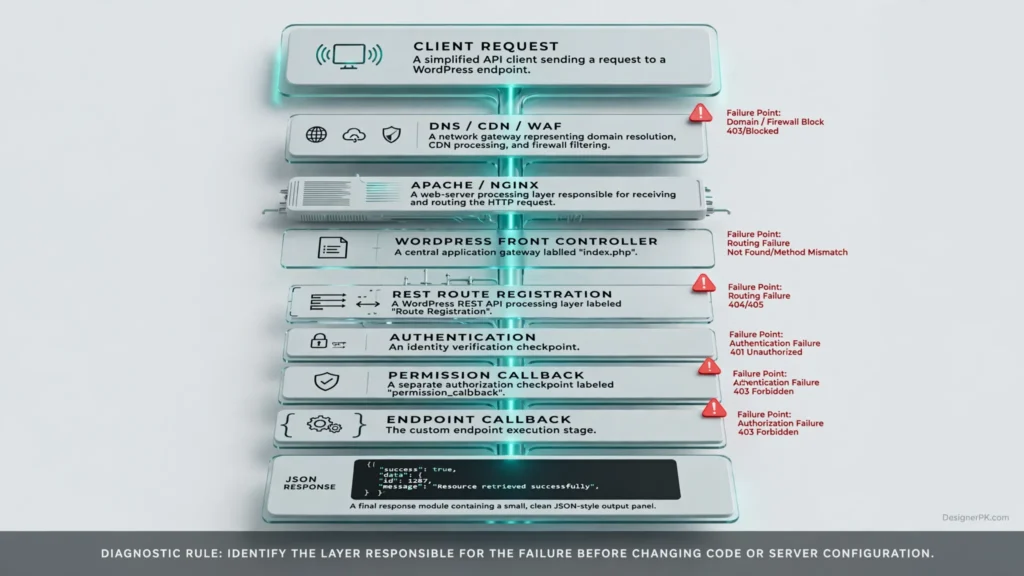
The shortest path to a fix is to trace the request in order:
Client
  ↓
DNS / CDN / WAF
  ↓
Apache / Nginx
  ↓
WordPress front controller
  ↓
REST route registration
  ↓
Route + HTTP method matching
  ↓
Authentication
  ↓
permission_callback
  ↓
Endpoint callback
  ↓
JSON response
A 404 at each layer has a different meaning. Identify the layer first, then change the configuration that actually owns the failure.
Need Help Fixing a Failing Custom Endpoint?
If your integration is returning 404 in staging or production, start with
the failing URL, HTTP method, response body, and the output of
/wp-json/. Those four pieces usually reduce the problem from
a broad WordPress troubleshooting exercise to a specific routing,
registration, or infrastructure fault.