The Quick Answer
A reliable WooCommerce-to-WhatsApp system should not send messages directly from the WooCommerce webhook handler. Instead, use an event pipeline that verifies webhooks, stores events durably, prevents duplicate processing, checks the current order state, and sends WhatsApp messages through a separate job queue.
AI should sit inside controlled application boundaries. It can understand customer requests and choose approved tools, but application code should control whether an order can actually be changed.
This design also needs retry handling, human escalation, monitoring, and reconciliation so missed or stale events do not turn into incorrect customer messages.
The Problem Is Not Sending a WhatsApp Message
Assume a U.S. WooCommerce store processes 2,000 orders per day. A customer places an order at 10:01:14, WooCommerce emits an order event, and the store wants WhatsApp to send:
- Order confirmation
- Payment confirmation
- Shipping notification
- Delivery update
- Exception notification when fulfillment fails
The naive approach calls the WhatsApp API directly from the WooCommerce webhook handler. That may work in a demo. It becomes risky when the downstream API takes 4 seconds, the webhook request times out at 5 seconds, and WooCommerce retries an event that your application already processed.
You can then send the customer two identical messages for one order event.
There is another failure mode. The customer places an order, the first webhook is queued, and ten minutes later the order is canceled. If the queued job sends without checking the current state, WhatsApp could tell the customer that the order is processing even though it has already been canceled.
WooCommerce supports webhook delivery logs, signed webhook payloads, and automatic disabling after repeated delivery failures. A serious integration therefore needs to treat webhook handling as an event-processing problem, not just a notification feature.
Use an Event Pipeline Instead of a Direct WooCommerce-to-WhatsApp Call
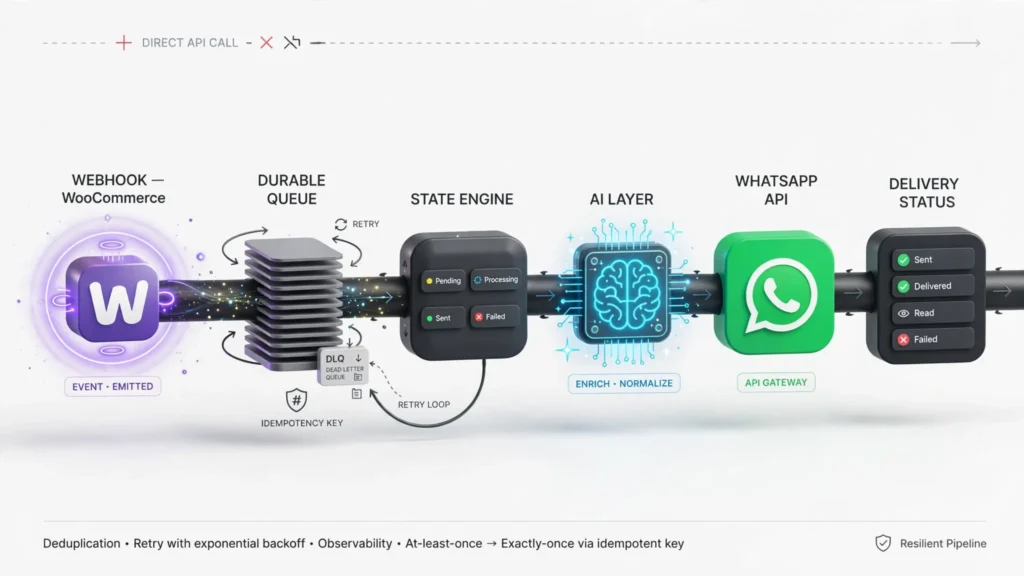
A safer design separates event ingestion from message delivery:
WooCommerce
    |
    | HTTPS webhook
    v
Webhook Ingress
    |
    | verify HMAC
    | validate schema
    | assign correlation ID
    v
Durable Event Store / Queue
    |
    +--------------------+
    |                    |
    v                    v
State & Policy       AI Decision Layer
Engine                  |
    |                    |
    +---------+----------+
              |
              v
       WhatsApp Job Queue
              |
              v
       WhatsApp Business API
              |
              v
       Message Status Webhook
              |
              v
       Delivery State Store
The key architectural decision is that the WooCommerce request should not wait for AI inference or WhatsApp delivery. The webhook endpoint should authenticate the event, persist enough information to process it safely, enqueue the work, and return a successful response.
WooCommerce documents an HMAC-SHA256 signature in X-WC-Webhook-Signature, along with X-WC-Webhook-ID and X-WC-Webhook-Delivery-ID. These values are useful for authentication, tracing, and deduplication.
Build the Webhook Ingress Around Verification and Idempotency
Verify the WooCommerce Signature
Never accept an order event simply because it arrived at a public HTTPS endpoint. Validate the signature against the raw request body before parsing the payload for business processing.
const crypto = require("crypto");

function verifyWooSignature(rawBody, signature, secret) {
  const expected = crypto
    .createHmac("sha256", secret)
    .update(rawBody)
    .digest("base64");

  const supplied = Buffer.from(signature || "");
  const calculated = Buffer.from(expected);

  if (supplied.length !== calculated.length) {
    return false;
  }

  return crypto.timingSafeEqual(supplied, calculated);
}
Keep the webhook secret outside your application source code. Rotate it as part of your normal credential-management process, and never write it to request logs.
Make Duplicate Delivery Harmless
Webhook delivery is not the same as exactly-once business execution. Your handler must assume that the same event can arrive more than once.
A practical idempotency record can use the WooCommerce delivery ID as one component of its identity:
{
  "event_id": "wc:delivery:184392",
  "order_id": 84721,
  "event": "order.updated",
  "received_at": "2026-10-07T14:01:15Z",
  "status": "accepted",
  "correlation_id": "ord_84721_01J...",
  "processed_at": null
}
Before creating downstream work, atomically insert the event identifier into a table with a unique constraint. If the insert conflicts, acknowledge the webhook without executing the business action again.
CREATE TABLE webhook_events (
    event_id VARCHAR(255) PRIMARY KEY,
    order_id BIGINT NOT NULL,
    event_type VARCHAR(100) NOT NULL,
    correlation_id VARCHAR(255) NOT NULL,
    received_at TIMESTAMP NOT NULL,
    processed_at TIMESTAMP NULL,
    status VARCHAR(32) NOT NULL
);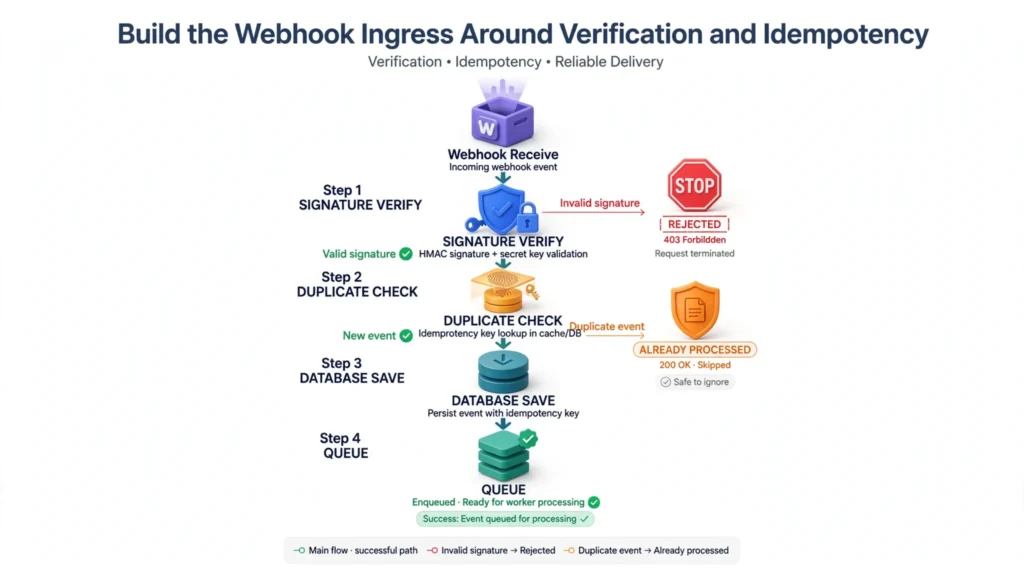
Do not rely on an in-memory cache for this. A process restart can erase the deduplication state while the upstream system is still capable of retrying the event.
Prevent Stale WhatsApp Messages With Order-State Checks
Idempotency prevents the same event from being processed twice. It does not prevent an old event from being processed once after the order has changed.
Consider this sequence:
- Order 84721 enters
processing. - WooCommerce emits an event.
- The event enters a queue.
- The customer service team cancels the order.
- The worker receives the original processing event.
The worker should fetch the current order state before sending the customer-facing message. Alternatively, include a state version or modified timestamp in the event and reject stale jobs.
async function processOrderNotification(job) {
  const order = await wooCommerce.getOrder(job.orderId);

  if (!order) {
    return markDeadLetter(job, "ORDER_NOT_FOUND");
  }

  if (order.status !== job.expectedStatus) {
    return markSkipped(job, "STALE_ORDER_STATE");
  }

  return sendWhatsAppNotification(order);
}
This check matters particularly for cancellations, refunds, failed payments, address changes, and fulfillment exceptions.
| Event | Unsafe Behavior | Safer Behavior |
|---|---|---|
| Processing | Send immediately without checking current state | Confirm the order remains eligible for the notification |
| Canceled | Send a queued fulfillment update | Cancel obsolete notification jobs |
| Refunded | Allow AI to infer refund completion | Read refund state from WooCommerce |
| Failed payment | Tell the customer the order is confirmed | Use payment and order state as the source of truth |
Separate Deterministic Commerce Actions From AI Reasoning
AI is useful when a customer says: Where is my order and can I change the delivery address?
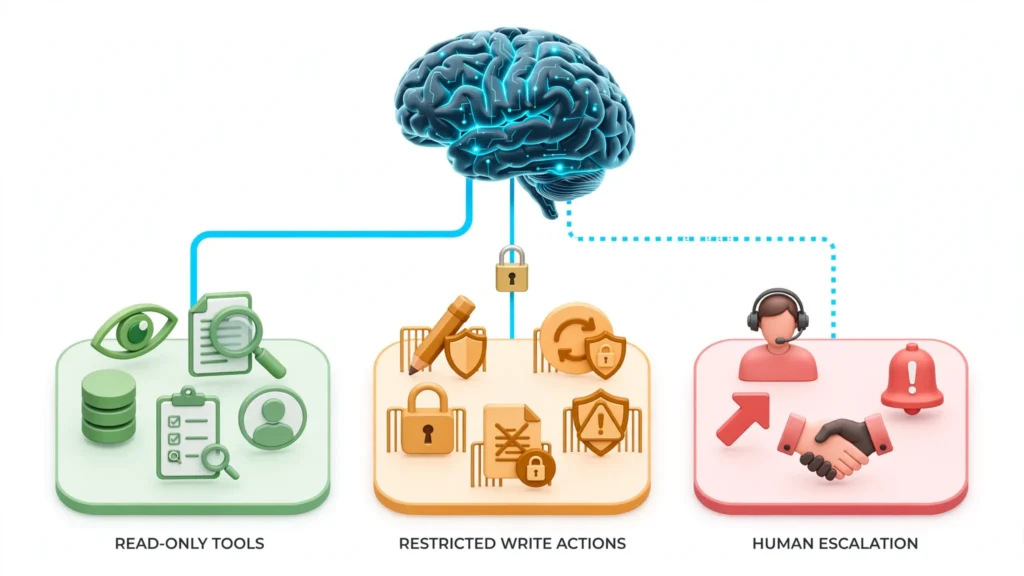
It is not a good idea to give the model unrestricted access to the WooCommerce REST API. The model should decide which approved tool is appropriate; application code should decide whether that tool is authorized to modify the order.
Recommended Tool Boundaries
Read Order Status
get_order_status(order_id) — read-only.
Get Tracking
get_tracking(order_id) — read-only.
Get Order Items
get_order_items(order_id) — read-only.
Request Address Change
request_address_change(order_id, new_address) — controlled action.
Request Cancellation
request_cancellation(order_id) — controlled action.
Human Handoff
create_human_handoff(reason, summary) — escalation action.
A cancellation tool should not simply execute because the model selected it. The application should validate conditions such as payment status, fulfillment state, fraud controls, and authorization before changing the order.
async function requestCancellation(orderId, customerId) {
  const order = await getOrder(orderId);

  if (order.customer_id !== customerId) {
    throw new Error("ORDER_OWNERSHIP_FAILED");
  }

  if (!["pending", "processing"].includes(order.status)) {
    throw new Error("ORDER_NOT_CANCELLABLE");
  }

  return createCancellationRequest({
    orderId,
    customerId
  });
}
The AI can explain the result. It should not be the source of truth for whether the order actually changed.
Design Around WhatsApp’s Messaging Constraints
WhatsApp automation has an application-state dimension that basic WooCommerce integration guides tend to omit.
A customer-initiated interaction opens a customer-service window. Within that window, the business can use permitted free-form responses. Outside the window, the application needs an approved template for business-initiated messaging. Current WhatsApp pricing and messaging rules also need to be checked before forecasting automation costs because Meta’s commercial rules have changed since the older conversation-based pricing model.
This means your message worker should not blindly execute:
sendText(customer, "Your order has shipped.");Instead, make message eligibility part of the workflow:
async function chooseMessage(order, customer) {
  const windowOpen = await isCustomerServiceWindowOpen(customer.id);

  if (windowOpen) {
    return {
      type: "free_form",
      body: renderShippingMessage(order)
    };
  }

  return {
    type: "template",
    name: "order_shipped",
    parameters: {
      order_number: order.number,
      tracking_number: order.tracking_number
    }
  };
}
Do not hard-code assumptions about WhatsApp pricing or policy into the core order system. Keep the policy layer configurable because Meta changes eligibility, pricing, and messaging requirements over time.
Handle Retries Without Creating Duplicate Customer Messages
There are two different things to retry: an infrastructure operation and a customer-facing message.
If a WhatsApp API request times out, you may not know whether the provider received it. A naive retry can therefore produce a duplicate message.
The worker needs a durable outbound-message record:
{
  "message_key": "order:84721:shipping:v3",
  "order_id": 84721,
  "channel": "whatsapp",
  "template": "order_shipped",
  "state": "sending",
  "attempts": 1,
  "provider_message_id": null,
  "last_error": null
}
Use a deterministic message key for business uniqueness. For example, an order should normally have one logical shipping notification for a particular shipment version, not one notification for every retry.
Use Bounded Exponential Backoff
function retryDelay(attempt) {
  const base = 1000;
  const cap = 60000;

  const exponential = Math.min(cap, base * (2 ** attempt));
  const jitter = Math.floor(Math.random() * 500);

  return exponential + jitter;
}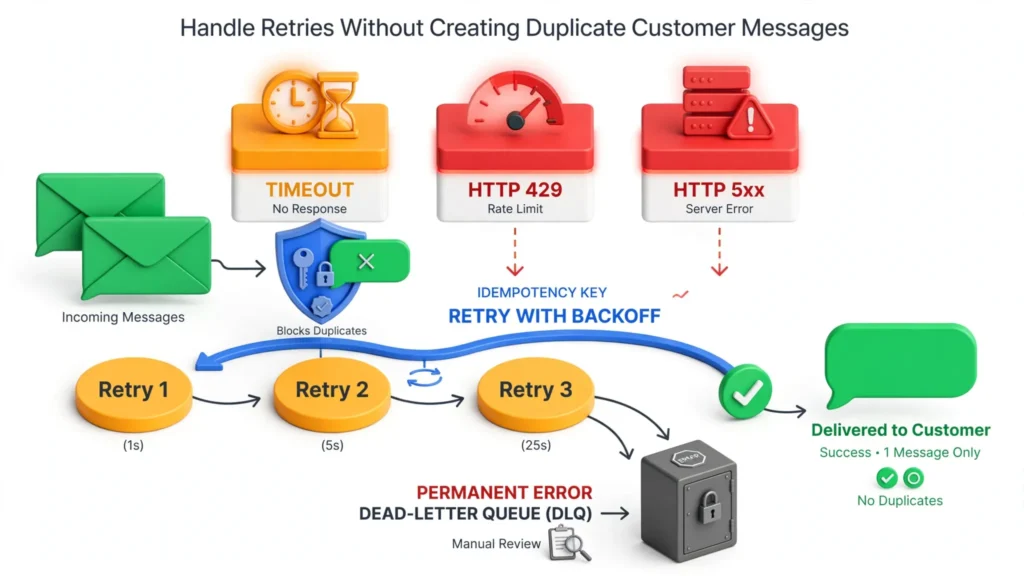
A reasonable initial policy is five attempts over several minutes for transient failures, followed by a dead-letter state. Do not retry authentication failures, invalid recipients, permanently rejected templates, or invalid business rules as though they were network failures.
| Failure | Retry? | Action |
|---|---|---|
| HTTP timeout | Usually | Retry with idempotency protection |
| HTTP 429 | Yes | Respect retry timing and backoff |
| HTTP 5xx | Yes | Use exponential backoff |
| Invalid template | No | Dead-letter and alert |
| Invalid recipient | No | Mark the customer contact as unusable |
| Authorization failure | No automatic loop | Rotate or fix the credential and replay deliberately |
Build Human Escalation Into the State Machine
The AI should stop when the risk of acting exceeds the value of automation.
Examples include:
Charge Dispute
Customer disputes a charge.
Refund Request
Customer requests a refund outside the normal policy.
Suspected Fraud
Customer reports suspected fraud.
Ownership Failure
Order ownership cannot be verified.
Late Address Change
Customer asks to change an address after fulfillment has started.
Repeated Rejection
The customer is angry and repeatedly rejects automated answers.
Conflicting Orders
The request spans two orders with conflicting information.
Unclear Policy
The AI cannot determine which policy applies.
A handoff should transfer context rather than simply create a ticket saying customer needs help.
{
  "reason": "ADDRESS_CHANGE_AFTER_FULFILLMENT",
  "customer_id": "cus_48192",
  "order_id": 84721,
  "summary": "Customer requested delivery-address change after carrier pickup.",
  "verified": true,
  "last_order_status": "completed",
  "recommended_team": "fulfillment",
  "conversation_id": "wa_98271"
}
The human should receive the relevant order state, verification result, customer request, AI actions already attempted, and the reason for escalation.
Operational Monitoring: Measure the Workflow, Not Just AI Accuracy
An AI automation can produce fluent answers while the commerce integration is failing. Track the entire path.
| Metric | What It Detects |
|---|---|
| Webhook acceptance rate | Ingress failures |
| Duplicate event rate | Upstream retries or duplicate delivery |
| Queue age | Backlog and worker saturation |
| WhatsApp send failure rate | Provider, API, or template problems |
| Message delivery rate | Actual customer reach |
| Stale-event skip rate | Out-of-order commerce events |
| AI escalation rate | Automation boundary effectiveness |
| Human takeover rate | Operational workload |
| Order reconciliation mismatches | Lost or incorrectly processed events |
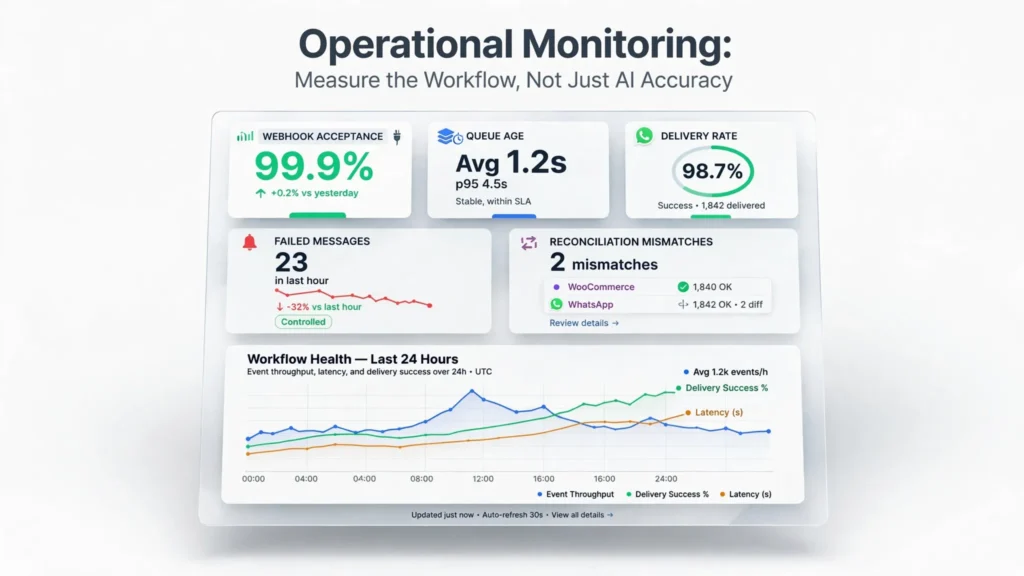
For a store processing 2,000 orders per day, a 99.5% notification success rate still means approximately 10 orders per day can fail to receive the intended notification. That is why the reconciliation job matters.
Run Reconciliation Independently of the Webhook Pipeline
Once or twice per day, compare the WooCommerce order state against the outbound notification ledger. If an order is marked as shipped in WooCommerce but has no successful shipping notification, create a repair job.
SELECT o.id
FROM orders o
LEFT JOIN outbound_messages m
  ON m.order_id = o.id
 AND m.message_type = 'shipping'
 AND m.state IN ('sent', 'delivered', 'read')
WHERE o.status = 'completed'
  AND o.shipped_at IS NOT NULL
  AND m.id IS NULL
  AND o.shipped_at > NOW() - INTERVAL '48 hours';
This is fundamentally different from assuming the webhook system is infallible. The reconciliation process gives the architecture a second path to detect missed work.
A Practical WooCommerce + WhatsApp AI Workflow
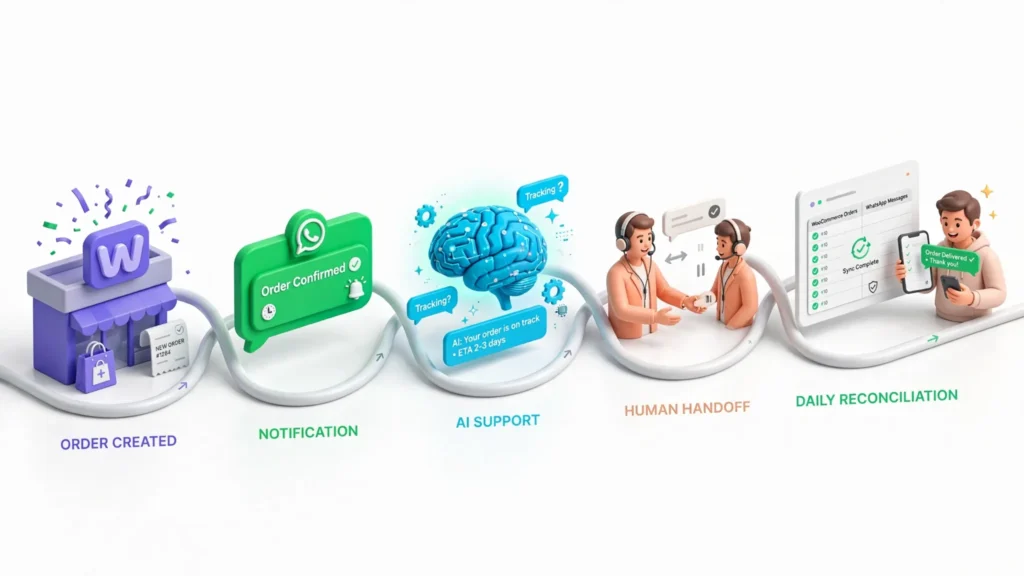
For a typical U.S. retailer, a useful first implementation can stay narrow:
Start with read-only support and deterministic notifications before allowing AI to modify orders. This keeps the initial failure domain small while giving the team real conversation data for deciding which actions are safe to automate.
What to Automate First and What to Leave Human-Controlled
| Use Case | Automation Suitability | Recommended Control |
|---|---|---|
| Order confirmation | High | Deterministic workflow |
| Shipping status | High | Current-state validation |
| Tracking lookup | High | Read-only AI tool |
| Product questions | High | Approved knowledge source |
| Order cancellation | Medium | Policy and state validation |
| Address change | Medium | Authentication plus fulfillment-state check |
| Refund decision | Low to medium | Rules engine or human approval |
| Fraud dispute | Low | Human escalation |
Validation Checklist Before Sending the First Live Message
- Webhook signature validation is tested with both valid and invalid payloads.
- Duplicate webhook deliveries do not create duplicate outbound messages.
- A delayed event cannot overwrite newer order state.
- WooCommerce webhook failure behavior is monitored.
- WhatsApp credentials are stored outside source control.
- Message templates have an owner and versioning process.
- The application distinguishes transient and permanent API errors.
- Every outbound message has a deterministic business key.
- AI tools have explicit read/write permissions.
- High-risk actions have application-level authorization.
- Human handoff contains order, customer, and conversation context.
- Dead-letter jobs can be inspected and replayed.
- A reconciliation process can find missed notifications.
- Metrics cover webhook ingestion through message delivery.
Bottom Line
WhatsApp AI automation for WooCommerce should not be designed as a chatbot attached to a store. It is an event-driven commerce workflow with a conversational interface.
WooCommerce owns order truth. The event pipeline owns reliable processing. The policy layer decides what is permitted. AI handles language and intent within those boundaries. WhatsApp handles customer communication. A reconciliation system catches what the event path missed.
That separation prevents a temporary API failure from becoming a customer-facing contradiction and gives engineering teams a system they can debug when traffic, integrations, and customer behavior stop following the happy path.
FAQ
Why not send WhatsApp messages directly from the WooCommerce webhook?
Direct delivery makes the webhook depend on the WhatsApp API. Timeouts, retries, and provider failures can then create duplicate messages or cause WooCommerce to retry an event that your application already processed. A durable queue separates webhook ingestion from message delivery.
Why is idempotency important for WooCommerce webhooks?
The same webhook can be delivered more than once. Idempotency lets the application recognize an event it has already accepted and prevent the same business action from running again.
Does idempotency prevent stale order notifications?
No. Idempotency prevents duplicate processing, but an old event can still be processed once after the order changes. The worker should check the current WooCommerce state or validate a state version before sending the message.
Should AI be allowed to modify WooCommerce orders?
AI should operate through restricted application tools rather than having unrestricted access to the WooCommerce API. Application code should validate authorization, payment status, fulfillment state, and other business rules before allowing a write action.
What should happen when a WhatsApp message fails?
Classify the failure first. Transient failures such as timeouts, HTTP 429 responses, and HTTP 5xx responses can generally be retried with backoff. Permanent failures such as invalid templates or recipients should be dead-lettered instead of retried forever.
When should a customer be handed to a human?
Human escalation is appropriate for high-risk or ambiguous requests, including fraud disputes, unusual refund requests, unverified order ownership, conflicting order information, and cases where the AI cannot determine which policy applies.
Need to Automate Your WooCommerce Support Workflow?
If your store is already receiving enough orders or support messages that manual WhatsApp updates are creating operational work, start by mapping three flows: order notifications, read-only order support, and human escalation. Then measure duplicate events, delivery failures, and escalation volume before granting AI permission to modify orders.
Recommended next step: build the read-only WooCommerce + WhatsApp workflow first, instrument every event, and use the resulting failure data to define which write actions are safe to automate.
Start With the Workflow