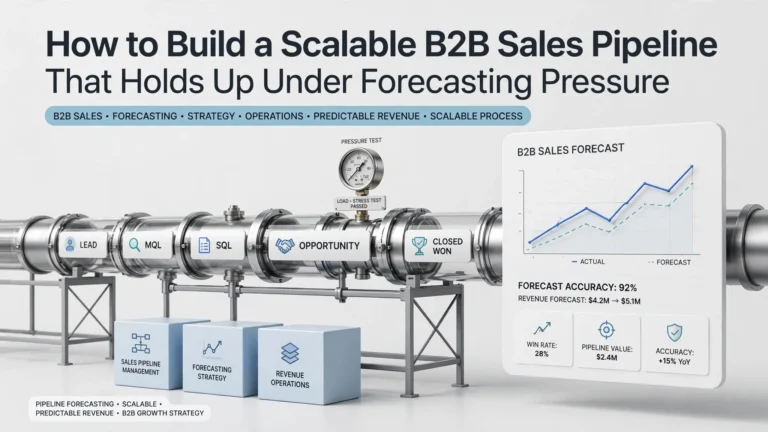
The expensive mistake is not having too few pipeline stages. It is building a sales process that becomes slower, harder to forecast, and more expensive every time lead volume increases.
A 50-rep sales organization can spend tens of thousands of dollars a year on CRM licenses and still face a much larger hidden cost from RevOps administration, data enrichment, workflow maintenance, integrations, manual routing, and implementation. A scalable B2B sales pipeline needs to be treated as an operating system, not just a set of CRM stages.
This guide explains how to design that system, calculate its real cost, identify the technical constraints that matter at scale, and decide when to use native CRM automation, an orchestration layer, or custom engineering.
The Core Buyer Bottleneck: Pipeline Volume Is Not Pipeline Capacity
Most sales organizations measure pipeline value. Fewer measure the capacity required to process that pipeline.
Suppose a company generates 5,000 inbound leads per month, has 50 sellers, routes leads by territory and account ownership, enriches every new account, schedules qualified meetings automatically, and synchronizes the result with its CRM.
The relevant question is no longer simply, “Can the CRM manage 5,000 leads?” The real questions are:
- Can routing decisions execute within the required response SLA?
- Can enrichment run without exhausting monthly or annual credits?
- Can integrations process peak demand without API throttling?
- Can RevOps diagnose failed workflows without engineering intervention?
- Can the system preserve auditability when rules change?
- Can the organization migrate away without rebuilding its entire revenue process?
A pipeline is scalable only when volume can increase without a proportional increase in manual operations, engineering support, or error rates.
Start With the Economics: What Does a Scalable Pipeline Cost?
Do not compare CRM or sales-automation products using license price alone. Build a three-year total-cost model before selecting the architecture.
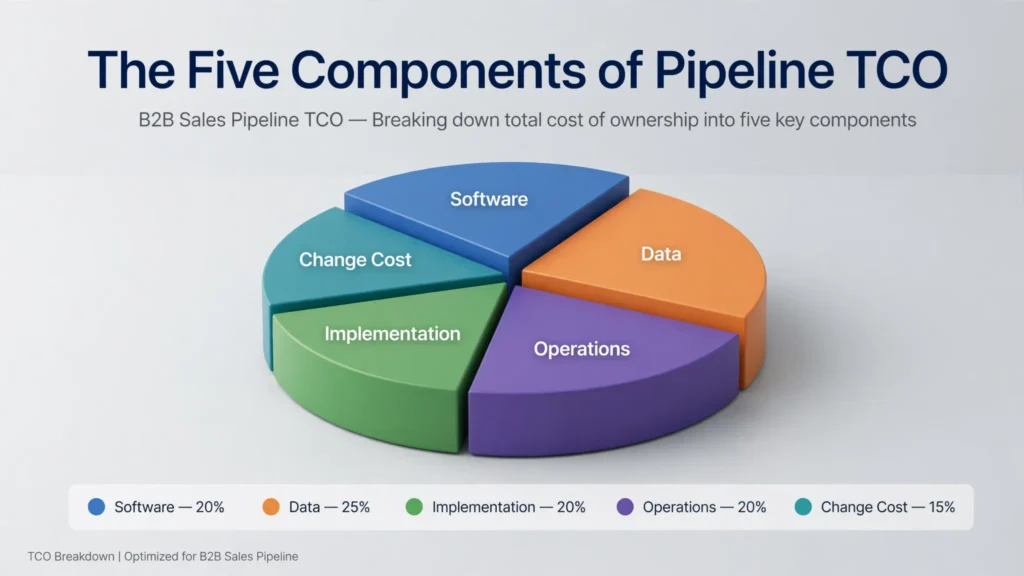
The Five Components of Pipeline TCO
- Software: User licenses, platform fees, add-ons, and usage charges.
- Data: Enrichment, intent data, contact databases, and verification.
- Implementation: Configuration, migration, integration, and testing.
- Operations: RevOps administration, workflow maintenance, and troubleshooting.
- Change cost: Training, process redesign, vendor management, and future migrations.
Illustrative Annual Planning Model
The following is a budgeting model, not a vendor quotation. Replace each assumption with the actual commercial proposal during procurement.
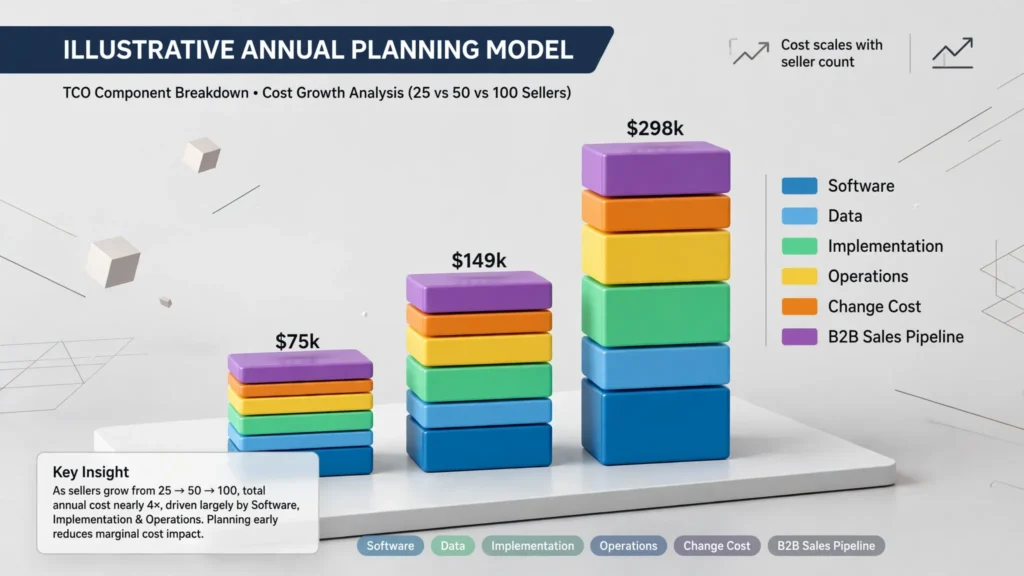
| Cost Component | 25 Sellers | 50 Sellers | 100 Sellers | What to Validate |
|---|---|---|---|---|
| Core software | $30k–$60k | $60k–$120k | $120k–$240k | Per-seat vs. platform pricing |
| Data/enrichment | $5k–$20k | $10k–$40k | $20k–$80k | Credits, records, and provider costs |
| Implementation | $10k–$30k | $20k–$60k | $40k–$120k | Migration, integration, and testing |
| Internal administration | $15k–$40k | $30k–$80k | $60k–$150k | RevOps and systems-admin hours |
| Integration/maintenance | $10k–$25k | $20k–$50k | $40k–$100k | API changes, failures, and custom logic |
These ranges are deliberately broad. The goal is to make procurement teams include costs that may disappear from a software quote. A product that costs $100 per seller per month can still produce a materially higher TCO if implementation and maintenance require dedicated engineering resources.
Use a Buyer-Grade Pipeline Architecture
A practical enterprise pipeline should separate the buyer’s progression from the seller’s operational controls.
| Stage | Required Evidence | Owner | Exit Condition | Primary Risk |
|---|---|---|---|---|
| Targeting | ICP fit and account signal | SDR/Marketing | Account meets entry criteria | Low-fit volume |
| Qualification | Need, authority, timing, commercial fit | SDR/AE | Qualified buying problem | False pipeline |
| Discovery | Business case and stakeholder map | AE | Problem and buying process confirmed | Single-threaded deal |
| Technical evaluation | Architecture, security, and integration fit | AE/SE/IT | Technical blockers resolved | Late-stage rejection |
| Commercial evaluation | Pricing, ROI, and procurement requirements | AE/Procurement | Commercial terms agreed | Discount spiral |
| Legal/procurement | Contract and compliance approval | Legal/Procurement | Signature-ready contract | Contract delay |
| Closed-won/implementation | Scope, owner, and success criteria | CS/Implementation | Operational handoff accepted | Expectation gap |
Define Stage Exit Criteria Before Buying Automation
Automation cannot repair ambiguous process definitions. Every stage needs objective evidence that can be represented as a CRM field, workflow event, or documented approval.
Set Discovery Exit Criteria
- Business problem documented.
- Economic impact estimated.
- Primary technical stakeholder identified.
- Economic buyer identified or access plan documented.
- Target decision date recorded.
- Next buyer action scheduled.
Set Proposal Exit Criteria
- Commercial scope confirmed.
- Pricing model accepted in principle.
- Procurement process documented.
- Security and legal requirements identified.
- Contracting authority identified.
- Implementation requirements reviewed.
If these conditions are absent, the opportunity should not advance merely because a seller wants a larger forecast.
Pipeline Technology: Native CRM, Orchestration, or Custom Build?
The right architecture depends on process complexity. Buying another platform simply because it has more features is not a strategy.
If you are still defining the underlying sales process before choosing automation, start with our B2B sales pipeline framework before selecting the technology stack.
| Architecture | Best Fit | Main Advantage | Main Risk |
|---|---|---|---|
| Native CRM automation | Simple routing and lifecycle rules | Low architectural complexity | Logic becomes difficult to govern as exceptions grow |
| CRM + automation/iPaaS | Multiple systems with moderate complexity | Flexible integrations | Workflow sprawl and fragmented ownership |
| CRM + revenue orchestration | High-volume routing, enrichment, and scheduling | Centralized operational logic | Additional platform cost and vendor dependency |
| Custom engineering | Highly differentiated requirements | Maximum control | Maintenance, engineering capacity, and migration burden |
When Custom Development Becomes Expensive
Custom routing may initially look inexpensive because the software license is zero. The economics change once engineering must maintain territory logic, retries, enrichment failures, API authentication, CRM schema changes, monitoring, and audit logs.
For planning purposes, assume a fully loaded engineering cost of $150,000 per engineer annually. If a custom pipeline consumes only 0.25 FTE of engineering capacity, that is approximately $37,500 per year before infrastructure and incident costs.
The relevant comparison is not “license versus free code.” It is annual platform cost versus annual engineering capacity plus operational risk.
Model API Throughput, Workflow Runs, and Usage Limits
A pipeline that works at 500 opportunities per month can fail economically or operationally at 10,000.
Calculate Peak Load, Not Average Load
Assume 5,000 new leads arrive monthly and each lead triggers:
1 CRM create/update operation.
1 enrichment workflow.
3 enrichment-provider calls.
1 routing decision.
1 notification.
1 scheduling operation when qualified.
That is already more than 35,000 discrete processing events per month before retries, deduplication, enrichment waterfalls, or exception handling.
During campaign launches, events may arrive in minutes rather than evenly throughout the month. Procurement should therefore request:
- API rate limits.
- Concurrency limits.
- Workflow execution limits.
- Retry behavior.
- Queueing behavior during bursts.
- Failure notification mechanisms.
- Audit-log retention.
- p95 and p99 processing latency where relevant.
What to Put in the Enterprise Procurement Checklist
Security and Compliance
| Requirement | Buyer Question | Evidence Required |
|---|---|---|
| SOC 2 | Does the applicable product/service have a current SOC 2 report? | Independent audit report or trust-center evidence |
| HIPAA | Can the vendor execute a BAA where required? | BAA availability and scope |
| GDPR | What controller/processor obligations apply? | DPA and subprocessor documentation |
| SSO/SCIM | Can identity lifecycle be centrally managed? | Supported identity protocols and plan requirements |
| Audit logging | Can administrators reconstruct workflow changes and executions? | Sample audit logs and retention policy |
| Data residency | Where is customer data stored and processed? | Regional hosting documentation |
Contract Terms
- Annual commitment and renewal terms.
- Price-increase ceiling at renewal.
- Minimum seat commitment.
- Unused-seat policy.
- Usage-overage pricing.
- Data-export rights.
- Termination assistance.
- Workflow and configuration portability.
- API deprecation notice period.
- Service-level commitments and credits.
SLA Requirements for a Revenue-Critical Pipeline
If the pipeline controls inbound routing or revenue-critical workflows, “business-hours support” is not enough information.
| Severity | Example | Planning Response Target | Escalation |
|---|---|---|---|
| P1 | Inbound leads cannot be routed | 15–30 minutes | Immediate engineering escalation |
| P2 | Major workflow degradation | 1–2 hours | Named technical owner |
| P3 | Non-critical automation defect | Business day | Standard support queue |
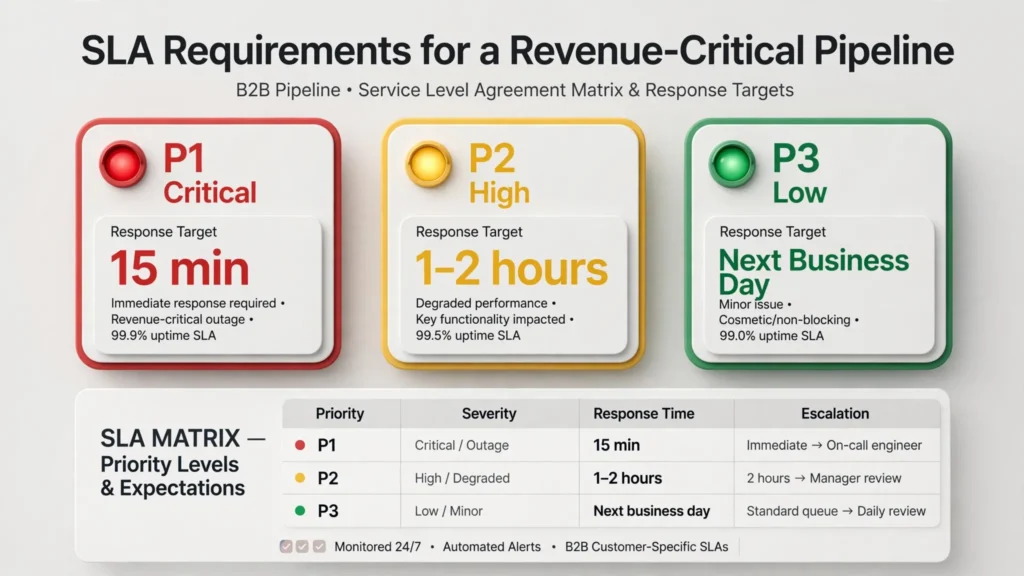
These are recommended procurement targets, not claims about any particular vendor’s SLA. The contract should define the actual response and restoration commitments.
Pipeline KPIs That Executives Should Actually Review
Do not report 30 metrics simply because the CRM can produce them. A senior operating review usually needs a compact set of metrics tied to economic outcomes.
| KPI | Formula | Why It Matters |
|---|---|---|
| Pipeline coverage | Qualified pipeline ÷ quota | Measures whether enough potential revenue exists |
| Stage conversion | Next-stage opportunities ÷ current-stage opportunities | Finds structural bottlenecks |
| Sales velocity | Opportunity value × win rate ÷ sales-cycle length | Combines value, conversion, and speed |
| Time in stage | Average elapsed days per stage | Identifies process and approval delays |
| Forecast accuracy | Forecast ÷ actual result | Tests whether the pipeline can support financial planning |
| Pipeline leakage | Lost/stale value attributable to process failure | Quantifies preventable revenue loss |
Use Coverage as a Model, Not a Magic Number
A commonly cited 3–4× pipeline-coverage ratio is only a starting point. A team with a 20% win rate, long sales cycle, and volatile deal size requires a different coverage model from a team with a 50% win rate and highly repeatable transactions.
Build the target from historical conversion rates instead of copying an industry benchmark.
Implementation Timeline: Plan for Parallel Operation
Pipeline migration should not be treated as a CRM configuration project. It is a revenue-process migration.
| Phase | Typical Planning Window | Primary Deliverable |
|---|---|---|
| Discovery | 1–2 weeks | Process, data, and integration inventory |
| Architecture | 1–2 weeks | Target-state design |
| Configuration | 2–6 weeks | Stages, routing, workflows, and permissions |
| Migration/testing | 2–4 weeks | Data validation and integration tests |
| Parallel run | 1–2 weeks | Old and new processes reconciled |
| Cutover | 1–3 days | Production transition and rollback readiness |
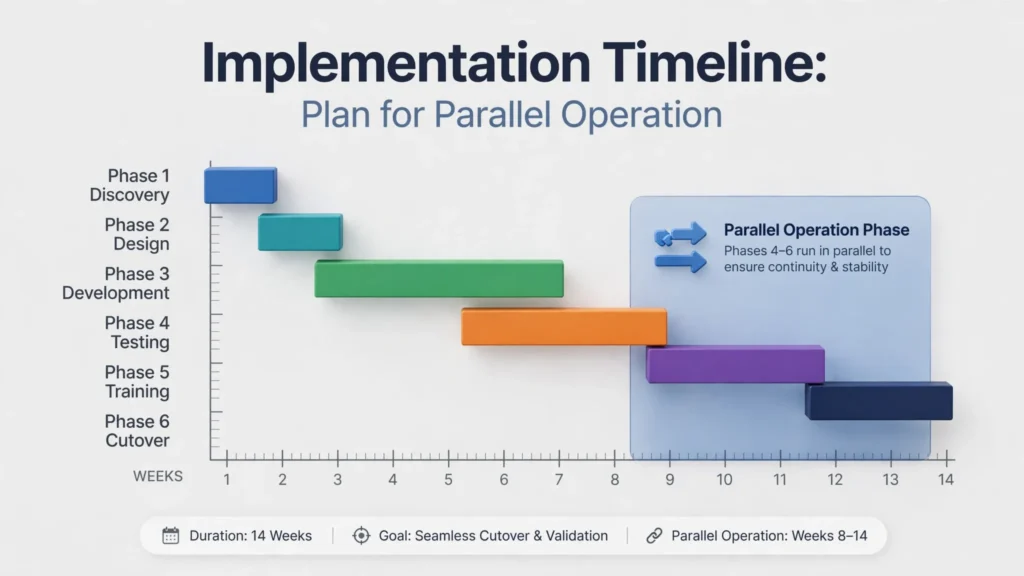
For a straightforward environment, an implementation may fit inside 6–8 weeks. A complex enterprise environment with multiple CRMs, custom objects, territory rules, and data dependencies can require several months.
Migration Downtime Risk
Do not ask only, “How long will migration take?” Ask, “What revenue process is unavailable during migration?”
If inbound routing is offline for four hours and the business normally receives 100 qualified opportunities during that period, the risk is not four hours of software downtime. It is delayed response, misassigned ownership, and potentially lost pipeline.
For revenue-critical systems, require a rollback plan, reconciliation procedure, and documented manual-routing fallback.
Scenario-Based Decision Framework: Which Architecture Should You Choose?
Under 20 Sellers
Recommended approach: Native CRM automation
Why: Lowest operational complexity.
20–75 Sellers
Recommended approach: CRM + targeted automation
Why: Enough flexibility without excessive architecture.
75–250 Sellers
Recommended approach: CRM + orchestration layer
Why: Centralizes routing, enrichment, and workflow governance.
Multiple Business Units and Regions
Recommended approach: Orchestration + strong governance
Why: Handles exceptions and policy differences systematically.
Highly Differentiated Revenue Process
Recommended approach: Selective custom engineering
Why: Custom code is justified only where differentiation warrants it.
Regulated or Security-Sensitive Pipeline
Recommended approach: Architecture-led procurement
Why: Compliance and audit requirements may outweigh feature breadth.
Common Pipeline Anti-Patterns to Reject
The “More Stages Means More Control” Mistake
Adding stages does not improve forecasting if representatives cannot consistently satisfy the exit criteria. A seven-stage pipeline with weak governance can be less useful than a five-stage pipeline with objective evidence.
The “Unlimited Automation” Mistake
Unlimited workflow creation does not necessarily mean unlimited execution. Always inspect the unit being metered: runs, records, credits, API requests, seats, or transactions.
The “Free Custom Development” Mistake
Internal engineering work is not free. Assign a fully loaded labor cost to every custom component and include future maintenance.
The “One Contact = One Deal” Mistake
Enterprise deals frequently require economic buyers, technical evaluators, procurement, legal, security, and end users. A pipeline that tracks only one contact can look healthy while remaining commercially fragile.
The “Closed-Won Ends the Pipeline” Mistake
Implementation risk begins after signature. Capture handoff requirements, success criteria, dependencies, and expansion opportunities before the deal disappears from the operating model.
Final Decision Framework
Before selecting a CRM, sales automation platform, or orchestration layer, score every option against these six questions:
- Economics: What is the three-year TCO at today’s volume and at 2× volume?
- Capacity: What happens to API, workflow, and enrichment usage during peak demand?
- Operations: How much RevOps and engineering time is required after implementation?
- Risk: What happens when a critical workflow fails?
- Procurement: Are security, SLA, contract, and data-export requirements acceptable?
- Exit: Can the organization migrate away without rebuilding its entire revenue process?
The winning architecture is not necessarily the platform with the largest feature set. It is the system that gives the business the lowest acceptable total cost while preserving forecast accuracy, operational control, and the ability to change vendors later.
Enterprise Sales Pipeline Evaluation Checklist
- ☐ Current pipeline stages have measurable entry and exit criteria.
- ☐ Economic buyer and technical stakeholder coverage are tracked.
- ☐ Three-year TCO has been modeled.
- ☐ Seat, usage, and overage pricing has been documented.
- ☐ API and workflow limits have been tested against peak volume.
- ☐ SLA and escalation requirements are contractual.
- ☐ SOC 2, GDPR, and applicable regulatory requirements have been validated.
- ☐ SSO, RBAC, and audit-log requirements have been tested.
- ☐ Data export and termination rights are documented.
- ☐ Migration and rollback procedures have been tested.
- ☐ Internal RevOps and engineering costs are included in TCO.
- ☐ The architecture remains economically viable at 2× current volume.
Frequently Asked Questions
How many stages should a B2B sales pipeline have?
The source does not prescribe one universal number. The key is to use stages with objective entry and exit criteria. A seven-stage pipeline with weak governance can be less useful than a five-stage pipeline with clear evidence requirements.
How should you calculate the cost of a scalable sales pipeline?
Use a three-year total-cost model that includes software, data, implementation, ongoing operations, and change costs. Also account for internal RevOps and engineering capacity.
When does custom engineering make sense?
Custom engineering is most appropriate for highly differentiated requirements where the additional control is worth the maintenance, engineering capacity, and migration burden.
Why does peak pipeline volume matter?
Average monthly volume can hide operational problems. Campaign launches can generate large bursts of events in minutes, so API limits, concurrency, workflow limits, retries, queueing, and processing latency need to be evaluated against peak demand.
What should executives track?
The article recommends a compact set of metrics tied to economic outcomes, including pipeline coverage, stage conversion, sales velocity, time in stage, forecast accuracy, and pipeline leakage.
Ready for a Procurement-Grade Pipeline Review?
If your team is evaluating CRM automation, sales orchestration, or a replacement for a fragmented revenue stack, do not start with a feature checklist.
Request a Custom TCO Audit that maps seat costs, workflow volume, data consumption, implementation effort, internal engineering time, SLA requirements, and migration risk against your actual pipeline volume.