Quick Answer: What Should You Check Before Redesigning a Shopify Store?
A successful Shopify store redesign should improve the shopping experience without disrupting sales, organic search visibility, product data, or checkout functionality.

Before publishing a new theme or rebuilding your storefront, review these essential areas:
- Audit existing revenue, conversion rates, organic traffic, and high-value landing pages.
- Duplicate your current theme and document custom code, settings, and integrations.
- Decide whether you need a theme refresh, theme replacement, or complete storefront rebuild.
- Review existing product, collection, blog, and informational page URLs.
- Evaluate your current theme and its compatibility with Shopify Online Store 2.0.
- Identify unnecessary apps, scripts, and overlapping functionality.
- Preserve valuable content, metadata, internal links, and product information.
- Test product variants, inventory, cart behavior, and checkout functionality.
- Optimize images, mobile layouts, and Core Web Vitals.
- Complete pre-launch testing and prepare a recovery plan.
- Monitor indexing, technical errors, sales, and conversions after launch.
Treat a Shopify redesign as a controlled business and technical project, not simply a theme installation. Careful planning helps prevent avoidable problems during development and after launch.
What Is a Shopify Store Redesign?
A Shopify store redesign involves changing the appearance, structure, functionality, or technical architecture of an existing ecommerce storefront.
The work can range from updating an existing theme to rebuilding product templates, adding custom functionality, or migrating legacy storefront components to a modern theme architecture.
Theme Refresh vs. Complete Store Rebuild
These projects are often treated as interchangeable, but they differ in development requirements, technical complexity, and implementation risk.
| Project type | Typical work involved | Complexity |
|---|---|---|
| Theme refresh | Updating colors, typography, images, layouts, and theme settings. | Low to moderate |
| Theme replacement | Installing a new theme and recreating existing storefront functionality. | Moderate |
| Custom storefront development | Building custom Liquid sections, templates, and integrations. | Moderate to high |
| Complete ecommerce rebuild | Changing storefront architecture, integrations, workflows, and related systems. | High |
Replacing a theme does not automatically require changing product URLs, transferring the product catalog, or rebuilding checkout. These are separate project decisions and should only be included when there is a clear need.
Understanding the scope helps avoid unnecessary development work and reduces the number of systems that need testing before launch.
Why Ecommerce Redesigns Require Additional Planning
A Shopify storefront connects several business-critical functions, including product availability, variant selection, pricing, shipping calculations, discounts, payment processing, and order management. All of them need to work correctly after the redesign.
Consider a product page with an attractive gallery that fails to update the price when a customer selects a different variant. The design may look complete, but the purchasing experience is broken.
Similar problems can affect collection pages. Products may appear correctly while filters, sorting options, or product links fail to work.
Visual approval alone is not enough. Test the complete shopping experience, including the interactions customers rely on to find and purchase products.
Shopify Redesign Checklist: What to Do Before Rebuilding
1. Audit Your Existing Store Before Changing Anything

Start by understanding how your Shopify store performs before making changes. This baseline helps you evaluate the redesign and identify valuable pages or functionality that should remain intact.
Review Existing Business Performance
Collect relevant data from Shopify Analytics, Google Analytics 4, and Google Search Console. Focus on the metrics that reveal commercial performance, customer behavior, and organic search visibility.
- Revenue: Review sales trends, average order value, and revenue by product.
- Conversion rate: Examine purchasing behavior and completed orders.
- Organic search: Identify pages generating valuable search impressions and clicks.
- Landing pages: Find product, collection, and informational pages attracting visitors.
- Customer behavior: Review product engagement, cart activity, and checkout progression.
- Technical performance: Record loading issues, mobile usability problems, and JavaScript errors.
Don’t evaluate the store by revenue alone. A page with relatively little traffic may still generate valuable purchases or attract important external backlinks.
Identify High-Value Pages That Need Protection
Review your most important product pages, collections, blog articles, and promotional landing pages before making structural changes.
Record their current URLs, search performance, content, and relevant business metrics. These records provide a baseline for comparing the redesigned storefront and identifying unexpected changes after launch.
2. Define the Redesign Scope and Business Requirements
Before choosing a Shopify theme or starting development, determine what the redesign needs to accomplish. A store that needs better navigation requires a different approach from one that relies on custom product configurators or external inventory integrations.
Identify the problems behind the redesign and turn them into specific development requirements.
| Business objective | Areas to evaluate |
|---|---|
| Improve conversions | Product layouts, navigation, purchase actions, and shopping friction. |
| Improve storefront speed | Theme code, images, JavaScript, and third-party applications. |
| Improve product discovery | Search, collection filters, product categorization, and navigation. |
| Introduce custom features | Liquid development, app integrations, metafields, and APIs. |
| Improve operations | Inventory synchronization, fulfillment, and payment integrations. |
Separate Launch Requirements From Future Improvements
Not every requested feature needs to be ready on launch day. Divide development priorities into two groups:
- Launch requirements: Features and fixes needed for the redesigned store to operate correctly.
- Future enhancements: Additional functionality that can be introduced later without disrupting essential shopping workflows.
For example, updating the product template and fixing mobile navigation may be essential. A more sophisticated product recommendation system could be introduced as a separate enhancement.
This approach keeps the project focused and makes development estimates, testing requirements, and launch decisions easier to manage.
3. Back Up Your Existing Theme and Document Customizations
Before modifying the storefront, duplicate the published theme and maintain a separate development copy.
Shopify allows merchants to keep multiple themes in their theme library. You can customize an unpublished theme, preview changes, and test the new storefront without immediately replacing the live design.
Document Existing Theme Customizations
Review the current theme for functionality added beyond its original configuration. Pay particular attention to:
- Custom Liquid sections, snippets, and templates.
- Theme-specific CSS and JavaScript modifications.
- Custom product forms and variant selectors.
- Promotional banners, product badges, and announcement bars.
- Navigation menus and mega menus.
- App blocks and app embeds.
- Custom analytics and tracking integrations.
For each customization, document its purpose, the business process that depends on it, and whether it needs to be recreated in the replacement theme.
Understand What a Theme Backup Does Not Protect
A duplicated theme is not a complete backup of your Shopify store.
Product records, customer information, orders, application configurations, external integrations, and store settings require separate consideration. Document important configurations and establish appropriate backup or recovery procedures before making major changes.
For custom integrations, preserve the relevant code, API documentation, configuration details, and access arrangements. Installing another theme will not automatically transfer these dependencies.
4. Evaluate Your Current Theme and Shopify Online Store 2.0 Requirements
One of the main technical decisions in a Shopify redesign is whether to update the existing theme, replace it with a modern theme, or migrate custom functionality to a different theme architecture.
Shopify Online Store 2.0 introduced a more flexible architecture built around JSON templates, reusable sections, and app blocks. Compatible themes allow merchants to manage and rearrange supported components through the theme editor.
Understand the Main Online Store 2.0 Components
- JSON templates: Define the sections and configurations used by supported storefront templates.
- Sections: Provide reusable components such as banners, product information, and featured collections.
- App blocks: Allow compatible applications to add functionality to supported theme locations.
- Section groups: Organize reusable areas such as headers and footers.
These features make storefront customization more flexible, but moving an older theme to Online Store 2.0 is not necessarily an automatic conversion.
What to Check Before Choosing a Migration Approach
- Whether the existing theme supports Online Store 2.0.
- Whether older Liquid templates require conversion.
- Whether existing custom sections can be reused.
- Whether applications depend on legacy theme code.
- Whether custom product and collection templates are required.
- Whether the replacement theme supports the functionality your store needs.
Review Shopify’s official theme architecture documentation before selecting an implementation approach.
You should also consult the Shopify Online Store 2.0 documentation for details about sections, templates, and app integration.
Important: Installing an Online Store 2.0 theme does not automatically transfer custom Liquid functionality, application integrations, or existing theme-specific settings. Evaluate and migrate these components separately.
5. Audit Shopify Apps and Remove Unnecessary Dependencies
Established Shopify stores often accumulate applications as their needs change. Some provide essential functionality, while others duplicate features already available through the theme or another app.
Review installed applications before rebuilding the storefront. This helps prevent unnecessary dependencies from carrying over into the new implementation.
Evaluate Every Installed Application
For each app, identify its purpose, business owner, storefront behavior, and technical dependencies.
- Identify applications that are no longer actively used.
- Look for overlapping functionality between installed apps.
- Check whether the replacement theme already provides the required feature.
- Review app embeds and their activation settings.
- Identify custom scripts associated with third-party applications.
- Verify whether essential business workflows depend on the application.
Pay particular attention to applications responsible for subscriptions, customer reviews, loyalty programs, product filtering, analytics, and fulfillment.
Check for Leftover Scripts and Integration Dependencies
Uninstalling an application does not guarantee that all related storefront code or configurations have been removed.
Depending on how an app was installed, its integration may leave behind theme code, tracking scripts, or external configurations that require separate attention.
Shopify supports app blocks and app embeds for compatible themes, but the integration method varies by application.
Review Shopify’s documentation on adding app functionality to themes before changing existing integrations.
Before removing an application, verify that the store can operate without its functionality. An app that appears unused may still support an important business process.
How to Protect Shopify SEO During a Store Redesign
A Shopify redesign can affect organic search performance when it changes URLs, page content, internal links, metadata, or technical indexing signals. This is especially important for established stores with valuable organic traffic and external backlinks.
Preserve the search value of existing pages while making necessary improvements to the storefront.
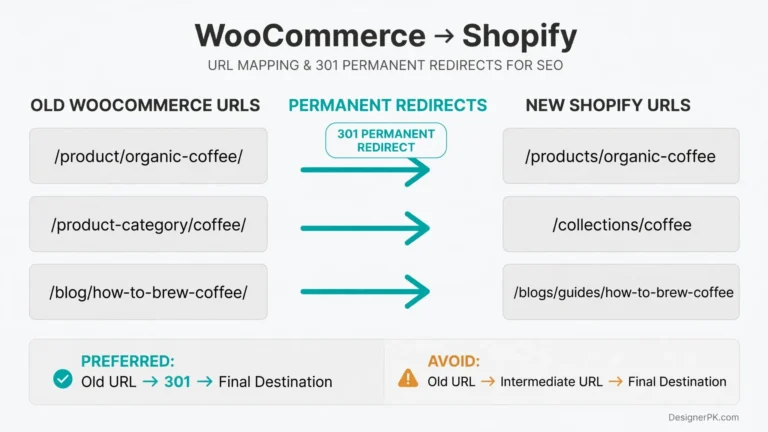
6. Preserve Existing Shopify URLs Wherever Possible
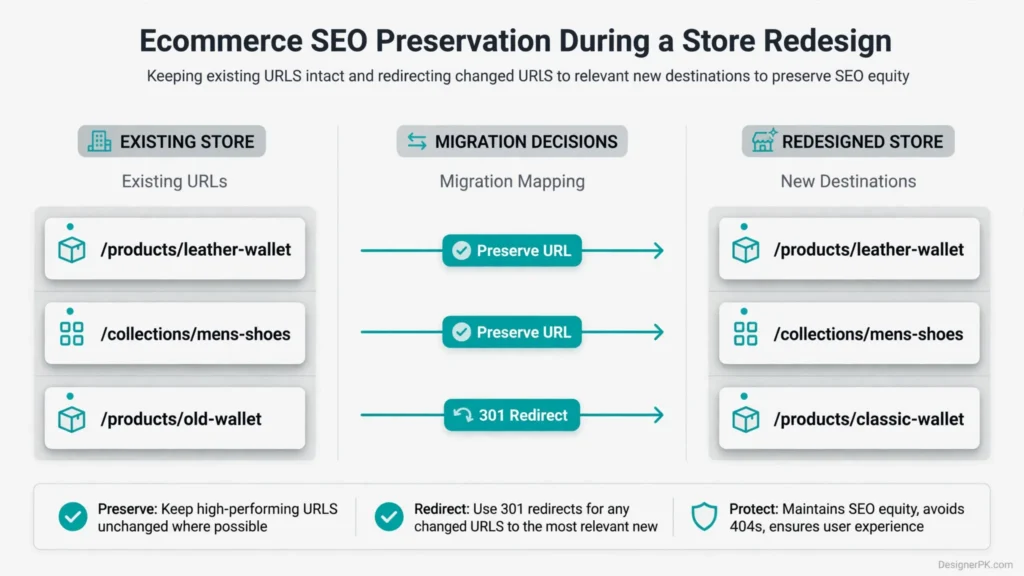
Replacing a theme generally does not require changing product or collection URLs. Keeping established URL handles is usually the simplest way to avoid unnecessary migration work.
Shopify commonly uses these URL structures:
/products/product-name
/collections/collection-name
/pages/about-us
/blogs/news/article-name
Before changing a URL, determine whether the existing page still serves a useful purpose and whether its destination genuinely needs to change.
For example, if a product continues to sell and its existing page attracts organic traffic, redesigning the page while keeping its URL is generally preferable to creating an unnecessary replacement.
Create a URL Migration Spreadsheet
If the project requires URL changes, prepare a migration map before publishing the new storefront.
| Existing URL | Approved destination | Required action |
|---|---|---|
| /products/leather-wallet | /products/leather-wallet | Preserve existing URL |
| /collections/mens-shoes | /collections/mens-shoes | Preserve existing URL |
| /products/old-wallet | /products/classic-wallet | 301 redirect |
| /collections/sale-items | /collections/clearance | 301 redirect |
These examples illustrate possible migration actions. Select actual destinations based on the original page, its content, and the most relevant replacement.
Implement Redirects for Necessary URL Changes
When a page moves to another URL, create a permanent redirect from the old address to the appropriate replacement.
- Redirect renamed products to their correct replacement pages.
- Redirect discontinued collections to relevant alternatives when appropriate.
- Avoid sending unrelated deleted pages to the homepage.
- Check for redirect chains and loops.
- Update internal links to point directly to their new destinations.
- Verify important redirects after launch.
Shopify URL redirects have specific limitations. Reserved paths such as /products and /collections cannot simply be replaced through ordinary URL redirects. Redirects also apply to broken or unavailable URLs rather than overriding existing valid pages.
Review Shopify’s official URL redirect documentation before implementing redirects in bulk.
For broader migration planning, consult Google’s website migration guidelines.
7. Preserve Metadata, Content, and Search Engine Signals
A new theme does not automatically improve existing SEO content. Product descriptions, collection introductions, page titles, and blog articles may already contribute to organic visibility.
Review existing content before changing it. Keep useful information intact unless there is a clear reason to improve or replace it.
Document these important elements:
- Product titles and meta descriptions.
- Collection titles and descriptive content.
- Product descriptions and image alternative text.
- Important blog articles and landing page copy.
- Canonical URL configurations.
- Internal links and navigation destinations.
- Product and organization structured data.
Check the Rendered HTML After Theme Replacement
Once the new theme is implemented, inspect the rendered pages rather than relying exclusively on theme editor settings.
Check important pages for correct title tags, meta descriptions, canonical URLs, heading structures, and structured data.
Look for duplicate metadata, missing content, conflicting product schema, and accidental noindex directives.
Structured data should accurately represent the visible page content. Avoid adding product information or review ratings that the storefront cannot substantiate.
Review Internal Linking and Navigation
Navigation changes can affect how visitors and search engines discover important pages.
Review links between products, collections, informational pages, and blog content. Keep important destinations accessible and replace links that point to outdated or redirected URLs.
8. Protect Product Data, Variants, and Inventory Relationships
A Shopify redesign should preserve the product information and relationships that support storefront functionality and purchasing decisions.
Before changing product templates or performing bulk catalog updates, review the existing product structure and identify custom data or external dependencies.
Audit Important Product Information
- Product titles and descriptions.
- Product images and image ordering.
- Variant names and option values.
- SKUs and barcodes.
- Prices and compare-at prices.
- Inventory tracking and availability.
- Product metafields and metaobject references.
- Product categories and collection assignments.
Pay particular attention to products with multiple variants, custom options, or external inventory dependencies. Changes to these elements can affect how products are displayed and purchased.
Understand Product CSV Import and Export Limitations
Shopify supports product CSV exports and imports, which help merchants review product records and perform supported bulk updates.
However, CSV operations are not a substitute for a complete store backup. They do not guarantee that every application relationship, custom configuration, or external integration will be preserved.
Variant changes can also affect existing variant identifiers. Avoid treating a catalog import as a simple formatting operation, particularly when other systems depend on those identifiers.
Review Shopify’s product CSV import and export documentation before making significant catalog changes.
Verify Inventory and External System Synchronization
If your store uses an external inventory management system, ERP, warehouse platform, or fulfillment application, verify that product and inventory synchronization continues working after the redesign.
For example, a product page may display the correct variant and price but show outdated stock availability because an external integration is no longer updating Shopify correctly.
Test representative products and variants to confirm that storefront availability matches the actual inventory configuration.
How to Protect Shopify Checkout During a Redesign
Checkout is one of the most business-critical parts of an ecommerce redesign. A storefront may look polished and function correctly while still preventing customers from completing purchases because of payment, shipping, discount, or integration problems.
Treat checkout compatibility as a separate part of the project rather than assuming theme testing will cover it.
9. Review Shopify Checkout Extensibility Requirements
Shopify Checkout Extensibility provides supported ways to customize checkout through apps, extensions, and platform capabilities.
This is particularly relevant for stores replacing older checkout customizations or maintaining complex Shopify Plus implementations.
Understand Legacy Checkout Customization Limitations
The retirement of checkout.liquid is an important consideration when planning a redesign or migrating older checkout functionality.
- checkout.liquid is no longer supported for the Information, Shipping, and Payment checkout steps.
- Its use on the Thank You and Order Status pages was sunset on August 28, 2025.
- Additional checkout-related script requirements have separate migration deadlines.
As of November 2026, Shopify’s published timeline also places the deadline for non-Plus stores to migrate certain additional scripts at August 26, 2026. Verify the current migration requirements and your store’s compatibility before relying on legacy customizations.
Review Shopify’s Checkout Extensibility documentation for current implementation requirements and supported customization methods.
Test Essential Checkout Workflows
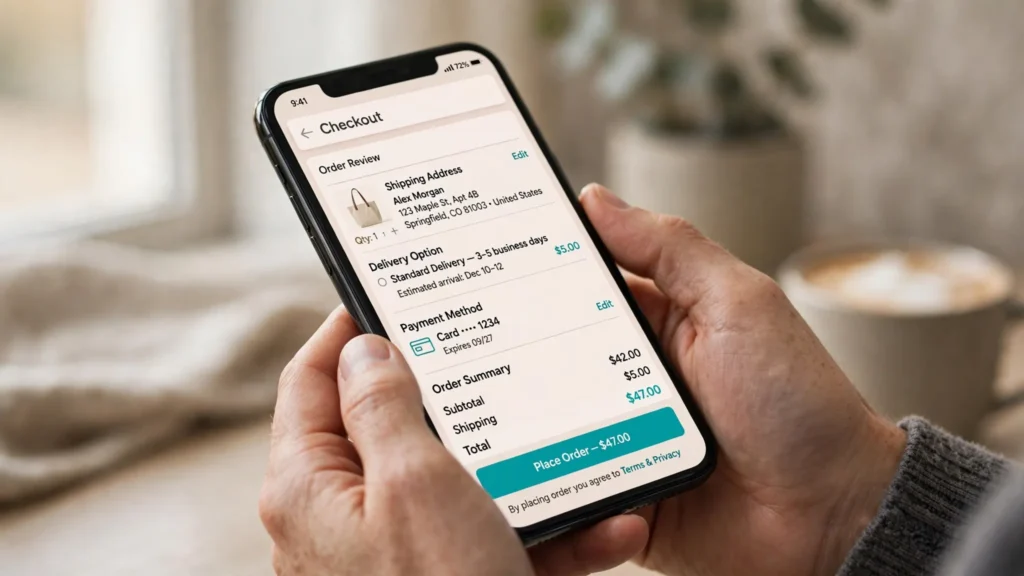
Before launching the redesigned storefront, test the complete purchasing process.
- Adding products to the cart.
- Removing products and updating quantities.
- Selecting product variants.
- Applying valid discount codes.
- Testing automatic discounts.
- Calculating shipping rates and delivery options.
- Validating customer address information.
- Checking applicable tax calculations.
- Testing available payment methods.
- Verifying order confirmation and notification emails.
- Checking post-purchase tracking events.
Check Custom Apps and Payment Integrations
Stores using subscriptions, loyalty programs, custom discounts, upsells, or external payment integrations should verify that these systems remain compatible with the configured checkout.
For example, a subscription-based store should confirm that recurring purchase options, subscription discounts, and customer subscription records continue working correctly.
Use appropriate Shopify testing configurations and supported test payment methods. A successful transaction with one payment option does not validate every payment method, shipping scenario, or customer workflow.
How to Improve Shopify Store Performance During a Redesign
A redesigned Shopify storefront should deliver a smooth shopping experience without introducing unnecessary loading delays or interaction problems. Heavy themes, oversized images, third-party scripts, and excessive visual effects can all affect performance.
Address these issues during development rather than waiting until after launch.
10. Identify Storefront Performance Bottlenecks
Start by reviewing the resources that contribute to page loading and interaction delays.
- Images: Oversized product images and promotional banners can increase loading times.
- JavaScript: Unnecessary scripts and excessive client-side functionality can delay rendering and interactions.
- Applications: Third-party scripts and app embeds may load across multiple storefront pages.
- CSS: Unused styles and excessive stylesheets can affect rendering.
- Animations: Heavy visual effects can delay content visibility and affect responsiveness.
- Fonts: Too many font families, weights, and external requests can slow initial rendering.
- Video: Large background videos and unnecessary autoplay resources can consume bandwidth.
Optimize Product and Collection Images
Use image assets that match their display dimensions instead of delivering unnecessarily large files to every device.
Shopify’s image delivery tools support responsive image sizing and automatic image optimization. Use appropriate formats and dimensions to balance visual quality with loading performance.
Pay particular attention to images visible immediately when a page loads. The main hero or product image may be the Largest Contentful Paint (LCP) element, so delaying its loading with lazy-loading settings can hurt performance.
For images below the initial viewport, lazy loading can reduce unnecessary downloads. Reserve eager loading for important above-the-fold content.
Reduce Unnecessary Third-Party Scripts
Review analytics, marketing, review, chat, advertising, and personalization scripts. Determine whether each one needs to load across the entire storefront.
Remove unused scripts, avoid overlapping applications, and defer noncritical resources where the integration supports it.
Shopify already provides image optimization, CDN delivery, and other platform-level performance features. Focus on theme code, applications, images, and manually added scripts rather than duplicating optimizations that Shopify handles automatically.
Measure performance before and after making changes. Removing an application or compressing an image does not guarantee an improvement unless the change addresses an actual bottleneck.
11. Evaluate Shopify Core Web Vitals
Google’s Core Web Vitals measure three important aspects of the shopping experience: loading performance, interaction responsiveness, and visual stability.
| Metric | What it measures | Good threshold |
|---|---|---|
| Largest Contentful Paint (LCP) | Loading performance | 2.5 seconds or less |
| Interaction to Next Paint (INP) | Interaction responsiveness | 200 milliseconds or less |
| Cumulative Layout Shift (CLS) | Visual stability | 0.1 or less |
Google evaluates these metrics at the 75th percentile of page loads, with mobile and desktop experiences considered separately.
Use Google PageSpeed Insights to review available field and laboratory performance data.
Shopify also provides online store performance reports that help merchants track Core Web Vitals and compare performance changes following theme updates or app installations.
For additional technical guidance, consult Google’s Core Web Vitals documentation and Shopify’s theme performance best practices.
When performance problems extend beyond standard theme settings, investigate the underlying scripts, assets, and integration dependencies. Additional support may be available through website speed optimization services.
12. Test the Mobile Shopping Experience
Mobile usability deserves separate attention. A layout that works with a mouse and large screen may create problems on smaller touchscreens, especially when navigation, product selection, or cart controls are difficult to use.
Test the redesigned storefront on actual mobile devices and review:
- Navigation menus and expandable categories.
- Product image galleries and image zoom.
- Variant selectors and quantity controls.
- Product descriptions and pricing visibility.
- Add-to-cart buttons and cart drawers.
- Search forms and collection filters.
- Checkout form usability.
Make sure important information remains readable, interactive controls are easy to tap, and product selection does not require unnecessary scrolling or repeated interactions.
Shopify Redesign Pre-Launch Testing Checklist
Before publishing a redesigned Shopify theme, complete a structured quality assurance review. Testing only the homepage is not enough. Different storefront templates, product configurations, and application integrations can introduce problems that aren’t immediately visible.
13. Test Every Important Storefront Template
Review each major page type using representative products and content.
- Homepage and main navigation.
- Product detail pages.
- Collection and category pages.
- Search results and filtering pages.
- Cart and cart drawer.
- Blog articles and informational pages.
- Contact forms and custom landing pages.
Test products with different templates, metafields, custom sections, and variant configurations. A product page that works for one item may behave differently when another product has additional options or custom content.
Check how the theme handles products without images, long product titles, unavailable variants, and different image formats.
14. Test Complete Shopping Journeys
Test realistic purchasing scenarios rather than checking individual buttons in isolation. Follow the steps a customer would take to complete an order.
- Open a collection and test product filtering and sorting.
- Open a product and select different variants.
- Add products to the cart and update quantities.
- Apply an eligible discount code.
- Proceed through the configured checkout process.
- Complete an appropriate test transaction.
- Verify order confirmation and related notifications.
For stores serving multiple regions, test relevant shipping zones, tax configurations, currencies, and payment methods. Include different product availability scenarios where applicable.
15. Inspect Technical Errors and Broken Functionality
Use browser developer tools and appropriate testing tools to identify problems that may not be obvious during visual testing.
Review the following:
- JavaScript console errors.
- Failed network requests.
- Broken images and missing assets.
- Unexpected application behavior.
- Broken internal links.
- Incorrect page status codes.
- Missing or duplicated SEO metadata.
Use a website crawler to inspect the redesigned storefront for broken links, redirect chains, missing page titles, and unexpected indexability problems.
For custom Shopify themes, Theme Check can help identify potential Liquid code issues. Include performance and accessibility testing in the QA process as well.
Shopify provides a theme testing guide with additional recommendations for checking storefront functionality, browser compatibility, accessibility, and performance.
Resolve critical issues before publishing the replacement theme.
How to Launch a Redesigned Shopify Store Safely
16. Prepare the Store Before Publishing the New Theme
Once development and testing are complete, prepare a controlled release. Don’t publish the replacement theme until essential functionality, integrations, and migration tasks have been checked.
Confirm that the following requirements are satisfied:
- The final approved theme is selected.
- Required customizations and storefront features are working.
- Product and collection templates display correctly.
- Navigation menus point to the correct destinations.
- Payment and shipping configurations are ready.
- Required URL redirects are implemented.
- Analytics and tracking integrations are configured.
- Essential applications are functioning.
- Critical accessibility and mobile usability issues are resolved.
17. Select an Appropriate Launch Window
For stores with substantial order volumes, avoid launching during major promotional campaigns or peak shopping periods whenever possible.
Choose a release window when your development and ecommerce teams are available to monitor the storefront and respond to unexpected problems.
Keep the previous theme in your Shopify theme library as a reference and potential recovery option.
However, publishing an older theme does not automatically reverse changes to product data, app configurations, checkout settings, or URL redirects. Those systems may require separate recovery procedures.
18. Verify the Live Store Immediately After Publishing
A successful theme preview does not guarantee that every feature will work correctly on the published storefront. Check the live website as soon as the new theme is published.
- Load the homepage and major collection pages.
- Open important product pages and test variants.
- Add products to the cart and update quantities.
- Verify discount and shipping behavior.
- Test available checkout and payment workflows.
- Check mobile navigation and product interactions.
- Verify important redirects and internal links.
- Confirm that analytics events are being recorded.
Prioritize purchasing functionality and investigate critical errors before making additional design changes.
How to Monitor Shopify SEO and Sales After Launch
Publishing the new theme is only one milestone. The first days and weeks after launch provide an opportunity to identify problems that may not have appeared during development or preview testing.
19. Monitor Organic Search and Indexing
Use Google Search Console to check how search engines access and process the redesigned storefront.
Pay attention to:
- Important product and collection URLs.
- Unexpected 404 errors.
- Redirect destinations and response codes.
- Submitted sitemap information.
- Indexing and canonicalization issues.
- Changes in organic clicks and impressions.
- Search performance of important landing pages.
Inspect important URLs individually when necessary. This helps distinguish technical problems from normal fluctuations in search performance.
Don’t interpret every short-term ranking change as a redesign failure. Traffic can also change because of seasonality, advertising activity, market demand, and search algorithm updates.
20. Compare Ecommerce Performance Against the Previous Baseline
Compare the redesigned storefront against your original business metrics using reasonably comparable reporting periods.
| Metric | What it helps evaluate |
|---|---|
| Conversion rate | Whether visitors are completing purchases more frequently. |
| Average order value | Whether purchasing behavior and basket value have changed. |
| Cart abandonment | Potential friction between cart and checkout. |
| Revenue by landing page | Whether important entry pages maintain commercial performance. |
| Mobile conversion rate | Whether the mobile shopping experience is performing effectively. |
Account for promotional campaigns, traffic sources, seasonality, and advertising spend when interpreting the results. A change in conversion rate does not necessarily mean the redesign is responsible.
21. Investigate Unexpected Performance Declines
If sales or conversions decline after launch, investigate the affected customer journey before assuming the design is responsible.
Fewer completed purchases, for example, could result from payment failures, incorrect shipping calculations, discount problems, product availability, or mobile usability issues.
Use analytics data, technical logs, and actual purchasing tests to identify the underlying cause before making corrective changes.
When Should You Hire a Shopify Development Specialist?
A straightforward theme customization may be manageable in-house, particularly when a store uses standard Shopify features and only needs visual adjustments.
Professional development support becomes more valuable when a redesign involves complex integrations, custom storefront functionality, SEO migration, or business-critical purchasing workflows.
Projects That May Require Specialist Support
- Migrating a heavily customized legacy Shopify theme.
- Implementing complex Shopify Online Store 2.0 functionality.
- Developing custom Liquid sections and reusable templates.
- Integrating external APIs, payment systems, and business applications.
- Synchronizing inventory with external ERP or warehouse systems.
- Implementing supported checkout extensions and custom workflows.
- Managing SEO migrations involving large product and collection catalogs.
- Diagnosing performance problems caused by multiple applications and scripts.
What to Evaluate Before Hiring a Developer
Ask prospective development partners how they approach technical discovery, theme backups, custom functionality, testing, and post-launch support.
Clarify who will manage application configurations, external integrations, migration redirects, and recovery procedures if something goes wrong.
If your requirements extend beyond Shopify, evaluate whether the platform still meets your ecommerce needs before committing to a more extensive rebuild.
Our guide on what to check before hiring a web developer covers important considerations when selecting a technical development partner.
Frequently Asked Questions About Shopify Store Redesigns
How much does a Shopify store redesign cost?
The cost depends on the selected theme, development requirements, product catalog complexity, integrations, and testing scope. A straightforward theme refresh generally requires less work than a custom storefront rebuild. Request a project assessment based on your actual requirements before comparing estimates.
How long does a Shopify redesign take?
The timeline depends on the number of templates, custom features, integrations, and testing requirements. A basic theme update is less complex than a project involving custom Liquid development, external systems, or checkout migration. Establish a realistic schedule after completing the technical assessment.
Can I redesign my Shopify store without changing its domain?
Yes. A theme redesign does not require a domain change. You can update the storefront while keeping your existing domain and URL structure.
Will changing my Shopify theme delete my products and orders?
No. Publishing a different theme does not normally delete your existing Shopify products or order records. Products, collections, pages, and other store content are managed separately from the theme. However, theme-specific settings, custom code, and application integrations may not transfer automatically. Document essential configurations and keep copies of important customizations before making changes.
Should I redesign my Shopify store during a major sales campaign?
Launching during a major promotional campaign can increase operational risk because unexpected storefront problems may affect a period of high customer activity. Whenever possible, schedule the release during a quieter period when your team can monitor the store and respond to technical issues.
Do I need to migrate to Shopify Online Store 2.0?
Not every redesign requires an immediate migration. However, Online Store 2.0 offers a flexible architecture built around JSON templates, sections, and app blocks. Review your existing theme, custom functionality, and future requirements before deciding whether migration makes sense.
How can I tell whether my Shopify redesign has affected SEO?
Compare organic clicks, impressions, indexed URLs, and important landing-page performance against your previous baseline. Use Google Search Console to investigate indexing problems, unexpected 404 errors, canonicalization issues, and redirect behavior. Consider seasonality, advertising changes, and other external factors before attributing performance fluctuations to the redesign.
Can I keep my existing Shopify apps when changing themes?
Many Shopify apps continue working after a theme replacement, but compatibility depends on how each application integrates with the storefront. Review app blocks, app embeds, custom scripts, and theme dependencies before publishing the replacement theme.
Planning a Shopify Redesign? Start With a Technical Assessment
A successful ecommerce redesign involves more than updating the storefront’s appearance. Product data, search visibility, checkout workflows, application integrations, and website performance all need to work together.
DesignerPK provides website development, ecommerce solutions, technical troubleshooting, and performance optimization for businesses with different website requirements.
Whether you’re replacing an outdated theme or planning a more extensive ecommerce rebuild, identify the technical requirements and potential risks before development begins.
Request a Shopify Redesign and Store Performance Assessment.
Contact DesignerPK to discuss your website requirements and explore suitable development and optimization solutions for your business.