
Which Is Right for Your Business?
Choosing between WooCommerce and Shopify affects more than your online store’s appearance. It determines how you manage products, process orders, customize functionality, handle maintenance, and pay for your e-commerce infrastructure.
Both platforms provide the tools businesses need to sell products online, but they approach website ownership and store management differently. WooCommerce is an open-source e-commerce solution built around WordPress, while Shopify is a hosted platform that manages much of the underlying infrastructure.
The right choice depends on your business model, technical resources, budget, customization needs, and growth plans. A platform that works well for a small product catalog may not be suitable for a business that needs wholesale pricing, complex integrations, or specialized checkout functionality.
In this guide, we compare WooCommerce vs Shopify from a practical business and technical perspective. We’ll examine pricing, customization, hosting, payment processing, SEO, security, performance, and migration considerations to help you make an informed decision.
WooCommerce vs Shopify: Quick Answer
WooCommerce is generally the better choice if you want greater control over your website, WordPress integration, flexible customization, and the freedom to choose your hosting infrastructure. Shopify is better suited to businesses that prefer managed hosting, centralized store management, and fewer infrastructure responsibilities.
Neither platform is universally better. Your decision should reflect your operational requirements rather than platform popularity or advertised starting prices.
- Choose WooCommerce if you already use WordPress, need specialized functionality, want control over your hosting environment, or require custom integrations.
- Choose Shopify if you prefer a managed e-commerce platform, want a simpler setup process, and don’t want to manage WordPress hosting or core software updates.
- Compare total ownership costs if budget is a major consideration. WooCommerce involves hosting, extensions, development, and maintenance expenses. Shopify involves subscriptions, applications, payment processing, and potentially additional transaction fees.
- Consider your technical resources if your store needs custom development, advanced troubleshooting, or ongoing performance optimization.
For a small business, the best e-commerce platform isn’t necessarily the one with the lowest initial cost. It’s the one that supports your sales operations without introducing unnecessary technical limitations or recurring expenses.
What Are WooCommerce and Shopify?
Before comparing individual features, it’s important to understand how each platform works. Although both support online selling, their underlying architecture, hosting arrangements, and customization methods differ.
What Is WooCommerce?
WooCommerce is an open-source e-commerce plugin for WordPress. It turns a WordPress website into an online store where businesses can publish products, manage inventory, accept payments, configure shipping, and process customer orders.
Because WooCommerce operates within WordPress, you can choose your hosting provider, customize your website, install compatible extensions, and develop additional functionality to meet your requirements.
The core WooCommerce plugin is free. However, operating a professional store may involve expenses for hosting, premium extensions, themes, payment services, development, backups, and maintenance.
WooCommerce is particularly useful when e-commerce needs to work alongside a broader content-driven website. For example, a business can combine product catalogs, educational articles, service pages, customer resources, and online sales within one WordPress installation.
Key consideration: WooCommerce offers substantial control over your website and infrastructure, but you’re also responsible for maintaining the WordPress environment.
What Is Shopify?
Shopify is a hosted e-commerce platform that provides the infrastructure and tools needed to operate an online store.
Businesses can create product listings, manage orders, configure payments, organize inventory, customize storefront designs, and connect external services without purchasing and configuring a web server independently.
Shopify manages its core platform infrastructure, including hosting and platform-level updates. Store owners can extend functionality through themes, applications, integrations, and supported development tools.
Shopify operates through paid subscription plans. Depending on your requirements, additional expenses may include premium themes, paid applications, payment processing, third-party services, and custom development.
Its managed approach is useful for businesses that want to focus on selling products and managing customers rather than administering their own WordPress installation.
Key consideration: Shopify reduces infrastructure management, but store owners still need to manage storefront content, applications, integrations, payment settings, and daily business operations.
The Fundamental Difference Between WooCommerce and Shopify
The main difference is how much control you have over the website infrastructure and who is responsible for maintaining it.
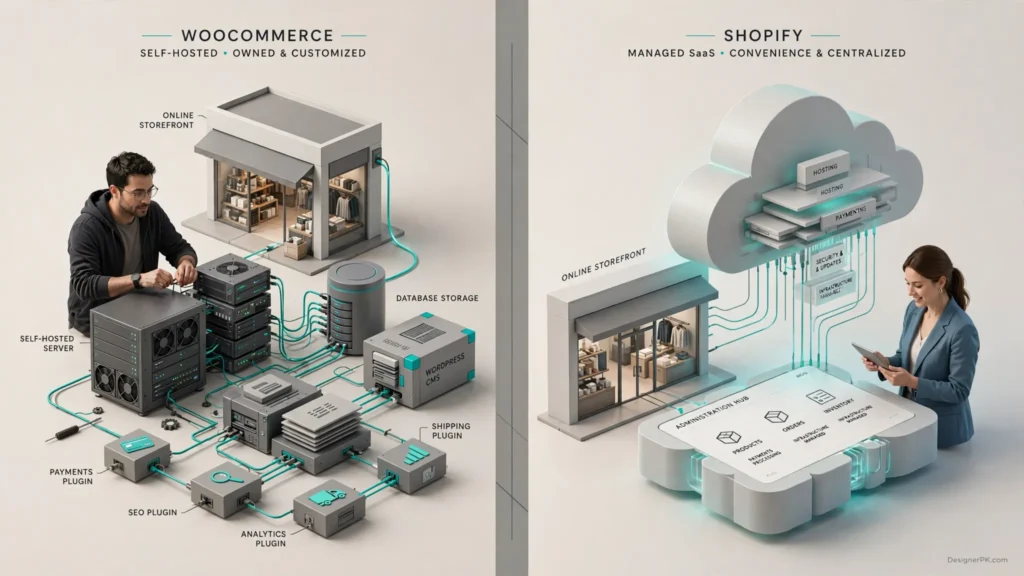
With WooCommerce, your store runs within a WordPress installation hosted in an environment you select. You control the hosting arrangement and can modify the website’s underlying code, subject to the technologies and services involved.
With Shopify, your store operates within Shopify’s hosted environment. The platform manages the underlying infrastructure, while you manage your storefront and business operations through its administration tools.
This distinction affects several important business decisions:
- Who manages server resources and hosting configuration.
- How software updates and maintenance are handled.
- How much control developers have over website functionality.
- Which integrations and applications are available.
- How recurring platform and infrastructure expenses are structured.
- How much technical support your business needs.
For official platform information, consult the WooCommerce documentation and Shopify Help Center.
WooCommerce vs Shopify: Side-by-Side Comparison
This table summarizes the main differences between the platforms. The following sections explore each area in more detail.
| Comparison Factor | WooCommerce | Shopify |
|---|---|---|
| Platform type | Open-source WordPress e-commerce plugin | Hosted e-commerce platform |
| Core software cost | Free core plugin | Paid subscription |
| Hosting | Purchased separately | Included in the platform subscription |
| Initial setup | Requires WordPress and hosting configuration | Generally simpler centralized setup |
| Customization | Extensive control over WordPress code and functionality | Theme, Liquid, application, and supported API customization |
| Maintenance | Owner-managed or outsourced | Core infrastructure managed by Shopify; storefront management remains necessary |
| Payment options | Multiple compatible payment gateways | Shopify Payments and supported third-party providers |
| SEO | Flexible WordPress SEO ecosystem | Built-in SEO features and customization options |
| Extensions | WordPress plugins and WooCommerce extensions | Shopify applications and integrations |
| Security | Depends on hosting, software updates, plugins, and configuration | Core infrastructure security managed by Shopify |
| Performance | Depends on hosting, database, theme, extensions, and optimization | Managed infrastructure with storefront and application performance considerations |
| Scalability | Depends on infrastructure and website architecture | Managed infrastructure with plan- and integration-dependent capabilities |
| WordPress integration | Native WordPress integration | Requires supported integrations or external connections |
| Best suited for | Businesses needing flexibility and infrastructure control | Businesses preferring managed infrastructure and centralized operations |
Greater flexibility doesn’t automatically mean lower operating costs, just as managed hosting doesn’t guarantee better storefront performance.
A poorly configured WooCommerce store can experience database bottlenecks, plugin conflicts, and checkout problems. Shopify stores can also encounter performance issues caused by heavy themes, excessive applications, third-party scripts, or inefficient storefront customization.
Both platforms need to be configured around the business’s actual requirements.
Ease of Use: Shopify vs WooCommerce
Ease of use affects how efficiently you and your employees can manage products, update prices, process orders, and maintain the store. A platform that requires frequent technical assistance can increase operating costs for a small business.
WooCommerce: More Setup and Configuration
WooCommerce requires a WordPress website before you can start building your store. You’ll need to arrange hosting, install WordPress, configure WooCommerce, select a compatible theme, and establish essential store settings.
Once configured, the WordPress dashboard provides access to products, orders, customers, coupons, inventory, and store settings.
For someone familiar with WordPress, managing WooCommerce can be relatively straightforward. Beginners, however, may need help with hosting configuration, plugin compatibility, payment gateways, shipping rules, and checkout customization.
Plan your website structure and required functionality before installing multiple extensions. Each additional plugin introduces another component that may need updates, compatibility checks, and troubleshooting.
Shopify: Simpler Store Management
Shopify provides a centralized setup process. After creating an account, you can select a theme, add products, configure payment methods, establish shipping settings, and prepare your storefront for launch.
Its administration dashboard brings common e-commerce operations into one environment. Business owners can manage orders, review inventory, monitor sales, and install applications without independently configuring a WordPress hosting environment.
Shopify isn’t entirely maintenance-free, though. Store owners still need to manage applications, storefront settings, product information, integrations, payment configurations, and business workflows.
Which Platform Is Easier for Beginners?
Shopify generally has the advantage for beginners who want a simpler setup process and fewer infrastructure responsibilities.
WooCommerce can be equally manageable if you already understand WordPress or work with a reliable developer. Its learning curve is more closely tied to hosting, plugins, and customization requirements.
Our recommendation: Consider Shopify if you want to launch a relatively standard store without managing hosting. Choose WooCommerce if you prefer a WordPress-based store with greater control over its functionality.
WooCommerce vs Shopify Pricing: Which Costs Less?
Pricing is an important consideration when comparing WooCommerce vs Shopify. However, comparing WooCommerce’s free core plugin with Shopify’s monthly subscription doesn’t provide an accurate picture of the total investment.
A better approach is to compare the total cost of ownership (TCO), including the expenses required to build, operate, maintain, and improve your store over time.
WooCommerce Pricing
WooCommerce doesn’t charge a mandatory subscription fee for its core plugin. You can use the software while choosing your own hosting provider, payment services, and additional functionality.
However, operating a professional online store can involve several expenses:
- Web hosting: Your hosting provider charges for the server resources needed to operate your website.
- Domain name: Your store needs a domain, which involves registration and renewal costs.
- Website theme: Free WordPress themes are available, while premium themes and custom designs may involve additional costs.
- Premium extensions: Advanced shipping, subscriptions, product filters, marketing, and payment functionality may require paid extensions.
- Development: Custom product features, checkout modifications, integrations, and troubleshooting may require professional development.
- Maintenance: Backups, software updates, security monitoring, and performance optimization can create recurring expenses.
- Payment processing: Payment providers charge processing fees based on their pricing structures and transaction terms.
WooCommerce gives you control over how your budget is allocated. You can select infrastructure and extensions based on your requirements rather than paying for a fixed collection of platform features.
However, choosing inexpensive hosting isn’t always economical. If your server struggles with product queries, customer traffic, and checkout activity, performance problems can affect the shopping experience.
For more information, review the official WooCommerce pricing information.
Shopify Pricing
Shopify follows a subscription-based pricing model. Its plans provide access to the hosted e-commerce platform, including web hosting and an SSL certificate.
Plans differ in pricing, payment processing rates, staff access, reporting capabilities, and other operational features.
Additional expenses may include:
- Subscription fees: The recurring cost of your selected Shopify plan.
- Premium themes: Optional storefront designs available for purchase.
- Paid applications: Additional functionality for marketing, shipping, inventory, subscriptions, customer support, and reporting.
- Payment processing: Fees charged for processing customer transactions.
- Third-party transaction fees: Additional platform fees may apply when using eligible third-party payment providers.
- Development: Custom theme development, advanced integrations, and specialized functionality may require professional assistance.
Shopify application subscriptions may have separate billing cycles from the main platform subscription. Installing multiple paid applications can therefore increase monthly operating expenses.
For current US subscription prices and plan conditions, consult the official Shopify pricing page.
WooCommerce vs Shopify: Total Cost Comparison
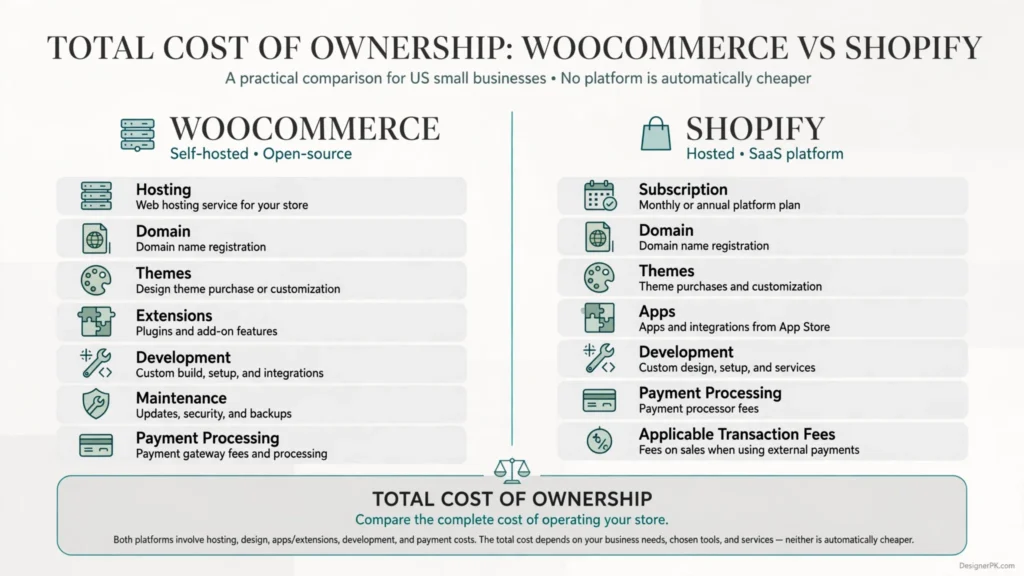
| Expense | WooCommerce | Shopify |
|---|---|---|
| Core platform | Free core plugin | Paid subscription |
| Hosting | Purchased separately | Included |
| Domain | Registration and renewal costs | Registration and renewal costs |
| Themes | Free and paid options | Free and paid options |
| Extensions and applications | Free and paid extensions | Free and paid applications |
| Maintenance | Owner-managed or outsourced | Core infrastructure managed by Shopify |
| Custom development | Depends on project requirements | Depends on project requirements |
| Payment processing | Provider-specific fees | Provider-specific fees and applicable platform fees |
Which Platform Is More Affordable?
WooCommerce can be more economical when a business already has suitable WordPress hosting, needs relatively few paid extensions, and has the resources to handle routine maintenance.
Shopify offers more predictable infrastructure expenses because hosting and core platform management are included in its subscription. However, paid applications, development, and payment-related charges can increase the overall investment.
Neither platform is automatically cheaper for every business.
For example, a small business with an existing WordPress website may be able to add WooCommerce without rebuilding its entire online presence. A new business without technical resources may find Shopify more economical when outsourced maintenance costs are included.
How to Calculate Your E-commerce Operating Costs
Before selecting a platform, prepare a cost estimate covering both initial development and recurring operations.
Total E-commerce Cost =
Initial Development
+ Hosting or Subscription
+ Domain and Themes
+ Extensions or Apps
+ Payment Processing
+ Maintenance
+ Integration Costs
+ Future Improvements
For a meaningful comparison, estimate costs over the same operating period. Use consistent assumptions about sales volume, payment methods, required features, and maintenance responsibilities.
Businesses with higher transaction volumes should pay particular attention to payment processing rates and additional platform transaction fees.
Our recommendation: Compare the complete cost of operating your store rather than choosing a platform simply because its core software is free or its advertised subscription appears inexpensive.
WooCommerce vs Shopify SEO: Which Is Better for Search Rankings?
Search engine optimization is an important consideration when choosing an e-commerce platform. Both WooCommerce and Shopify provide the tools needed to build search-friendly online stores, but they differ in technical flexibility and content management.
WooCommerce SEO Capabilities
WooCommerce runs on WordPress, giving store owners extensive control over website structure, content, and technical SEO implementation.
Compatible plugins and custom development allow you to manage important SEO elements, including:
- SEO titles and meta descriptions.
- Product descriptions and category content.
- XML sitemaps and canonical URLs.
- Product and organization structured data.
- Breadcrumb navigation.
- URL structures and redirects.
- Image optimization and alternative text.
When evaluating a WooCommerce store’s technical SEO, pay particular attention to product variations, filtered URLs, duplicate content, canonical configuration, and indexation. Poorly configured product filters or unnecessary URLs can create crawling and indexing problems.
Shopify SEO Capabilities
Shopify includes several SEO features within its hosted platform, including automatically generated XML sitemaps, canonical tags, and robots.txt files.
Store owners can also customize page titles, meta descriptions, image alternative text, and URL redirects.
Some technical SEO requirements may still need theme customization, applications, or developer assistance. Shopify also uses predefined URL structures for products, collections, and other content types.
Which Platform Is Better for SEO?
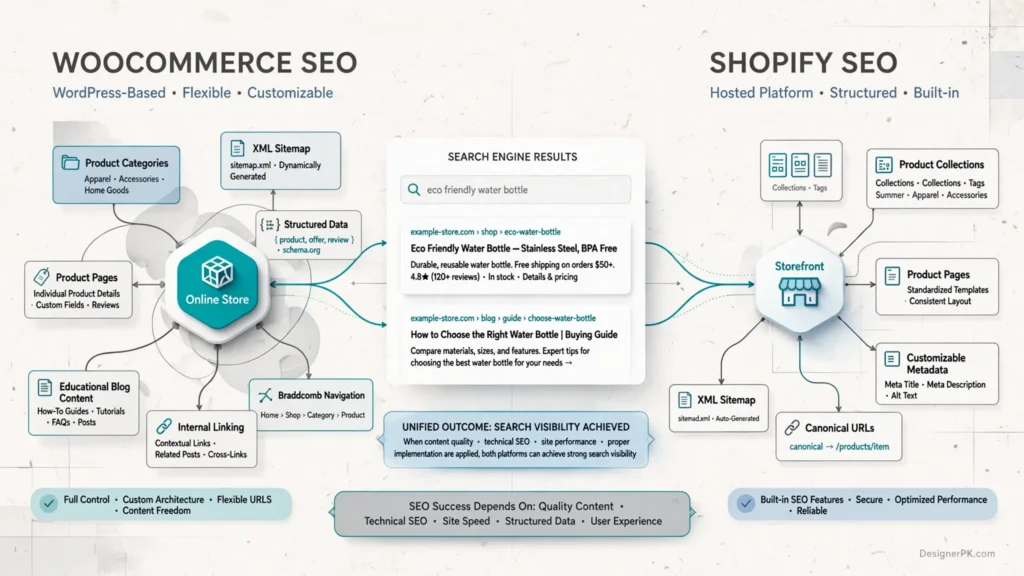
WooCommerce offers greater flexibility for businesses that need extensive control over technical SEO and content architecture. Shopify provides a more structured environment with useful built-in SEO functionality.
Neither platform automatically achieves better Google rankings. Search performance depends on content quality, technical implementation, internal linking, website performance, competition, and how well your pages match search intent.
For additional technical guidance, explore our articles about Core Web Vitals for business websites and how to improve WordPress website speed.
WooCommerce vs Shopify Security
Security is essential for e-commerce websites because they handle customer accounts, personal information, order records, and payment-related transactions.
The main difference between WooCommerce and Shopify is how security responsibilities are distributed between the platform provider and the store owner.
WooCommerce Security
WooCommerce security depends on the complete WordPress environment, including hosting, themes, plugins, user permissions, and custom code.
Important security practices include:
- Keep WordPress, WooCommerce, themes, and plugins updated.
- Use strong administrator passwords and multifactor authentication.
- Install a valid SSL/TLS certificate and enforce HTTPS.
- Maintain regular backups and test restoration procedures.
- Choose reputable hosting with appropriate security controls.
- Monitor vulnerable plugins and suspicious website activity.
- Restrict administrator access according to employee responsibilities.
Update compatibility also deserves attention. A software update can affect checkout functionality or custom integrations, even when the update itself is legitimate. Test significant changes in a staging environment before deploying them to a live store.
If you need help identifying technical weaknesses, our website security audit service can help assess potential website security issues.
Shopify Security
Shopify manages core platform infrastructure, hosting-related security, and platform updates. This reduces the infrastructure-level security workload for individual store owners.
However, store owners remain responsible for protecting employee accounts, managing application permissions, securing connected services, and handling customer information appropriately.
Which Platform Is More Secure?
Shopify generally requires less infrastructure-level security management because its core environment is maintained by the platform provider.
WooCommerce provides greater control but requires more attention to hosting, software updates, access permissions, and website configuration.
Neither platform eliminates security risks. A secure store requires appropriate configuration, monitoring, and ongoing security practices.
WooCommerce vs Shopify: Themes, Plugins, and Apps
Themes and extensions allow businesses to add functionality without developing every feature from scratch. Both WooCommerce and Shopify offer extensive ecosystems, but their implementation and management differ.
WooCommerce Themes and Plugins
WooCommerce works with compatible WordPress themes and plugins. Businesses can use these tools to customize their storefront and add e-commerce functionality.
Common examples include:
- SEO and structured data tools.
- Shipping and fulfillment integrations.
- Subscription and membership functionality.
- Advanced product filters and search.
- Marketing automation integrations.
- Payment gateway extensions.
- Inventory and accounting integrations.
One advantage of WooCommerce is the ability to combine existing plugins with custom development. However, installing too many extensions can introduce compatibility problems, increase maintenance requirements, and affect website performance.
Select plugins based on actual business needs rather than installing multiple extensions that provide overlapping functionality.
Shopify Themes and Apps
Shopify provides themes for storefront design and applications for extending e-commerce functionality. Its app ecosystem supports marketing, analytics, shipping, subscriptions, customer support, inventory management, and other business operations.
Businesses can use these applications to add features without independently developing every integration.
Before installing third-party apps, evaluate their recurring subscription costs, permissions, compatibility, and potential performance impact.
Which Platform Has the Better Extension Ecosystem?
WooCommerce is attractive if you want access to the WordPress plugin ecosystem and greater control over implementation.
Shopify is convenient if you prefer a centralized application ecosystem designed around its hosted commerce platform.
In either case, prioritize reliability, compatibility, and ongoing maintenance rather than the total number of available plugins or applications.
Inventory and Order Management: WooCommerce vs Shopify
Inventory and order management become increasingly important as your product catalog and sales volume grow. Your e-commerce platform should support how your business manages stock, product variations, fulfillment, and customer orders.

WooCommerce Inventory Management
WooCommerce includes standard inventory management features. Store owners can track stock quantities, enable stock management, configure backorders, and manage product variations.
Additional plugins and integrations can support more specialized requirements, including:
- Wholesale inventory management.
- Warehouse management systems.
- Multi-channel inventory synchronization.
- Advanced product and stock reporting.
- Integration with external ERP systems.
Businesses selling through multiple channels may need custom integrations to synchronize stock information and reduce the risk of overselling.
Shopify Inventory Management
Shopify provides built-in inventory management features that allow businesses to track stock, manage product variants, and organize inventory across supported locations.
Additional applications and integrations can extend these capabilities to support warehouse operations, fulfillment, purchasing, and inventory synchronization.
Which Platform Is Better for Inventory Management?
Both platforms can handle standard inventory and order management requirements. The better choice depends on your operational workflow.
A small business selling a limited product range may need only basic stock tracking. A retailer managing multiple warehouses, wholesale customers, and external sales channels may require specialized integrations or custom development regardless of the platform.
WooCommerce vs Shopify: Scalability and Performance
Your e-commerce platform should support more than your current needs. Consider how the store will perform as product listings, customer traffic, orders, and integrations increase.
WooCommerce Scalability
WooCommerce can support growing businesses, but its performance depends on hosting resources, database configuration, theme quality, extensions, and custom code.
As your store grows, technical improvements may include:
- Upgrading to hosting with sufficient CPU, memory, and storage resources.
- Optimizing database queries and reducing unnecessary database operations.
- Implementing appropriate object caching and page caching.
- Compressing images and using a content delivery network where appropriate.
- Improving product search and filtering functionality.
- Reviewing background tasks and external integrations.
WooCommerce gives developers control over the hosting environment, but that flexibility also means your business is responsible for monitoring and maintaining performance.
The WooCommerce database deserves particular attention as the store expands. Product catalogs, orders, customer sessions, and background processes can generate substantial database activity. Poorly optimized queries or inefficient extensions may increase response times during busy periods.
Shopify Scalability
Shopify provides managed infrastructure designed to support online stores as their businesses grow. Store owners don’t need to independently upgrade web servers or administer the underlying database infrastructure.
However, business-specific scalability still requires planning. Advanced workflows, large product catalogs, specialized integrations, and complex storefront functionality may require additional applications, custom development, or a different subscription tier.
Evaluate application limitations and recurring costs before assuming every advanced feature is included in your subscription.
Which Platform Handles Business Growth Better?
Both WooCommerce and Shopify can support growing e-commerce businesses, but they approach infrastructure management differently.
WooCommerce is suitable when you want control over infrastructure and the flexibility to optimize the complete WordPress environment. Shopify is attractive when you prefer managed infrastructure and less responsibility for server administration.
Performance isn’t determined by the platform name alone. Website architecture, hosting quality, third-party scripts, images, integrations, and checkout implementation all influence the customer experience.
If your existing store suffers from slow loading times, checkout delays, or other performance problems, our website speed optimization services can help identify and address the underlying issues.
WooCommerce vs Shopify: Integrations and Customer Support
Your e-commerce platform should work with the other systems your business depends on. These may include accounting software, CRM platforms, email marketing tools, shipping services, inventory systems, and business automation applications.
WooCommerce Integrations
WooCommerce benefits from the WordPress ecosystem and its available APIs. Businesses can connect their stores to external applications through plugins, webhooks, REST APIs, and custom development.
Common integration requirements include:
- Customer relationship management systems.
- Accounting and invoicing software.
- Email marketing and customer communication platforms.
- Shipping and fulfillment providers.
- Inventory and warehouse management systems.
- External payment gateways.
For specialized workflows, developers can build integrations using the WooCommerce REST API, WordPress REST API, and webhooks.
If your business needs to connect multiple applications or automate information exchange, explore our API integration development services.
Shopify Integrations
Shopify provides an application ecosystem and developer tools for connecting stores to external services.
Businesses can integrate their stores with accounting systems, CRM platforms, shipping providers, analytics tools, inventory applications, and email marketing services.
Custom integrations are also possible through Shopify’s APIs and supported application architecture.
Before selecting an integration, check its compatibility, data synchronization capabilities, permissions, ongoing costs, and support arrangements.
Customer Support Differences
Shopify provides official platform support through its support channels. The assistance available can depend on the issue and the relevant service.
WooCommerce provides documentation, community resources, and support options for its products and extensions. Hosting providers and individual plugin developers may also assist with their respective services.
With WooCommerce, troubleshooting can involve multiple providers. For example, a checkout problem might originate from a payment extension, hosting configuration, theme customization, or another plugin.
Which Platform Offers Better Support?
Shopify is generally more convenient if you prefer centralized platform support. WooCommerce is suitable if you’re comfortable coordinating different providers or have access to reliable WordPress development assistance.
WooCommerce vs Shopify: Pros and Cons
Both platforms have advantages and limitations. The right choice depends on your technical resources, budget, business model, and plans for growth.
WooCommerce Pros
- Open-source flexibility: Greater control over website code, hosting, and functionality.
- No mandatory core plugin subscription: The WooCommerce core plugin is free to use.
- WordPress integration: Combine e-commerce functionality with blogging, landing pages, and content marketing.
- Extensive customization: Build specialized features, checkout experiences, integrations, and business workflows.
- Hosting flexibility: Select your own hosting provider and infrastructure.
- SEO control: Access extensive options for managing website structure and technical SEO.
WooCommerce Cons
- Technical responsibility: You must manage hosting, updates, backups, and website security.
- Maintenance requirements: Plugin conflicts and compatibility issues may require troubleshooting.
- Variable operating costs: Hosting, premium extensions, development, and maintenance can increase expenses.
- Performance management: Poor hosting or inefficient plugins can affect website speed and reliability.
- Setup complexity: Beginners may need professional assistance to configure their store correctly.
Shopify Pros
- Managed hosting: Hosting and core platform infrastructure are included in the subscription.
- Simpler setup: Launch a storefront without independently configuring WordPress hosting.
- Centralized management: Manage products, orders, inventory, and store settings through one platform.
- Built-in e-commerce features: Access essential tools for operating an online store.
- App ecosystem: Extend functionality through compatible applications and integrations.
- Reduced infrastructure workload: Shopify manages core platform updates and hosting operations.
Shopify Cons
- Recurring subscription costs: An active paid plan is required to operate your store.
- Additional app expenses: Some advanced functionality requires paid applications.
- Platform limitations: Certain customizations depend on Shopify’s supported architecture and APIs.
- Transaction-related costs: Additional fees may apply depending on your payment provider and subscription plan.
- Less infrastructure control: You cannot independently manage Shopify’s underlying server environment.
- Platform dependency: Your store operates within Shopify’s hosted ecosystem and service conditions.
Overall assessment: WooCommerce prioritizes flexibility and control, while Shopify emphasizes managed infrastructure and operational convenience. Neither platform is universally superior.
Which E-commerce Platform Should You Choose?
The best e-commerce platform depends on your current resources, technical requirements, and future plans. Consider how each platform fits your actual business operations rather than choosing based on popularity alone.
Beginners and First-Time Store Owners
Recommended: Shopify
If you’re launching your first online store and have limited technical experience, Shopify is generally easier to get started with.
Its managed hosting and centralized dashboard reduce the infrastructure work required before launch.
WooCommerce is also worth considering if you already understand WordPress or have access to reliable development support.
Budget-Conscious Small Businesses
Recommended: Depends on Existing Resources
WooCommerce can be cost-effective if you already have suitable hosting, a WordPress website, and the resources to handle routine maintenance.
Shopify may provide more predictable infrastructure expenses for businesses that prefer one managed subscription rather than coordinating several providers.
Compare total operating costs instead of assuming free software means a free online store.
Growing E-commerce Brands
Recommended: Either Platform
Both WooCommerce and Shopify can support growing businesses.
WooCommerce is suitable when you need control over hosting, application architecture, and specialized functionality. Shopify is a good option if you prefer managed infrastructure and less responsibility for server administration.
Evaluate product volume, integration requirements, expected traffic, and operating costs before deciding.
Businesses Needing Extensive Customization
Recommended: WooCommerce
WooCommerce is a strong option when you need direct access to WordPress functionality, custom plugins, specialized product logic, or complex website workflows.
Developers can customize the store’s underlying code and connect external business systems according to project requirements.
Shopify also supports advanced customization, but implementation must fit its supported architecture.
Businesses Preferring Managed Hosting
Recommended: Shopify
If you don’t want to manage web hosting, server configuration, or core platform updates, Shopify is a practical option.
Its managed infrastructure lets business owners focus more on product management, marketing, customer service, and sales operations.
Questions to Ask Before Choosing
Before committing to either platform, consider these questions:
- Do you already have a WordPress website?
- How much control do you need over your store’s code and infrastructure?
- Do you have technical staff or a development partner?
- Which payment gateways support your business location?
- Will you need custom integrations with accounting, inventory, or CRM software?
- What are your expected monthly operating and maintenance costs?
- How might your store’s requirements change as the business grows?
Your answers will help identify the platform that fits your operations, technical resources, and budget.
WooCommerce vs Shopify: What to Consider When Migrating
Switching e-commerce platforms requires more planning than simply transferring products to a new website. A poorly managed migration can affect search visibility, customer accounts, order records, payment processing, and daily business operations.
Whether you’re moving from WooCommerce to Shopify or Shopify to WooCommerce, start with a technical audit of your existing store and document what the new platform needs to support.
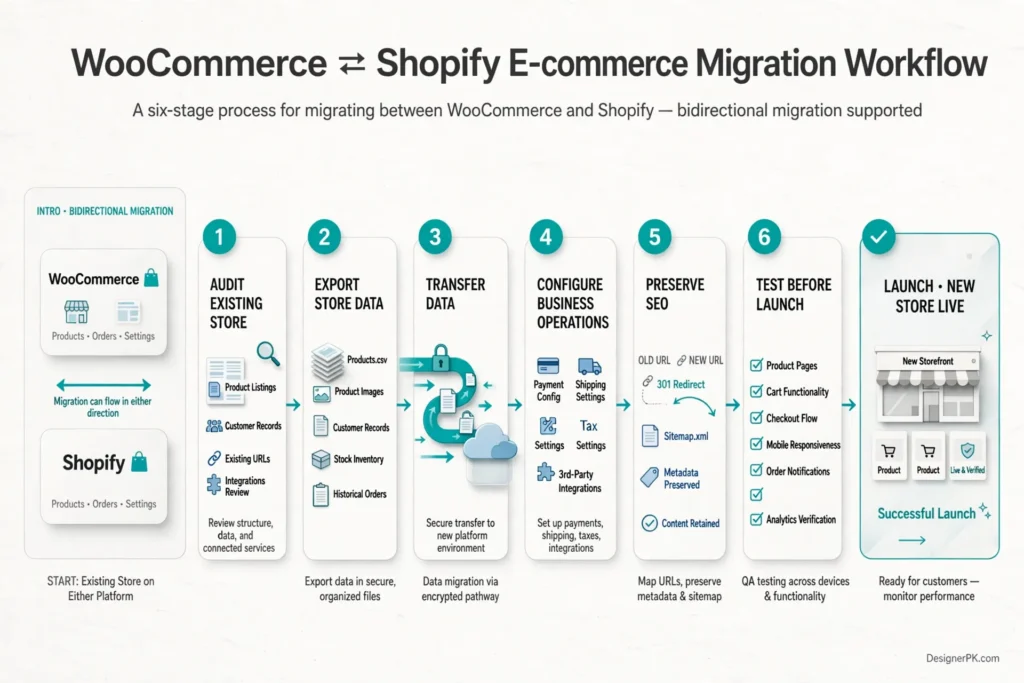
1. Audit Your Existing E-commerce Store
Before starting the migration, document your current website structure, functionality, and business workflows.
Review the following areas:
- Product listings, variations, categories, and attributes.
- Customer records and historical order information.
- Existing URLs and pages receiving organic search traffic.
- Payment gateways and shipping configurations.
- Discounts, subscriptions, and membership functionality.
- Third-party applications and custom integrations.
- Analytics, conversion tracking, and marketing tools.
This audit helps identify which features need to be transferred, recreated, replaced, or redesigned.
2. Plan Product and Customer Data Migration
Product data is one of the most important parts of an e-commerce migration. Prepare a structured export containing product names, descriptions, images, prices, stock information, SKUs, categories, and variations wherever supported.
Customer and order data require additional attention. WooCommerce and Shopify use different data structures, account systems, and export options, so information may not transfer directly.
Before importing anything, verify which customer records and historical orders can be transferred and identify information that requires a separate migration process.
Businesses handling customer information should also review access permissions, data retention policies, and applicable privacy obligations.
3. Preserve Existing URLs and SEO Value
Changing e-commerce platforms can alter product, category, and other page URLs. If existing URLs disappear without appropriate redirects, customers and search engines may encounter broken links.
Prepare a URL mapping document before launching the new store.
Important migration tasks include:
- Identify existing URLs receiving organic traffic or external links.
- Map old product and category URLs to relevant new destinations.
- Implement appropriate permanent redirects, typically 301 redirects.
- Preserve relevant page titles, descriptions, and useful content.
- Review canonical URLs and XML sitemaps.
- Update internal links pointing to outdated destinations.
- Monitor indexing and crawl errors after launch.
Avoid redirecting every discontinued product URL to the homepage. When a relevant replacement exists, redirect to that page. If no suitable replacement is available, assess whether the original URL should return an appropriate status code instead.
Google provides additional guidance in its site move documentation.
4. Reconfigure Payments, Shipping, and Taxes
Don’t assume payment gateway settings will transfer automatically. You may need to configure new provider accounts, API credentials, webhook connections, and supported payment methods.
Review shipping zones, delivery rates, tax rules, and fulfillment settings against your business locations and customer markets.
For US businesses, verify applicable state and local sales tax requirements and check your tax configuration before accepting live orders. Consult a qualified tax professional if your business has complex tax obligations.
5. Rebuild Important Business Integrations
Some plugins and applications provide platform-specific functionality. A WooCommerce extension may not have a direct Shopify equivalent, and a Shopify application may not support the same workflow in WooCommerce.
Identify critical integrations before migration, including:
- CRM and email marketing platforms.
- Inventory and warehouse management systems.
- Accounting and invoicing software.
- Shipping and fulfillment services.
- Customer support applications.
- Analytics and advertising platforms.
If your business relies on automated processes, determine whether existing integrations can be recreated through APIs, webhooks, or workflow automation tools.
6. Test the New Store Before Launch
A migration isn’t complete simply because the new website loads correctly. Test the complete customer journey before switching your live domain.
Use this pre-launch checklist:
- Verify product pages, images, and product variations.
- Test cart and checkout functionality.
- Complete test transactions using the payment provider’s supported testing process.
- Verify order confirmation emails and notifications.
- Check shipping and tax calculations.
- Test customer account access.
- Check mobile responsiveness.
- Review website speed and essential page functionality.
- Verify redirects and important SEO elements.
- Confirm analytics and conversion tracking.
For complex stores, a staged migration with a controlled launch and documented rollback plan can reduce operational risks.
Our recommendation: Treat platform migration as a website development and business continuity project, not simply a data transfer. Careful planning and testing help reduce avoidable disruptions to sales and search visibility.
Practical Tips for Choosing Between WooCommerce and Shopify
Before investing in an e-commerce platform, evaluate these factors to avoid making a decision based only on initial pricing or feature comparisons.
Calculate the Total Cost of Ownership
Compare subscriptions, hosting, applications, premium extensions, payment processing, development, and maintenance. Include recurring operating expenses rather than focusing exclusively on initial setup costs.
Prioritize Essential Functionality
List the features your business genuinely needs, including product variations, subscriptions, wholesale pricing, shipping rules, inventory synchronization, and customer account functionality.
Check whether these requirements are supported natively or require additional extensions, applications, or custom development.
Evaluate Your Technical Resources
If you have a WordPress developer or an internal technical team, WooCommerce may provide the flexibility you need. If you prefer not to manage hosting and infrastructure, Shopify may reduce your operational workload.
Consider Performance Before Launch
Choose a suitable theme, limit unnecessary extensions, optimize images, and test important customer journeys. For WooCommerce, evaluate hosting resources and database performance. For Shopify, review the impact of themes, applications, and third-party scripts.
Plan for Future Integrations
Consider whether your store will eventually need connections to CRM, accounting, inventory, fulfillment, or automation systems. Confirm that your chosen platform supports the required integrations before committing.
When Should You Choose WooCommerce or Shopify?
The right platform depends on your business model, technical requirements, and preferred approach to managing an online store.
Choose WooCommerce When:
- You already operate a WordPress website and want to add e-commerce functionality.
- You need extensive control over website code, hosting, and customization.
- Your business requires specialized product functionality or checkout workflows.
- You want to combine e-commerce with a content-heavy WordPress website.
- You need custom integrations with external business applications.
- You have access to reliable WordPress development and maintenance support.
Choose Shopify When:
- You want to launch an online store without managing separate hosting infrastructure.
- You prefer centralized store management and a simpler setup process.
- You want Shopify to manage core platform updates and hosting operations.
- Your business can operate within Shopify’s supported features and application ecosystem.
- You prefer focusing on products, marketing, customer service, and fulfillment.
- You want fewer server-level maintenance responsibilities.
Our practical advice: If your business needs extensive WordPress customization, WooCommerce is a strong candidate. If managed infrastructure and straightforward store administration are your priorities, Shopify deserves serious consideration.
Customer Data, Privacy, and E-commerce Responsibilities
Both WooCommerce and Shopify handle information associated with online store operations. This may include customer contact details, shipping addresses, order records, account information, and payment-related information.
Using a hosted platform does not remove your business’s responsibility to handle customer information appropriately.
WooCommerce Data Responsibilities
WooCommerce gives you greater control over your hosting environment and website data. Your business should establish appropriate access controls, backup procedures, hosting security measures, and data retention policies.
Review the permissions granted to third-party plugins and integrations. Install extensions from trustworthy providers and avoid collecting information your business does not need.
Shopify Data Responsibilities
Shopify manages its core platform infrastructure, but store owners remain responsible for their business practices, staff access, application permissions, and the customer information they collect.
Review third-party applications carefully, particularly when they request access to customer records, order information, or other sensitive store data.
What Should US Businesses Consider?
Depending on their operations, US businesses may need to consider applicable federal and state privacy requirements, consumer protection obligations, payment security requirements, and contractual responsibilities.
Maintain a clear privacy policy, review third-party data processors, limit unnecessary access, and seek qualified legal advice when your business has specific regulatory obligations.
Frequently Asked Questions About WooCommerce vs Shopify
Is WooCommerce cheaper than Shopify?
WooCommerce can be less expensive because its core plugin is free and you can choose your hosting provider. However, hosting, premium extensions, development, security, and maintenance add to the cost. Shopify requires a subscription, while paid applications and payment processing can increase its total expenses. Compare complete operating costs before deciding.
Is WooCommerce better than Shopify for SEO?
WooCommerce offers greater control over WordPress content management, website structure, and technical customization. Shopify includes useful SEO features such as canonical tags, XML sitemaps, and customizable page metadata. Both platforms can support effective SEO. Rankings depend on content quality, technical implementation, website performance, and competition rather than the platform alone.
Is Shopify easier to use than WooCommerce?
Shopify is generally easier for beginners because hosting and core platform infrastructure are managed for you. WooCommerce requires a WordPress website and additional configuration. However, users already familiar with WordPress may find WooCommerce straightforward once the initial setup is complete.
Can WooCommerce and Shopify handle a large online store?
Yes. Both platforms can support growing e-commerce businesses. WooCommerce performance depends on hosting, database optimization, software configuration, and website architecture. Shopify provides managed infrastructure, while advanced functionality may require additional applications, integrations, or development. Choose based on your store’s operational requirements.
Can I migrate from WooCommerce to Shopify or Shopify to WooCommerce?
Yes. Businesses can migrate between the platforms using export tools, import applications, APIs, and custom development. Product data, customer records, order history, URL redirects, payment configurations, and third-party integrations require careful planning. Test the new store before switching your live domain.
Can I use my existing domain with WooCommerce or Shopify?
Yes. You can generally use an existing domain with either platform by configuring the appropriate DNS settings. Prepare the new store, verify its functionality, and plan any required redirects before changing domain records. If you are migrating an existing website, avoid interrupting the live store during the transition.
Do I need a developer to build a WooCommerce or Shopify store?
Not necessarily. Both platforms provide tools for building stores without writing code. However, a developer can help with custom designs, advanced checkout functionality, specialized integrations, performance improvements, and complex migrations.
Can WooCommerce integrate with external business applications?
Yes. WooCommerce supports integrations through plugins, REST APIs, webhooks, and custom development. Businesses can connect their stores to CRM systems, accounting software, inventory applications, shipping services, and marketing platforms.
Does Shopify include website hosting?
Yes. Shopify includes hosting within its subscription. Store owners do not need to purchase or independently manage a separate web server. They remain responsible for storefront content, application configuration, integrations, and daily store operations.
Which platform is better for a small business?
Shopify generally suits small businesses that want managed hosting and straightforward store management. WooCommerce is attractive to businesses that already use WordPress or need greater customization. Compare your technical resources, operating costs, and required functionality before choosing.
WooCommerce vs Shopify: Which Is Right for Your Business?
Choosing between WooCommerce and Shopify comes down to how you want to manage your online store, the level of technical control you need, and the resources available to operate it.
WooCommerce is a strong option for businesses that value open-source software, extensive customization, WordPress integration, and control over their hosting environment. It works particularly well when your store requires specialized functionality or you have access to reliable WordPress development support.
Shopify is better suited to businesses that prefer managed hosting, centralized store management, and a simpler setup process. By handling core infrastructure, it reduces server administration responsibilities and lets business owners focus on products, marketing, and customer experience.
Neither platform guarantees higher sales, better search rankings, or lower operating costs. Those outcomes depend on your products, pricing, website experience, technical implementation, and overall business strategy.
Before making a decision, evaluate your current requirements alongside your growth plans. Compare the total cost of ownership, essential integrations, customization needs, and the technical resources available to maintain your store.
Need Help Choosing the Right E-commerce Platform?
Choosing between WooCommerce and Shopify is easier when you understand your business requirements and the technical implications of each platform.
At DesignerPK, we help businesses plan and develop websites around their operational goals, functionality requirements, and future needs.
Whether you need a new WooCommerce store, improvements to an existing WordPress e-commerce website, or a custom e-commerce solution, our team can help you identify the right approach.
Let’s discuss your business goals, website requirements, and e-commerce plans before you invest in a platform.
Contact Our Team