Which Is Right for Your Business?
Customers expect businesses to answer questions, resolve problems, and provide helpful assistance without unnecessary delays. Whether they need to check an order, understand a service, request a refund, or report a technical issue, the quality of customer support plays an important role in their overall experience.
Traditional customer support relies on human representatives who communicate through phone, email, live chat, and help desk systems. AI chatbots offer another way to handle customer enquiries by understanding messages, retrieving information, and automating selected support tasks.
Does this mean businesses should replace human support with AI? Not necessarily. Choosing between AI chatbot vs. traditional customer support depends on enquiry volume, the complexity of customer requests, business processes, security requirements, and customer expectations.
At DesignerPK, we view AI customer support as a business automation decision, not simply a technology upgrade. The objective is to identify which tasks can be automated reliably while keeping human representatives available for situations that require judgment, investigation, or personal attention.
AI Chatbot vs. Traditional Customer Support: Quick Answer
AI chatbots work well for repetitive enquiries, routine information retrieval, and predictable support workflows. Human representatives are better suited to complex problems, sensitive complaints, unusual requests, and decisions requiring personal judgment. A hybrid model brings both approaches together.
Use these guidelines to determine which support model fits your business:
- Choose AI chatbot support: When customers regularly ask similar questions about business hours, products, services, shipping policies, or order updates.
- Choose traditional human support: When enquiries involve complicated technical problems, billing disputes, emotional complaints, negotiations, or exceptions to company policies.
- Choose hybrid customer support: When you want to automate routine interactions while giving customers a straightforward way to reach a human representative.
Consider a WooCommerce store that receives frequent questions about shipping and order status. An AI chatbot can explain delivery policies and retrieve order information through a properly secured integration.
However, if a customer reports a damaged package or disputes a payment, the chatbot should collect the relevant details and transfer the case to an authorized support representative.
Our recommendation: Focus on automating predictable tasks rather than trying to automate every customer interaction. A good support system should resolve routine enquiries efficiently without making human assistance difficult to access.
What Is the Difference Between AI Chatbots and Traditional Customer Support?
Both AI chatbot customer support and traditional customer support aim to help customers find information and resolve problems. The difference lies in how conversations are handled, how decisions are made, and which tools are available to complete customer requests.
What Is AI Chatbot Customer Support?
AI chatbot customer support uses software to communicate with customers through website chat interfaces, mobile applications, and supported messaging platforms.
Depending on its configuration, a chatbot can interpret customer messages, search approved business information, generate responses, retrieve data from connected systems, and trigger automated workflows.
Not all chatbots work the same way. Understanding the following three categories will help you choose the right type for your support requirements.
1. Rule-Based Chatbots
Rule-based chatbots follow predefined conversation flows, keywords, menus, and decision rules. They respond according to the options and conditions configured by the business.
For example, a website chatbot might display options such as:
- View shipping information.
- Check return policies.
- Explore available services.
- Contact customer support.
These chatbots are relatively straightforward to configure and work well when customers follow predictable conversation paths. Their main limitation is flexibility: unexpected questions or unfamiliar wording can take the conversation outside the predefined flow.
2. AI-Powered Chatbots
AI-powered chatbots use natural language processing and, in modern implementations, large language models (LLMs) to interpret customer questions and generate conversational responses.
Unlike menu-based chatbots, LLM-powered systems can recognize different ways of expressing the same request.
For example, a customer might ask:
- Where is my package?
- Has my order shipped yet?
- Can you tell me when my purchase will arrive?
An AI-powered chatbot can recognize that all three questions relate to order tracking, even though the wording is different.
However, understanding a question and providing an accurate answer are two different things. Chatbots need reliable knowledge sources, clear instructions, and a way to handle situations where the required information is unavailable.
3. AI Agents With Business System Integrations
AI agents can do more than answer questions. When connected to business applications through approved tools and APIs, they can also perform specific tasks within their assigned permissions.
For example, a customer support agent might:
- Search an approved knowledge base.
- Retrieve authorized WooCommerce order information.
- Create a support ticket.
- Update a CRM record.
- Send a notification to the responsible employee.
These capabilities depend on working integrations, authentication, permissions, and appropriate workflow controls. An AI model does not automatically gain access to business databases simply because it can understand a customer’s request.
For example, WooCommerce provides REST API endpoints that allow connected applications to interact with store information. API keys can be configured with different permission levels to control which operations an application can perform.
For implementation details, see the official WooCommerce REST API authentication documentation and WooCommerce orders API reference.
Businesses looking beyond basic FAQ automation can explore our AI customer support automation services for solutions that connect chatbot functionality with existing business processes.
What Is Traditional Customer Support?
Traditional customer support involves human representatives who communicate with customers, investigate problems, and resolve requests through established business channels.
Common support channels include:
- Phone support: Customers speak directly with a representative to discuss questions or resolve problems.
- Email support: Customers submit written enquiries and receive responses from support employees.
- Human live chat: Representatives communicate with website visitors through real-time messaging.
- Help desk tickets: Support teams organize, assign, track, and resolve incoming requests.
- In-person assistance: Employees provide direct support at a business location.
Human representatives can interpret customer context, ask follow-up questions, recognize unusual circumstances, and make decisions within their assigned authority.
For example, a customer who receives a damaged product may be unsure whether to request a replacement or a refund. A representative can review the circumstances, explain the applicable policy, consider available options, and help the customer reach an appropriate resolution.
Traditional support teams can also use automation. Help desk platforms, CRM systems, predefined responses, ticket routing, and notification workflows reduce manual work while keeping employees involved in customer resolutions.
How Do the Two Approaches Work Differently?
An AI chatbot processes incoming messages using its instructions, available knowledge, and connected tools. Its response accuracy and ability to perform business actions depend on the quality of those resources and the permissions granted to it.
A human representative, on the other hand, can interpret a customer’s circumstances using personal judgment, experience, communication skills, and company policies.
The distinction matters most when a request falls outside a standard process. A chatbot may suggest a possible solution, but a human employee may still need to investigate the issue, verify information, or authorize an action.
Rather than assuming one approach is always better, businesses should evaluate both according to the tasks they need to handle and the level of support their customers expect.
AI Chatbot vs. Human Customer Support: Side-by-Side Comparison
Response speed is only one factor when comparing AI customer service with traditional support. Availability, resolution quality, operating costs, integration requirements, security, and customer expectations also influence which approach makes sense for a business.
This table highlights the main differences from an operational perspective.
| Comparison Factor | AI Chatbot Customer Support | Traditional Human Support |
|---|---|---|
| Availability | Can provide automated assistance outside normal business hours, subject to platform availability. | Depends on staffing schedules and business operating hours. |
| Response time | Can respond immediately to supported enquiries. | Depends on queue length, agent availability, and workload. |
| Repetitive enquiries | Handles recurring questions and predictable support workflows. | Representatives can answer these questions but must spend time responding manually. |
| Complex problem-solving | Can assist with structured troubleshooting and information retrieval but may struggle with unusual situations. | Can investigate complicated issues, ask follow-up questions, and apply judgment. |
| Personal interaction | Can maintain conversational context and personalize responses using authorized information. | Can adapt communication naturally and provide personal reassurance. |
| Empathy | Can generate empathetic language but does not provide genuine human understanding. | Can recognize emotional context and respond with human understanding. |
| Operating costs | Involves software, AI usage, development, integration, monitoring, and maintenance costs. | Involves salaries, recruitment, training, management, and scheduling. |
| Scalability | Can handle concurrent conversations, subject to platform capacity and usage limits. | Support capacity depends on the number of available representatives. |
| Business integrations | Can connect with CRMs, help desks, APIs, e-commerce platforms, and automation workflows. | Representatives can use the same systems to retrieve information and manage requests. |
| Accuracy | Depends on knowledge quality, information retrieval, instructions, integrations, and validation controls. | Depends on employee knowledge, training, documentation, and access to accurate information. |
| Privacy and security | Requires controlled AI provider access, secure integrations, data permissions, and retention policies. | Requires employee access controls, secure systems, and appropriate staff procedures. |
| Escalation | Requires clear handoff rules and a reliable route to human assistance. | Can transfer cases between departments or specialized representatives. |
| Consistency | Can follow approved instructions across conversations, although generated responses still need monitoring. | Can provide personalized assistance, but responses may vary between employees. |
Key takeaway: The comparison shows that each approach has different operational strengths and requirements. The right choice depends on the quality of service and resources your business needs to provide.
The real measure of a successful support system is not how many conversations it automates. It is how effectively the business resolves customer problems without creating additional work or frustration.
Benefits and Limitations of AI Chatbots for Business
AI chatbots can make customer support more efficient by handling suitable enquiries and connecting conversations with business systems. However, their effectiveness depends on the quality of the implementation, the accuracy of available information, and the actions the chatbot is authorized to perform.
Before introducing chatbot technology, consider whether it addresses a genuine support problem rather than focusing on the number of features a platform offers.
Benefits of AI Chatbots
Faster Responses to Routine Questions
AI chatbots can answer supported enquiries without requiring customers to wait for an available employee. Common examples include questions about business hours, shipping policies, service descriptions, product details, and frequently asked questions.
Extended Customer Support Availability
Businesses can offer automated assistance outside normal working hours, including evenings, weekends, and holidays, as long as the chatbot and its connected services remain operational.
Handling Multiple Conversations
Chatbots can manage multiple conversations simultaneously, subject to platform capacity, AI usage limits, and integration reliability. This can help businesses handle predictable increases in customer enquiries without assigning an employee to every conversation.
Less Repetitive Work for Employees
Automating common enquiries gives support representatives more time to investigate technical problems, handle complaints, and resolve requests that require personal attention.
Connected Business Workflows
With suitable integrations, chatbots can retrieve approved information, create help desk tickets, update CRM records, and trigger workflows through authorized applications and APIs.
Useful Customer Interaction Data
Chatbot conversations can reveal recurring questions, confusing website information, common product concerns, and gaps in existing support documentation. Businesses can use these insights to improve both their website content and support processes.
Limitations of AI Chatbots
Despite these benefits, AI automation introduces technical and operational challenges. Businesses should understand these limitations before allowing a chatbot to handle important customer interactions.
- Inaccurate or fabricated answers: Generative AI can produce convincing but incorrect responses, particularly when its knowledge sources are incomplete, outdated, or irrelevant.
- Limited decision-making authority: A chatbot may identify a possible solution, but it should not automatically make every business decision. Refund exceptions, account ownership changes, and financial adjustments require appropriate authorization.
- Customer frustration: Repeated irrelevant responses, unnecessary questions, and difficult human handoffs can make automated support more frustrating than contacting an employee directly.
- Integration dependencies: Order tracking, CRM updates, appointment booking, and ticket creation rely on working integrations, authentication, and appropriate permissions.
- Ongoing maintenance: Products, services, prices, policies, and procedures change. Chatbot instructions, knowledge sources, and connected workflows need regular review to remain accurate.
- Privacy and security risks: Incorrect permissions, insecure API connections, or inappropriate data retention can expose customer information.
- Monitoring requirements: Businesses need to review incorrect answers, failed workflows, unresolved conversations, and inappropriate automated actions.
One distinction deserves particular attention: generating a response is not the same as completing a business action. For example, a chatbot might tell a customer that a refund request has been submitted. Unless the connected system confirms that the request was successfully created, that statement could mislead the customer.
How to Reduce AI Chatbot Risks
A few practical safeguards can make automated customer support more reliable:
- Use approved knowledge sources to guide chatbot responses.
- Retrieve customer-specific information from verified business systems.
- Validate inputs before executing connected workflows.
- Apply limited permissions to API connections and automation tools.
- Require human approval for sensitive or consequential actions.
- Give customers an accessible way to request human assistance.
- Monitor failed requests and review customer complaints regularly.
These controls help businesses maintain oversight of automated responses and actions as their products, policies, and processes change.
Benefits and Limitations of Traditional Customer Support
Human customer support remains valuable because customer problems do not always follow a predictable process. Representatives can interpret context, investigate unusual situations, communicate naturally, and make decisions within their assigned responsibilities.
Automation can assist with routine support activities, but human involvement is still necessary when customers need personal attention or a decision that cannot be safely automated.
Benefits of Human Customer Support
Personal Customer Interaction
Customers can explain their concerns directly to a representative who can ask relevant questions, understand additional context, and adapt the conversation to their situation.
Human Judgment and Flexibility
Experienced employees can evaluate unusual requests, consider business circumstances, and determine appropriate actions within company policies and their assigned authority.
Empathy During Difficult Situations
Human representatives can acknowledge frustration, provide reassurance, and respond naturally when customers experience service failures or sensitive problems.
Detailed Troubleshooting
Technical support specialists can investigate issues involving multiple systems, unclear symptoms, software conflicts, and problems that require diagnostic testing.
Limitations of Human Customer Support
Traditional support also presents operational challenges, particularly for small businesses with limited staffing resources or fluctuating enquiry volumes.
- Restricted availability: Customers may have to wait until business hours when support teams operate on fixed schedules.
- Staffing expenses: Businesses must account for salaries, recruitment, training, scheduling, supervision, and employee management.
- Queue management: High enquiry volumes can increase waiting times when the available team cannot respond to every incoming request promptly.
- Repetitive workloads: Employees may spend considerable time answering similar questions instead of investigating more demanding customer problems.
- Inconsistent responses: Differences in employee experience, training, and access to documentation can affect support quality.
- Knowledge transfer: Customer information can become difficult to manage when conversations are scattered across individual email accounts, messaging applications, and disconnected systems.
These challenges do not make human support outdated. They highlight the need for organized processes and appropriate tools to manage incoming requests.
For example, a company can use a help desk to organize enquiries, predefined responses for common questions, and automated notifications to reduce manual work while keeping employees responsible for customer resolutions.
When support requests involve website functionality, WooCommerce errors, or integration problems, general customer service may not be enough. These issues often require a developer to examine the underlying website or application.
Our website bug fixing services and website maintenance services can help when problems involve website functionality, integrations, or ongoing technical maintenance.
Common AI Chatbot Use Cases for Business
AI chatbots are particularly useful for businesses that receive recurring questions or requests involving predictable processes. The aim is to automate suitable interactions while keeping employees available for cases that need further investigation.
Start with tasks that have clearly defined inputs, expected outcomes, and a reliable fallback process when automation cannot complete the request.

1. Answering Frequently Asked Questions
An AI chatbot can answer common questions about business hours, service availability, product specifications, pricing information, shipping policies, and return conditions using approved business documentation.
For example, someone visiting a web development agency’s website might ask about available services, project requirements, or the website development process.
Business benefit: Gives visitors convenient access to routine information without requiring a representative to answer every basic enquiry.
2. Tracking Customer Orders
E-commerce businesses can connect chatbots to their order management systems to retrieve authorized order information and provide status updates.
A WooCommerce chatbot could verify the customer through an appropriate process, retrieve an order’s available status through a secured API connection, and explain the result.
If the system cannot retrieve the order or identifies a delivery exception, the chatbot should avoid guessing and direct the customer to the appropriate support process.
Business benefit: Makes routine order enquiries easier to handle while allowing employees to investigate delivery problems, missing packages, and disputes.
3. Qualifying Sales Leads
Businesses can use chatbots to collect initial information from prospective customers, including project requirements, service interests, estimated budget ranges, and preferred contact methods.
The chatbot can organize the responses and send them to an authorized CRM system or the relevant sales team.
For example, a visitor interested in a custom WordPress website could share their business type, required functionality, and project goals through a website chatbot.
Business benefit: Reduces manual information collection and helps sales representatives prioritize relevant enquiries.
4. Booking Appointments
A chatbot can collect appointment preferences and communicate with a supported scheduling system to check available time slots and submit booking requests.
For example, a consulting business could let visitors select a preferred meeting time and provide their contact details before the system creates the booking.
The chatbot should confirm an appointment only after receiving successful confirmation from the scheduling application.
Business benefit: Simplifies appointment requests and reduces unnecessary back-and-forth communication.
5. Routing Customer Support Requests
AI chatbots can identify the general purpose of an enquiry and direct it to the appropriate department or support queue.
For example:
- Payment enquiries can go to billing support.
- Website functionality problems can go to technical support.
- Product enquiries can go to the sales or product team.
- Delivery complaints can go to the order support team.
Business benefit: Organizes incoming requests and reduces the manual work involved in classifying and assigning enquiries.
6. Collecting Technical Support Information
Technical service businesses can use chatbots to collect initial diagnostic details before a specialist investigates a problem.
For example, a chatbot could ask for the affected website URL, a description of the error, when the problem started, and any relevant error messages.
The information can then be added to a support ticket so a developer has useful context when reviewing the issue.
Business benefit: Improves the quality of incoming technical support requests without allowing the chatbot to make unrestricted changes to a customer’s website.
These use cases depend on reliable business information and suitable integrations. A chatbot that only generates text can answer general questions, but it cannot independently retrieve an order, confirm a booking, or update a CRM record without the necessary system connections.
WooCommerce businesses interested in connecting customer messaging with store operations can explore our WhatsApp AI automation for WooCommerce.
When Is Human Customer Support Necessary?
AI automation is useful for routine enquiries, but it should never prevent customers from reaching a human representative when their situation requires judgment, investigation, or personal attention. Some problems simply cannot be resolved reliably through predefined workflows or automated responses.
Businesses should define clear escalation conditions so conversations reach appropriately trained employees when needed.
1. Sensitive Customer Complaints
Customers dealing with serious service failures or frustrating experiences may need someone who can listen carefully and respond to their concerns.

A chatbot can acknowledge a complaint and collect basic information. However, a human representative should take over when the customer needs reassurance, a detailed explanation, or a resolution that requires individual attention.
2. Billing Disputes and Refund Exceptions
Payment problems, disputed charges, unusual refund requests, and account-related financial concerns often involve sensitive information and decisions that require authorization.
A chatbot can explain the published refund policy or retrieve transaction information through an authorized integration. However, disputes and exceptions should be reviewed by an authorized employee rather than approved automatically without appropriate controls.
3. Complex Technical Issues
Technical problems can involve multiple systems, incomplete information, or symptoms that require investigation before a solution becomes clear.
For example, a WooCommerce store owner may report that checkout stopped working after a plugin update. Resolving the issue could involve reviewing error logs, testing plugin compatibility, checking payment gateway responses, and investigating server behavior.
A chatbot can collect the affected URL, error message, and relevant details before creating a support ticket. A technical specialist should investigate the underlying problem.
Website owners experiencing these issues can explore our guides on fixing WooCommerce checkout problems and common website errors.
4. Unusual Requests and Policy Exceptions
Not every customer request fits a standard process. Customers may need special arrangements, account changes, or solutions that fall outside the chatbot’s approved knowledge sources.
If the system cannot identify a reliable next step within its permissions, it should collect the relevant details and transfer the request to a human representative.
5. High-Value or Relationship-Sensitive Conversations
Some enquiries involve important business relationships, contract discussions, large orders, or customers who need to speak directly with a decision-maker.
AI can assist with preparation and information retrieval, but a human representative should lead conversations involving negotiations, relationship management, or significant business decisions.
Key consideration: Always give customers a clear way to request human assistance. Once someone has explained that they need a representative, do not force them through repeated chatbot questions.
Why a Hybrid Customer Support Model Often Makes Sense
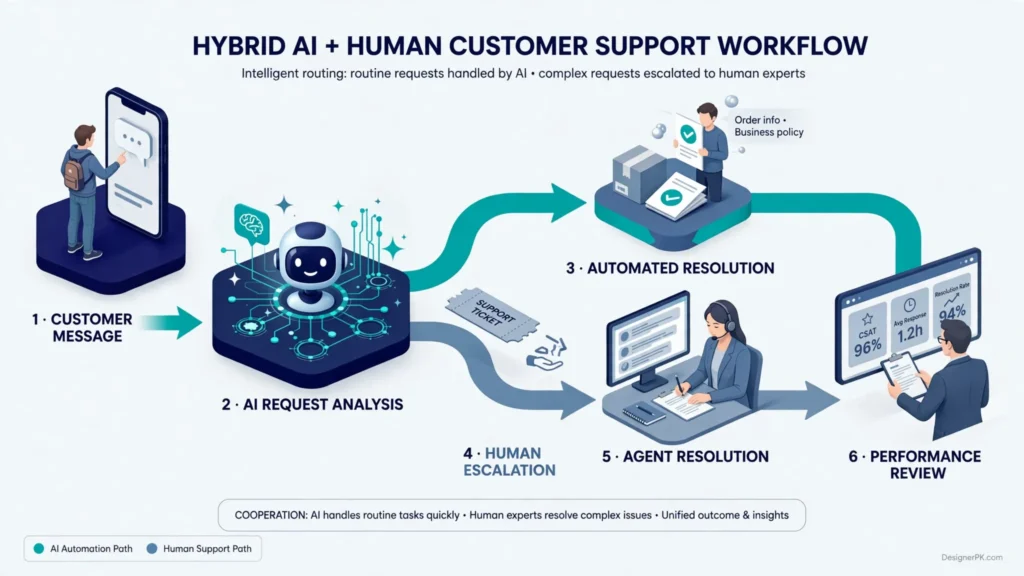
A hybrid customer support model combines AI chatbots with human representatives. Instead of treating automation and personal assistance as competing approaches, businesses assign each one the tasks it can handle most effectively.
AI can manage routine questions, collect customer details, retrieve approved information, and perform supported workflow actions. Human representatives handle issues requiring investigation, empathy, authorization, or decisions outside the chatbot’s permitted scope.
How a Hybrid Support System Works
-
1
Customer Starts a Conversation
A customer sends a message through the website chat, WhatsApp, or another supported communication channel.
-
2
AI Identifies the Request
The chatbot determines whether the customer needs product information, order assistance, billing help, technical support, or another service.
-
3
AI Handles Suitable Requests
It answers approved questions, retrieves authorized information, or starts a connected workflow when the request falls within its capabilities.
-
4
Complex Requests Are Escalated
If the issue requires human judgment, the chatbot creates or updates a support ticket and transfers the conversation to an appropriate representative.
-
5
The Human Agent Resolves the Issue
The representative reviews the conversation history and available customer information before continuing the discussion.
-
6
The Business Reviews the Outcome
Support managers evaluate resolution quality, escalation patterns, customer feedback, and recurring issues to identify areas for improvement.
Example: Hybrid Support for an Online Store
Consider a WooCommerce store that regularly receives enquiries about delivery times, order status, damaged products, and refund requests.
The chatbot can answer general shipping questions using approved store policies. When a customer wants to check an order, it can retrieve the available status through a secure WooCommerce connection.
If an order arrives damaged, the chatbot should collect the relevant information and create a support ticket. A human representative can then review the complaint, examine any submitted evidence, and determine the appropriate response under the store’s policies.
This approach handles predictable interactions automatically while keeping employees involved in cases that need closer attention.
What Makes Human Handoffs Effective?
Simply transferring a customer to another channel does not guarantee a good support experience. The receiving representative needs enough information to continue the conversation without asking the customer to explain everything again.
- Conversation history: Make previous messages available to the receiving representative.
- Customer identification: Include verified customer details where authorized.
- Issue classification: Identify the reason for escalation, such as billing, delivery, or technical support.
- Actions already taken: Record relevant information retrieved and steps completed by the chatbot.
- Clear escalation rules: Define when the chatbot must stop processing a request and seek human assistance.
- Fallback handling: Provide an alternative contact method when no representative is immediately available.
- Customer notification: Explain that the request has been transferred and provide realistic expectations for the next response.
These requirements are worth considering when evaluating AI agent development solutions and customer support automation services.
A hybrid model is particularly useful for businesses that receive recurring enquiries alongside exceptions, sensitive requests, and complicated customer problems that still require human involvement.
How to Integrate AI Chatbots with CRM, Help Desks, and Business Tools
An AI chatbot becomes more useful when it can access relevant business information and connect customer conversations with existing operations. Rather than functioning as an isolated messaging tool, it can work alongside a CRM, help desk, website, e-commerce platform, and workflow automation system.
The integrations you need depend on what the chatbot is expected to do. A basic FAQ chatbot may only require approved business documentation, while an advanced customer support agent may need access to customer records, order management systems, ticketing platforms, and internal workflows.
1. CRM Integration
Connecting an AI chatbot to a customer relationship management (CRM) system helps businesses organize enquiries and maintain relevant customer interaction records.
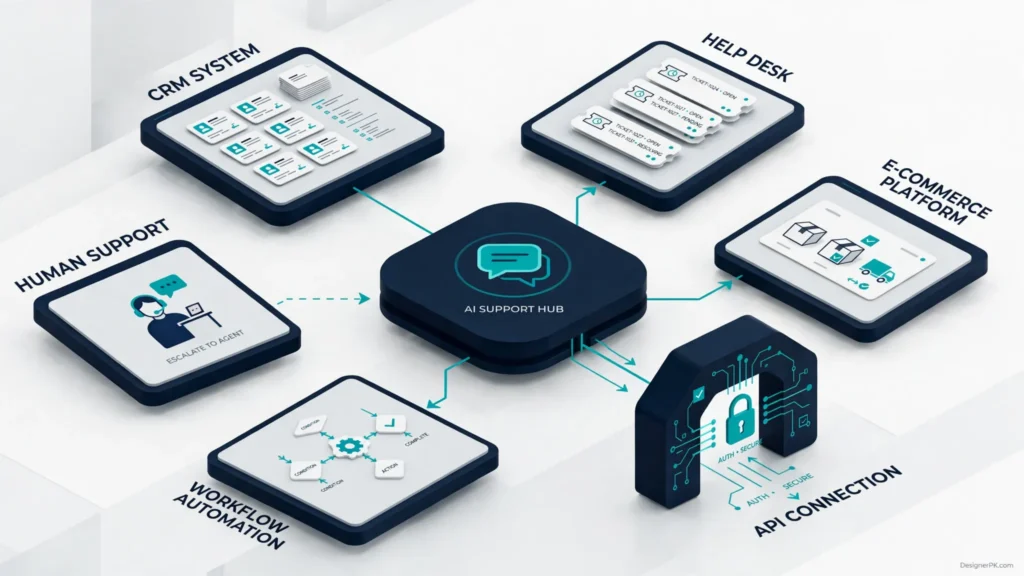
Depending on the CRM’s capabilities and configured permissions, a chatbot workflow can:
- Collect contact information from potential customers.
- Create new leads or update existing customer records.
- Save conversation summaries.
- Assign enquiries to appropriate sales representatives.
- Trigger follow-up tasks based on customer requests.
For example, someone enquiring about website development services can provide project details through a chatbot. The system can send the approved information to the CRM so the sales team can review the enquiry and follow up.
2. Help Desk Integration
Help desk integration connects chatbot conversations with the business’s ticket management process.
A properly configured integration can create support tickets, categorize requests, attach conversation summaries, and route enquiries to the relevant team.
When the chatbot cannot resolve an issue, it should pass the available conversation context to the human support team. This saves customers from having to explain the same problem again.
When evaluating a help desk integration, check whether it supports ticket creation, status updates, agent assignment, conversation history, and notifications.
3. Website and WooCommerce Integration
Businesses can add AI chatbot functionality to their websites to assist customers as they browse products, services, or support information.
For WooCommerce stores, supported integrations can enable workflows such as:
- Retrieving order status after appropriate customer verification.
- Answering product questions using approved product information.
- Explaining shipping and return policies.
- Creating support tickets for delivery or payment issues.
- Routing customers to the appropriate support channel.
Customer orders, payment information, and account details must remain protected through suitable authentication and permissions. A chatbot should never expose private order information simply because someone provides an order number.
Test WooCommerce chatbot integrations against realistic scenarios, including incorrect order details, unauthorized access attempts, cancelled orders, and unavailable order information.
Our WordPress and e-commerce development services are relevant when chatbot functionality needs to connect with an existing WooCommerce website.
4. Connecting Chatbots Through APIs
Application programming interfaces (APIs) allow different software systems to exchange information and perform supported actions.
For example, a chatbot can send an authorized request to an order management system, receive the available order status, and use that information to respond to the customer.
A typical integration follows this process:
- The chatbot identifies the customer’s request.
- The application validates the required information.
- An authenticated API request retrieves the relevant business data.
- The application checks the response and handles possible errors.
- The chatbot communicates the verified result to the customer.
If existing integrations do not support the required functionality, a custom API connection may be necessary. This can involve authentication, request validation, rate limits, error handling, and data permissions.
Businesses with specialized integration requirements can explore our custom API integration services.
5. Using n8n for AI Customer Support Automation
n8n is a workflow automation platform that connects applications, APIs, and business processes. It can coordinate support activities between a chatbot, CRM, help desk, website, and notification system.
For example, a customer support workflow might look like this:
- A customer submits a request through a website chatbot.
- The chatbot sends the relevant information to an authorized webhook.
- n8n receives the request and validates the required information.
- The workflow checks the appropriate business system or routes the request to a help desk.
- If human assistance is needed, the workflow creates a ticket and notifies the responsible team.
- The system records the workflow outcome for monitoring and follow-up.
n8n can also coordinate conditional workflows. A routine product question might receive an automated response, while a billing complaint is assigned to a human representative.
One distinction is worth keeping clear: n8n coordinates workflows; it does not automatically provide chatbot intelligence or guarantee that integrations will work successfully. The chatbot, APIs, and connected applications still perform their respective functions.
Example: n8n Workflow for WooCommerce Customer Support
Consider an online store that receives order-status enquiries through its website chatbot. A possible workflow could look like this:
Customer Message
       |
       v
Website AI Chatbot
       |
       v
Authenticated Webhook
       |
       v
n8n Workflow
       |
       v
Validate Customer Request
       |
       v
WooCommerce API
       |
       v
Retrieve Authorized Order Status
       |
       v
Check API Response
       |
       +----------------------+
       |                      |
       v                      v
 Valid Order Data       Error / Exception
       |                      |
       v                      v
Chatbot Response        Create Support Ticket
                              |
                              v
                       Notify Human Agent
This example shows how automation can coordinate an order enquiry without giving the chatbot unrestricted access to the store’s administrative functions.
Before using this type of workflow with real customer information, configure authentication, webhook protection, error handling, execution monitoring, and appropriate data retention.
Businesses that need connected automation rather than isolated chatbot functionality can explore our AI workflow development services.
When Should You Use Custom Integrations?
Not every chatbot needs custom development. Existing plugins and supported integrations may be sufficient for basic FAQ functionality or simple lead collection.
A custom integration may make sense when:
- The business uses specialized internal software.
- Existing plugins do not support the required workflow.
- Customer data must be retrieved from multiple systems.
- Complex authorization rules are necessary.
- The chatbot needs to perform specific business actions through APIs.
- Multiple applications must exchange information through conditional workflows.
The goal is to build only the connections needed for the intended workflow. Unnecessary integrations increase implementation complexity, maintenance requirements, and potential security risks.
AI Chatbot Privacy and Security Considerations
AI chatbot customer support can involve personal information, customer conversations, account details, and internal business records. Before giving a chatbot access to these resources, businesses need to consider how information is collected, processed, stored, and protected.
We recommend following the principle of least privilege when designing chatbot integrations. Each component should receive only the information and permissions necessary to perform its assigned tasks.
Important Security Practices
- Limit data access: Avoid giving chatbots unrestricted access to customer accounts, payment information, or internal business records.
- Use secure authentication: Protect API connections with appropriate authentication methods and securely managed credentials.
- Verify customer identity: Require suitable verification before retrieving sensitive account or order information.
- Review data retention: Understand how chatbot conversations, logs, and customer information are stored, processed, and retained by the relevant providers.
- Protect sensitive information: Avoid collecting passwords, full payment card details, or unnecessary personal information through chat conversations.
- Control staff permissions: Ensure that only authorized employees can access sensitive support records and administrative functions.
- Monitor connected services: Review API access, third-party providers, workflow permissions, and integration activity.
- Validate automated actions: Apply appropriate authorization checks before allowing chatbot workflows to modify customer records or initiate business operations.
Protect Customer Information in AI Workflows
Businesses using external AI providers should review their data processing terms, retention settings, access controls, and security documentation before connecting customer information.
For example, a customer support chatbot connected to WooCommerce may need access to order status, but it should not receive unnecessary payment credentials or unrestricted administrative permissions.
Likewise, an n8n workflow should use securely managed credentials and limit access to the applications involved in the automation process.
Depending on the business and the information collected, relevant requirements may include applicable US state privacy laws, contractual obligations, and industry-specific regulations. Businesses should assess their actual legal obligations rather than assuming that following a general security framework automatically guarantees compliance.
Useful Privacy and Security Frameworks
These official resources provide useful guidance for businesses planning and evaluating customer support automation:
- NIST Privacy Framework: Offers guidance for identifying and managing privacy risks associated with personal information. Review the NIST Privacy Framework.
- NIST Cybersecurity Framework: Provides guidance for identifying, managing, and reducing organizational cybersecurity risks. Review the NIST Cybersecurity Framework.
- OWASP Top 10 for LLM Applications: Highlights security risks associated with applications that use large language models. Review the OWASP LLM security guidance.
Privacy and security should be considered from the beginning of chatbot development, not treated as issues to address only after deployment.
How to Measure AI Chatbot and Customer Support Performance
The success of customer support automation depends on how effectively it resolves customer problems, not simply how many conversations a chatbot handles.
Track performance across automated and human support channels to understand whether automation improves response quality, reduces unnecessary workload, and contributes to a better customer experience.
1. First-Response Time
First-response time measures how long customers wait before receiving their first meaningful response.
For AI chatbots, this metric helps determine whether automated assistance is available when expected. For human support teams, it highlights queue delays and possible staffing issues.
Measure meaningful responses rather than counting an automated greeting as a successful answer.
2. Resolution Rate
Resolution rate measures the proportion of customer requests successfully resolved within a defined measurement process.
Distinguish between requests genuinely resolved by a chatbot and conversations that simply ended without confirmation of a successful outcome.
For example, when a chatbot answers an order-status question, evaluate whether the customer received accurate information rather than simply counting the generated response.
3. Escalation Rate
Escalation rate measures how frequently chatbot conversations are transferred to human representatives.
A high escalation rate may indicate limited chatbot coverage or more complex customer requests than expected. However, a very low rate is not automatically positive. Customers may abandon conversations instead of reaching a representative.
Review escalation reasons to identify where better documentation, improved integrations, or direct human assistance may be needed.
4. Customer Satisfaction (CSAT)
Customer satisfaction measures how customers rate their support experience, commonly through a short survey after an interaction.
Review feedback from both chatbot and human interactions to determine whether automated assistance is helping customers or creating additional frustration.
Where possible, compare similar request types so differences in issue complexity do not distort the results.
5. Cost per Resolved Request
Cost per resolved request estimates how much the business spends to successfully resolve a customer issue.
Include relevant expenses such as:
- Chatbot software subscriptions.
- AI model usage and API charges.
- Integration development and maintenance.
- Support staff time.
- Employee training and management.
- Help desk and CRM operating expenses.
Compare the cost of resolving similar customer requests through automated and human-assisted processes. Chatbot usage alone does not guarantee lower operating expenses.
6. Unresolved and Reopened Tickets
Track requests that remain unresolved or need to be reopened after an initial response.
This metric helps identify situations where a chatbot provides incomplete information, an agent misses an important detail, or an integration fails to complete the expected action.
For example, if a chatbot repeatedly creates incomplete WooCommerce support tickets, the business may need to improve its information collection process or integration logic.
Recommended Customer Support KPI Dashboard
| Metric | What It Measures | Why It Matters |
|---|---|---|
| First-response time | Time before the first meaningful response | Helps evaluate response delays and availability. |
| Resolution rate | Requests successfully resolved | Measures actual support effectiveness. |
| Escalation rate | Requests transferred to human agents | Identifies automation limitations and handoff requirements. |
| CSAT | Customer satisfaction feedback | Evaluates the quality of the customer experience. |
| Cost per resolved request | Operating expense per successful resolution | Helps compare the economics of different support methods. |
| Reopened tickets | Requests requiring additional support | Identifies incomplete resolutions and recurring problems. |
Measurement recommendation: Establish a performance baseline before introducing automation. Compare similar request types across automated and human-assisted support, looking at resolution quality alongside response speed and operating costs.
How to Choose Between AI Chatbots and Traditional Customer Support
The right customer support model depends on your business operations, customer expectations, available resources, and the types of enquiries you receive.
Before investing in chatbot technology or expanding your support team, consider the following factors.
Business Decision-Making Checklist
- Customer enquiry volume: Do you receive enough repetitive questions to justify automation?
- Request complexity: Are most enquiries predictable, or do they require investigation and individual decisions?
- Availability requirements: Do customers expect assistance outside your normal operating hours?
- Customer preferences: Do your customers prefer self-service, live chat, phone assistance, or a combination?
- Existing business systems: Can your chatbot connect with your CRM, help desk, website, or e-commerce platform?
- Staffing resources: Do you have employees available to manage escalated conversations?
- Privacy requirements: Can you securely manage the customer information the chatbot needs?
- Implementation budget: Can you account for development, software, integration, maintenance, and ongoing usage costs?
- Performance measurement: Can you evaluate resolution quality, customer satisfaction, and cost per resolved request?
Which Support Model Fits Your Business?
| Business Situation | Recommended Approach | Reason |
|---|---|---|
| Small business with frequent basic enquiries | AI chatbot or hybrid support | Automates recurring questions while keeping human assistance available. |
| Online store receiving regular order enquiries | Hybrid support | AI can retrieve order information while agents handle delivery problems and disputes. |
| Business handling sensitive customer complaints | Human-led support | Personal attention and judgment are important for resolving difficult situations. |
| Service business qualifying new enquiries | AI-assisted lead qualification | Chatbots can collect initial information and route relevant enquiries to sales representatives. |
| Technical support provider | Human-led support with AI assistance | AI can collect diagnostic details, but complex investigations may require technical specialists. |
| Business with high support volumes and varied requests | Hybrid support | Combines automation for predictable tasks with human handling for exceptions. |
Our Recommendations for Different Business Types
Small Businesses
Start with an FAQ chatbot that answers common questions about services, operating hours, pricing information, and contact options.
Keep a direct human contact option available. Expand automation when recurring enquiries justify additional functionality.
WooCommerce and E-commerce Stores
Consider a hybrid chatbot that answers product and shipping questions, retrieves authorized order information, and creates support tickets for delivery or payment problems.
Give particular attention to customer verification and secure WooCommerce integrations.
Service-Based Businesses
Use AI-assisted lead qualification to collect project requirements, identify service interests, and organize incoming enquiries.
Let sales representatives handle consultations, quotations, and important client discussions.
Technical Support Businesses
Use AI to collect diagnostic information, classify technical enquiries, and create organized support tickets.
Keep troubleshooting, system changes, and complex technical decisions under specialist supervision.
For many small businesses, a sensible starting point is to automate a limited number of repetitive enquiries and evaluate the results before expanding the chatbot’s responsibilities.
There is no need to automate every customer interaction. If your business receives only a small number of enquiries, a well-organized human support process may be more practical than introducing a complex AI system.
Frequently Asked Questions
Are AI chatbots better than human customer support?
AI chatbots and human customer support serve different purposes. Chatbots are useful for repetitive questions, basic information retrieval, and predictable workflows. Human representatives are better suited to complex problems, sensitive complaints, and situations requiring judgment. A hybrid model is often practical for businesses that need both capabilities.
Can AI chatbots replace customer service representatives?
AI chatbots can automate certain customer support activities, but they should not automatically replace human representatives. Customers may still need personal assistance with billing disputes, unusual requests, technical problems, and complaints. Businesses should identify suitable tasks for automation while retaining human escalation for situations that require it.
Are AI chatbots suitable for small businesses?
Yes. Small businesses can use AI chatbots to answer frequently asked questions, collect sales enquiries, provide basic service information, and route customer requests. The right solution depends on enquiry volume, available budget, and integration requirements.
How much does an AI customer support chatbot cost?
Costs depend on the chatbot platform, AI usage, development requirements, integrations, security controls, and ongoing maintenance. A basic FAQ chatbot has different requirements from a custom AI support agent connected to WooCommerce, a CRM, and a help desk. Evaluate total implementation and operating costs rather than comparing software subscription prices alone.
Can AI chatbots integrate with WooCommerce?
Yes. A chatbot can connect with WooCommerce through supported plugins, APIs, or custom integrations. Depending on the implementation, it may retrieve authorized order information, answer product questions, and create support requests. Secure authentication and appropriate customer verification are essential when accessing private order data.
Can n8n be used for AI customer support automation?
Yes. n8n can connect chatbots with CRMs, help desks, websites, APIs, and notification services. For example, it can receive a chatbot request, validate the required information, create a support ticket, and notify the responsible team. The chatbot and connected applications must still provide the necessary AI and business functionality.
How can an AI chatbot transfer a conversation to a human agent?
A chatbot can use predefined escalation conditions to transfer a conversation when a customer requests human assistance, the issue is too complex, or reliable information is unavailable. An effective handoff includes conversation history, relevant customer details, the request category, and actions already completed.
How do businesses measure AI chatbot success?
Businesses can measure chatbot performance through first-response time, resolution rate, escalation rate, customer satisfaction, cost per resolved request, and reopened support tickets. Evaluate these metrics together because a fast response does not necessarily mean that a customer received a correct or complete solution.
Is AI chatbot customer support secure?
AI chatbot security depends on the implementation and providers involved. Businesses should use secure authentication, restrict access to customer information, validate requests, review data retention practices, and monitor integrations. Sensitive account actions should require appropriate verification and authorization.
Should a business start with AI chatbots or a hybrid support model?
If your business receives predictable enquiries, you can start with a limited chatbot implementation while including human escalation from the beginning. A hybrid approach works particularly well when customers need automated assistance for routine questions but also expect access to representatives for more complicated situations.
Conclusion: AI Chatbot vs Traditional Customer Support – Which Is Right for Your Business?
Choosing between AI chatbot vs. traditional customer support starts with understanding what your customers need and how your business handles incoming requests.
AI chatbots can improve access to information, automate repetitive enquiries, and connect customer conversations with business workflows. Human representatives remain essential for complex problems, sensitive complaints, technical investigations, and decisions requiring personal judgment.
For small businesses and e-commerce operators, a hybrid customer support model offers a practical way to combine these capabilities. AI handles suitable routine interactions, while human representatives remain available when customers need additional assistance.
Before introducing automation, identify repetitive support tasks, prepare accurate knowledge sources, assess integration requirements, establish escalation rules, and define performance metrics. Start with a manageable scope and expand automation when the results show that it improves customer support and business operations.
At DesignerPK, we offer AI automation, customer support automation, AI agent development, workflow development, and API integration services. We can help businesses evaluate their requirements and plan a solution that connects AI assistance with existing operations.
Want to Improve Customer Support With AI?
Whether you need an AI chatbot, human-supported automation, or a complete hybrid customer support workflow, the solution should fit your business processes and customer expectations.
Our team can help you explore chatbot functionality, CRM and website integrations, n8n workflows, and AI customer support solutions based on your requirements.
Contact Our TeamExplore our AI Customer Support Automation Services to learn more about connecting intelligent assistance with your business operations.