What Is Automated Lead Scoring?
Automated lead scoring is a CRM-based process that evaluates potential customers using predefined business attributes, behavioral signals, and engagement activity. Instead of manually reviewing every new contact, businesses can use automation to assign scores, identify qualified prospects, and route high-priority leads to the appropriate sales team.
A business might receive hundreds of inquiries through website forms, landing pages, email campaigns, webinars, and product demonstrations. However, not every inquiry represents a genuine buying opportunity. Some visitors are researching solutions, others are comparing vendors, and some may have no immediate purchasing plans.
A practical lead scoring model evaluates prospects across three dimensions:
- Firmographic fit: How closely does the prospect match your ideal customer profile (ICP)?
- Behavioral engagement: What actions has the prospect taken across your website, emails, and product?
- Buying intent and timing: Are there recent signals suggesting that the prospect is actively evaluating a solution?
Combining these dimensions helps your CRM distinguish between contacts who simply interact with your content and prospects who represent realistic sales opportunities. It also gives marketing and sales teams a consistent way to prioritize follow-ups.
This guide covers how to design a lead scoring model, configure positive and negative scoring rules, implement behavioral decay, compare CRM platforms, and automate sales handoffs using CRM workflows and integration tools such as n8n.
Some links in this article may be affiliate links. If you purchase through them, DesignerPK.com may earn a commission at no additional cost to you. Recommendations are based on relevant features, integration capabilities, pricing transparency, and suitability for different business needs.
What Is a Lead Scoring System and How Does It Work?
A lead scoring system assigns numerical values to contacts based on their suitability for your business and the strength of their buying signals. The CRM updates these scores as new information becomes available.
Consider a software company targeting US businesses with 20 to 200 employees. A visitor who matches its target industry, explores the pricing page, and requests a product demonstration may deserve more attention than someone who only subscribes to a newsletter.
The objective is not to reward every interaction with points. It is to identify the information and activities that help predict whether a prospect is worth pursuing.
1. Firmographic Fit: Who Is the Prospect?
Firmographic scoring evaluates whether a contact belongs to the type of organization your business wants to serve. It helps distinguish promising opportunities from contacts that fall outside your ideal customer profile.
Common qualification attributes include:
- Company size: Does the organization have enough employees or operational capacity to benefit from your solution?
- Industry: Does the business operate in a market you actively serve?
- Geographic location: Can your company provide services in the prospect’s operating region?
- Job title: Is the contact a decision-maker, department manager, technical evaluator, or relevant influencer?
- Technology stack: Does the organization use software or infrastructure compatible with your offering?
- Business requirements: Does the prospect have a problem your product or service can realistically solve?
For example, a B2B software provider might assign additional fit points to an operations director working at a company within its target industry and employee range.
However, individual attributes should not automatically disqualify a contact. A smaller company may still be a valuable customer, and an employee without a senior title may influence the purchasing decision.
2. Behavioral Engagement: What Is the Prospect Doing?
Behavioral scoring measures how prospects interact with your business. These activities can help distinguish casual research from active product evaluation.
Useful engagement signals include:
- Visiting product and service pages.
- Viewing pricing information.
- Requesting a product demonstration.
- Starting a free trial.
- Attending a product webinar.
- Downloading technical documentation.
- Responding to relevant marketing emails.
- Returning to the website during an active evaluation.
These activities should not receive equal weight. A demo request generally represents a stronger buying signal than a general blog visit. Repeated pricing page visits may also indicate more purchase interest than repeated consumption of introductory educational content.
Focus on actions that have a meaningful relationship with your sales process. Email opens and routine page views, for example, should not automatically receive high scores.
3. Buying Intent and Timing: Is the Prospect Ready?
A prospect can match your ICP and interact with your content regularly without having an immediate purchasing requirement. Fit and engagement alone are not enough to establish sales readiness.
Evaluate buying intent alongside the recency of important interactions. Examples include:
- Recent demo request: Indicates direct interest in evaluating your offering.
- Pricing inquiry: Suggests that the prospect may be comparing commercial options.
- Repeated product evaluation: May indicate an active research process.
- Direct sales inquiry: Creates an opportunity for immediate human follow-up.
Recency matters because a pricing inquiry from yesterday may deserve more attention than a similar interaction from six months ago. Your scoring model should account for both the type of activity and when it occurred.
Understanding the Complete Lead Scoring Architecture
A practical scoring model combines firmographic fit, behavioral engagement, and buying intent before triggering CRM qualification and sales routing.
Company, industry, role, and ICP match
Website activity, product usage, and interactions
Recent buying signals and qualification readiness
Scoring, segmentation, and sales routing
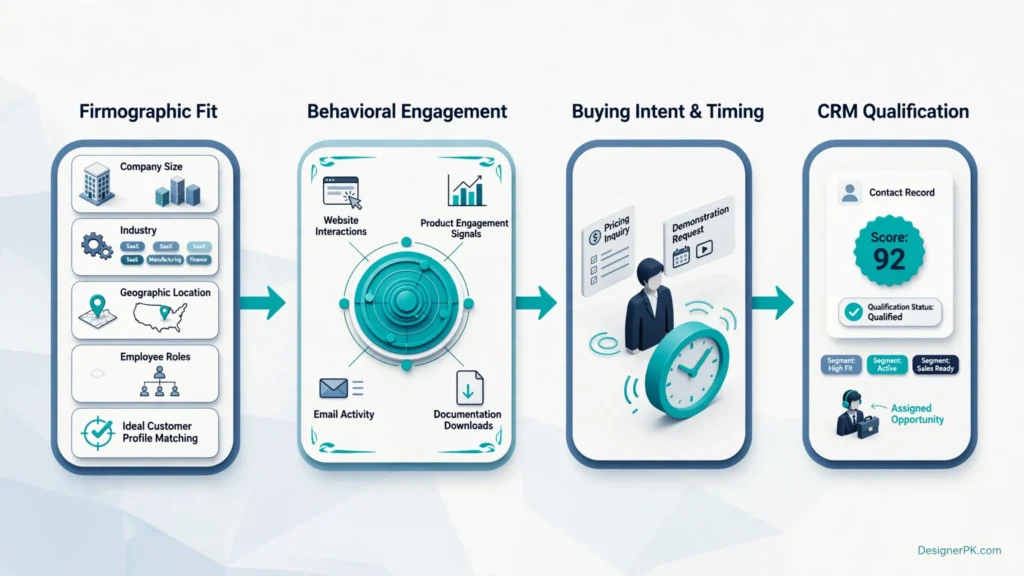
The resulting score should support a specific business decision. Depending on the contact’s qualification status, your CRM might place the prospect into a nurturing sequence, trigger additional review, or assign the opportunity to a sales representative.
One important distinction: a high engagement score does not necessarily mean a contact is ready for sales. A prospect should meet your ICP requirements and demonstrate relevant buying intent before being treated as a qualified opportunity.
Set scoring weights and qualification thresholds using your historical conversion data where available. The example values in this guide are starting points for designing a model, not universal benchmarks.
Behavioral Decay and Negative Lead Scoring Mechanics
A lead can accumulate engagement points over several months without showing any recent buying interest. For example, someone who downloaded a whitepaper six months ago should not receive the same sales priority as a prospect who requested a demonstration yesterday.
Behavioral decay and negative scoring address two different problems. Decay reduces the influence of outdated engagement, while negative scoring adjusts qualification when a contact no longer meets relevant business criteria.
1. Implement Time-Based Behavioral Score Decay
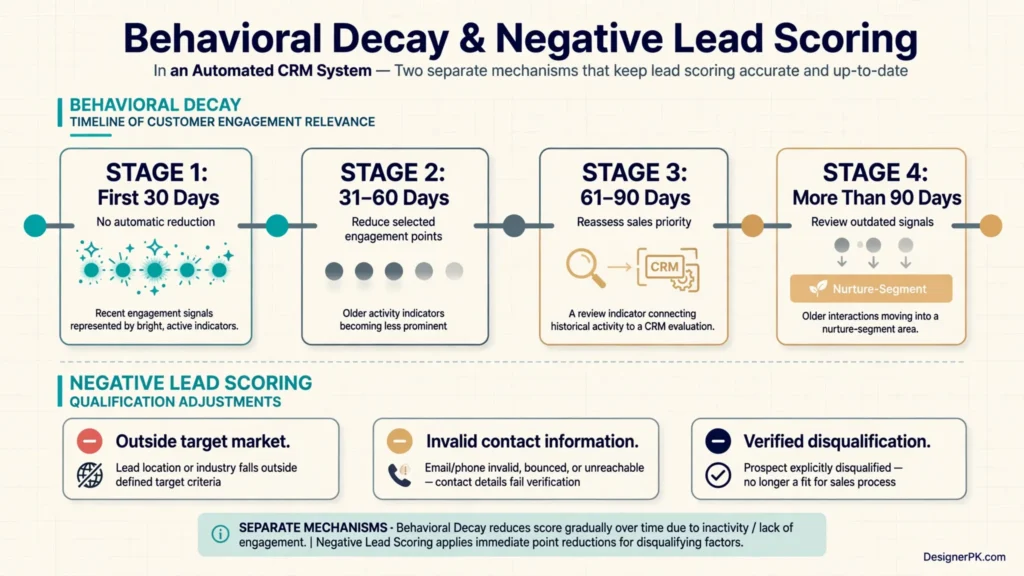
Score decay gradually reduces the value of older engagement signals when contacts stop interacting with your business. It prevents historical activity from permanently inflating qualification scores.
Consider a prospect who downloaded a technical guide, attended a webinar, and visited your pricing page. If that person has not returned to your website or engaged with relevant campaigns for several months, the CRM should reflect the reduced relevance of those activities.
A rules-based implementation might use the following configuration:
| Inactivity Period | Example Scoring Adjustment | Recommended Action |
|---|---|---|
| First 30 days | No automatic reduction | Monitor engagement |
| 31–60 days | Reduce selected engagement points | Continue nurturing |
| 61–90 days | Apply an additional reduction | Reassess sales priority |
| More than 90 days | Review outdated behavioral signals | Move to an appropriate nurture segment |
These intervals are illustrative, not universal benchmarks. Choose decay periods according to your sales cycle and historical conversion data.
There are two common implementation approaches:
- Scheduled decay: A CRM workflow periodically checks inactivity and reduces eligible scores.
- Event-based decay: The system evaluates an engagement signal’s age and applies predefined expiration or reduction rules.
Some CRM platforms provide native scoring decay for supported configurations. Others require scheduled workflows or external automation. HubSpot documents scoring functionality and related configuration options for supported products.
Official documentation: HubSpot Lead Scoring Documentation.
2. Apply Negative Scoring to Low-Quality Leads
Negative scoring helps prevent strong engagement from hiding a poor customer fit. A contact might repeatedly visit your product pages but belong to an industry your business does not serve.
Common conditions that may justify a scoring adjustment include:
- Outside your target market: Reduce fit points when a company operates in an industry your business does not serve.
- Unqualified job function: Apply a limited adjustment when the contact has no relevant purchasing or evaluation role.
- Invalid contact information: Flag bounced or invalid email addresses for data-quality review.
- Student or research inquiries: Place these contacts in a separate category when they fall outside your commercial audience.
- Competitor activity: Exclude or separately classify verified competitor contacts when appropriate.
- Explicit disqualification: Update qualification status when a contact confirms that there is no relevant business requirement.
Apply these rules carefully. A Gmail address does not automatically indicate a low-quality lead, and a junior employee may influence a purchasing decision without holding a senior title.
Use verified business information and meaningful qualification criteria instead of assumptions about email domains, job titles, or individual characteristics.
3. Build a Practical Lead Scoring Matrix
A scoring matrix gives marketing and sales teams a shared reference for evaluating contacts. Each rule should have a defined trigger, point value, and business purpose.
The following example illustrates an initial B2B scoring model:
| Scoring Category | Qualification Signal | Example Points |
|---|---|---|
| Firmographic Fit | Matches target company profile | +20 |
| Firmographic Fit | Relevant decision-making role | +15 |
| Behavioral Engagement | Visits a product page | +5 |
| Behavioral Engagement | Downloads relevant documentation | +10 |
| Buying Intent | Visits the pricing page | +15 |
| Buying Intent | Requests a product demonstration | +30 |
| Negative Scoring | Confirmed outside target market | -20 |
Important: These values are illustrative starting points, not validated scoring recommendations. Calibrate the model against historical sales outcomes and review it with marketing and sales teams.
Worked Example: Calculate a Lead Score
Consider a prospect evaluating workflow automation software. The contact works as an operations director at a company that matches the provider’s target industry and employee range.
Based on the example scoring matrix, the CRM records these activities:
| Qualification Signal | Points | Running Total |
|---|---|---|
| Matches target company profile | +20 | 20 |
| Relevant decision-making role | +15 | 35 |
| Visits a product page | +5 | 40 |
| Downloads technical documentation | +10 | 50 |
| Visits the pricing page | +15 | 65 |
| Requests a product demonstration | +30 | 95 |
Final lead score: 95 points.
The prospect has a strong company fit, relevant purchasing influence, and several buying signals. Under the example qualification thresholds below, the contact enters the sales review category.
However, the CRM should still check contact validity, recent activity, account ownership, and any mandatory qualification conditions before assigning the lead. The numerical score supports the decision; it does not replace it.
4. Define Lead Qualification Thresholds
Once your scoring rules are configured, establish categories that determine how the CRM should handle contacts at different stages of the buying journey.
| Lead Category | Example Score | Recommended CRM Action |
|---|---|---|
| Low Priority | Below 30 | Continue educational nurturing |
| Developing Interest | 30–59 | Monitor relevant engagement |
| Marketing Qualified | 60–79 | Review qualification and buying intent |
| Sales Review | 80 or above | Check ICP fit and recent intent before routing |
These thresholds are examples, not industry standards. A high numerical score should not automatically make every contact a sales-qualified lead.
For example, a contact with 85 points but no verified business fit may still belong in a nurture segment. Another contact with a slightly lower score and a recent direct sales inquiry may deserve immediate human review.
A contact should become sales-ready when its score and qualification criteria indicate a genuine business opportunity, not simply because it crossed a numerical threshold.
5. Prevent Duplicate Events and Inflated Scores
Duplicate event processing can undermine an otherwise well-designed scoring model. For example, a form submission webhook might be delivered more than once because of a network timeout or automatic retry.
If the CRM awards points every time the same event arrives, a single action could incorrectly increase a contact’s score multiple times.
Use the following safeguards:
- Assign a unique event identifier to each scoring event.
- Check whether the event has already been processed.
- Set maximum scoring limits for repetitive activities.
- Prevent repeated form submissions from generating unlimited points.
- Maintain an audit record of scoring changes.
- Use reliable retry handling for CRM integrations.
These controls are particularly useful when website forms, marketing platforms, CRM systems, and external automation tools exchange data through APIs and webhooks.
Reliable event processing should be part of the scoring architecture, especially when several systems contribute engagement data to the same contact record.
Rules-Based vs. Predictive Lead Scoring
Choosing the right scoring methodology depends on how much reliable customer data your business has and how much control your team needs over qualification rules.
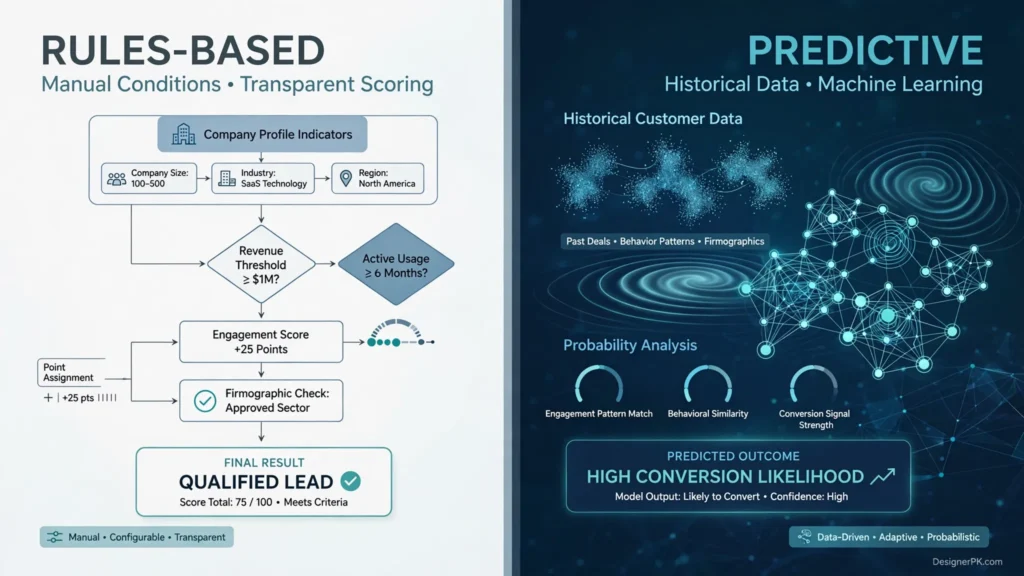
Rules-based scoring is generally easier to implement and audit. Predictive scoring can identify patterns in historical conversion data that manual rules may overlook, but it requires suitable data and ongoing monitoring.
1. Rules-Based Lead Scoring
Rules-based scoring assigns points according to conditions configured by your marketing or revenue operations team. Each qualification attribute or activity has a defined value, and the CRM updates contact scores when those conditions are met.
For example, a B2B business might configure these rules:
- A contact matching the target company profile receives additional fit points.
- A pricing page visit increases the engagement or intent score.
- A product demonstration request triggers a stronger buying-intent score.
- A verified disqualification condition reduces the contact’s qualification score.
The main advantage is transparency. Your team can inspect individual scoring conditions, understand why a contact received a particular score, and adjust the model when the sales process changes.
The limitation is that manually configured rules can become outdated. If your team assigns points without reviewing conversion outcomes, the system may prioritize activities that generate engagement but rarely produce qualified opportunities.
2. Predictive Lead Scoring
Predictive scoring uses machine learning to identify patterns in historical customer and prospect data. Rather than relying entirely on manually assigned point values, the model evaluates which characteristics and behaviors are associated with a defined conversion outcome.
Depending on the platform and available data, predictive models may analyze:
- Historical customer and prospect records.
- Previous conversion outcomes.
- Company and contact attributes.
- Marketing engagement patterns.
- Sales activity and lifecycle information.
The system then generates predictions or scores that help sales teams prioritize contacts according to their likelihood of reaching the selected conversion milestone.
Predictive scoring does not eliminate data-quality requirements. Inconsistent CRM records, outdated customer profiles, insufficient conversion examples, and changing buying behavior can all affect model reliability.
3. Rules-Based vs. Predictive Scoring Comparison
| Evaluation Factor | Rules-Based Scoring | Predictive Scoring |
|---|---|---|
| Scoring logic | Manually configured conditions | Machine learning-based patterns |
| Transparency | Usually easier to inspect | Depends on model explainability |
| Historical data | Can start with limited conversion history | Requires suitable historical data |
| Maintenance | Manual rule reviews and adjustments | Model monitoring and data-quality reviews |
| Flexibility | Direct control over individual rules | Depends on platform capabilities |
| Best suited for | SMBs and teams establishing qualification processes | Organizations with established conversion data |
For most growing businesses, a well-designed rules-based system is a sensible starting point. Consider predictive scoring when your CRM contains enough reliable conversion history to support meaningful predictions.
Best CRM Platforms for Automated Lead Scoring
Your CRM determines how easily your team can capture engagement signals, maintain scoring properties, create automation workflows, and transfer qualified leads to sales representatives.
When comparing platforms, look beyond the term “AI-powered automation.” Check whether the product supports the scoring rules, behavioral tracking, decay settings, reporting, and integrations your business actually needs.
HubSpot Marketing Hub
Best for: Growing B2B businesses looking for integrated marketing automation and CRM-based lead scoring.

HubSpot’s lead scoring tool supports contact and company qualification using fit and engagement criteria. Depending on the scoring configuration, businesses can add or subtract points and apply score decay to eligible engagement events.
Its AI scoring capabilities can also help identify patterns associated with lifecycle-stage progression. HubSpot’s documentation specifies a Marketing Hub Enterprise subscription for creating AI-powered contact lead scores, along with a minimum sample of 50 contacts, including at least 25 converted and 25 non-converted contacts.
Considerations: AI scoring, advanced automation, and other capabilities have subscription-specific requirements. Confirm the features available in your selected HubSpot edition before implementation.
ActiveCampaign
Best for: Small and medium-sized businesses that need marketing automation, contact scoring, and customizable engagement workflows.
ActiveCampaign supports numerical contact scores based on configurable rules. Businesses can award or subtract points, create static or dynamic scoring conditions, and set expiration periods for eligible scoring events.
Its automation builder can also adjust scores when contacts perform relevant actions, such as visiting selected web pages, interacting with campaigns, or submitting forms.
Considerations: ActiveCampaign documents Contact Scoring availability on Marketing Plus and above and Sales plans. Deal Scoring is available on Sales plans. Verify the current plan requirements before choosing a subscription.
Salesforce Marketing Cloud Account Engagement
Best for: Established B2B organizations managing structured marketing operations and multi-stage sales processes.
Salesforce Account Engagement provides two distinct qualification methods. Prospect scoring measures engagement and activities, while grading evaluates how closely a prospect matches your ideal customer profile.
Businesses can customize scoring rules and grading profiles to reflect their qualification criteria. Salesforce also offers Einstein-powered scoring and insights for supported configurations.
Considerations: Einstein capabilities, licensing, implementation, and integration requirements should be evaluated separately. Advanced Salesforce environments may also require dedicated administration and configuration work.
CRM Platform Comparison Matrix
| Platform | Scoring Capabilities | Suitable Business | Selection Consideration |
|---|---|---|---|
| HubSpot Marketing Hub | Fit, engagement, negative scoring, and supported score decay; AI scoring for eligible subscriptions | Growing B2B teams | Subscription-dependent advanced features |
| ActiveCampaign | Contact scoring, positive and negative points, expiration, and automation-based adjustments | SMBs and marketing-led businesses | Plan-specific contact and deal scoring |
| Salesforce Account Engagement | Prospect scoring, profile-based grading, and separately available Einstein capabilities | Established B2B marketing teams | Licensing, implementation, and administration requirements |
These platforms do not offer identical products or scoring models. For example, Salesforce prospect scoring and grading are separate from ActiveCampaign contact scoring, while HubSpot offers configurable score decay for eligible engagement-based configurations.
Feature availability, product packaging, and subscription terms can change. Review the official documentation and confirm your required capabilities with the vendor before purchasing.
How to Choose the Right Lead Scoring CRM
Before committing to a platform, evaluate these practical requirements:
- Scoring flexibility: Can you assign separate scores to company fit, contact engagement, and buying intent?
- Behavioral tracking: Can the platform capture relevant website, email, and product activity?
- Score decay: Can older engagement points expire or decrease automatically?
- Automation capabilities: Can you trigger workflows when a score changes or a qualification condition is met?
- CRM integration: Can marketing and sales teams access consistent contact and account information?
- Reporting: Can you identify which scoring signals contribute to qualified opportunities?
- Data portability: Can you export scoring records and connect the CRM with other business applications?
- Total operating cost: Does the subscription, implementation, and ongoing administration fit your budget?
A smaller business may need only a straightforward rules-based CRM with basic workflow automation. Organizations managing multiple sales teams, complex customer journeys, and large contact databases may benefit from more advanced marketing automation capabilities.
Choose a platform your team can maintain reliably and integrate with its existing sales process. Additional features have limited value if the business cannot configure, monitor, and use them consistently.
Official Product Documentation
Practical Use Cases of Automated Lead Scoring
Automated lead scoring can support different business models, but the signals used to qualify prospects should reflect each organization’s sales process and customer journey.
B2B Software Companies
A software company can evaluate company size, industry, product demonstrations, trial activity, and pricing inquiries to identify organizations actively considering its solution.
When a prospect meets the qualification criteria, the CRM can assign an account executive, create a follow-up task, and include the prospect’s recent activity in the sales notification.
E-commerce Businesses
E-commerce businesses offering high-value products or B2B purchasing options can prioritize inquiries based on product interest, order requirements, company information, and repeat engagement.
For example, a wholesale supplier could assign higher priority to a business requesting bulk pricing than to an individual browsing product categories.
Digital Marketing Agencies
Marketing agencies can evaluate service-page visits, consultation requests, project requirements, and available budget information to prioritize relevant inquiries.
A company requesting a detailed SEO or custom development consultation may deserve a different qualification path from someone downloading a general marketing guide.
Enterprise Sales Teams
Enterprise organizations often have several stakeholders involved in purchasing decisions. Evaluating contacts individually may overlook the broader buying activity within an account.
Account-level scoring can combine relevant engagement from decision-makers, technical evaluators, and other stakeholders to help sales teams identify organizations showing meaningful purchase intent.
SaaS Free-Trial Businesses
SaaS companies can evaluate product events such as account activation, feature adoption, team invitations, and trial usage to identify accounts demonstrating meaningful product interest.
For example, an account that invites several team members and regularly uses important features may warrant onboarding assistance or a sales conversation.
Professional Service Providers
Consulting firms and professional service providers can prioritize inquiries using project requirements, service relevance, geographic eligibility, company size, and consultation requests.
This helps teams distinguish suitable projects from inquiries that fall outside their actual service capabilities.
Lead Scoring Best Practices for Better Results
A scoring model should reflect actual sales outcomes rather than simply rewarding activity. As your business collects more conversion data, review which qualification signals consistently identify suitable opportunities.
1. Keep Qualification Rules Understandable
Start with the attributes and engagement signals that have a meaningful relationship with your sales process. Hundreds of overlapping conditions make a model difficult to troubleshoot and maintain.
Document each rule, including its trigger, point value, purpose, and any frequency limits. This gives marketing and sales teams a shared understanding of how scores are calculated.
2. Separate Contact Scoring from Account Scoring
In B2B sales, multiple contacts may belong to the same purchasing organization. One person’s activity does not necessarily represent the entire account’s buying readiness.
Use contact-level scoring to evaluate individual engagement and account-level scoring to understand broader organizational interest. For example, several stakeholders requesting technical information may indicate a stronger opportunity than one highly active contact.
3. Avoid Giving Too Much Weight to Email Opens
Email opens are not always reliable engagement indicators. Privacy features and automated image loading can register opens even when recipients have not actively read a message.
Give greater weight to stronger signals, such as direct inquiries, relevant website activity, product usage, and demonstration requests.
4. Use Sales Feedback to Improve Qualification
Marketing teams should not evaluate scoring performance using engagement metrics alone. Sales representatives can identify problems that numerical scores may overlook.
Review accepted, rejected, converted, and disqualified leads. If high-scoring contacts repeatedly turn out to be unsuitable, investigate whether your ICP criteria, behavioral weights, or qualification thresholds need adjustment.
5. Recalibrate Your Model Regularly
A quarterly review is a reasonable starting point for many businesses, although rapidly changing products and sales processes may require more frequent adjustments.
Compare closed-won opportunities with previously qualified contacts. Look for patterns in company characteristics, engagement history, and buying signals that distinguish genuine opportunities from less relevant activity.
6. Monitor Workflow Failures
Automated scoring depends on reliable data transfer between your website, marketing tools, CRM, and external integrations.
Monitor failed API requests, missing contact properties, duplicate events, unsuccessful assignments, and incomplete workflow executions. A workflow that fails silently can leave qualified prospects without a sales owner or follow-up task.
7. Measure Business Outcomes Instead of Score Volume
A growing number of high-scoring contacts does not necessarily mean your qualification strategy is working.
Track operational and commercial indicators such as:
- Percentage of marketing-qualified leads accepted by sales.
- Conversion rate from qualified leads to opportunities.
- Opportunity-to-customer conversion rate.
- Time between qualification and first sales contact.
- Lead rejection and disqualification reasons.
- Percentage of CRM records with complete qualification information.
These metrics help determine whether your scoring model is identifying useful opportunities and supporting an efficient sales process.
When Should a Business Implement Automated Lead Scoring?
Automated lead scoring becomes useful when a business receives enough inquiries and engagement data that manually reviewing every contact starts consuming significant sales and marketing time.
Consider implementing it when:
- Your marketing campaigns generate more inquiries than your sales team can review individually.
- Your business has clearly defined customer qualification criteria.
- Marketing and sales teams disagree about which contacts are ready for follow-up.
- Your CRM captures meaningful contact and company information.
- Your sales process includes multiple qualification stages.
- You need consistent lead assignment and follow-up workflows.
However, a complex predictive scoring system may not be suitable for a new business with limited conversion history. A straightforward rules-based model can provide a more practical starting point while your team builds reliable customer and sales data.
Expand the system as your sales process matures. The objective is to automate decisions your business already understands, not introduce unnecessary complexity before the underlying qualification process is established.
Data Privacy and Security Considerations for Automated Lead Scoring

Lead scoring systems process personal and business contact information. Website activity, form submissions, marketing interactions, and CRM records should be handled according to applicable privacy and data protection requirements.
Before enabling automated tracking and scoring, review these safeguards:
- Collect relevant information: Avoid collecting personal information that is unnecessary for your stated business purpose.
- Respect consent requirements: Configure tracking, cookies, and marketing communications according to applicable consent and privacy requirements.
- Explain data usage: Document relevant collection and processing practices in your privacy policy.
- Restrict CRM access: Give employees access only to the information required for their responsibilities.
- Protect API credentials: Store integration secrets securely and avoid exposing authentication tokens in workflow logs.
- Define retention policies: Establish appropriate procedures for retaining, updating, and deleting contact information.
- Maintain human oversight: Review automated qualification decisions when they could significantly affect how prospects are treated.
US businesses should evaluate applicable federal and state privacy requirements, including the California Consumer Privacy Act (CCPA) and California Privacy Rights Act (CPRA), where applicable.
Useful references:
- California Consumer Privacy Act Information
- Federal Trade Commission Privacy and Security Guidance
- NIST Privacy Framework
Privacy obligations depend on your business activities, customer locations, data types, and applicable laws. Consult qualified legal counsel when designing processes involving sensitive personal information or automated decision-making.
Frequently Asked Questions About Automated Lead Scoring
What is the difference between lead scoring and lead grading?
Lead scoring evaluates a prospect’s engagement and buying signals using a numerical system. Lead grading measures how closely a prospect matches your ideal customer profile. Some CRM platforms support both methods, helping marketing teams distinguish engagement from customer suitability.
How many points should a qualified lead receive?
There is no universal lead scoring threshold. Determine qualification ranges using historical conversion data, ICP requirements, sales feedback, and buying-intent signals. A high score should support, not replace, mandatory qualification checks.
How often should lead scoring models be recalibrated?
Quarterly reviews are a reasonable starting point for many RevOps teams. Compare converted customers with previously qualified and rejected leads, then adjust scoring conditions when your customer profile or sales process changes.
Can small businesses use automated lead scoring?
Yes. Small businesses can start with a rules-based model using CRM properties, website forms, engagement events, and automated follow-up workflows. Predictive scoring is not necessary when a business has limited historical conversion data.
What is the difference between rules-based and predictive lead scoring?
Rules-based scoring uses manually configured conditions and point values. Predictive scoring uses machine learning to identify patterns in historical data and estimate conversion likelihood. Rules-based models are generally easier to inspect, while predictive models depend on suitable data and platform capabilities.
Can n8n automate lead scoring?
Yes. n8n can connect website forms, CRM platforms, databases, and communication applications through APIs and webhooks. A workflow can retrieve contact information, evaluate scoring rules, update CRM properties, and notify sales representatives when qualification conditions are met.
How do you prevent duplicate lead scoring events?
Use unique event identifiers, event-processing records, duplicate checks, and controlled retry handling. These safeguards prevent repeated webhook deliveries or integration retries from awarding points multiple times for the same activity.
Should newsletter subscribers receive lead scores?
Newsletter subscribers can receive limited engagement points when their interactions are relevant to your business. However, subscribing to educational content alone should not qualify someone for sales outreach. Give greater importance to meaningful buying signals and ICP compatibility.
Which CRM is best for automated lead scoring?
HubSpot is worth evaluating for integrated marketing and CRM scoring. ActiveCampaign can suit businesses that need marketing automation and contact engagement tracking, while Salesforce Account Engagement supports more sophisticated B2B marketing operations. Compare the required features, subscription tiers, integrations, and operational costs before choosing.
What is the difference between an MQL and an SQL?
A Marketing Qualified Lead (MQL) meets marketing-defined engagement and fit criteria. A Sales Qualified Lead (SQL) has been evaluated against additional sales requirements and is considered suitable for direct sales follow-up. Marketing and sales teams should agree on these definitions before configuring automated handoffs.
Ready to Build a Smarter Automated Lead Scoring System?
A well-designed lead scoring system helps your business identify relevant opportunities, organize customer information, and connect marketing activity with sales operations.
Whether you need CRM integration, custom n8n workflows, automated lead routing, or AI-powered business process automation, the implementation should fit your existing systems and sales process.
At DesignerPK, you can explore solutions for connecting business applications and building automation workflows that support your sales operations.
Explore AI Automation ServicesHave a specific CRM integration or automation requirement? Contact DesignerPK to discuss your project.