
CRM REST API Integration: Quick Answer
CRM REST API integration connects customer relationship management software with websites, applications, databases, and other business systems through standardized HTTP requests. A reliable implementation requires secure authentication, structured data exchange, pagination, rate-limit management, error handling, and monitoring to keep information consistent across platforms.
Establishing an API connection is only the first step. The integration must also handle expired credentials, duplicate records, temporary network failures, changing data structures, and provider-specific API restrictions. Without these safeguards, customer records can become inconsistent even when the initial connection works correctly.
A typical CRM integration architecture includes six components:
- Authentication: Verifies application identity and authorizes access to CRM resources.
- API client: Sends HTTP requests and processes CRM responses.
- Integration middleware: Validates, transforms, and routes information between connected systems.
- Data synchronization: Transfers new and updated customer records according to defined synchronization rules.
- Error management: Handles failed requests, retries, and unresolved transactions.
- Monitoring: Tracks API availability, response times, failed operations, and synchronization status.
A small business connecting a website to one CRM may only need a lightweight API client or automation platform. Larger environments involving multiple applications, complex data relationships, or high transaction volumes may require dedicated middleware, centralized authentication, background processing, and distributed monitoring.
Some links on this page may be affiliate links. If you purchase through them, DesignerPK.com may earn a commission at no additional cost to you. Recommendations are based on software functionality, technical suitability, and documented capabilities.
What Is CRM REST API Integration?
CRM REST API integration connects customer relationship management software with other applications through RESTful endpoints. These interfaces allow systems to exchange structured information using HTTP methods such as GET, POST, PUT, PATCH, and DELETE.
For example, an e-commerce website can send customer information to a CRM after a purchase. A marketing platform can retrieve contact details for a campaign, while a sales application can update a lead’s status after a representative completes a follow-up.
How a CRM REST API Request Works
Most CRM REST APIs expose resources through endpoint URLs. An application sends a request containing an HTTP method, authentication credentials, headers, and, when required, a JSON payload.
Consider this simplified example of retrieving customer contacts:
GET /crm/v1/contacts
Host: api.example-crm.com
Authorization: Bearer YOUR_ACCESS_TOKEN
Accept: application/json
The CRM validates the request, checks the application’s permissions, and returns the requested information or an appropriate error response.
A successful response might look like this:
{
  "results": [
    {
      "id": "1001",
      "firstname": "John",
      "lastname": "Smith",
      "email": "john@example.com"
    }
  ],
  "hasMore": false
}
Note: These examples use illustrative endpoint paths and response structures. Actual URLs, field names, authentication requirements, and pagination formats vary by CRM provider.
Common HTTP Methods Used in CRM Integrations
| HTTP Method | Typical Purpose | Example CRM Operation |
|---|---|---|
| GET | Retrieve information | Fetch customer contacts |
| POST | Create a resource | Create a new lead |
| PUT | Replace a resource | Replace an existing record |
| PATCH | Update selected fields | Change a lead’s status |
| DELETE | Delete a resource | Remove an outdated contact |
These methods describe common REST operations, but individual CRM platforms may implement them differently. For example, some APIs use PATCH for partial updates, while others have provider-specific requirements for PUT, DELETE, or record archiving. Check the official API documentation before building request and synchronization logic.
CRM REST API Architecture and Authentication
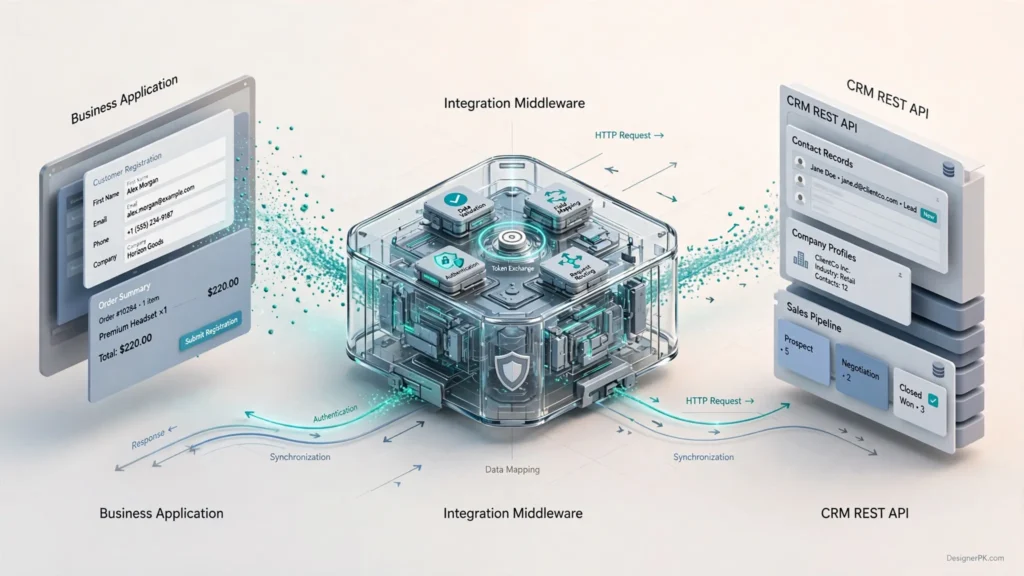
A CRM integration needs a communication architecture that defines how applications exchange information and manage access. When multiple systems connect to the same CRM, a centralized integration layer can simplify request handling, credential management, and data transformation.
Understanding the Integration Architecture
The middleware acts as the communication layer between the source application and the CRM. It can validate incoming information, transform field names, manage authentication, and record transaction results.
For example, a website might store an email address under customer_email, while the CRM expects email. Middleware maps the fields before submitting the request, allowing both applications to retain their existing database structures.
The middleware can also enforce business rules. A website form might send incomplete contact information, for instance. Instead of passing an invalid record directly to the CRM, the integration can validate required fields and reject or flag the submission before processing it.
OAuth 2.0 Authentication for CRM APIs
OAuth 2.0 is a widely adopted authorization framework that allows applications to access protected CRM resources with specific permissions. It is not required for every integration. Depending on the provider and application type, authentication may also use API keys, private application tokens, or other supported mechanisms.
For integrations that access a user’s CRM account, the OAuth 2.0 authorization code flow is a common choice. Public clients, such as applications that cannot securely store a client secret, should use PKCE where supported and applicable. The application should also validate the returned state parameter to protect against cross-site request forgery.
The authorization process generally follows these steps:
- The application generates an authorization request with the required permissions, redirect URI, and a unique state value. When applicable, it also generates a PKCE code verifier and challenge.
- The user is redirected to the CRM authorization page and reviews the requested permissions.
- After approval, the CRM redirects the user to the registered callback URL with an authorization code and the original state value.
- The application validates the returned state value and exchanges the authorization code for an access token through the token endpoint. When PKCE is used, the application also supplies the original code verifier.
- The application includes the access token in subsequent authenticated API requests.
- If supported, a refresh token can obtain a replacement access token without requiring the user to repeat the authorization process.
Sending Bearer Tokens in HTTP Headers
After obtaining an access token, the application generally includes it in the HTTP Authorization header when accessing protected CRM endpoints.
GET /crm/v1/contacts
Host: api.example-crm.com
Authorization: Bearer ACCESS_TOKEN
Accept: application/json
Keep authentication logic separate from business operations. A dedicated authentication component makes token renewal, credential rotation, permission management, and authorization troubleshooting easier without requiring changes to the application’s core workflow.
Secure Credential Management
- Store client secrets and refresh tokens in an encrypted secrets manager or secure server-side configuration.
- Never expose private API credentials in frontend JavaScript, public repositories, or browser-visible source code.
- Request only the OAuth scopes required by the integration.
- Use HTTPS for all authentication and API communication.
- Restrict refresh-token access to authorized application components.
- Avoid logging access tokens, passwords, or sensitive customer information.
Official technical references: OAuth 2.0 Authorization Framework (RFC 6749), OAuth 2.0 Bearer Token Usage (RFC 6750), and Proof Key for Code Exchange (PKCE, RFC 7636).
CRM API Pagination, Cursor Management, and Rate Limits
When a CRM contains thousands of contacts, deals, or customer activities, retrieving every record in one API request is rarely practical. Most CRM platforms limit the number of records returned per request to manage server load and API performance.
Pagination divides large datasets into smaller batches. This makes synchronization jobs easier to process, reduces memory requirements, and allows applications to resume work without retrieving the entire dataset again.
Offset-Based vs. Cursor-Based Pagination
Two common pagination strategies are offset-based and cursor-based pagination. They differ in how an application identifies the next batch of records.
Offset-Based Pagination
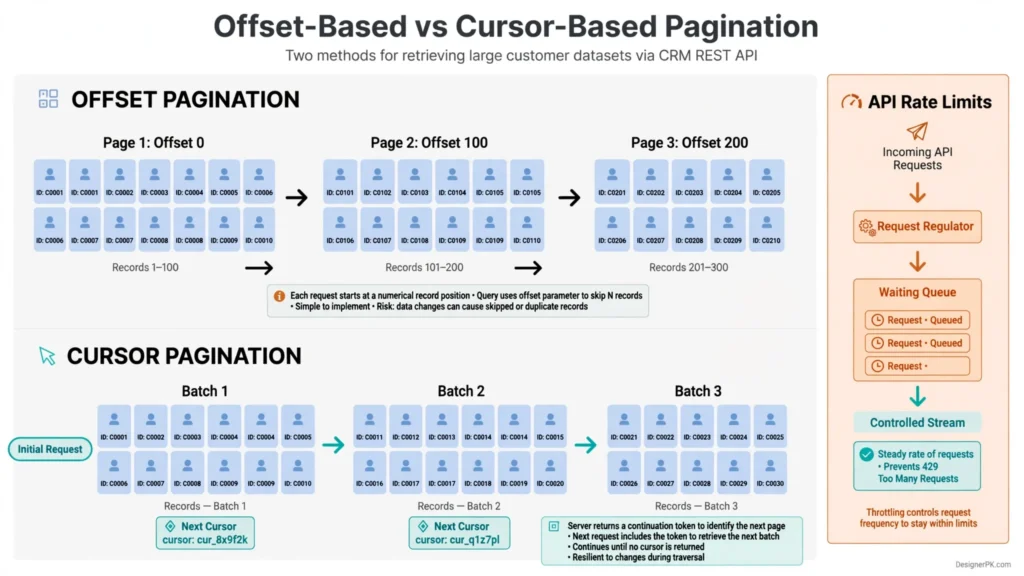
Offset pagination uses a starting position and a record limit. An application can retrieve the first 100 contacts and then skip those records when requesting the next batch.
GET /crm/v1/contacts?limit=100&offset=0

GET /crm/v1/contacts?limit=100&offset=100

GET /crm/v1/contacts?limit=100&offset=200
This approach is straightforward to implement, but large offsets may become inefficient. Changes to the dataset between requests can also shift page boundaries, potentially causing skipped or duplicated records unless the API provides suitable consistency guarantees.
Cursor-Based Pagination
Cursor pagination uses a continuation token returned by the CRM to identify where the next request should continue. Instead of calculating a numerical offset, the application passes this token to retrieve the next batch.
GET /crm/v1/contacts?limit=100

Response:
{
  "results": [
    {
      "id": "1001",
      "email": "john@example.com"
    }
  ],
  "paging": {
    "next": {
      "after": "NEXT_CURSOR_VALUE"
    }
  }
}
The next request uses the returned cursor:
GET /crm/v1/contacts?limit=100&after=NEXT_CURSOR_VALUEActual parameter names and response structures vary between CRM providers. Some APIs return a next-page URL, page token, or continuation link instead of an after value.
Pagination Strategy Comparison
| Criteria | Offset Pagination | Cursor Pagination |
|---|---|---|
| Implementation | Simple page or offset calculations | Requires storing continuation tokens |
| Large datasets | May become inefficient | Generally more suitable for sequential retrieval |
| Changing datasets | Can produce inconsistent page boundaries | Often provides more reliable sequential traversal |
| Provider support | Depends on the API | Depends on the API |
| Best use case | Small or relatively stable datasets | Large datasets requiring sequential retrieval |
Implementation guidance: Use the pagination mechanism documented by the CRM provider. Cursor pagination does not automatically guarantee a consistent snapshot when records change during synchronization. For critical data imports, check whether the API supports snapshot tokens, stable sorting, or incremental synchronization based on modification timestamps.
Handling CRM API Rate Limits
CRM providers impose API rate limits to control request volume and protect shared infrastructure. Depending on the platform, limits may apply per application, user account, access token, subscription tier, or time window.
When an integration exceeds an applicable limit, the CRM may return HTTP 429 Too Many Requests. Some providers include a Retry-After response header specifying when another request can be attempted.
To manage API consumption, implement these controls:
- Request throttling: Control how frequently API requests are sent.
- Batch processing: Use supported batch endpoints to reduce unnecessary individual requests.
- Exponential backoff: Increase the waiting period after repeated temporary failures.
- Randomized jitter: Vary retry delays to prevent multiple workers from retrying simultaneously.
- Retry limits: Set maximum attempts and execution deadlines to avoid endless retry loops.
- Usage monitoring: Track API consumption and available quota information.
Exponential Backoff with Randomized Jitter
Exponential backoff gradually increases the delay between retry attempts. Randomized jitter adds variation to those delays, reducing synchronized retry bursts when multiple workers encounter the same API failure.
A simplified full-jitter calculation is:
delay = random(
    0,
    min(max_delay, base_delay * (2 ** retry_attempt))
)
If the provider supplies a valid Retry-After value, the integration should respect that instruction rather than applying a shorter retry delay. The application should also enforce a maximum execution deadline so retries do not continue indefinitely.
Managing Large CRM Synchronization Jobs
Large contact databases are better handled through controlled background jobs than by loading the entire dataset into application memory.
- Request the first available record batch.
- Validate the response and process the records.
- Save successfully processed records and synchronization checkpoints.
- Retrieve the next page using the returned continuation token.
- Pause requests when rate limits require it.
- Resume from the last reliable checkpoint after temporary failures.
Persist the continuation token and checkpoint only after the corresponding records have been processed successfully. This reduces the risk of skipping records when a background job stops unexpectedly.
This approach works well for synchronizing CRM contacts with WooCommerce customers, marketing platforms, sales databases, and internal business applications.
CRM API Error Handling, Retries, and Recovery Strategies
CRM integrations can encounter authentication failures, invalid fields, missing records, conflicting updates, network interruptions, and temporary server errors. Each failure requires a different response.
The first step is to distinguish between errors that need corrective action and temporary failures that may succeed on another attempt. Retrying an invalid request, for example, will usually produce the same result.
Understanding Common CRM API HTTP Status Codes
| HTTP Status | Meaning | Recommended Handling |
|---|---|---|
| 200 | Successful request | Process the returned response. |
| 201 | Resource created | Save the returned CRM record ID. |
| 400 | Invalid request | Validate payload structure and field values. |
| 401 | Unauthorized | Check credentials and refresh tokens where supported. |
| 403 | Forbidden | Review permissions and OAuth scopes. |
| 404 | Resource not found | Verify the endpoint and requested resource ID. |
| 409 | Conflict | Investigate duplicate or conflicting record updates. |
| 429 | Rate limit exceeded | Respect Retry-After and apply throttling. |
| 500–599 | Server-side failure | Use controlled retries for eligible operations. |
These are common HTTP status meanings, not a universal CRM-specific error contract. Individual providers may return additional codes, use different response formats, or assign different meanings to certain errors. Always check the provider’s documentation before defining retry rules.
Structuring Standardized Error Responses
Different CRM platforms may return errors in different formats. Integration middleware can normalize these responses into a consistent internal structure, making failures easier to process across multiple providers.
{
  "error": {
    "code": "INVALID_PROPERTY",
    "message": "The lifecycle_stage value is not supported.",
    "status": 400,
    "request_id": "req_12345",
    "retryable": false
  }
}
This is an illustrative internal error format, not a guaranteed response structure from any particular CRM.
A normalized error object can include:
- Error code: Identifies the type of failure.
- HTTP status: Records the response status.
- Error message: Provides a readable explanation.
- Request identifier: Helps correlate the transaction with provider logs.
- Retry eligibility: Indicates whether another attempt may succeed.
- Timestamp: Records when the failure occurred.
Retryable vs. Non-Retryable Errors
Not every failed request should be submitted again. Network interruptions, eligible server errors, and rate-limit responses may justify a retry. Invalid payloads and insufficient permissions generally require correction first.
Temporary Failures
Network interruptions, eligible 5xx responses, and rate-limit errors may recover after the appropriate delay. Apply bounded retries and respect provider-specific instructions.
Validation Failures
Invalid property values, malformed JSON, missing required fields, and unsupported data types require payload correction rather than automatic retries.
Authentication and Permission Failures
Expired credentials may require token renewal. Permission failures need a review of application authorization and access scopes.
Conflict and Duplicate Failures
Conflicting updates and duplicate records require reconciliation, deduplication, or an appropriate update strategy.
Why Idempotency Matters in CRM Integrations
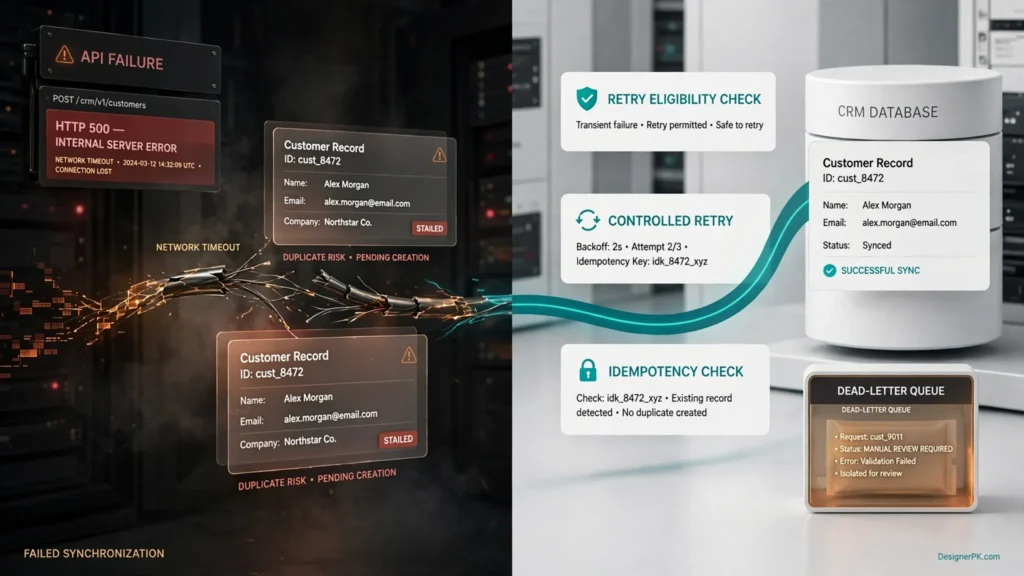
Network timeouts can create duplicate CRM records even when the original request succeeds.
For example, a website submits a new lead to a CRM. The CRM creates the record, but a temporary connection failure prevents the website from receiving the response. If the website blindly repeats the POST request, the CRM may create a second lead.
Use provider-supported idempotency keys where available. If the CRM does not support them, a stable external identifier combined with a carefully designed lookup-before-create or upsert strategy can reduce duplicate creation. The matching logic should also account for concurrent requests so two workers do not create the same record at the same time.
For WordPress REST API implementations, see our guide on how to add idempotency keys to the WordPress REST API.
Using Dead-Letter Queues for Unresolved Requests
Some transactions cannot be recovered automatically. A dead-letter queue stores requests that have exhausted their retry policy or require manual investigation, keeping them separate from normal processing.
A useful dead-letter record should preserve:
- Original transaction identifier.
- Source application and target CRM.
- Failure category and sanitized error details.
- Retry count and last attempt timestamp.
- Relevant record identifier.
- Recovery or manual review status.
Before replaying a failed transaction, check whether the original operation may already have succeeded. This is particularly important for contact creation, deal creation, payments, and other non-idempotent operations.
Practical approach: Retry eligible temporary failures, correct invalid data at its source, and move unresolved transactions into a monitored recovery process. This provides a clear way to investigate failures without repeatedly submitting requests that cannot succeed.
Recommended CRM API Integration Tools and Technology Stack
The right tools for a CRM integration depend on API complexity, request volume, security requirements, development resources, and operational needs. A small business connecting a website to one CRM may only need an API testing tool and a lightweight integration workflow. Organizations managing multiple applications or high-volume data transfers may need an API gateway, background processing, and centralized monitoring.
These tools serve different purposes. Postman supports development and testing, Kong manages API traffic, and Datadog helps monitor application performance. n8n provides workflow automation, while custom middleware handles specialized integration logic.
Postman
Best for API Development, Testing, and Documentation
Postman helps developers organize API requests, manage environments, inspect response structures, document endpoints, and collaborate on API collections.
- Reusable API request collections.
- Environment and variable management.
- Automated API tests.
- Mock servers for development workflows.
Use Postman when validating authentication, testing CRM endpoints, troubleshooting payload errors, or preparing API requests before implementation.
Kong API Gateway
Best for Centralized API Traffic Management
Kong provides an API gateway layer for managing application traffic, routing, rate limiting, authentication integrations, and other API management requirements.
- Centralized API routing.
- Rate-limiting capabilities.
- Authentication-related plugins.
- Gateway-level traffic management.
Kong is worth considering when several applications or services need centralized API policies. A small website-to-CRM connection generally does not need a dedicated gateway.
Datadog APM
Best for Integration Monitoring and Distributed Tracing
Datadog Application Performance Monitoring helps engineering teams investigate application performance, trace distributed requests, and identify bottlenecks across connected services.
- Distributed request tracing.
- Application latency monitoring.
- Error and performance analysis.
- Service dependency visibility.
Consider Datadog when an integration spans multiple services and developers need to trace failures or latency across the complete request path.
CRM API Integration Technology Comparison
| Tool | Primary Function | Suitable For | Important Consideration |
|---|---|---|---|
| Postman | API development and testing | Developers and QA teams | Does not replace production integration middleware. |
| Kong Gateway | API traffic and gateway management | Complex application environments | Requires appropriate deployment and configuration. |
| Datadog APM | Application monitoring and tracing | DevOps and engineering teams | Requires instrumentation and monitoring configuration. |
| Custom Middleware | Business logic and data synchronization | Specialized CRM integrations | Requires development, testing, and ongoing maintenance. |
| n8n | Workflow orchestration and automation | Small businesses and automation teams | Complex workflows need appropriate error and execution management. |

When Should You Use n8n for CRM API Integration?
Not every CRM connection requires a custom application. n8n provides a practical way to connect CRM platforms with websites, email services, spreadsheets, databases, and other business applications through visual workflows.
For example, a workflow can receive a website form submission, validate the information, search for an existing CRM contact, and create or update the appropriate record. This can be sufficient for lead capture, notifications, and straightforward data synchronization.
Custom middleware becomes more useful when an integration involves complex field relationships, high transaction volumes, strict latency requirements, advanced conflict resolution, or specialized security controls that are difficult to manage through visual workflows.
A hybrid setup is also possible. n8n can handle routine workflow orchestration while a dedicated API service manages complex validation, synchronization, or provider-specific business rules.
Explore our guides on automating business tasks with n8n and building a reliable n8n lead router.
How to Build a Reliable CRM REST API Integration
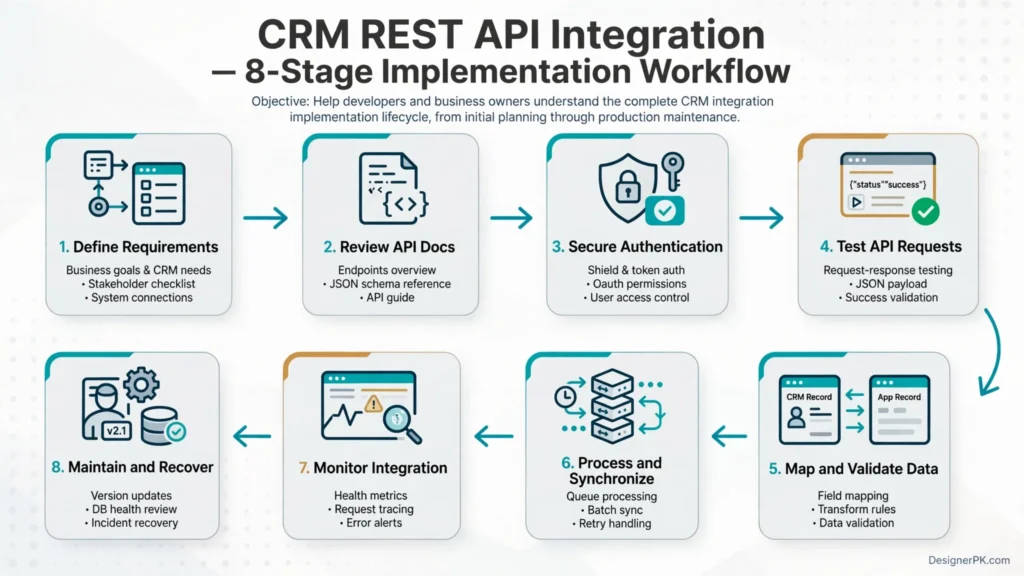
Start by defining how information should move between connected systems, which application owns each field, and what should happen when an update fails. These decisions influence the authentication model, data mapping, synchronization method, and recovery process.
-
1
Define the Integration Requirements
Identify the applications involved and the information they need to exchange.
- Determine which system owns each data field.
- Identify the CRM objects involved, such as contacts, companies, leads, and deals.
- Define whether synchronization is one-way or bidirectional.
- Document the rules for creating and updating records.
- Establish how conflicting updates will be resolved.
For example, an e-commerce website might send customer details and order information to a CRM while keeping product inventory managed separately. The integration should also define whether CRM changes can update the original website records.
-
2
Review the CRM API Documentation
Check the provider’s official documentation to understand available API capabilities and restrictions.
- Authentication methods and required permissions.
- Available endpoints and supported HTTP methods.
- Request and response schemas.
- Pagination and batch-processing capabilities.
- Rate limits and error response formats.
- Webhook support and API version policies.
Two CRM platforms may support similar operations but implement different endpoint structures, property names, and request requirements. Test the operations the integration actually needs instead of assuming that features work identically across providers.
-
3
Configure Secure Authentication
Implement the authentication method supported by the CRM. For OAuth integrations, configure the authorization flow, redirect URI, required scopes, token storage, and refresh process.
Where applicable, validate the OAuth state parameter and use PKCE for public clients. Keep credentials server-side and separate authentication management from the application’s business logic.
-
4
Build and Test API Requests
Create reusable request functions for retrieving, creating, and updating CRM records.
Use Postman or another suitable API testing environment to validate request headers, payload structures, response codes, and error scenarios before production deployment.
Test both successful operations and failure cases, including expired credentials, invalid properties, missing records, and rate-limit responses.
-
5
Implement Data Validation and Field Mapping
Connected applications frequently use different field names and data formats. A mapping layer converts incoming information into the structure expected by the CRM.
- Validate email addresses and required fields.
- Normalize phone numbers and date formats.
- Check supported CRM property values.
- Handle optional and missing fields explicitly.
- Prevent accidental overwriting of important customer information.
Define how empty values should be handled. An omitted field, a null value, and an empty string may have different meanings in the source application and CRM.
-
6
Add Pagination, Queues, and Retry Handling
For background synchronization, process records in controlled batches and preserve progress checkpoints.
Configure provider-aware rate limiting, bounded retries, and duplicate prevention. Use a queue when operations need asynchronous processing or recovery after temporary service interruptions.
Make sure retry policies account for whether an operation is safe to repeat. A timed-out record creation request should not automatically be submitted again without checking whether the original operation succeeded.
-
7
Deploy Monitoring and Error Logging
Monitor API response times, failed requests, synchronization delays, and authentication problems after deployment.
Use structured logs and transaction identifiers to investigate issues without exposing access tokens or sensitive customer information.
Set alerts for repeated failures, growing processing queues, and synchronization delays that exceed the application’s expected operating limits.
-
8
Test Recovery and Maintain the Integration
Test how the integration behaves when credentials expire, CRM endpoints become unavailable, records contain invalid fields, or network connections drop.
Review API version changes and update the implementation when the provider modifies endpoint behavior, authentication requirements, or response schemas.
Document recovery procedures so another developer can identify failed transactions, determine whether records were already processed, and safely resume synchronization.
Pre-Deployment CRM Integration Checklist
- Authentication works with the required permissions.
- API requests use HTTPS.
- Request payloads pass validation.
- Field ownership and synchronization rules are documented.
- Pagination handles the expected dataset.
- Rate limits are respected.
- Duplicate record creation is controlled.
- Temporary failures have a recovery strategy.
- Logs exclude sensitive credentials.
- Monitoring and failure alerts are configured.
- Integration behavior is tested in a non-production environment.
CRM REST API Integration Best Practices
A reliable CRM integration depends on more than correctly configured API requests. Data quality, synchronization efficiency, application performance, and compatibility with future API changes all affect how well the connection works over time.
The following practices help engineering teams build integrations that are easier to troubleshoot, extend, and maintain as connected applications evolve.
1. Keep Authentication and Business Logic Separate
Handle authentication through a dedicated component rather than scattering token management throughout application code. This separates credential management from business operations and makes authentication changes easier to implement.
- Centralize token acquisition and refresh operations.
- Keep credentials outside publicly accessible application files.
- Request only the permissions required by the integration.
- Handle expired credentials through a controlled authentication process.
2. Validate Data Before Sending API Requests
A request can be technically valid but still fail because its payload contains unsupported values, missing fields, or incorrect data types. Validate information against the CRM’s expected schema before submitting it.
- Check required fields and expected data types.
- Normalize email addresses and phone numbers.
- Validate date formats and supported property values.
- Handle optional and missing fields explicitly.
- Prevent accidental overwriting of important customer information.
3. Use Idempotent Processing Where Possible
Repeated API requests can create duplicate CRM records when an earlier operation succeeds but its response is lost. This commonly becomes an issue when applications retry requests after network interruptions.
Use provider-supported idempotency keys where available. Otherwise, consider stable external identifiers, unique database constraints, and carefully implemented upsert operations.
Do not assume that repeating a POST request is safe simply because the original request timed out.
4. Avoid Unnecessary API Requests
Frequent polling and repeated retrieval of unchanged records consume API quotas and increase processing overhead. Design synchronization around actual data changes instead of repeatedly requesting entire datasets.
- Use webhooks when the CRM supports reliable event notifications.
- Retrieve only the fields required by the integration.
- Use supported batch endpoints for related operations.
- Store synchronization checkpoints.
- Use incremental synchronization instead of repeatedly importing entire datasets.
- Cache appropriate reference data when freshness requirements permit.
5. Design Reliable Background Processing
Long-running CRM synchronization tasks should generally run through background workers or an appropriate workflow processing system rather than blocking customer-facing application requests.
For example, when a website receives a new lead, it can validate the submission and enqueue the CRM synchronization operation. A background worker then processes the request and records its result independently of the website’s response.
This separation helps customer-facing applications remain responsive when the CRM API experiences temporary delays or service interruptions.
6. Monitor API Performance and Integration Health
Successful HTTP responses alone do not prove that an integration is working correctly. A workflow may return successful responses while silently skipping records or failing to update important fields.
Monitor operational indicators such as:
- API request success and failure rates.
- Average and maximum response latency.
- HTTP 429 and 5xx response frequency.
- Pending synchronization jobs.
- Dead-letter queue volume.
- Time since the last successful synchronization.
- Authentication and token refresh failures.
Use structured logs and transaction identifiers to trace individual operations across applications. Keep access tokens, passwords, and unnecessary personal information out of monitoring records.
7. Maintain API Version Compatibility
CRM providers may introduce new API versions, modify response fields, deprecate endpoints, or change authentication requirements. Integrations that depend on outdated endpoints can break when these changes take effect.
- Use supported and documented API versions.
- Monitor provider deprecation announcements.
- Test schema changes before production deployment.
- Keep API request and response handling modular.
- Maintain automated regression tests for critical operations.
8. Document Integration Dependencies
Clear documentation helps developers understand how connected systems exchange information and what to investigate when something goes wrong.
Document the connected applications, authentication requirements, API endpoints, data mappings, synchronization direction, retry policies, and recovery procedures. Include relevant dependencies and environment-specific configuration details.
CRM API Integration Best Practices Checklist
- Authentication and permissions are configured securely.
- Customer data is validated before submission.
- Duplicate record prevention is implemented.
- API requests respect provider rate limits.
- Background jobs have controlled retry policies.
- Synchronization progress can be recovered.
- Monitoring and error alerts are active.
- API version changes are reviewed regularly.
- Integration documentation is available to maintainers.
For businesses connecting CRM platforms with WordPress, WooCommerce, or custom applications, these practices provide a foundation for dependable data exchange. When an implementation involves complex field mapping, custom endpoints, or recurring synchronization problems, a technical review can help identify architectural weaknesses before they affect business operations.
Explore our API integration development services for custom application connectivity and business workflow integration.
CRM API Security, Data Privacy, and Customer Information Protection
CRM integrations often process sensitive customer and business information, including contact details, purchase histories, communication records, and sales activities. Unauthorized API access, exposed credentials, and insecure data transfers can put this information at risk.
Security controls should be part of the integration architecture from the beginning. The following practices help protect customer information and reduce common vulnerabilities.
Protect API Credentials and Access Tokens
API credentials grant access to connected business systems. If an attacker obtains a valid access token or client secret, they may be able to access or modify CRM records within the application’s permissions.
- Store API keys, client secrets, and refresh tokens in a secure secrets manager.
- Never expose private credentials in frontend JavaScript or public repositories.
- Use separate credentials for development, testing, and production.
- Rotate compromised credentials and follow the provider’s recommended procedures.
- Restrict access to authentication configuration.
- Revoke credentials that are no longer needed.
Use HTTPS for API Communication
All CRM API communication should use HTTPS to protect information transmitted between connected systems. Transport Layer Security (TLS) helps prevent unauthorized interception and modification of requests and responses.
Applications must also validate server certificates correctly. Disabling certificate verification to bypass connection errors introduces unnecessary security risks.
Apply the Principle of Least Privilege
Give each integration only the permissions it needs. For example, a website that creates leads does not automatically need permission to delete contacts or modify unrelated customer records.
- Separate read and write permissions where supported.
- Restrict access to the CRM objects required by the integration.
- Use narrowly scoped OAuth permissions.
- Review application permissions periodically.
- Remove access that is no longer necessary.
Minimize the Customer Data You Transfer
Only exchange information needed for the integration’s intended purpose.
For example, a lead-routing workflow may need a customer’s name, business email, inquiry category, and assigned sales representative. It may not need unrelated purchase records or private communications.
Limiting the information shared between applications reduces the amount of customer data exposed if an integration or connected service is compromised.
Protect Sensitive Information in Logs
Application logs help developers investigate failed requests, but they can also expose sensitive information when configured incorrectly.
Never log complete authentication headers, passwords, access tokens, or unnecessary personal information. Use transaction IDs, sanitized error messages, timestamps, and relevant CRM record references instead.
Implement Secure Webhook Verification
CRM webhooks notify external applications about events such as new contacts, updated deals, and changes to customer records. However, receiving a webhook does not automatically mean the notification is genuine.
- Validate provider-supported webhook signatures.
- Use HTTPS endpoints.
- Follow the provider’s timestamp and replay-protection recommendations.
- Reject invalid or improperly formatted notifications.
- Handle duplicate event deliveries safely through idempotent processing.
- Keep webhook secrets outside publicly accessible application code.
Signature verification and duplicate detection address different risks. A valid event can still be delivered more than once, so the receiving application should also track processed event identifiers where the provider makes them available.
Understand Data Privacy and Compliance Responsibilities
Businesses handling customer information must identify the privacy and data protection requirements that apply to their operations. These obligations depend on the information collected, customer locations, business activities, and applicable laws.
For US businesses, relevant considerations may include:
- California Consumer Privacy Act (CCPA), as amended by the CPRA: Covered businesses may have obligations involving personal information, consumer rights, disclosures, and data handling.
- Other state privacy laws: Additional requirements may apply depending on state-specific thresholds, exemptions, and business activities.
- FTC Act: Businesses should avoid deceptive privacy representations and maintain appropriate safeguards consistent with their legal obligations.
- Industry-specific requirements: Organizations handling regulated information may have additional compliance responsibilities.
API encryption alone does not establish privacy compliance. Businesses should also review privacy notices, retention policies, vendor agreements, access controls, and procedures for handling applicable consumer requests.
For authoritative guidance, consult the California Attorney General’s CCPA resources and the Federal Trade Commission’s privacy and security guidance.
CRM API Security Checklist
- All API communication uses HTTPS.
- Credentials are stored securely.
- Permissions follow the principle of least privilege.
- Development and production credentials are separated.
- Only necessary customer information is transferred.
- Sensitive information is excluded from application logs.
- Webhook signatures are validated where supported.
- Duplicate webhook events are handled safely.
- Data retention and deletion requirements are documented.
- Applicable privacy obligations have been reviewed.
Review credentials, permissions, webhook configurations, and API dependencies whenever connected applications or business processes change. Security requires ongoing attention, not just a successful initial deployment.
Businesses that need help reviewing website security and application configurations can explore our website security audit services.
Frequently Asked Questions About CRM REST API Integration
What is CRM REST API integration?
CRM REST API integration connects customer relationship management software with websites, applications, databases, and other business systems through HTTP requests. It allows businesses to exchange customer information, synchronize records, automate sales processes, and reduce manual data entry.
How does OAuth 2.0 authentication work with CRM APIs?
OAuth 2.0 allows an application to obtain authorized access to CRM resources without directly handling the user’s CRM password. In an authorization code flow, the user grants permission, the application exchanges an authorization code for an access token, and that token authenticates subsequent API requests. Depending on the CRM, other authentication methods may also be available.
What is the difference between offset and cursor pagination?
Offset pagination retrieves records using a numerical starting position, while cursor pagination uses a continuation token to identify where the next request should continue. Cursor pagination is often more suitable for large or frequently changing datasets, but neither method guarantees snapshot consistency unless the API explicitly supports it.
How should I handle HTTP 429 errors in a CRM integration?
HTTP 429 indicates that an application has exceeded an applicable request limit. Respect the Retry-After header when provided, reduce request frequency, and implement bounded exponential backoff with randomized jitter. Monitoring API usage can also help prevent repeated rate-limit failures.
How do I prevent duplicate CRM contacts during API synchronization?
Use stable external identifiers, provider-supported idempotency keys, unique database constraints, or appropriate upsert operations. Define clear record-matching rules before creating contacts. Avoid blindly retrying POST requests after timeouts because the original operation may already have succeeded.
Should I use custom middleware or an automation platform for CRM integration?
Automation platforms such as n8n work well for standard workflows involving lead capture, notifications, and application synchronization. Custom middleware is more suitable for specialized business logic, complex data transformations, advanced recovery mechanisms, or greater infrastructure control. A hybrid architecture is another option.
Can I integrate WooCommerce with a CRM using REST APIs?
Yes. WooCommerce provides REST API capabilities for connecting online stores with compatible CRM systems. Depending on the integration, customer information, order details, and relevant business events can be transferred through custom middleware or an automation platform. Authentication, permissions, and duplicate prevention should be handled carefully.
What happens when a CRM access token expires?
Expired access tokens can cause protected API requests to return HTTP 401 responses. If the CRM supports refresh tokens, the application can use a valid refresh token to obtain a replacement and retry the original request when appropriate. If the refresh token has expired or been revoked, the user may need to authorize the application again.
Are CRM batch and composite API requests supported by every CRM?
No. Batch and composite API capabilities vary by provider. Some CRMs support multiple operations in one HTTP request, while others require individual requests. Check the official documentation for batch limits, supported operations, transaction behavior, and partial-failure handling.
How can I monitor CRM API integration performance?
Track API response times, request success rates, HTTP errors, rate-limit events, synchronization delays, and failed background jobs. Datadog APM can help trace requests across connected services, while structured logs and transaction identifiers make individual failures easier to investigate.
Is CRM REST API integration secure?
It can be implemented securely when applications use HTTPS, protect credentials, enforce least-privilege permissions, validate incoming data, verify webhooks, and exclude sensitive information from logs. Regular credential reviews and appropriate data retention controls are also necessary.
How much does custom CRM API integration cost?
The cost depends on the CRM platform, connected applications, authentication requirements, data complexity, synchronization frequency, error-handling requirements, and ongoing maintenance. A straightforward connection may require limited development, while a multi-system integration with custom middleware and monitoring involves more engineering work. A technical assessment is the best way to establish an accurate project estimate.
Build a Reliable and Scalable CRM REST API Integration
A dependable CRM integration requires more than a working API connection. Secure authentication, accurate data mapping, efficient synchronization, and reliable error recovery help connected applications exchange information consistently.
For straightforward business workflows, an automation platform such as n8n may be sufficient. More complex environments may require custom middleware, centralized API management, and dedicated monitoring tools.
Start by defining how information should move between systems and reviewing the CRM provider’s API documentation. Choose an architecture that addresses the actual integration requirements without adding unnecessary complexity.
Whether you are connecting a CRM with WordPress, WooCommerce, a custom application, or an existing business system, the implementation should remain secure, reliable, and practical to maintain.
Need Help Building a Reliable CRM API Integration?
Connect your CRM with websites, e-commerce platforms, and business applications through secure API integrations and custom automation workflows.
DesignerPK provides custom API connectivity, WordPress integrations, application development, and workflow automation based on specific technical and operational needs.
Explore API Integration Services →Have a specific integration requirement? Contact our team to discuss your project.


One Response