How to Hire the Right Specialist
Businesses increasingly use AI and workflow automation to reduce repetitive tasks, connect applications, improve customer communication, and streamline daily operations. However, building a reliable automation system involves more than connecting a few tools. It requires understanding business processes, designing workflows, integrating APIs, validating data, implementing security controls, and planning for ongoing support.
If you are searching for a freelance AI automation expert in Pakistan, you may be comparing independent developers, automation consultants, and development agencies. The challenge is finding someone who understands how your business operates and can translate those requirements into a dependable technical solution.
At DesignerPK, we approach AI automation as a combination of process improvement and technical development. An effective solution should address a specific operational problem, work with your existing applications, and remain manageable as your business evolves.
This guide covers the role of an AI automation specialist, the services available, the technical skills worth evaluating, and how US-based and international businesses can work with Pakistan-based professionals. It also explains pricing models, security considerations, remote collaboration, and what to ask before hiring.
Quick Answer: What Does a Freelance AI Automation Expert in Pakistan Do?
A freelance AI automation expert in Pakistan designs, develops, and maintains automated business workflows using platforms such as n8n, Make.com, and Zapier, alongside AI models, APIs, webhooks, and third-party applications.
Depending on your operations, an automation specialist can help with:
- Lead generation, qualification, and CRM management.
- AI-powered customer support and chatbot development.
- WhatsApp Business communication and notifications.
- Sales pipeline and marketing workflow automation.
- WooCommerce order processing and e-commerce integrations.
- Document processing, data extraction, and reporting.
- Custom API integrations and internal business workflows.
- AI agents and intelligent application integrations.
When evaluating a specialist, look beyond their familiarity with popular automation platforms. They should be able to assess existing processes, choose appropriate technologies, manage integrations, protect business information, troubleshoot failed executions, and document the completed system.
For US and international businesses: Working with a Pakistan-based automation specialist offers another option for accessing remote technical development services. The right fit depends on technical expertise, communication, working-hour arrangements, security practices, and clearly defined deliverables.
If you are exploring implementation options, visit DesignerPK’s AI automation services to learn more about available business automation solutions.
What Is a Freelance AI Automation Expert?
A freelance AI automation expert is an independent technical professional who helps businesses automate processes that would otherwise involve repeated manual work. Their responsibilities may include connecting software applications, building conditional workflows, integrating AI models, processing business information, and triggering actions based on specific events.
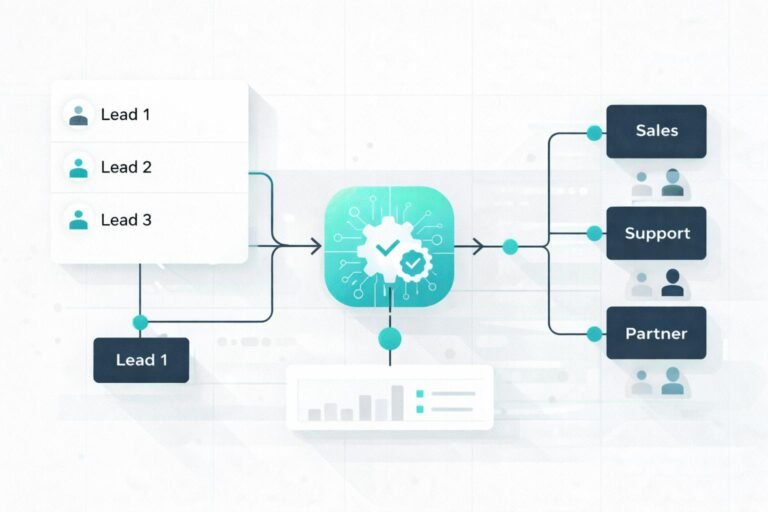
Consider a company that receives inquiries through its website. Without automation, an employee might need to review each submission, enter the information into a CRM, assign the lead, notify a sales representative, and prepare a follow-up email.
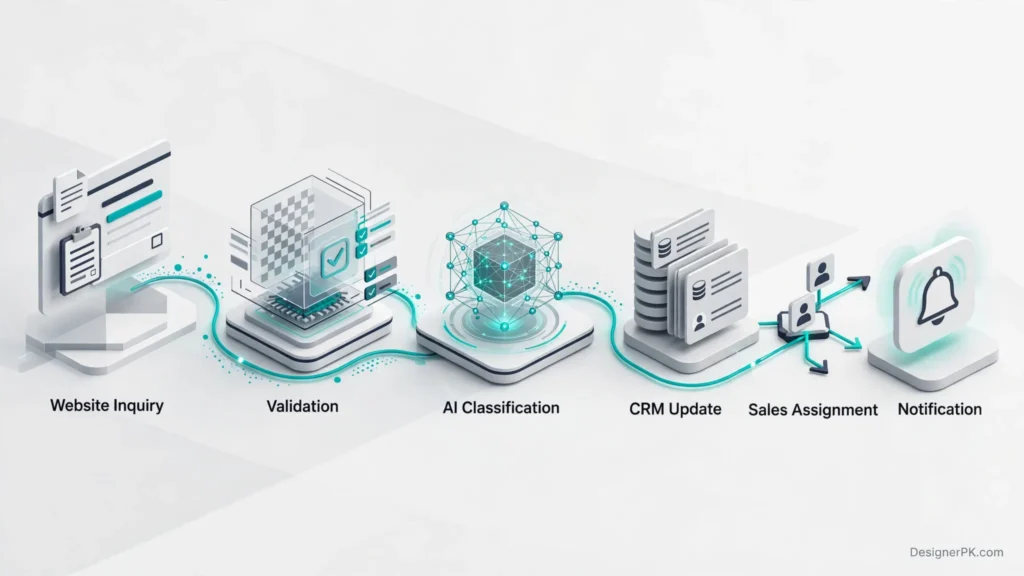
A properly designed workflow can handle much of this process automatically:
- A visitor submits an inquiry through the website form.
- The workflow receives and validates the submitted information.
- AI classifies the inquiry if contextual interpretation is needed.
- The system creates or updates the corresponding CRM record.
- The appropriate sales representative receives a notification.
- A follow-up message is prepared or sent according to approved business rules.
AI is especially useful when a workflow involves interpreting unstructured information, classifying messages, extracting details from documents, or generating contextual responses. For predictable operations, conventional automation rules are often simpler and more reliable.
Core Responsibilities of an AI Automation Specialist
A successful automation project requires attention to the entire implementation process, not just the software being used. Depending on the project, a specialist may handle the following responsibilities:
- Business process analysis: Review existing operations, identify repetitive activities, and determine which processes are suitable for automation.
- Workflow architecture: Plan triggers, conditions, data transformations, application connections, and automated actions.
- Automation platform development: Build workflows using n8n, Make.com, Zapier, or custom-developed applications.
- AI integration: Connect suitable AI models for classification, information extraction, summarization, and conversational functionality.
- API integration: Connect websites, CRMs, e-commerce platforms, communication services, and external business applications.
- Testing and troubleshooting: Identify failed executions, invalid data, duplicate events, authentication problems, and integration errors.
- Security and documentation: Configure appropriate access permissions, protect credentials, and document completed workflows.
- Ongoing maintenance: Monitor workflow execution, resolve integration issues, and update systems when connected applications change.
Why Business Process Understanding Matters
Technical knowledge alone does not guarantee a successful automation project. A developer needs to understand what happens before and after each automated action, who is responsible for the process, and how the system should respond when something goes wrong.
For example, automatically sending every customer inquiry to an AI chatbot can create problems when requests involve refunds, billing disputes, or sensitive account information. A better approach is to identify these situations and route them to an appropriate human representative.
Define business rules, exceptions, approval requirements, and expected outcomes before selecting an automation platform. This gives the developer a clearer implementation plan and helps prevent unnecessary complexity.
It is equally important to recognize when AI is not needed. If a process follows predictable rules, conventional automation may be more affordable, consistent, and easier to maintain than an AI-powered solution.
AI Automation Services You Can Hire a Specialist For
The services offered by an AI automation specialist depend on your existing applications, technical requirements, and the processes you want to improve. Rather than choosing a platform first, start by identifying the operational problem and finding a solution that addresses it.
Here are some common services businesses can consider when hiring a freelance developer or automation team.
Business Workflow Automation
Automate repetitive operations involving website forms, spreadsheets, email notifications, internal approvals, document processing, and application updates.
Example: Transfer website inquiries into a CRM, categorize submissions, and notify the appropriate department automatically.
AI Agents and Chatbots
Develop AI-powered assistants that interpret customer requests, retrieve relevant information, and interact with approved business applications.
Example: A customer support assistant that checks order information before preparing a response or escalating a request to a human agent.
Lead Routing and CRM Automation
Automate lead collection, information validation, prospect qualification, CRM updates, sales assignments, and follow-up activities.
Example: Assign qualified inquiries to sales representatives based on location, service requirements, or predefined business rules.
WhatsApp Business Automation
Connect approved WhatsApp Business integrations with CRMs, e-commerce platforms, and customer communication workflows.
Example: Send relevant order notifications and direct incoming customer questions to the appropriate support process.
Customer Support Automation
Automate ticket categorization, inquiry summaries, knowledge-base retrieval, support notifications, and escalation workflows.
Example: Classify incoming support requests and send complex or sensitive cases to human support agents.
Sales and E-commerce Automation
Connect WooCommerce, CRM systems, inventory applications, email platforms, and other business tools to simplify e-commerce operations.
Example: Synchronize WooCommerce order events with customer records and trigger relevant post-purchase communication.
Custom API and AI Integrations
Connect applications without suitable native integrations through REST APIs, webhooks, authentication, and custom development.
Example: Connect an internal business application with an external CRM and an AI-powered document processing workflow.
For broader implementation requirements, explore AI automation solutions from DesignerPK. You can also review our custom AI workflow development and AI agent development services.
Tools and Technologies an AI Automation Expert Should Know
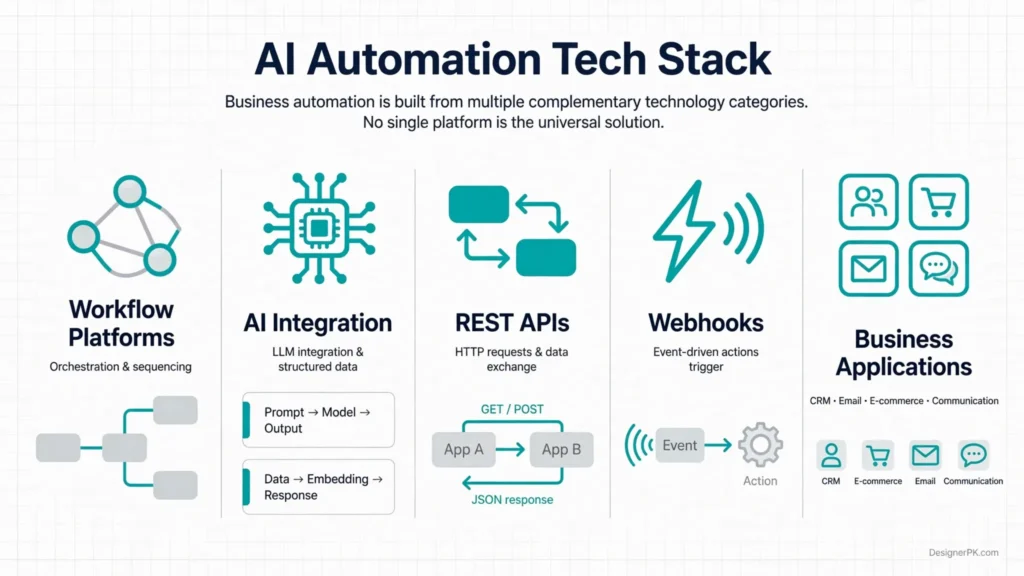
When evaluating a freelance AI automation developer, focus on their ability to select and integrate technologies rather than simply counting the platforms listed on their profile.
The right choice depends on workflow complexity, integration requirements, data sensitivity, execution volume, hosting preferences, and support needs. Ask the developer to explain why a particular technology fits your project.
1. n8n Automation
n8n is a workflow automation platform suited to businesses that need flexible integrations, conditional logic, custom API requests, and control over workflow execution. It supports both cloud-hosted and self-hosted deployment options.
An experienced n8n automation expert in Pakistan should understand workflow triggers, credentials, HTTP requests, data transformation, error workflows, execution monitoring, and webhook configuration.
For example, an n8n workflow can receive a website lead, validate the submitted information, apply qualification criteria, update a CRM, and notify the sales team.
Businesses considering self-hosting should also understand the responsibilities involved in server management, backups, access control, and ongoing updates.
Explore our practical guide on how to automate business tasks with n8n.
2. Make.com Automation
Make.com provides a visual environment for connecting applications and building multi-step workflows. It is useful for teams that want to create integrations through visual scenarios without writing custom code for every operation.
A qualified Make.com automation specialist should understand scenario design, routers, filters, iterators, data mapping, webhook processing, error handling, and execution limits.
For example, a business can use Make.com to collect form submissions, check customer information, create CRM records, and send internal notifications through connected applications.
3. Zapier Automation
Zapier is often a practical choice for straightforward integrations between commonly used business applications. It can automate form submissions, notifications, CRM updates, marketing activities, and other routine tasks.
A Zapier automation expert should know how to configure triggers, actions, filters, paths, application connections, and appropriate error-handling procedures.
For smaller projects, a straightforward Zapier workflow may be sufficient. More complex requirements should be assessed against platform task limits, application support, and recurring operating costs.
4. OpenAI APIs and AI Integrations
AI integration involves more than sending a prompt to a language model. A freelance AI automation developer should understand structured outputs, prompt design, API requests, context management, token usage, model limitations, and response validation.
Depending on the application, AI can help with:
- Classifying customer messages and support requests.
- Extracting structured information from documents.
- Summarizing customer conversations.
- Generating contextual business communications.
- Retrieving relevant information from approved knowledge sources.
- Supporting conversational workflows and AI agents.
AI-generated responses can be inaccurate or incomplete. Important business operations therefore need validation rules, appropriate permissions, and human approval where necessary.
For technical implementation details, consult the official OpenAI API documentation.
5. REST APIs, Webhooks, and CRM Integrations
API integration experience is one of the most valuable skills to verify before hiring an AI workflow automation expert. Native application connectors do not cover every business requirement, particularly when custom data exchange or specialized functionality is involved.
A technically capable specialist should understand:
- REST API methods, endpoints, request parameters, and response structures.
- API authentication, OAuth 2.0, access tokens, and credential rotation.
- Webhooks and event-driven workflow execution.
- JSON data structures, validation, and transformation.
- Pagination, rate limits, timeouts, and API errors.
- Duplicate prevention, retries, and idempotent operations.
For example, if a CRM does not offer the exact integration your business needs, a developer may use its REST API to exchange customer information with an automation platform.
For more complex integrations, explore custom API integration services and our guide to CRM REST API architecture, OAuth, and integration best practices.
Which Automation Platform Should You Choose?
Each platform serves different needs. Compare the available options against your actual workflow requirements instead of assuming one tool will work for every project.
| Platform | Suitable for | What to evaluate |
|---|---|---|
| n8n | Custom workflows and flexible integrations. | Deployment, APIs, error handling, access control, and maintenance. |
| Make.com | Visual multi-application automation. | Scenario design, data mapping, execution management, and operation limits. |
| Zapier | Common business application integrations. | Triggers, actions, task limits, and application support. |
| OpenAI APIs | AI-powered processing and conversational features. | Output validation, privacy, model selection, and API costs. |
| Custom development | Specialized application logic and integrations. | Architecture, maintainability, testing, and documentation. |
There is no universally best automation platform. A good specialist should explain the technical and financial trade-offs and select an approach that fits your requirements rather than forcing every project into the same technology.
Benefits of Hiring a Pakistan-Based AI Automation Specialist
Businesses in the United States and other international markets can work with Pakistan-based automation professionals through remote project arrangements. This provides an alternative to hiring an in-house developer for every automation requirement.
When considering an international development partnership, focus on technical capability, communication, project management, security, and the availability of support after delivery. These factors have a greater impact on project suitability than geographical location alone.
Access to Specialized Technical Skills
Instead of hiring a full-time employee for every technical requirement, businesses can engage an independent specialist or development team for a specific project, integration, or ongoing responsibility.
This arrangement can work well for startups, small businesses, marketing agencies, and e-commerce operators that need automation expertise without expanding their permanent development teams.
Flexible Project Engagement
Freelancers and development teams can work on clearly defined deliverables, such as CRM integration, lead routing, AI customer support, or workflow development.
Businesses can agree on the scope, establish milestones, and review deliverables before committing to a longer engagement. This also allows them to prioritize projects according to their operational needs.
Remote Collaboration With US Businesses
Pakistan-based specialists can collaborate with US companies through project management platforms, video meetings, shared documentation, and version-controlled development environments.
Time-zone differences require some planning. Agree on overlapping working hours, response expectations, meeting schedules, progress updates, and escalation procedures before development begins.
Potential Cost Flexibility
International hiring may offer different pricing options compared with local hiring. However, a lower initial development fee does not necessarily translate into lower total ownership costs.
Consider the complete implementation budget, including platform subscriptions, AI API usage, hosting, third-party services, maintenance, and future modifications.
Project-Based Technical Support
Some businesses need assistance with a single integration, while others require regular help with workflow monitoring and improvements. Freelance arrangements and agency engagements can accommodate both types of work.
Before hiring, clarify whether the agreement covers development only or also includes deployment, documentation, troubleshooting, and post-launch support.
Practical AI Automation Use Cases for Different Businesses
The value of an automation specialist becomes clearer when technical capabilities are connected to actual business problems. These examples illustrate common implementation opportunities, not guaranteed business outcomes.
Marketing Agencies
Marketing agencies can automate lead collection, campaign inquiry routing, CRM updates, reporting, and internal notifications.
Example workflow: Website form submission → lead validation → CRM record → sales notification.
Business value: Reduces manual data entry and helps teams organize incoming inquiries.
Real Estate Businesses
Real estate companies can organize property inquiries, categorize prospective buyers, distribute leads, and schedule follow-up tasks.
Example workflow: Property inquiry → requirement classification → agent assignment → follow-up reminder.
Business value: Helps agents manage inquiries according to property requirements and customer preferences.
WooCommerce Stores
WooCommerce businesses can connect order events with customer communication, support systems, CRM records, and internal operations.
Example workflow: New order → order information processing → approved notification → CRM update.
Business value: Simplifies repetitive order administration and customer communication.
SaaS Companies
SaaS businesses can automate user onboarding, subscription notifications, support categorization, and internal operational workflows.
Example workflow: New account → onboarding workflow → product instructions → customer success notification.
Business value: Helps maintain consistent operational processes as the customer base grows.
Sales Teams
Sales departments can automate prospect qualification, CRM updates, follow-up reminders, and sales activity notifications.
Example workflow: New prospect → qualification rules → sales pipeline update → assigned follow-up.
Business value: Helps sales representatives organize prospects and follow-up responsibilities.
Small Business Operations
Small businesses can reduce repetitive administrative work involving documents, approvals, email notifications, and reporting.
Example workflow: Document submission → information extraction → validation → approval request.
Business value: Reduces manual document handling while preserving necessary approval controls.
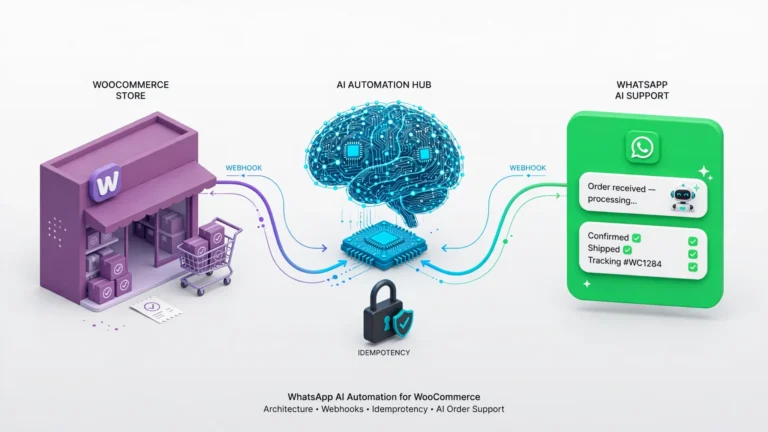
For additional implementation ideas, explore our resources on website automation ideas for small businesses and WhatsApp AI automation for WooCommerce.
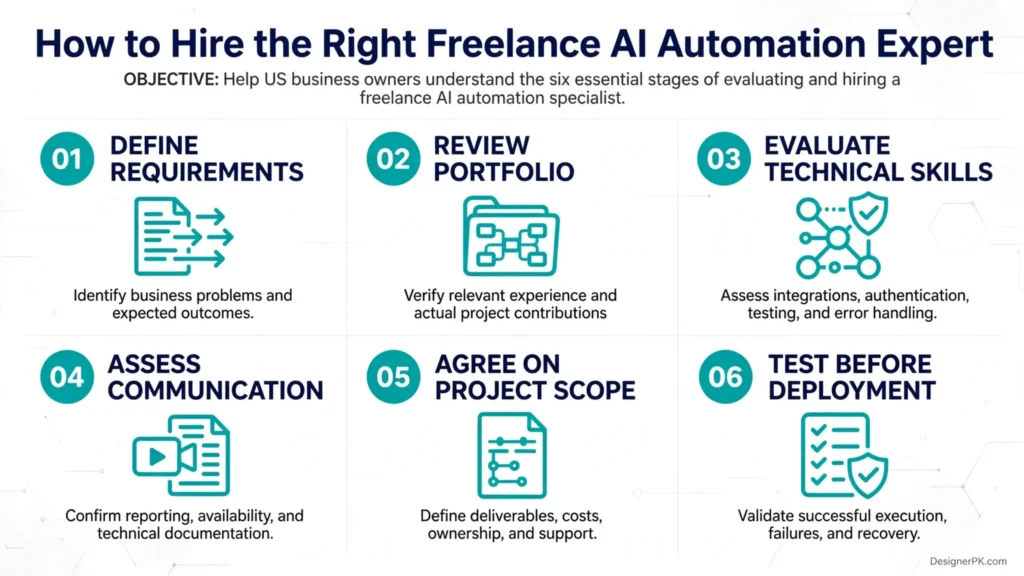
How to Hire the Right Freelance AI Automation Expert

Hiring an automation specialist involves more than reviewing a profile or selecting the lowest proposal. Evaluate whether the professional can understand your operations, make sound technical decisions, and deliver a solution that works reliably.
-
1
Define Your Business Automation Requirements
Start by identifying the repetitive process you want to improve. Document the applications involved, the information being exchanged, the people responsible, and the expected outcome.
For example, explain whether website inquiries need to be transferred into a CRM, qualified according to business rules, and assigned to sales representatives.
Documenting the existing workflow before discussing platforms helps developers understand the actual problem instead of making assumptions about your operations.
-
2
Review Relevant Portfolio Projects
Ask for examples that demonstrate similar technical requirements. Look for workflow screenshots, architecture explanations, integration details, and descriptions of how errors and exceptions are handled.
Do not rely exclusively on attractive dashboards or lists of software logos. Ask the specialist to explain their contribution to each project and how the implementation was tested.
-
3
Evaluate Technical Knowledge
Ask how the candidate handles API authentication, webhooks, rate limits, failed executions, duplicate events, data validation, and third-party service outages.
A capable freelance AI automation developer should explain technical decisions clearly and identify potential limitations before development begins.
For AI-based workflows, ask how model outputs are validated, sensitive operations are restricted, and requests requiring human approval are handled.
-
4
Assess Communication and Documentation
Confirm how progress will be reported, where project documentation will be maintained, and who will have access to workflow configurations and credentials.
Agree on meeting schedules, response times, deliverable reviews, and ownership of completed work.
For international engagements, establish overlapping working hours and a clear process for handling urgent technical issues.
-
5
Agree on Scope, Costs, and Deliverables
Request a written proposal covering workflow requirements, integrations, development milestones, testing, deployment, documentation, and post-launch support.
Identify external platform subscriptions, AI API charges, hosting, messaging services, and other recurring expenses separately.
Also clarify exclusions, change-request procedures, payment milestones, and project acceptance criteria.
-
6
Test the Solution Before Deployment
Request a staging or controlled testing environment where practical. Verify successful executions, invalid inputs, API failures, duplicate events, and recovery procedures.
For AI-powered workflows, test inaccurate model responses, ambiguous requests, unexpected inputs, and situations that should be escalated to a human.
Move the workflow into production only after the agreed acceptance criteria have been met.
How Much Does It Cost to Hire a Freelance AI Automation Expert in Pakistan?
The cost of hiring a freelance AI automation expert in Pakistan depends on workflow complexity, the number of integrations, the technologies involved, and the level of support required.
A basic notification workflow and a custom AI-powered business application involve very different levels of development. Rather than relying on advertised hourly rates, request a project-specific proposal based on your actual requirements.
Factors That Affect AI Automation Project Costs
- Workflow complexity: Multiple conditions, approval stages, data transformations, and interconnected processes require additional development and testing.
- Number of integrations: Connecting several applications may involve custom API development, authentication configuration, and compatibility testing.
- AI functionality: Document processing, AI agents, contextual responses, and structured data extraction can require additional development and validation.
- Existing infrastructure: Older applications, limited APIs, custom databases, and legacy systems may increase implementation effort.
- Security requirements: Sensitive business data may require additional access controls, infrastructure decisions, and security reviews.
- Testing and deployment: Production testing, monitoring, documentation, and recovery procedures should be included in the project scope.
- Ongoing support: Maintenance arrangements, troubleshooting, updates, and future improvements affect the overall cost.
Common Pricing Models
Automation specialists typically offer several engagement models depending on project scope and how clearly the requirements have been defined.
| Pricing model | How it works | Suitable for |
|---|---|---|
| Fixed project pricing | An agreed price for a defined scope and deliverables. | Clearly specified automation projects. |
| Hourly engagement | Payment based on development and troubleshooting hours. | Uncertain requirements and technical improvements. |
| Monthly retainer | Recurring payment for agreed maintenance and support. | Businesses requiring ongoing automation assistance. |
| Milestone-based pricing | Payments linked to agreed project stages. | Multi-stage integrations and larger implementations. |
Additional Costs to Consider
Development fees are only one part of the total project budget. Depending on the architecture, your business may also need to account for:
- Automation platform subscriptions.
- AI model and API usage.
- Cloud hosting or self-hosted infrastructure.
- Database and storage services.
- WhatsApp Business messaging charges.
- Third-party application subscriptions.
- Ongoing monitoring and technical maintenance.
Our recommendation: Compare proposals based on deliverables, reliability, documentation, ownership, and support. The lowest initial quote may not offer the best value if important implementation and maintenance responsibilities are excluded.
Maintenance, Scalability, and Long-Term Automation Support
An automation workflow is not a one-time installation that can be ignored indefinitely. Connected applications may change their APIs, authentication requirements, subscription limits, and data structures. A workflow that works during initial testing can encounter problems when its operating environment changes.
Plan maintenance responsibilities before launching an automation system, especially when it handles customer inquiries, sales records, orders, or other important business operations.
What Should Ongoing Maintenance Include?
- Monitoring failed workflow executions and identifying recurring problems.
- Updating integrations when third-party APIs or application features change.
- Reviewing authentication credentials and access permissions.
- Checking execution logs, resource consumption, and API usage.
- Testing changes before deploying them to production.
- Updating technical documentation as workflows evolve.
- Reviewing workflow performance as transaction volumes increase.
Planning for Future Business Growth
Scalable automation starts with thoughtful architecture. A specialist should consider execution limits, concurrency, API rate limits, data storage, workflow dependencies, and recovery requirements.
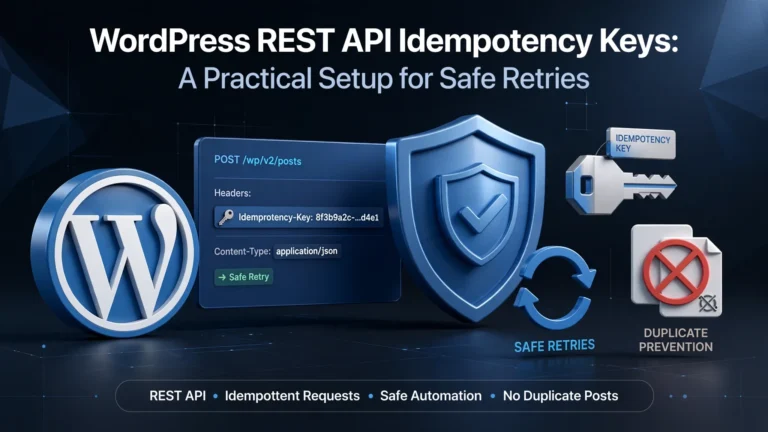
For important business operations, discuss idempotency and duplicate prevention. If a webhook is delivered more than once, the system should avoid unintentionally creating duplicate orders, CRM records, or other business transactions.
Separating critical processes into manageable workflow components can also make troubleshooting and future modifications easier than maintaining one large workflow with numerous interconnected operations.
Who Should Own the Automation System?
Before development begins, clarify who owns and controls these resources:
- Automation platform accounts and subscriptions.
- Workflow configurations and exported workflow files.
- Custom source code and integration scripts.
- API credentials and authentication configurations.
- Hosting environments and associated infrastructure.
- Technical documentation and deployment instructions.
Keep important business accounts under the client’s ownership and grant developers only the access needed to complete their responsibilities. This reduces dependency on a single freelancer and makes future technical handovers easier.
Security, Data Privacy, and Reliability in AI Automation
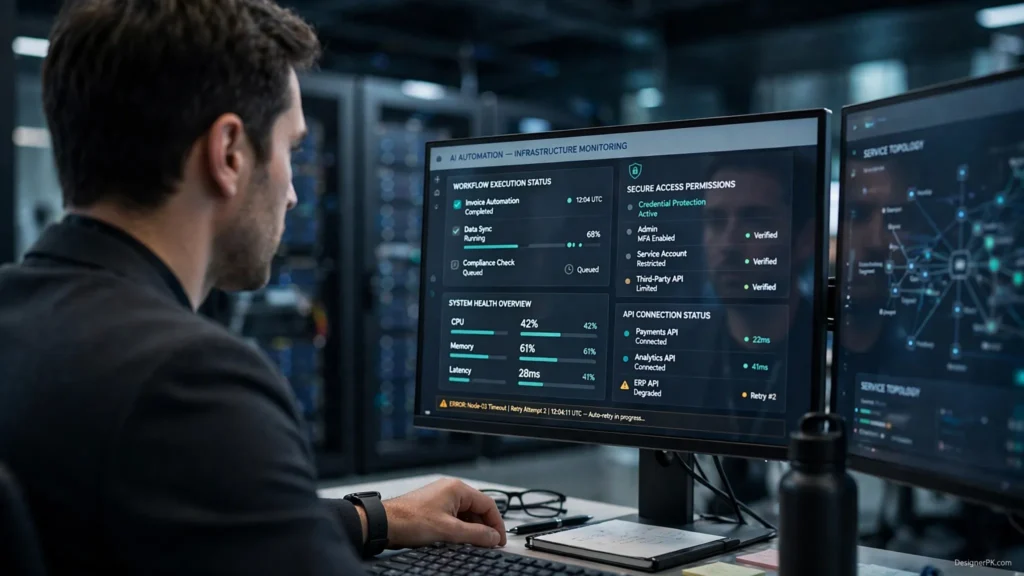
AI automation systems may process customer information, sales records, business documents, contact details, and internal operational data. Security should therefore be part of the system architecture from the beginning, not an optional feature added after development.
At DesignerPK, we consider security throughout the implementation process, from initial application access to production deployment and ongoing support.
API Authentication and Credential Management
API keys, OAuth tokens, passwords, and webhook secrets must be handled carefully. They should not be exposed in public workflow exports, source code repositories, client-side applications, or ordinary log messages.
A secure implementation should consider:
- Using restricted permissions wherever possible.
- Storing credentials in appropriate secret-management systems.
- Rotating credentials when necessary.
- Restricting access to production environments.
- Revoking access when a project or working relationship ends.
- Reviewing authentication and access logs where available.
Data Privacy and AI Model Usage
Before connecting business information to an AI provider, review its data processing terms, retention policies, and available privacy controls. Only send information necessary for the workflow, and avoid exposing unnecessary personal or confidential data.
AI providers may have different policies covering API data, application state, abuse monitoring, and optional data-retention controls. Using a particular AI platform does not automatically make the entire automation system private or compliant.
Businesses handling regulated or sensitive information should evaluate applicable contractual privacy requirements, relevant US state privacy laws, and industry-specific regulations. Consult qualified legal or compliance professionals when a project requires a formal regulatory assessment.
For provider-specific details, review the official OpenAI API data controls documentation.
Error Handling and Workflow Monitoring
Reliable automation requires a defined response to failures. A specialist should consider these controls:
- Retries: Retry temporary failures using appropriate limits and backoff strategies.
- Error notifications: Alert responsible personnel when important workflows fail.
- Duplicate prevention: Use idempotency controls for operations that must not execute twice.
- Input validation: Reject or isolate invalid data before processing.
- Monitoring: Track workflow executions and identify unexpected behavior.
- Recovery procedures: Define how failed transactions and incomplete operations will be reviewed and recovered.
Consider a lead-routing workflow that cannot update the CRM because its API is temporarily unavailable. A poorly designed system may silently lose the lead. A more reliable implementation should record the failure, follow an appropriate retry strategy, and notify the responsible team if recovery is unsuccessful.
Security Considerations for WordPress and WooCommerce
For WordPress and WooCommerce businesses, automation must work properly with existing website functionality, authentication, customer information, and order-processing operations.
Review API permissions, webhook authentication, user access, plugin compatibility, and customer data handling before connecting external automation platforms to a production store.
Businesses needing additional website support can explore our resources on WordPress website maintenance and WooCommerce checkout troubleshooting.
When Should You Hire a Freelance AI Automation Expert?
Hiring an automation specialist makes sense when repetitive operational work is taking up valuable time, multiple applications need to communicate, or existing workflows have become difficult to manage.
Consider professional automation development when:
- Your team repeatedly transfers information between different applications.
- Website inquiries are not reaching the correct sales representatives.
- Customer support requests require repetitive manual classification.
- Your CRM contains inconsistent or incomplete customer records.
- Your WooCommerce store needs better connections with customer communication and business systems.
- Existing automation workflows fail frequently or are difficult to maintain.
- Your business needs custom AI functionality that standard integrations cannot provide.
- Employees spend significant time processing documents, updating records, or preparing routine reports.
When You May Not Need AI Automation
Not every repetitive business task requires artificial intelligence. When a process follows predictable rules, conventional automation may be sufficient.
For example, transferring a website form submission into a spreadsheet does not necessarily require an AI model. A standard webhook or application integration can handle that operation with less complexity.
AI becomes more useful when a process involves language understanding, contextual classification, information extraction, document interpretation, or conversational interactions.
Start by identifying the operational problem and establishing the necessary business rules. Introduce AI only where it offers a meaningful advantage over conventional automation.
Best Practices Before Hiring an AI Automation Specialist
Use this checklist to evaluate potential developers and reduce misunderstandings before a project begins.
- Define the business problem and expected outcome before discussing tools.
- Request relevant examples of completed integrations or automation workflows.
- Ask the specialist to explain the proposed architecture and technology choices.
- Confirm how API credentials, customer data, and business information will be protected.
- Request a written scope covering deliverables, exclusions, and acceptance criteria.
- Clarify ownership of accounts, workflow configurations, source code, and documentation.
- Agree on testing, deployment, communication, and project milestones.
- Discuss monitoring, maintenance, and post-launch support responsibilities.
- Verify that another developer or internal team can take over the solution if necessary.
- Confirm how AI-generated outputs will be validated before important business actions.
Questions to Ask Before Hiring
During the initial consultation, ask practical questions that reveal how the specialist approaches technical challenges and project responsibilities.
- Which automation platform would you recommend for my requirements, and why?
- How will you handle API authentication, rate limits, and failed requests?
- How will the workflow prevent duplicate operations?
- What happens when an AI model produces an incorrect or incomplete response?
- How will customer information and API credentials be protected?
- What testing will be completed before production deployment?
- Will I receive workflow configurations, documentation, and ownership of the completed work?
- What maintenance and support options are available after launch?
A good freelance AI automation developer should explain technical decisions in terms you can understand. If a proposal promises complete automation without addressing exceptions, data quality, testing, or failure recovery, ask for more detail before proceeding.
Frequently Asked Questions About Hiring a Freelance AI Automation Expert in Pakistan
What does a freelance AI automation expert in Pakistan do?
A freelance AI automation expert designs and implements business workflows using tools such as n8n, Make.com, Zapier, and AI APIs. Their work may include CRM integrations, lead routing, AI agents, customer support automation, WhatsApp workflows, and system maintenance.
Can US businesses hire AI automation experts from Pakistan?
Yes. US businesses can work with Pakistan-based freelancers and development teams through remote collaboration. Establish clear communication schedules, project milestones, data access rules, deliverables, and support arrangements before hiring.
How much does it cost to hire an AI automation freelancer in Pakistan?
Pricing depends on workflow complexity, the number of integrations, AI functionality, API requirements, security needs, testing, and ongoing support. Request a project-specific proposal and check whether platform subscriptions, hosting, and API usage are included or billed separately.
Which tools should an AI automation specialist know?
Relevant technologies include n8n, Make.com, Zapier, OpenAI APIs, REST APIs, webhooks, and CRM platforms. The right combination depends on the project. API integration, data handling, error recovery, and workflow monitoring are equally important skills.
How long does an AI automation project take?
Project timelines depend on scope, integration complexity, application availability, testing requirements, and access to business stakeholders. A straightforward workflow may require substantially less development than a custom AI agent connected to several business systems. Request a realistic delivery estimate after the requirements have been reviewed.
Is AI business process automation secure?
AI automation can be implemented with appropriate security controls, but overall security depends on the complete system. Important measures include secure credential storage, restricted API permissions, data minimization, suitable AI provider settings, access monitoring, and documented recovery procedures.
Should I hire an n8n expert or a Zapier automation specialist?
Choose according to your workflow requirements. n8n can suit flexible integrations and custom workflow architectures, while Zapier can work well for straightforward integrations between supported applications. Make.com is another option for visual multi-step workflows. Ask the specialist to explain the trade-offs before selecting a platform.
Can an AI automation freelancer integrate WooCommerce with WhatsApp and CRM systems?
Yes, provided the required APIs, platform permissions, and supported integrations are available. The solution may connect WooCommerce order events with approved WhatsApp Business messaging services and CRM records. It should also account for consent requirements, data handling, and error management.
Does an AI automation project require ongoing maintenance?
Many production workflows need ongoing maintenance because APIs, authentication methods, application features, and usage limits can change. Agree on monitoring, troubleshooting, updates, and support responsibilities before deployment.
How do I choose the right AI automation specialist for my business?
Review relevant portfolio work, verify API and integration experience, assess security practices, and discuss workflow architecture. Request clear project documentation and choose someone who can explain how the solution will be tested, maintained, and scaled.
Can a freelance AI automation expert build custom AI agents?
Yes. A qualified developer can integrate AI models with approved business applications, APIs, and knowledge sources to create AI-powered assistants. The implementation should include appropriate permissions, output validation, monitoring, and human escalation for sensitive operations.
Find the Right AI Automation Expert for Your Business
Hiring the right freelance AI automation expert in Pakistan starts with identifying the processes you want to improve and the technical skills needed to address them.
A capable specialist should understand your existing operations, select suitable technologies, build reliable integrations, protect business information, and account for future support requirements.
Whether you run a small business, an e-commerce store, a marketing agency, or a growing SaaS company, well-planned automation can simplify repetitive tasks and help your applications work together more effectively.
At DesignerPK, we provide website development, API integration, AI workflow development, and business automation solutions. Our team can assess your requirements and discuss a practical implementation approach for your business.
Looking to Hire an AI Automation Expert?
Tell us about your business processes, existing applications, and automation goals. Our team can review your requirements and help identify a suitable solution for your workflow.
Get a Free AI Automation Consultation
Explore our AI automation services to learn more about our implementation capabilities.