WORDPRESS AI AUTOMATION GUIDE
WordPress AI Workflow Automation: Bit Flows vs AI Workflow Automation vs Uncanny Automator vs n8n
Compare four WordPress automation tools by AI features, pricing models, data handling, human approval options, and where each workflow runs.
Affiliate Disclosure: Some links on this page are affiliate links. If you complete a purchase through them, we may earn an affiliate commission at no extra cost to you. Our technical evaluations remain completely independent of compensation.
How We Reviewed These Tools: We reviewed official product documentation, vendor marketing materials, WordPress.org plugin listings , published release notes, pricing pages, and licensing terms as of September 30, 2026. We did not run independent lab benchmarks or controlled server performance tests. When we discuss performance, we are describing differences based on the technical specifications published by each vendor.
How WordPress AI Automation Works

If you’re using AI to automate WordPress tasks, one of the biggest decisions is where the workflow runs.
Native WordPress plugins run inside your website’s hosting environment. They share PHP memory, database connections, and other server resources with your website. External workflow tools run the automation outside the WordPress PHP process. WordPress then connects to those tools through APIs and webhooks.
For business owners, marketing teams, managers, and anyone comparing WordPress AI automation tools, six areas are especially important:
- Where the workflow runs: Complex AI tasks can use a lot of server resources. Running them outside WordPress can keep that workload separate from normal website traffic.
- How AI keys and accounts work: Bring Your Own Key (BYOK) lets you connect your own AI provider account. You generally pay the provider directly for usage. Managed cloud services can make setup easier but may have their own usage plans or limits.
- Human approval: Human-in-the-Loop (HITL) means a person can review, edit, approve, or reject an AI-generated result before it changes your website or calls another service.
- AI connection standards: Tools such as the Model Context Protocol (MCP) and WordPress Abilities give AI systems structured ways to use website functions. For more information, see our WordPress MCP integration guide .
- Customization: Developers may need custom PHP, JavaScript, or Python code when a workflow goes beyond the built-in features.
- Security and data handling: You should know where credentials are stored, whether your prompts leave your server, and how webhook connections are protected.
WordPress


↓
Native Automation Plugin
↓
AI Provider / External ServiceWordPress
↓
API / Webhook
↓
External Workflow Engine
↓
AI Provider / External ServiceFeature Comparison
The table below summarizes capabilities documented by the vendors and official listings as of September 30, 2026.
| Platform | Where It Runs | AI Features | Connections & Customization | Human Approval | BYOK / Account Model |
|---|---|---|---|---|---|
| Bit Flows | Inside WordPress (PHP / Queue) | AI Agent nodes, OpenAI/Anthropic actions | MCP Client + MCP Server, webhooks, visual node builder | Human approval controls | Direct BYOK supported |
| AI Workflow Automation | Hybrid (Local BYOK / Cloud) | RAG / Knowledge Base, AI Agent Chatbot, PDF generation | WordPress 6.9+ Abilities, MCP Adapter, custom nodes | Operator Inbox & task approvals | Local BYOK (no account) or keyless Cloud |
| Uncanny Automator | Inside WordPress (PHP) | Uncanny Agent, AI Recipe Actions, Page Builder AI | 240+ WordPress plugin integrations, webhooks, PHP hooks | Approval prompts for important Agent/Page Builder actions | Agent: Managed / No key Recipes: Provider integrations |
| n8n | External server (Node.js) | AI Agent, vector stores, sub-workflows | LangChain integrations, custom JavaScript/Python code | Wait Nodes & webhook approvals | Direct BYOK / Credential Storage |
1. Bit Flows
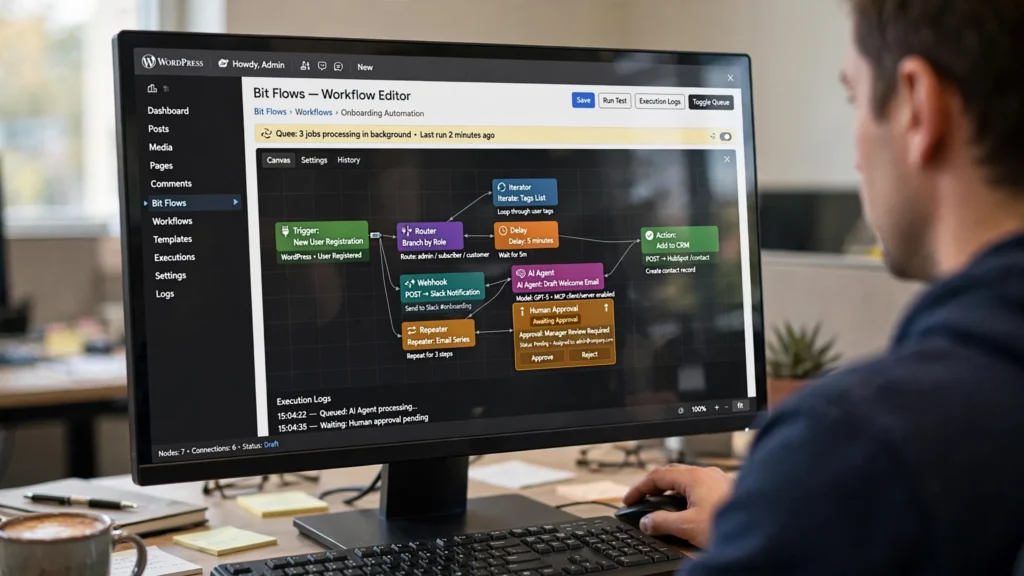 Developed by Bit Apps, Bit Flows is a visual WordPress automation plugin. It uses a node-based canvas to connect WordPress, outside services, and AI providers.
Best For
Bit Flows may be a good fit for teams that want to build visual workflows directly inside WordPress and connect their site with other apps and AI services.
Key Features
- Visual workflow builder: You can create multi-step workflows with a drag-and-drop interface. It supports branching, routers, repeaters, iterators, and delays ( Bit Flows Documentation ).
- AI and MCP support: Bit Flows includes AI Agent nodes and supports the Model Context Protocol (MCP) as both a client and a server. This gives workflows a structured way to work with AI tools and services.
- App connections: The vendor advertises hundreds of app integrations, although the exact number varies across its marketing pages. It also supports incoming and outgoing webhooks.
- Background processing: Bit Flows supports queue-based processing and cloud-cron options for running tasks in the background.
- Workflow monitoring: Detailed execution logs help administrators review workflow activity, errors, and results.
- Human approval: Human-in-the-Loop approval controls allow a person to review certain actions before they are completed.
Pros and Cons
Visual workflow building
You can create workflows without writing every step as code.
Works inside WordPress
Your team can manage workflows from the WordPress environment.
MCP support
Bit Flows supports MCP as both a client and a server.
Background queues
Queue-based processing can help handle longer-running tasks without putting everything into a normal website request.
Main limitation
Because Bit Flows runs with WordPress, it still depends on your hosting environment, PHP memory limits, database performance, and background-processing setup.
Shared hosting concerns
Large or continuous batch jobs can put extra pressure on resource-limited shared hosting and may affect website performance.
When It May Not Be a Fit
Bit Flows may not be the right choice if you need workflow processing to be completely separate from WordPress PHP. It may also not be a fit if you need custom server-side Python vector pipelines.
Pricing
Bit Flows offers annual and lifetime licensing options. Check current Bit Flows pricing
Bottom Line
Bit Flows may be a good option for teams that want a visual workflow builder inside WordPress, especially if MCP client and server support is important to their setup.
2. AI Workflow Automation
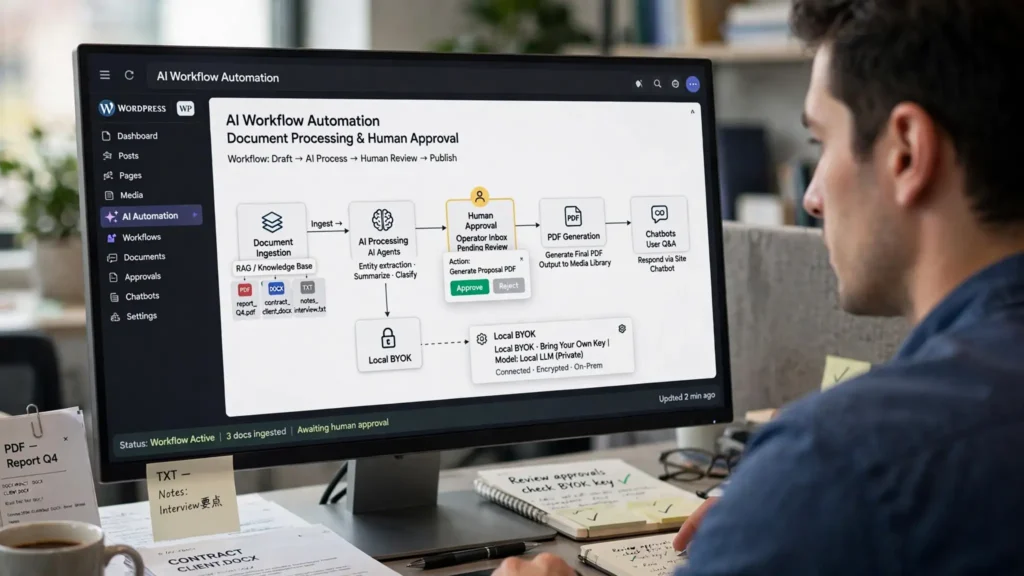 AI Workflow Automation, available as a Lite edition on WordPress.org , is an AI-focused WordPress automation plugin built around a React Flow interface.
Best For
This may be a good fit for teams that want AI-focused automation, direct connections to AI providers, document-based RAG, and human approval tools inside WordPress.
Key Features
- AI tools: The plugin includes RAG / Knowledge Base document ingestion for PDF, DOCX, and TXT files. It also includes PDF generation, interactive AI agent chatbots, in-canvas AI assistants, WooCommerce product cards, chat memory, and rate limiting ( AI Workflow Automation Documentation ).
- Local BYOK: You can use your own AI provider key directly from your WordPress site. This does not require a third-party platform account.
- Cloud option: An optional Cloud keyless mode uses a managed hosted service, so you do not have to provide your own AI provider key.
- Human approval: The Operator Inbox and Tasks approval page allow team members to review chatbot handoffs and workflow actions before they are completed.
- WordPress Abilities: On supported WordPress 6.9+ installations, eligible workflows can be exposed as WordPress Abilities.
- MCP support: When the MCP Adapter is enabled, eligible workflows can also be exposed as MCP tools on an opt-in basis.
How the Two Account Options Work
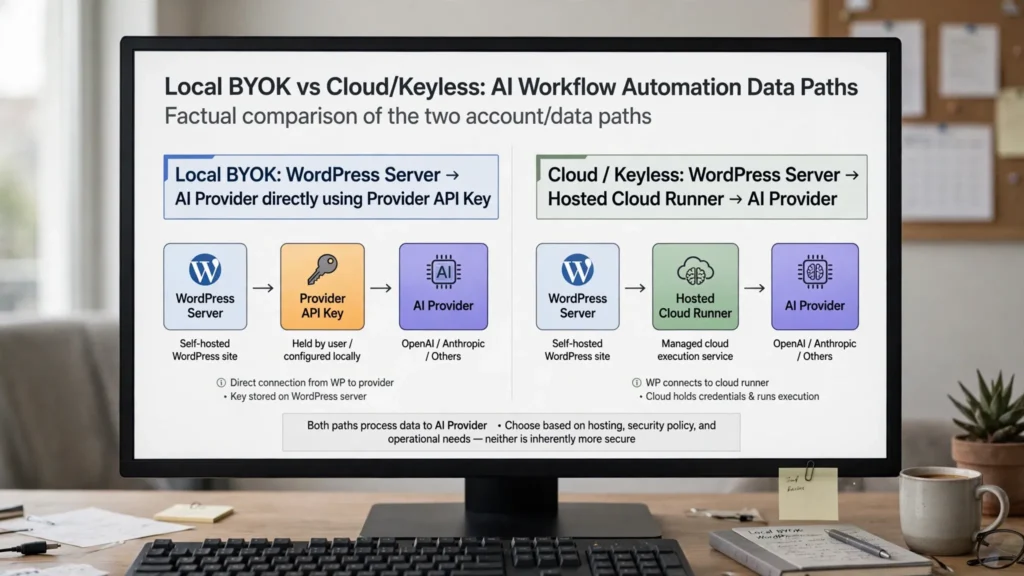
Local Mode
API Key: Your direct provider key (OpenAI, Anthropic, OpenRouter)
Platform Account Required? No
How Data Moves:
WordPress Server → AI Provider directlyCloud / Keyless Mode
API Key: Managed hosted service
Platform Account Required? Yes (Free / Paid Account)
How Data Moves:
WordPress Server → Hosted Cloud Runner → Provider| Mode | API Key | Platform Account Required? | How Data Moves |
|---|---|---|---|
| Local Mode | Your direct provider key (OpenAI, Anthropic, OpenRouter) | No | WordPress Server → AI Provider directly |
| Cloud / Keyless Mode | Managed hosted service | Yes (Free / Paid Account) | WordPress Server → Hosted Cloud Runner → Provider |
Pros and Cons
Direct AI connections
Local BYOK lets you connect directly to providers such as OpenAI, Anthropic, and OpenRouter without needing a separate platform account.
Local data path
According to the vendor, Local mode keeps workflow data and provider API keys in WordPress and sends the data directly to the selected AI provider.
Strong AI focus
The plugin includes RAG, document processing, AI agents, chatbots, PDF generation, and other AI-focused features.
Human review
The Operator Inbox gives teams a central place to review workflow actions before they are completed.
Main limitation
Local BYOK means site administrators are responsible for protecting API keys stored in WordPress-managed storage.
Changing WordPress standards
Features that rely on WordPress Abilities and MCP depend on continued development and adoption across the broader WordPress ecosystem.
When It May Not Be a Fit
This may not be the right option if you do not want to manage your own AI provider keys. It may also not be a good fit if you are mainly looking for a traditional, non-AI recipe automation plugin.
Pricing
AI Workflow Automation provides free Local BYOK execution with optional paid Cloud tiers. Check current AI Workflow Automation pricing
Bottom Line
AI Workflow Automation may be a good fit if you want direct BYOK provider connections, local data handling, document-based RAG, and human approval through an Operator Inbox.
3. Uncanny Automator
 Developed by Uncanny Owl, Uncanny Automator is a WordPress automation platform built around three main areas: the Recipe Builder, Uncanny Agent, and Uncanny Page Builder ( Uncanny Automator Documentation ).
Best For
Uncanny Automator may be a good fit for teams that want to connect WordPress plugins through predictable, event-based workflows while also having access to AI-powered website assistance.
Key Features
- Three main tools: The platform combines event-based recipes for 240+ WordPress plugins, natural-language website management through Uncanny Agent, and AI-assisted content creation through Uncanny Page Builder.
- Large WordPress ecosystem: Its Recipe Builder can connect more than 240 WordPress plugins for different types of automated tasks.
- Managed AI: Uncanny Agent uses a managed AI model interface, so you do not need a separate OpenAI key for the Agent.
- Direct AI provider connections: Standard automation recipes can connect directly to AI providers such as OpenAI, Anthropic, and Google Gemini.
- Approval options: Agent approval prompts and Page Builder review workflows allow users to review important actions or content before they are completed.
Pros and Cons
Many WordPress integrations
The platform supports more than 240 WordPress plugin integrations.
Predictable recipes
The Recipe Builder is designed for event-based automation. This works well when you want a specific action to happen after a specific event.
Built-in AI assistance
Uncanny Agent adds a conversational way to ask questions about your site and perform supported actions.
AI content tools
Uncanny Page Builder provides AI-assisted content-building features.
App credits
The free Lite version includes a limited number of app credits, such as 250 credits. Paid Pro plans provide unlimited app automations ( App Credits Documentation ).
Outside limits still apply
External APIs and services can have their own rate limits.
AI workflow limitation
The Recipe Builder is mainly designed for predictable, event-based WordPress automation. Uncanny Agent provides a separate conversational AI layer rather than turning every recipe into an autonomous AI agent workflow.
When It May Not Be a Fit
Uncanny Automator may not be the right choice if your main goal is to build complex, non-deterministic autonomous AI agent chains. It is more focused on WordPress recipes and plugin-to-plugin automation, with AI features available as a separate layer.
Pricing
Uncanny Automator offers a free Lite edition alongside annual Pro plans with unlimited app automations. Check current Uncanny Automator pricing
Bottom Line
Uncanny Automator may be a good fit for teams that want to connect established WordPress plugins through predictable recipes while also having access to managed natural-language AI features.
4. n8n: An External Workflow Tool
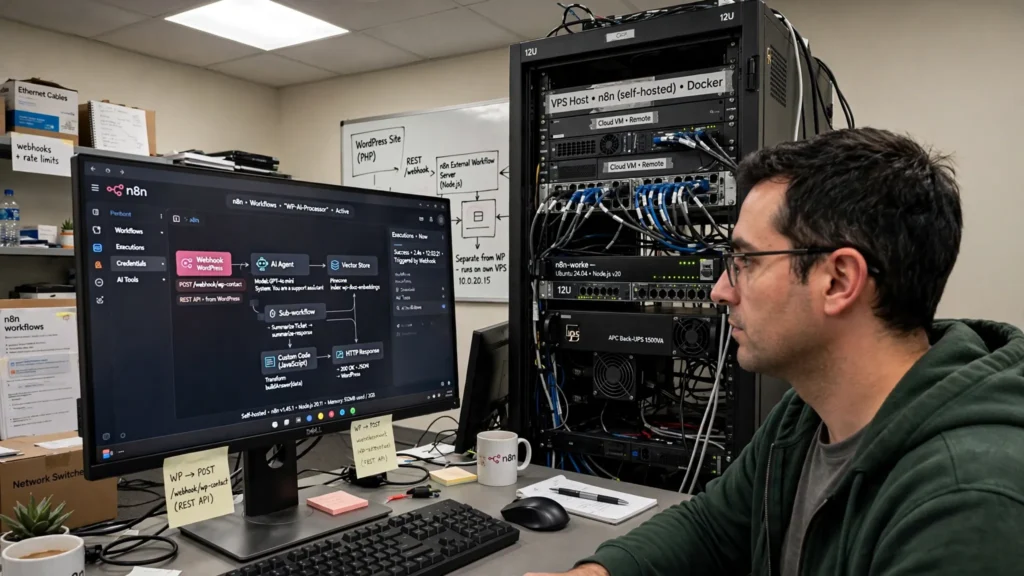 n8n is a workflow automation platform that runs separately from WordPress PHP. You can host it yourself or use n8n Cloud.
Best For
n8n may be a good fit for teams that need advanced workflows, heavy AI processing, custom code, or a separate server that can handle automation without using WordPress hosting resources.
Key Features
- Runs outside WordPress: Workflow processing, data processing, and heavy AI tasks can run on a separate server. n8n communicates with WordPress through REST APIs and webhooks.
- AI tools: n8n includes AI Agent nodes, vector-store integrations, LangChain nodes, sub-workflows, and other tools for building advanced AI workflows.
- Custom code: You can use JavaScript and Python code when the built-in workflow tools are not enough.
- Vector stores: n8n supports vector-store integrations such as Qdrant and Pinecone. These tools can be used for AI workflows that need to search and work with stored information.
- Community integrations: n8n also supports community integrations that can extend what you can connect to your workflows.
- Flexible hosting: n8n is available as a self-hosted Community option, paid Enterprise self-hosted instances, and managed n8n Cloud plans.
- Execution-based Cloud plans: n8n Cloud plans use execution-based usage limits. One execution represents a complete workflow run rather than one individual workflow step.
Licensing and Hosting
The self-hosted Community option is governed by the n8n Sustainable Use License . n8n also offers paid Enterprise self-hosted options and managed Cloud plans.
Pros and Cons
Separate processing
Heavy automation work does not have to compete with your WordPress PHP process.
Developer flexibility
JavaScript and Python let technical teams build custom logic when standard workflow nodes are not enough.
Advanced AI support
n8n supports AI agents, vector stores, sub-workflows, and other tools for complex AI automation.
Self-hosting option
Teams can run n8n on their own infrastructure rather than relying on n8n Cloud.
More maintenance
Self-hosting means maintaining a separate environment. This can include Docker, Node.js, PostgreSQL, SSL certificates, backups, and other server tasks.
Network dependency
WordPress actions depend on HTTP and REST connections. Secure webhook setup and error handling are therefore important.
When It May Not Be a Fit
n8n may not be the right choice if you want a WordPress-only plugin that works entirely inside wp-admin without separate server infrastructure.
Pricing
n8n offers self-hosted options under Sustainable Use License terms alongside tiered Cloud plans. Check current n8n pricing
Bottom Line
n8n may be a good fit when you need high-volume workflows, complex multi-step AI agent processes, or a separate server to handle automation work instead of your WordPress hosting.
Security, Privacy, and API Keys
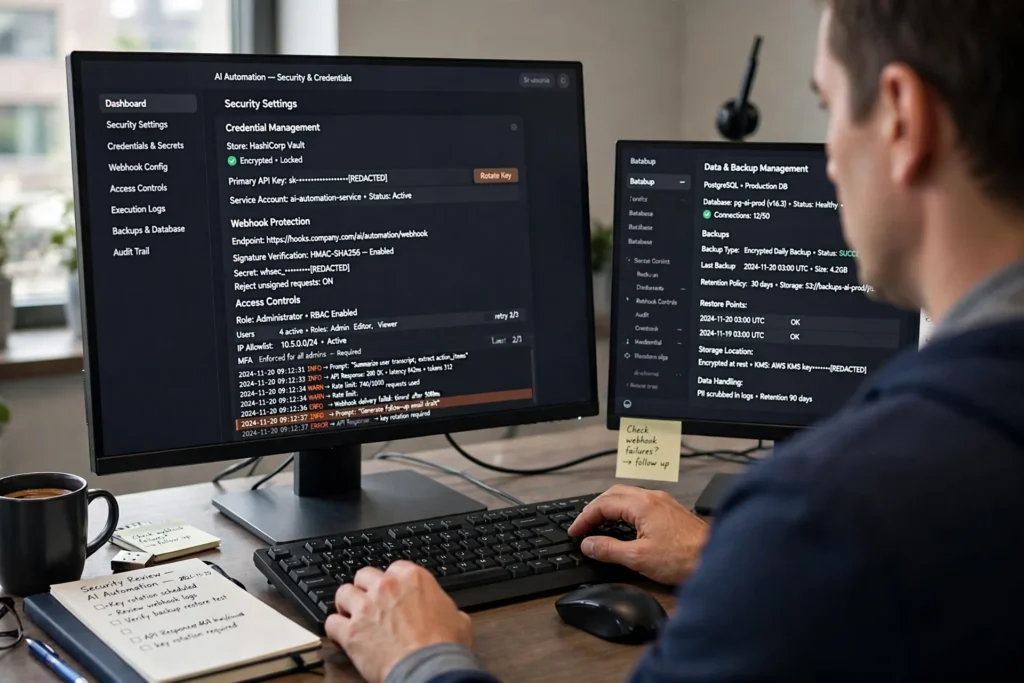
Adding AI to WordPress creates several security questions. You need to know where your API keys are stored, where your prompts are sent, and how connections to outside services are protected.
What to Consider
Local vs. Cloud Data
In AI Workflow Automation’s Local mode, the vendor says workflow data and provider API keys remain in WordPress and are sent directly to the selected AI provider. Cloud mode sends the data needed for the workflow through the hosted execution service.
API Key Storage
Native WordPress plugins store provider credentials in WordPress-managed storage. The exact storage method depends on the plugin and your system setup. Administrators should protect the database, limit admin access, and secure backups.
n8n Credentials
n8n stores credentials in its own encrypted external database or secret manager.
Webhook Security
External tools such as n8n may require WordPress REST API or webhook endpoints. Secure setups should use secret-token verification, signature headers, and least-privilege application passwords.
Activity Logs
Bit Flows, AI Workflow Automation, and n8n provide execution logs that can show prompt inputs, API responses, and errors. These logs can help administrators review automated activity.
For any AI automation setup, your team should understand what data is being sent to an AI provider and what information is stored by the automation platform. This is especially important when workflows handle customer, employee, financial, or other sensitive business data.
Error Handling and Retries
 AI services do not always respond successfully. You may encounter rate limits such as HTTP 429 errors, temporary service outages such as HTTP 503 errors, or connection timeouts.
The way an automation tool handles these problems can affect how reliable your workflows are in everyday use.
How These Tools Handle Failures
Background Retries
Bit Flows provides queue processing and retry options so failed steps can be tried again without crashing a normal user request. n8n offers error workflows, node retries, and the ability to resume manual executions.
Rate Limits
AI Workflow Automation includes built-in rate-limiting controls. These can help prevent batch jobs from overwhelming provider limits.
Human Approval
When a workflow reaches an approval step, such as the Operator Inbox in AI Workflow Automation or a Wait Node in n8n, the workflow can pause until someone approves or rejects the action.
For businesses that rely on automated AI tasks, retry and recovery options are important. A workflow that stops after one temporary API problem may require more manual work than a workflow that can safely retry or wait for approval.
Background Jobs: WP-Cron vs. Server Cron
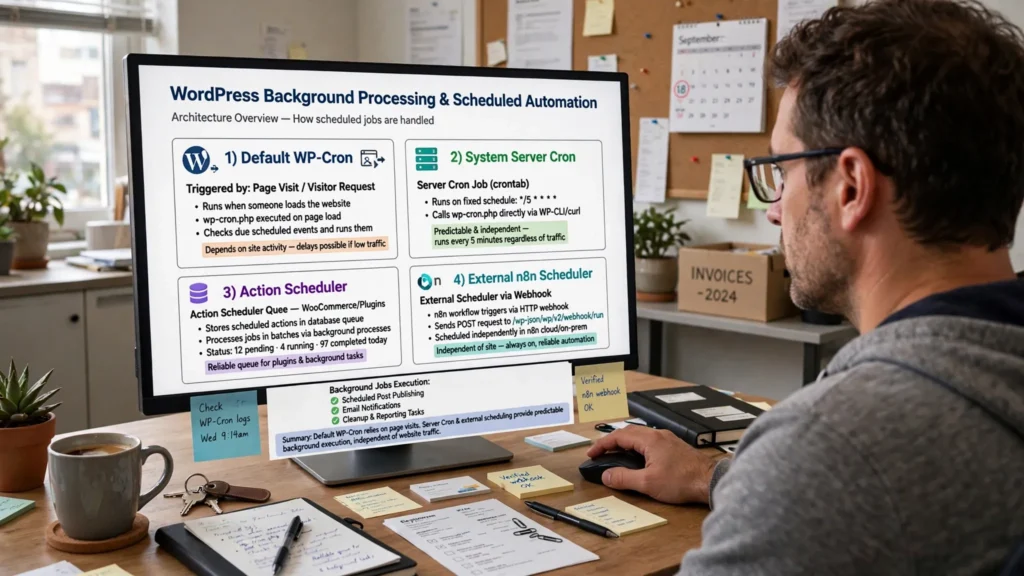 Scheduled and background WordPress tasks depend on how your site handles cron jobs. This can affect when automated tasks actually run.
Default WP-Cron
WordPress normally uses WP-Cron to trigger scheduled tasks when someone loads a page.
On a low-traffic site, scheduled jobs can be delayed because there may not be enough page visits to trigger them. On a high-traffic site, heavy AI jobs can compete with normal website requests for server resources.
Server Cron and Action Scheduler
A real system cron job can provide more predictable scheduling. For example, a server can be configured to run a cron job every minute.
Using a system server cron job or Action Scheduler can improve background-job reliability for native plugins such as Bit Flows, AI Workflow Automation, and Uncanny Automator.
See our WordPress cron optimization guide for more information.
External Scheduling with n8n
n8n has its own server-based scheduler. Scheduled workflows can therefore run independently of WordPress visitor traffic.
This is one of the key differences between an external workflow engine and a WordPress-native automation plugin.
What Goes Into the Total Cost?
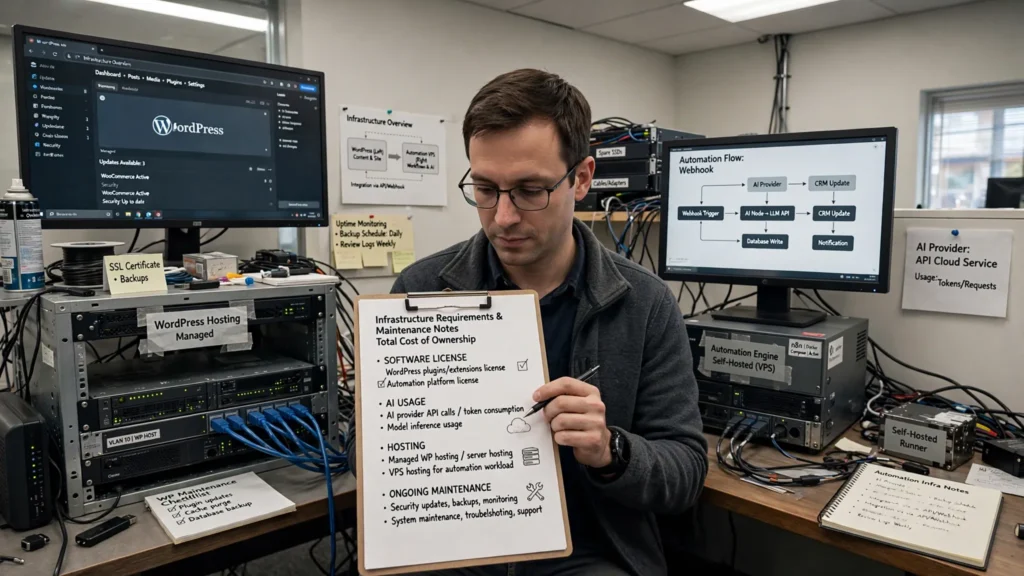
The software license is only one part of the cost of an automation setup. Your total cost can include four main areas: the software license, AI usage, hosting, and ongoing maintenance.
The table below shows how those costs differ between the main approaches covered in this article.
| Setup | Main License Cost | AI Costs | Infrastructure Costs | Main Cost Trade-Off |
|---|---|---|---|---|
| Native Plugin + Local BYOK (e.g., AI Workflow Automation, Bit Flows) | Plugin License (Annual/Lifetime) or Free Lite | Direct token charges paid to the provider (OpenAI, OpenRouter, etc.) | Existing WordPress hosting | Little or no intermediary usage markup; your WordPress server handles the processing load. |
| Native Plugin + Managed Agent (e.g., Uncanny Automator Pro) | Plugin Subscription | Included in plan / App credits or direct provider key | Existing WordPress hosting | More predictable pricing, although free-tier app-credit limits may apply. |
| External Engine Self-Hosted (e.g., n8n Self-Hosted) | Self-hosted Community option / license terms apply | Direct token charges paid to the provider | VPS Host (Docker/Node.js) + Maintenance time | No n8n Cloud subscription is needed for self-hosting, but you take on server costs, maintenance, and applicable licensing requirements. |
| External Engine Cloud (e.g., n8n Cloud) | Monthly/Annual Cloud Tier (billed per workflow execution) | Direct token charges paid to the provider | Fully managed hosting | You pay a recurring service fee but do not have to maintain the server yourself. |
What This Means for Your Business
A WordPress-native setup can keep your infrastructure simple because you are using your existing WordPress hosting. However, that also means your website server handles the workflow workload.
A self-hosted external tool such as n8n moves that workload to a separate server. This gives you more separation and flexibility, but it also means you have another server to manage.
Cloud services remove much of that server maintenance, but they add an ongoing service cost and may use their own usage limits or pricing structure.
Which Option Fits Your Needs?
The right automation tool depends on how your team works, where you want workflows to run, and how much technical control you need. Use the guide below to narrow down the options.
| What You Need | Options to Consider |
|---|---|
| Local BYOK provider control without requiring a separate platform account | AI Workflow Automation (Local Mode), Bit Flows, and n8n (Self-Hosted) |
| Connect WordPress plugins for LMS, e-commerce, forms, and other common tasks | Uncanny Automator and Bit Flows |
| RAG document processing for PDFs and other documents, plus a support or operator inbox | AI Workflow Automation and n8n |
| Move workflow processing completely away from the WordPress server | n8n |
| WordPress 6.9+ Abilities and MCP tool integration | AI Workflow Automation, WordPress MCP-compatible solutions, and ecosystem plugins. Check compatibility for your specific use case. |
| A visual workflow builder inside WordPress | Bit Flows and AI Workflow Automation |
How to Think About the Four Options
Bit Flows
Bit Flows keeps workflow building inside WordPress while providing a visual canvas, AI features, MCP support, webhooks, queues, and approval controls.
AI Workflow Automation
AI Workflow Automation focuses more heavily on AI-powered workflows. Its Local BYOK mode can connect directly to providers, while its Cloud option provides managed execution. It also includes RAG features and an Operator Inbox.
Uncanny Automator
Uncanny Automator focuses on WordPress automation recipes and connections between WordPress plugins. Its AI features add natural-language assistance and AI-powered content tools.
n8n
n8n takes a different approach. It runs outside WordPress and gives teams more control over custom code, AI agents, data processing, and server resources. The trade-off is that self-hosted deployments require additional infrastructure and ongoing maintenance.
Frequently Asked Questions
Does BYOK eliminate AI platform markups?
BYOK, or “Bring Your Own Key,” means your workflow sends requests directly to an AI provider using your own API key. This can avoid usage markups from third-party SaaS middleware when that middleware would otherwise sit between your server and the AI provider. However, BYOK does not eliminate your overall AI costs. You still pay the AI provider for token usage, along with any plugin, hosting, or infrastructure costs.
What is the main difference between WordPress plugins and external tools such as n8n?
WordPress-native plugins run their workflow logic within the WordPress hosting environment. They share server resources such as PHP memory and database connections with your website.
n8n runs as a separate application. It communicates with WordPress through REST APIs and webhooks. This separates workflow processing from the WordPress PHP environment, but it also adds another system that your team may need to manage.
How do Human-in-the-Loop (HITL) controls improve workflow safety?
Human-in-the-Loop, or HITL, means a person reviews an automated action before the workflow continues. For example, a team member can review AI-generated content or an important database change before it is completed.
HITL does not make an AI model more accurate. Instead, it adds a human review step so important actions do not happen without approval.
Can scheduled WordPress workflows run without visitor traffic?
Default WP-Cron normally relies on WordPress page activity to trigger scheduled tasks. On sites with little traffic, jobs can therefore be delayed.
For more predictable background processing, site administrators can use a system server cron job or Action Scheduler instead of relying only on default WP-Cron.
Final Takeaway
There is no single automation setup that fits every WordPress business. The biggest difference between these four options is where the workflow runs and how much control you need over AI processing.
If you want a visual workflow builder that works directly inside WordPress, Bit Flows and AI Workflow Automation are the two options to examine closely.
If your main goal is connecting established WordPress plugins through predictable recipes, Uncanny Automator takes a more traditional WordPress automation approach while also offering AI features.
If you need to move workflow processing away from WordPress and want more control over custom code, AI agents, and data processing, n8n provides an external workflow environment.
Before choosing a platform, consider your hosting resources, AI usage, API-key requirements, security needs, workflow complexity, and the amount of technical maintenance your team is prepared to handle.
Official Sources and Documentation
The following links are the primary product and documentation sources referenced for this comparison.
Product Documentation
- Bit Flows Official Documentation
- AI Workflow Automation on WordPress.org
- AI Workflow Automation Official Documentation
- Uncanny Automator Official Site
- Uncanny Automator App Credits Guide
- n8n Platform Documentation
- n8n Sustainable Use License Terms