
A slow website can cost your business valuable opportunities. Visitors may leave before exploring your services, product pages may take too long to load, and customers may abandon purchases when interactions feel unresponsive.
Professional website speed optimization services in Pakistan help identify and resolve technical problems affecting loading speed, responsiveness, and website stability. Depending on the issues involved, optimization may include image compression, caching, server configuration, database improvements, CSS and JavaScript optimization, and Core Web Vitals improvements.
WordPress websites and WooCommerce stores need particular attention because themes, plugins, page builders, dynamic content, and third-party integrations can introduce performance bottlenecks. Installing a caching plugin or compressing images may help, but these steps alone do not always address the underlying problems.
DesignerPK provides website development and technical services to businesses in Pakistan and internationally. Businesses experiencing slow WordPress websites, e-commerce performance issues, or technical loading problems can explore its website speed optimization service.
What Are Website Speed Optimization Services?
Website speed optimization services involve auditing, diagnosing, and improving the technical factors that determine how efficiently a website loads, displays content, and responds to visitors.
A professional optimization project may include:
- Auditing important website pages across desktop and mobile devices.
- Optimizing images, fonts, and other media resources.
- Configuring browser, page, and object caching.
- Reducing unnecessary CSS and JavaScript processing.
- Investigating slow server responses and database queries.
- Improving Largest Contentful Paint (LCP), Interaction to Next Paint (INP), and Cumulative Layout Shift (CLS).
- Resolving WordPress and WooCommerce performance bottlenecks.
- Comparing performance measurements before and after implementation.
The goal is to improve the actual browsing experience rather than chase an arbitrary PageSpeed Insights score. Important pages should load faster and interactions should feel more responsive without compromising existing website functionality.
What Do Professional Website Speed Optimization Services Include?
Website performance problems can originate from several parts of the technology stack. Oversized images, inefficient JavaScript, slow database queries, limited hosting resources, and poorly configured caching can all contribute to slow loading.
Professional optimization starts with identifying the underlying causes. The appropriate improvements depend on the website’s architecture, hosting environment, and measured performance limitations.
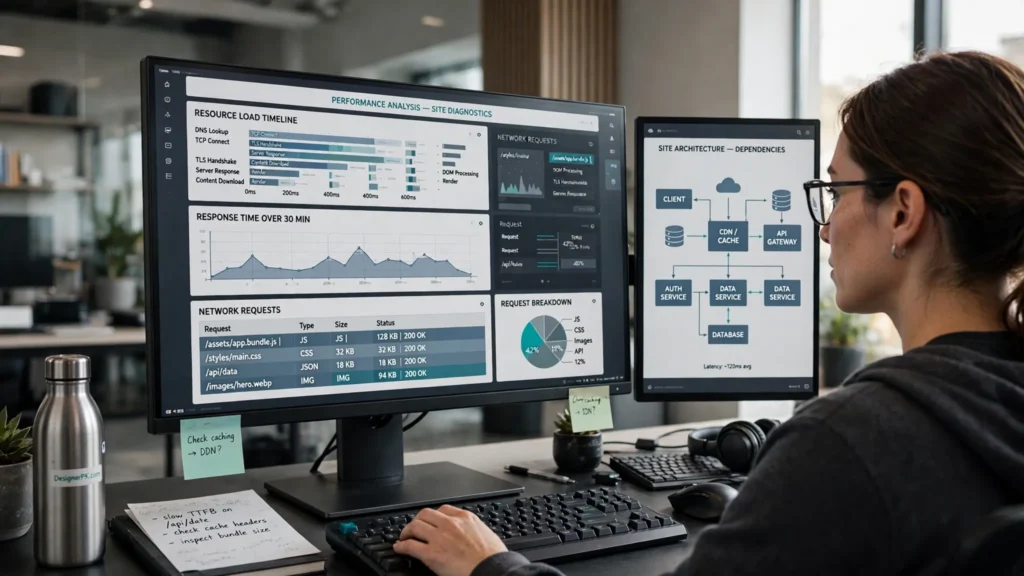
1. Website Performance Audit and Technical Diagnosis
A website speed audit establishes a performance baseline and identifies the resources responsible for slow loading, delayed interactions, or unstable layouts.
The assessment may cover:
- Google PageSpeed Insights reports for mobile and desktop.
- Core Web Vitals field data, when available.
- Lighthouse performance diagnostics.
- Time to First Byte (TTFB) and server response behavior.
- Network requests, large resources, and render-blocking files.
- WordPress theme, plugin, and page builder performance.
- Database queries and server resource utilization.
- Third-party scripts, analytics, chat widgets, and marketing integrations.
Performance testing generally involves two types of measurements:
- Laboratory data: Collected in a controlled testing environment. Lighthouse helps developers reproduce performance conditions and investigate specific technical problems.
- Field data: Collected from actual users through the Chrome User Experience Report and related reporting systems. It reflects how visitors experience eligible pages under real-world conditions.
PageSpeed Insights can provide both Lighthouse laboratory results and available real-user field data. However, field data may not be available for every website or individual URL.
These measurements serve different purposes. A good laboratory result does not necessarily mean every visitor experiences the same performance. Network quality, device capabilities, geographic location, and browsing patterns can all affect loading times.
2. Image and Media Optimization
Large images can add considerable weight to a webpage, particularly on business websites featuring hero sections, portfolios, product catalogs, and image galleries.
Image optimization reduces unnecessary file sizes while maintaining appropriate visual quality and display dimensions.

Depending on the website, this may involve:
- Converting compatible images to WebP or AVIF.
- Resizing images to match their actual display dimensions.
- Using responsive image sources through appropriate HTML image attributes.
- Applying compression settings suited to each image.
- Lazy-loading images outside the initial viewport.
- Prioritizing important above-the-fold images.
- Specifying image dimensions or aspect ratios to prevent layout movement.
Lazy-loading should be applied selectively. The primary hero image or another important Largest Contentful Paint element should not be unnecessarily delayed. Developers may use appropriate loading priorities or preload hints to help browsers discover critical resources sooner.
For WooCommerce stores, optimization should also cover product thumbnails, gallery images, category banners, and responsive product photography. Images need to load efficiently without losing the visual detail customers rely on when evaluating products.
3. Caching and Content Delivery Network Configuration
Caching reduces repeated processing and resource transfers by allowing eligible content to be reused. The right configuration depends on the website’s content structure, hosting environment, and dynamic functionality.
Common caching layers include:
- Page caching: Stores generated page output so eligible requests can be served without repeating the complete WordPress processing cycle.
- Browser caching: Uses HTTP caching headers to let browsers reuse static resources such as images, CSS, and JavaScript.
- Object caching: Stores reusable application data and database query results to reduce repeated retrieval work.
- Server-side caching: Uses infrastructure such as PHP OPcache or supported reverse-proxy caching to reduce server processing overhead.
- Content Delivery Network (CDN): Delivers eligible resources through geographically distributed infrastructure, reducing delivery distance for visitors.
WordPress supports several caching approaches, but their effectiveness depends on the hosting stack and the content being delivered. A CDN can improve static resource delivery for geographically distributed audiences, but it cannot independently fix inefficient database queries or poorly developed application code.
Dynamic websites also need carefully defined cache rules. Personalized pages and session-dependent responses should not be treated like publicly cacheable content. WooCommerce stores require particular attention to cart, checkout, and account functionality.
4. CSS and JavaScript Optimization
WordPress themes, plugins, page builders, analytics platforms, and marketing integrations can introduce CSS and JavaScript resources that affect rendering and interaction responsiveness.
When these resources are unnecessary, oversized, or poorly scheduled, browsers may spend additional time downloading, parsing, compiling, and executing code.
Depending on the identified bottlenecks, optimization may involve:
- Removing unused CSS and JavaScript where safe.
- Reducing render-blocking resources.
- Generating critical CSS for important visible content when appropriate.
- Deferring non-critical scripts.
- Removing unnecessary third-party integrations.
- Identifying long-running JavaScript tasks.
- Improving script loading and execution order.
Minification removes unnecessary characters from source files, but it does not automatically fix inefficient application logic. Combining CSS or JavaScript files is also not universally beneficial, particularly when HTTP/2 or HTTP/3 is available.
Every optimization setting should be tested against existing website functionality. Delaying scripts or changing their execution order can interfere with navigation menus, forms, sliders, product variations, and other interactive components.
5. Database and Server Performance Optimization
Some performance problems originate on the server rather than in the browser. A website may deliver relatively small files but still load slowly because PHP execution, database operations, or limited hosting resources create delays.
WordPress performance depends on how efficiently its application code, themes, plugins, database, and server environment work together.
Depending on the audit findings, server-side improvements may include:
- Investigating slow or repetitive database queries.
- Reviewing excessive autoloaded WordPress options.
- Removing obsolete revisions, expired transients, and unnecessary data when safe.
- Checking PHP version and application compatibility.
- Evaluating available CPU, memory, and database resources.
- Configuring persistent object caching where supported.
- Reviewing PHP OPcache and server configuration.
- Identifying hosting limitations that affect response times.
Database cleanup requires care. Removing records without understanding plugin dependencies can damage functionality or delete information an application still needs. A verified backup and recovery plan should be in place before making database-level changes.
If insufficient hosting resources or slow database infrastructure are the primary bottlenecks, front-end optimization settings alone may produce limited improvements. Server configuration changes or a more suitable hosting environment may be necessary.
Why Core Web Vitals Matter for Business Websites
Website performance involves more than how quickly a page initially appears. Visitors also expect content to load predictably and interactive elements to respond without noticeable delays.
Google’s Core Web Vitals measure three important aspects of user experience: loading performance, interaction responsiveness, and visual stability.
The current Core Web Vitals are Largest Contentful Paint (LCP), Interaction to Next Paint (INP), and Cumulative Layout Shift (CLS). Google evaluates these metrics using real-user field data at the 75th percentile, with mobile and desktop experiences assessed separately.
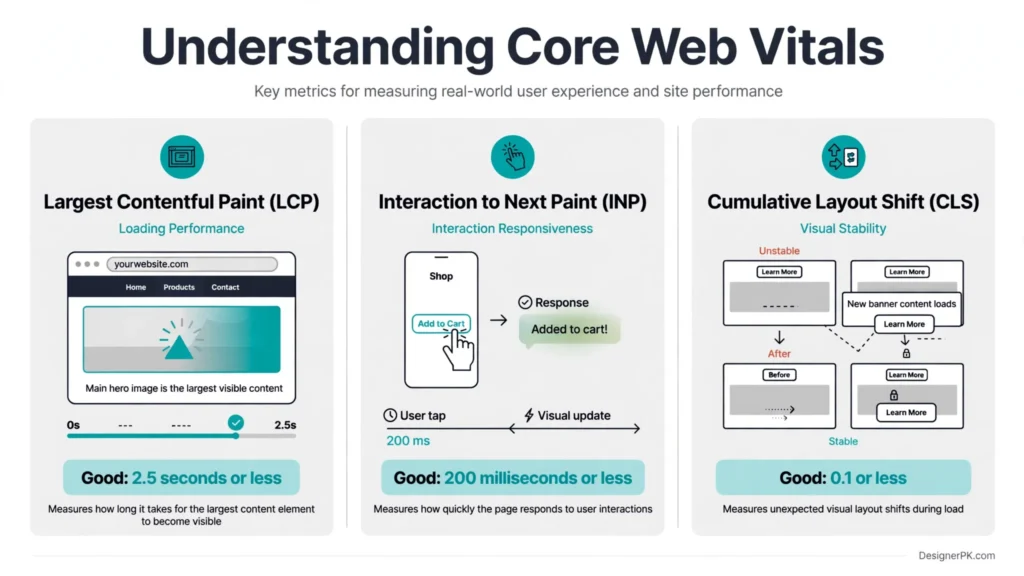
| Metric | What It Measures | Good Threshold |
|---|---|---|
| Largest Contentful Paint (LCP) | How quickly the largest visible content element renders. | 2.5 seconds or less |
| Interaction to Next Paint (INP) | How quickly the page responds visually to user interactions. | 200 milliseconds or less |
| Cumulative Layout Shift (CLS) | The amount of unexpected visual layout movement. | 0.1 or less |
These thresholds classify performance as good, needs improvement, or poor. Meeting the recommended thresholds supports a better page experience, but it does not guarantee higher Google rankings or replace other SEO requirements.
1. Largest Contentful Paint (LCP) Optimization
Largest Contentful Paint measures how long it takes for the largest image or text block within the visible viewport to render. Depending on the page layout, the LCP element could be a hero image, prominent heading, or large product image.
A slow LCP can make a page appear unfinished, even when other elements have already loaded.
Effective optimization starts by identifying the actual LCP element and determining which part of its loading process causes the delay.
Potential improvements include:
- Reducing the file size of the primary hero or product image.
- Serving responsive images with appropriate dimensions.
- Avoiding unnecessary lazy-loading of the initial LCP image.
- Using preload selectively for critical resources.
- Reducing server response time and unnecessary redirects.
- Addressing render-blocking CSS and JavaScript.
- Improving font delivery and resource discovery.
For example, a business homepage may use a large background image as its primary visual element. If the browser discovers that image late or downloads an unnecessarily large file, LCP can suffer. Improving its delivery method, dimensions, and loading priority can address the underlying problem.
2. Interaction to Next Paint (INP) Optimization
Interaction to Next Paint measures how responsive a website feels when visitors click, tap, or type. It evaluates the delay between an interaction and the next visual update presented by the browser.
A website may display its content quickly but still feel slow when visitors open navigation menus, submit forms, filter products, or update their shopping carts.
INP problems commonly involve excessive JavaScript execution, long main-thread tasks, and inefficient interaction handling.
Depending on the diagnostic findings, improvements may include:
- Identifying and reducing long-running JavaScript tasks.
- Removing unnecessary scripts and plugin-generated functionality.
- Breaking expensive operations into smaller tasks.
- Improving event handlers and interaction logic.
- Reducing unnecessary DOM updates and rendering work.
- Investigating third-party scripts that compete for browser resources.
For WooCommerce stores, INP optimization is particularly relevant to product filters, variation selectors, cart updates, and interactive checkout fields. Changes should preserve these features rather than disable important functionality simply to improve a laboratory score.
3. Cumulative Layout Shift (CLS) Optimization
Cumulative Layout Shift measures unexpected visual movement during a page’s lifecycle. It identifies situations where content changes position after visitors have started reading or interacting with a page.
For example, a customer may attempt to click a navigation link, only for a promotional banner to load above it and move the link to another position.
Common causes include:
- Images and videos without reserved dimensions.
- Advertisements or promotional elements inserted dynamically.
- Web fonts that cause unexpected text changes.
- Content injected above existing page elements.
- Animations that unexpectedly change layout dimensions.
Improvements may involve specifying image dimensions or aspect ratios, reserving space for dynamic content, improving font loading behavior, and avoiding unnecessary layout-changing animations.
CLS optimization is particularly relevant to product pages, promotional landing pages, and content-heavy websites where unexpected movement can disrupt reading and navigation.
How to Measure Core Web Vitals
Reliable performance assessment requires tools that provide different types of information. No single testing tool answers every performance question.
- Google PageSpeed Insights: Provides Lighthouse laboratory diagnostics and available real-user field data.
- Google Search Console: Reports groups of URLs with Core Web Vitals issues when sufficient field data is available.
- Chrome UX Report: Provides aggregated real-user experience data for eligible websites and pages.
- Chrome DevTools: Helps investigate network activity, JavaScript execution, rendering, and browser performance.
- Lighthouse: Provides controlled performance diagnostics and opportunities for technical improvements.
Not every website has sufficient field data for every page. When field measurements are unavailable, laboratory testing can help developers reproduce and investigate performance problems, but it should not be presented as actual real-user Core Web Vitals data.
A useful assessment should distinguish between laboratory scores, field measurements, and the technical changes made during implementation.
WordPress and WooCommerce Speed Optimization
WordPress and WooCommerce websites have performance requirements that differ from those of simple static websites. Their speed depends on themes, plugins, page builders, database queries, dynamic content, and external integrations.
Effective WordPress speed optimization addresses the website’s actual limitations rather than applying identical plugin settings to every installation.

WordPress Website Performance Optimization
A WordPress website may become slower as additional plugins, page builder elements, custom features, and third-party integrations are introduced. Some extensions load scripts and styles across the entire website, even when their functionality is only needed on specific pages.
Depending on the technical issues identified, optimization may involve:
- Reviewing the performance impact of installed themes and plugins.
- Identifying unnecessary scripts and stylesheets.
- Optimizing page builder output and resource loading.
- Configuring caching solutions compatible with the hosting environment.
- Investigating PHP execution and database query performance.
- Reducing unnecessary background processing.
- Testing compatibility between optimization settings and existing functionality.
Plugin quantity alone does not determine website speed. A website with several lightweight plugins may perform better than one using a single poorly developed extension. What matters is the resources each component consumes and how efficiently it executes.
When performance problems require deeper platform development, WordPress and WooCommerce development services may also be relevant for custom functionality, theme improvements, and technical changes.
WooCommerce Speed Optimization
WooCommerce stores must balance loading performance with dynamic functionality. Product variations, inventory information, customer sessions, cart updates, payment integrations, and checkout calculations can all influence website performance.
Unlike ordinary informational pages, some e-commerce resources depend on individual customer sessions. Aggressive caching can therefore create problems if personalized content is treated as publicly cacheable information.
A WooCommerce optimization project may include:
- Optimizing product images, gallery assets, and thumbnails.
- Improving product and category page rendering.
- Reviewing database queries related to products and orders.
- Evaluating the performance impact of payment and shipping extensions.
- Configuring page caching with appropriate exclusions for dynamic content.
- Investigating slow cart updates and checkout interactions.
- Reviewing unnecessary scripts loaded across product and checkout pages.
Cart, checkout, account, and other session-dependent pages require special attention. Their caching behavior should follow WooCommerce and hosting-provider recommendations to avoid exposing personalized information or serving incorrect customer data.
Consider a store where the homepage and product-category pages load quickly, but customers experience delays when updating quantities or proceeding to checkout. The cause may involve JavaScript execution, database queries, payment integrations, or server-side processing rather than image compression.
Businesses experiencing specific purchasing problems can also consult this WooCommerce checkout troubleshooting guide.
WooCommerce optimization should always include functional testing. Performance improvements are not worthwhile if customers can no longer select product variations, update their carts, apply coupons, or complete payments correctly.
Mobile Website Speed Optimization
Mobile website performance deserves separate attention because visitors use devices with different processing capabilities, screen sizes, and network conditions.
A page that performs well on a desktop computer may load more slowly on a smartphone. Large images, excessive JavaScript, complex page builder layouts, and third-party scripts can create noticeable delays on mobile devices.
Mobile optimization focuses on delivering important content efficiently while keeping navigation, forms, and interactive features easy to use.

What Mobile Performance Optimization Involves
Improvements may include:
- Serving appropriately sized images for mobile screens.
- Reducing unnecessary JavaScript execution and main-thread work.
- Optimizing font delivery and above-the-fold content.
- Reducing excessive page elements and resource requests.
- Reviewing mobile navigation, menus, and interactive components.
- Improving responsive layouts and preventing unexpected content movement.
- Testing important forms, buttons, and e-commerce interactions on mobile devices.
Why Mobile and Desktop Performance Results Differ
Google PageSpeed Insights provides separate mobile and desktop assessments because performance depends on the testing environment and the resources required to render a page.
For example, a large hero image may be less problematic on a powerful desktop connection but create noticeable delays on a mobile network. JavaScript that runs smoothly on a desktop processor may also cause slower interactions on a lower-powered smartphone.
Businesses should evaluate mobile and desktop performance independently rather than assuming a good desktop score represents the entire user experience.
For websites receiving substantial mobile traffic, testing should cover real customer journeys, including navigating service pages, submitting inquiry forms, browsing products, and completing checkout.
Mobile optimization should preserve the website’s visual design and functionality. Removing important content or disabling useful interactive features simply to improve a testing score is not a sustainable performance strategy.
How Professional Website Speed Optimization Works
A professional website speed optimization project follows a structured process. Each change should address an identified performance issue while protecting the website’s design, functionality, and user experience.
The scope depends on the website’s platform, hosting environment, technical issues, and business requirements. A typical project involves the following stages.
-
Initial Website Assessment
The process begins with reviewing the website’s purpose, platform, hosting environment, and existing performance concerns.
This may involve examining important landing pages, product pages, mobile performance, optimization plugins, and customer-facing functionality.
-
Baseline Performance Testing
Performance measurements are collected before any changes are made. Google PageSpeed Insights, Lighthouse, and other diagnostic tools help establish the website’s current condition.
Available real-user Core Web Vitals data should also be reviewed. Recording the original measurements and testing conditions makes it easier to compare results after implementation.
-
Technical Bottleneck Identification
The next stage is to identify the underlying causes of poor performance. These may include oversized images, slow server responses, inefficient database queries, unnecessary JavaScript, or incorrectly configured caching.
Issues should be prioritized according to their impact on visitors, severity, and the feasibility of resolving them safely.
-
Implementation of Performance Improvements
Changes are implemented based on the audit findings. This may involve image optimization, caching configuration, resource loading improvements, database work, or server-side adjustments.
For WordPress and WooCommerce websites, compatibility testing is essential to prevent conflicts with themes, plugins, forms, payment gateways, and other important features.
-
Functional and Compatibility Testing
After implementation, important website features are checked to confirm they still work correctly.
Testing may cover navigation, responsive layouts, contact forms, product variations, cart updates, checkout, account access, and relevant third-party integrations.
-
Before-and-After Performance Comparison
The final stage compares updated performance measurements with the original baseline, using consistent testing conditions wherever possible.
The report should explain what changed, which issues were resolved, which metrics improved or remained unchanged, and whether any limitations require further attention.
What Should a Website Speed Optimization Report Include?
A clear report helps business owners understand the work completed and evaluate its technical impact.
| Report Element | What It Should Show |
|---|---|
| Initial assessment | Original performance issues and baseline measurements. |
| Testing conditions | Pages tested, device category, testing tools, and relevant conditions. |
| Technical changes | Specific optimization tasks completed. |
| Final measurements | Updated test results and available Core Web Vitals data. |
| Functional testing | Confirmation that important website features were checked. |
| Remaining limitations | Hosting restrictions, third-party dependencies, or unresolved issues. |
Laboratory test scores can vary because of network conditions, server load, browser versions, and testing environments. Before-and-after comparisons should use repeatable conditions rather than treating a single result as guaranteed real-world performance.
Businesses that need technical assistance beyond the initial optimization project can explore professional website maintenance services.
DIY Website Optimization vs Professional Speed Optimization Services
Not every slow website needs a professional developer. Website owners can handle some improvements themselves using existing hosting tools, properly configured plugins, and basic image optimization.
However, persistent performance problems may require technical investigation, custom development, or server-level changes.
| Consideration | DIY Optimization | Professional Services |
|---|---|---|
| Image compression | Suitable for basic improvements. | Can include advanced image delivery and prioritization. |
| Caching configuration | Possible with supported plugins. | Can include compatibility testing and advanced configuration. |
| JavaScript problems | Limited without development knowledge. | Can include code-level diagnosis and optimization. |
| Database issues | Basic cleanup may be possible. | Can include query analysis and server-side investigation. |
| WooCommerce performance | Basic improvements are possible. | Can include dynamic caching and checkout testing. |
| Technical reporting | Usually requires manual interpretation. | Can include structured baseline and final reports. |
DIY optimization is a reasonable starting point when performance issues are straightforward and the website owner understands the existing configuration.
Professional support becomes more useful when problems persist, plugins conflict, custom functionality is involved, or important business operations depend on website availability and performance.
Before making major technical changes, create a reliable backup and establish a rollback plan. Incorrect settings can affect layouts, forms, navigation, and e-commerce functionality.
What Affects Website Speed Optimization Costs in Pakistan?
Website speed optimization costs in Pakistan depend on the project’s technical complexity rather than a single standard price. A small business website with a few performance issues requires a different level of work from a large WooCommerce store with extensive integrations and custom functionality.
Several factors influence the final quotation.
Website Size and Technical Complexity
A website with a limited number of pages and straightforward functionality may require less work than a large website with custom templates, extensive plugins, dynamic content, and multiple integrations.
Platform and E-commerce Requirements
Basic WordPress optimization and complex WooCommerce optimization are not necessarily equivalent projects. Online stores may require additional testing for product variations, cart behavior, checkout, payment processing, and customer sessions.
Hosting and Server Limitations
If the main problem comes from insufficient server resources, database performance, or hosting configuration, resolving it may require additional technical work or infrastructure changes.
Existing Performance Problems
A website that needs image compression and caching adjustments may have a smaller scope than one affected by inefficient custom code, plugin conflicts, excessive JavaScript, or database bottlenecks.
Testing and Ongoing Support
The quotation may also depend on the number of pages tested, the extent of functional testing, reporting requirements, and whether ongoing monitoring or maintenance is included.
Before accepting a quotation, ask for a clear explanation of the optimization scope, deliverables, exclusions, testing approach, and any additional hosting or third-party costs.
For an estimate based on your actual website, contact DesignerPK to discuss your website speed optimization requirements.
How to Choose the Right Website Speed Optimization Company in Pakistan
Choosing a website speed optimization provider involves more than comparing PageSpeed scores or selecting the cheapest quotation. Businesses should evaluate the provider’s technical approach, understanding of their website platform, testing process, and ability to protect existing functionality.
Before hiring a specialist, consider these factors.
1. Look for a Proper Performance Audit
A reliable provider should investigate the reasons behind slow performance before recommending changes. Be cautious of services that promise specific results without reviewing the website, hosting environment, or technical requirements.
2. Check WordPress and WooCommerce Experience
If your website uses WordPress or WooCommerce, choose someone who understands themes, plugins, caching behavior, database performance, and dynamic e-commerce functionality. General front-end optimization knowledge may not be sufficient for complex WordPress projects.
3. Ask About Core Web Vitals
The provider should understand LCP, INP, and CLS and explain which issues affect your website. They should also distinguish between laboratory test results and real-user field measurements.
4. Understand What Is Included
Request a clear project scope covering the pages being optimized, technical improvements, testing requirements, reporting, and exclusions. This helps prevent misunderstandings about what the service actually delivers.
5. Confirm Website Safety and Testing Procedures
Performance changes can affect existing website functionality. Ask whether the provider creates backups, checks compatibility, tests important forms and checkout processes, and has a recovery plan if an optimization causes problems.
6. Avoid Guaranteed Ranking and Score Promises
Be cautious of providers guaranteeing perfect PageSpeed scores, specific Google rankings, or identical results across every device. Actual performance depends on hosting, website architecture, third-party services, and visitor environments.
A trustworthy provider should explain realistic improvement opportunities and technical limitations before beginning the project.
Why Consider DesignerPK for Website Speed Optimization?
DesignerPK provides freelance website development and technical services to businesses in Pakistan and internationally. Its service offerings include website development, WordPress and WooCommerce solutions, performance optimization, maintenance, and technical troubleshooting.
Businesses experiencing slow loading or website performance issues can explore DesignerPK’s website speed optimization service.
Depending on the technical requirements, other relevant services include:
- WordPress and WooCommerce development for platform improvements and e-commerce functionality.
- Website bug fixing services for technical errors and functionality problems.
- Website maintenance services for ongoing technical support.
- Other website development and digital solutions for broader business requirements.
The right approach depends on the website’s condition. Some projects need targeted performance improvements, while others require deeper WordPress development or technical troubleshooting.
To learn more about the business and its services, visit the DesignerPK About Us page.
Frequently Asked Questions About Website Speed Optimization Services in Pakistan
How much do website speed optimization services cost in Pakistan?
The cost depends on website size, platform, hosting environment, existing performance issues, and the amount of technical work required. A simple business website may need a smaller optimization scope than a complex WooCommerce store. Request a website assessment and detailed quotation for an accurate estimate.
How long does professional website speed optimization take?
Project duration depends on the number of pages, technical complexity, server limitations, plugin conflicts, and required testing. Straightforward improvements may take less time than projects involving custom code, database issues, or complex e-commerce functionality. The expected timeline should be established after an initial assessment.
Can you optimize a WordPress website without changing its design?
Yes. Many performance improvements can be implemented without redesigning a website. Image optimization, caching configuration, server improvements, and resource loading adjustments can often preserve its existing appearance. However, some websites may require code or layout changes if their current design creates significant performance problems.
Can WooCommerce speed optimization break checkout functionality?
Incorrect optimization settings can interfere with cart sessions, payment gateways, product variations, and checkout functionality. Proper WooCommerce optimization accounts for dynamic content, appropriate cache exclusions, and functional testing before and after implementation.
Does a higher Google PageSpeed Insights score guarantee better Google rankings?
No. Google uses multiple ranking systems and signals. Core Web Vitals are part of Google’s page experience considerations, but passing their thresholds or achieving a particular PageSpeed score does not guarantee higher search rankings. Performance improvements should focus on providing a better user experience.
Can you optimize a website hosted outside Pakistan?
Yes. Website performance optimization can be performed remotely, regardless of whether the website is hosted in Pakistan, the United States, Europe, or another region. Hosting location, server resources, CDN configuration, and the geographic distribution of visitors should all be considered when planning improvements.
Will website speed optimization improve mobile performance?
It can. Optimizing images, JavaScript execution, resource loading, and responsive layouts can improve mobile performance. However, mobile and desktop results should be assessed separately because device capabilities and network conditions differ.
Do I need ongoing website speed optimization after the initial project?
Not every website needs continuous optimization work, but performance should be monitored as the website changes. New plugins, themes, images, marketing scripts, integrations, and content updates can introduce new problems. Regular maintenance helps identify issues before they significantly affect visitors.
Can a website achieve a perfect 100 PageSpeed score?
A perfect score may be achievable in some testing environments, but it is not a necessary or realistic target for every website. Complex functionality, third-party services, and external dependencies can affect results. The more useful objective is to improve real-world loading performance, responsiveness, and visual stability without removing important website features.
Improve Your Website Performance with Professional Speed Optimization
A slow website can affect how visitors interact with your business, explore your services, and complete purchases. Identifying the actual performance bottlenecks is the first step toward meaningful improvements.
Whether you operate a WordPress business website, a WooCommerce store, or a custom-developed website, the right optimization approach should address its technical requirements without compromising essential functionality.
Request a free website speed audit from DesignerPK. Share your website URL and describe the performance issues you are experiencing. You can discuss potential improvements, technical requirements, and an appropriate optimization scope before proceeding.
Get a Free Website Speed Audit
Need a project-specific estimate? Request a Website Speed Optimization Quote.