WordPress provides a flexible foundation for business websites, online stores, membership platforms, and custom web applications. However, as business requirements become more specialized, standard themes and publicly available plugins may not provide all the functionality needed to support specific workflows, integrations, or operational processes.
Installing multiple plugins to overcome these limitations can also introduce unnecessary dependencies, overlapping features, compatibility issues, and additional maintenance requirements. In some situations, a dedicated plugin offers a more practical way to implement the functionality a business actually needs.
DesignerPK provides custom WordPress development, plugin development, WooCommerce customization, REST API integrations, and business workflow automation. Our approach focuses on understanding the technical requirements before deciding whether an existing plugin, an extension, or a purpose-built solution is appropriate.
Whether you operate a business in Karachi, manage an expanding WooCommerce store, or serve customers internationally, working with an experienced custom WordPress plugin developer in Karachi can help you build website functionality around your business processes.
Quick Answer: What Does a Custom WordPress Plugin Developer Do?
A custom WordPress plugin developer creates software extensions that add specific functionality to a WordPress website. These extensions can introduce new features, automate business processes, connect external applications, and customize existing WordPress or WooCommerce functionality.
Common custom plugin development requirements include:
- Custom booking, appointment, and reservation systems.
- Advanced quotation forms and dynamic pricing calculators.
- Membership platforms and customer dashboards.
- Custom WooCommerce product, cart, and checkout functionality.
- CRM, ERP, inventory, and accounting integrations.
- Custom WordPress REST API endpoints.
- Automated order processing and customer notifications.
- Webhook integrations and n8n business automation.
A professional developer should also consider plugin architecture, data security, compatibility, performance, testing, and long-term maintenance.
At DesignerPK, our custom WordPress plugin development and API integration services address business requirements involving tailored website functionality, external application connectivity, and automation.
Important: Custom development is not always necessary. If an established plugin already meets your requirements reliably, using or extending that solution may be more economical than building a replacement.
What Is Custom WordPress Plugin Development?
Custom WordPress plugin development is the process of building a dedicated software extension that adds functionality to a WordPress website. Instead of modifying WordPress core files or placing business-specific code directly inside a theme, developers create a separate component responsible for the required features.
A custom plugin can manage business rules, introduce administrative settings, process submitted information, create frontend interfaces, register REST API endpoints, and communicate with external applications.
Depending on the project’s complexity, its implementation may include PHP classes, JavaScript, CSS, database operations, scheduled tasks, and integration components.
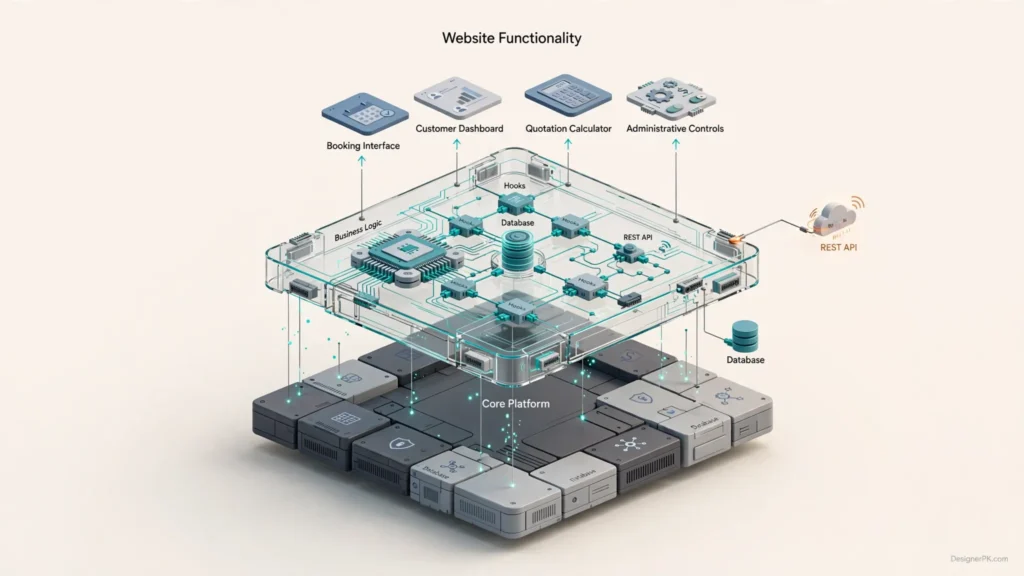
How WordPress Plugins Extend Website Functionality
WordPress provides several established mechanisms that allow developers to extend its functionality without modifying the platform’s underlying files.
Two particularly important mechanisms are actions and filters:
- Actions: Allow plugins to execute functionality when WordPress reaches a particular event or execution point. For example, a plugin can respond when a customer registers or a WooCommerce order changes status.
- Filters: Allow developers to modify data before WordPress or another component uses or displays it. A plugin might use a filter to customize product information or modify generated content.
WordPress also provides APIs for settings management, database operations, user permissions, HTTP requests, scheduled tasks, and REST API functionality.
These interfaces allow custom functionality to remain separate from WordPress core files and, where properly designed, independent of the active website theme.
Why Plugin Architecture Matters
A well-organized plugin separates business functionality from website presentation and the underlying content management system.
For example, consider a company that needs a custom quotation calculator. The plugin can handle the pricing rules, customer submissions, validation, and administrative management, while the active WordPress theme controls the visual presentation.
This separation makes it easier to redesign the website without rebuilding the underlying business functionality.
It also makes the custom solution easier for another developer to understand and maintain, provided its implementation follows WordPress development standards and avoids unnecessary dependencies.
A Basic Example of a WordPress Plugin
A WordPress plugin begins with a PHP file containing a valid plugin header. Developers can then register functions and connect them to appropriate WordPress hooks.
The following example illustrates a minimal plugin structure:
<?php
/**
 * Plugin Name: Business Workflow Extension
 * Description: Example of custom WordPress functionality.
 * Version: 1.0.0
 * Author: DesignerPK
 */

if ( ! defined( 'ABSPATH' ) ) {
    exit;
}

function designerpk_register_workflow_hook() {
    // Register custom workflow functionality here.
}

add_action(
    'init',
    'designerpk_register_workflow_hook'
);
This example includes a plugin header, a direct-access protection check, a PHP function, and an action hook registered through WordPress.
It is only a starting structure, not a complete business solution. A production plugin requires implementation-specific validation, permission checks, security controls, error handling, and testing.
Technical Knowledge Required for Professional Plugin Development
Developing a reliable plugin requires more than basic PHP programming. A developer should understand how WordPress loads plugins, processes hooks, manages users, handles database operations, and exposes functionality through its APIs.
Projects involving WooCommerce also require knowledge of product data, cart and checkout behavior, order management, payment workflows, and High-Performance Order Storage (HPOS).
For integrations, the developer should understand HTTP requests, API authentication, JSON data structures, webhooks, response validation, and failure handling.
These technical foundations help ensure that a custom plugin does more than work under ideal conditions. It should also remain secure, compatible, and maintainable within the actual website environment.
For additional technical guidance, consult the official WordPress Plugin Developer Handbook.
When Does Your Business Need a Custom WordPress Plugin?
Not every WordPress website requires custom plugin development. Many common website requirements can be handled through established plugins or existing WordPress features. However, custom development becomes worth considering when available solutions cannot support your business rules, integration requirements, or operational workflows.
The decision should begin with the problem you need to solve rather than a preference for custom software.

1. Your Business Requires Specialized Functionality
Some businesses follow processes that generic WordPress plugins cannot accommodate without significant compromises.
For example, a service company might need a quotation calculator that determines prices using customer location, service category, selected options, and additional requirements.
A standard form plugin may collect customer information but lack the business logic needed to calculate prices, generate quotations, and manage administrative approvals.
A custom plugin can combine these requirements into one solution, including frontend forms, pricing calculations, validation rules, and administrative controls.
2. You Need to Connect WordPress With External Applications
Businesses frequently use separate applications for CRM management, accounting, inventory, marketing, and order processing. When these systems operate independently, employees may have to transfer information manually or maintain duplicate records.
A custom WordPress plugin can connect these applications through their supported APIs, allowing information to move between systems according to defined business rules.
For example, a WooCommerce store could send customer and order information to a CRM when an order reaches a specified status.
Depending on the integration, this may involve REST API requests, OAuth authentication, webhooks, scheduled synchronization, and error handling.
Read our guide to CRM REST API integration architecture, OAuth, and best practices for additional technical considerations.
3. Your WooCommerce Store Needs Custom Features
WooCommerce supports a wide range of e-commerce functionality, but businesses with specialized products, pricing structures, or fulfillment requirements may need additional features.
Common development requirements include:
- Dynamic product pricing based on dimensions or configurations.
- Conditional checkout fields and custom validation.
- Specialized shipping and delivery calculations.
- Custom order approval and fulfillment workflows.
- Membership and subscription-related functionality.
- Inventory synchronization with external applications.
A dedicated WooCommerce extension can implement these requirements while keeping business-specific logic separate from WooCommerce core files.
Businesses planning more extensive store functionality can explore our WordPress and WooCommerce development services.
4. You Want to Automate Repetitive Business Tasks
As a business grows, administrative work involving customer inquiries, registrations, orders, and notifications can become increasingly time-consuming.
A custom plugin can respond to defined WordPress events and trigger appropriate actions. These may include sending information to another application, generating notifications, or initiating an automated workflow.
For example, a WooCommerce order workflow could:
- Detect a new order or relevant order-status change.
- Validate the information required by the integration.
- Send selected customer and order details to a CRM.
- Notify the appropriate employee or department.
- Record integration failures for investigation and recovery.
For workflows involving multiple external applications, WordPress can work alongside n8n. The plugin handles website-side functionality, while n8n coordinates the connected applications and automation steps.
See our guide to WhatsApp AI automation for WooCommerce for an example of how e-commerce functionality can connect with business communication workflows.
5. Your Existing Plugins Have Become Difficult to Maintain
Some websites accumulate several plugins to support a single business process. These extensions may overlap in functionality, introduce dependencies, or create conflicts when updated.
A custom solution may be appropriate when a defined set of business requirements can be implemented more effectively through a dedicated extension.
However, removing multiple plugins and replacing them with one custom plugin is not automatically an improvement. The proposed solution should be evaluated against functionality, security, maintenance effort, performance, and long-term development costs.
Custom WordPress Plugin Development vs. Existing Plugins
Before commissioning custom development, compare the available approaches. Installing an established plugin, extending an existing solution, and building a dedicated plugin each have different advantages and responsibilities.
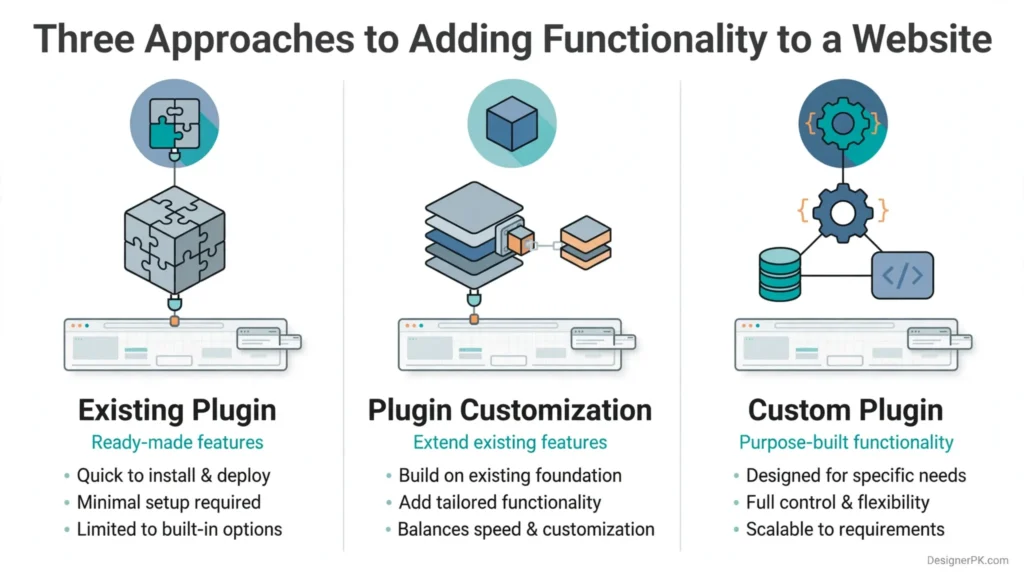
Option 1: Install an Existing WordPress Plugin
An established plugin is often the most practical choice when its functionality already meets your requirements.
This approach can reduce initial development effort and provide access to features maintained by an established developer or software company.
Before installation, review its compatibility, update history, licensing, support availability, security practices, and third-party dependencies.
Option 2: Customize an Existing Plugin
If an existing plugin handles most of your requirements, customization may be sufficient.
Developers can introduce additional functionality through documented hooks, filters, official extension interfaces, or separate integration components.
Directly editing the original plugin’s files should generally be avoided because updates can overwrite custom modifications.
Option 3: Build a Custom WordPress Plugin
A dedicated plugin is appropriate when existing solutions cannot support important business requirements or when specialized functionality needs to be designed around a particular workflow.
It provides greater control over implementation, business rules, data handling, and integrations.
However, the project also requires an appropriate budget for development, testing, documentation, and future maintenance.
Comparison of the Three Development Approaches
| Evaluation factor | Existing plugin | Plugin customization | Custom plugin |
|---|---|---|---|
| Initial development effort | Usually low | Depends on available extension options | Depends on project scope |
| Specialized business logic | Limited to available features | Depends on the original plugin | Can be designed around requirements |
| API integrations | Depends on built-in integrations | Depends on supported interfaces | Can support defined integration requirements |
| Customization flexibility | Limited by configuration | Depends on extension capabilities | Greater implementation control |
| Maintenance | Depends on the plugin developer | Requires consideration of both components | Requires an agreed maintenance plan |
| Compatibility | Depends on vendor updates and testing | Requires testing of original and custom functionality | Requires deliberate compatibility testing |
How to Select the Right Development Approach
Evaluate the requirements using the following decision criteria:
- Choose an existing plugin when its features meet your requirements without significant compromises.
- Choose customization when the existing plugin provides suitable extension points and already handles most of the required functionality.
- Choose custom development when unique business rules, specialized integrations, or technical limitations justify a dedicated solution.
Also consider licensing costs, third-party dependencies, support availability, data ownership, and the long-term cost of maintaining the solution.
A carefully selected existing plugin may be a better investment than custom development. When an established solution cannot support an important business process, a purpose-built extension may be more appropriate.
Custom WordPress Plugin Development Services for Business Requirements
Custom WordPress plugin development can involve much more than adding a new website feature. A plugin may introduce specialized functionality, connect multiple business applications, process customer information, or automate internal operations.
DesignerPK offers WordPress development capabilities covering custom plugin development, WooCommerce customization, REST API integrations, CRM synchronization, and workflow automation.
The appropriate solution depends on your existing website architecture, required functionality, external dependencies, and long-term maintenance requirements.
1. Custom WordPress Functionality Development
Businesses sometimes need website features that standard themes and plugins cannot provide. Custom development makes it possible to implement functionality around specific customer interactions and internal business processes.
Potential development requirements include:
- Custom booking and appointment management systems.
- Advanced quotation forms and pricing calculators.
- Customer dashboards and account management functionality.
- Membership and subscription-related features.
- Document submission and management systems.
- Custom administrative interfaces and reporting tools.
- Business-specific registration and approval workflows.
Each project should begin with clearly defined user interactions, business rules, data requirements, and administrative permissions. This provides a practical development scope and helps prevent unnecessary features.
2. WordPress API Integration
WordPress API integration allows a website to exchange information with external applications and services. A custom plugin can manage this communication through supported API endpoints and authentication mechanisms.
Common integration requirements include:
- Customer relationship management platforms.
- Inventory and warehouse management systems.
- Accounting and invoicing applications.
- Payment and subscription services.
- Email marketing and communication platforms.
- Shipping and fulfillment applications.
- Internal business applications and custom APIs.
For example, information submitted through a WordPress registration form could be validated and transmitted to a CRM. The integration would map the required fields, authenticate the request, process the external response, and record any synchronization failures.
A reliable API integration should account for authentication, request validation, timeouts, rate limits, response handling, and temporary service interruptions.
For additional guidance, explore our CRM REST API integration architecture guide.
3. Custom WordPress REST API Development
The WordPress REST API provides an established interface for interacting with website data through HTTP requests. It allows external applications to retrieve information and perform authorized operations without requiring direct access to the WordPress database.
A custom plugin can register additional REST API endpoints for specific business requirements.
For example, a booking application may need to retrieve available appointment information from WordPress, while an authorized external application may submit new booking requests.
When developing custom REST API functionality, important considerations include:
- Route registration: Define endpoints and supported HTTP methods.
- Permission callbacks: Restrict protected operations to authorized users or applications.
- Request validation: Validate incoming parameters and reject unexpected information.
- Data sanitization: Process input according to its intended data type.
- Response handling: Return appropriate response structures and HTTP status codes.
- Data protection: Prevent unauthorized access to private customer and business information.
- Duplicate prevention: Account for repeated requests and retry behavior.
Using WordPress REST API interfaces allows developers to extend website functionality without building an entirely separate API framework.
Our technical articles cover related implementation challenges, including fixing custom WordPress REST routes that return 404 errors and exposing custom post meta through the WordPress REST API.
4. CRM Synchronization and Webhook Integration
Businesses often maintain customer information across WordPress, WooCommerce, and external CRM platforms. Without a defined synchronization process, employees may need to update the same information manually in multiple applications.
A custom integration can synchronize selected customer, lead, and order information according to defined business rules.
Webhooks provide another way to coordinate connected applications. When a supported event occurs, an application sends information to a configured endpoint that validates the request and initiates the appropriate workflow.
Consider a WooCommerce order integration:
- WooCommerce generates an order-related event.
- The integration receives and validates the relevant information.
- Customer and order data are mapped to the CRM format.
- The CRM receives the information through its supported API.
- The integration records the outcome and handles failures appropriately.
For more complex processes, WordPress can work alongside n8n. The custom plugin manages website-side events and functionality, while n8n coordinates communication between external applications.
This approach can be useful when a workflow involves several services and conditional automation steps.
5. Existing WordPress Plugin Customization
Building an entirely new plugin is not always necessary. If an existing solution already handles most of your requirements, adding functionality through its supported extension mechanisms may be more efficient.
Depending on the plugin, customization may involve:
- Documented WordPress actions and filters.
- Official plugin extension interfaces.
- Available REST API endpoints.
- Separate integration plugins.
- Supported configuration and customization options.
Direct modifications to third-party plugin files should generally be avoided. Updates may overwrite those changes and introduce maintenance problems.
Before extending an existing solution, review its documentation, licensing, maintenance status, available extension points, and compatibility with your current WordPress environment.
WooCommerce Custom Plugin Development for Online Stores
WooCommerce provides a flexible foundation for building and managing online stores. However, businesses with specialized products, complex pricing structures, or unique order-processing requirements may need functionality beyond its standard configuration.
Custom WooCommerce plugin development makes it possible to extend store functionality while keeping business-specific logic separate from WooCommerce core files.
Before developing an extension, review the store’s existing configuration, checkout implementation, installed plugins, order management requirements, and data storage architecture.
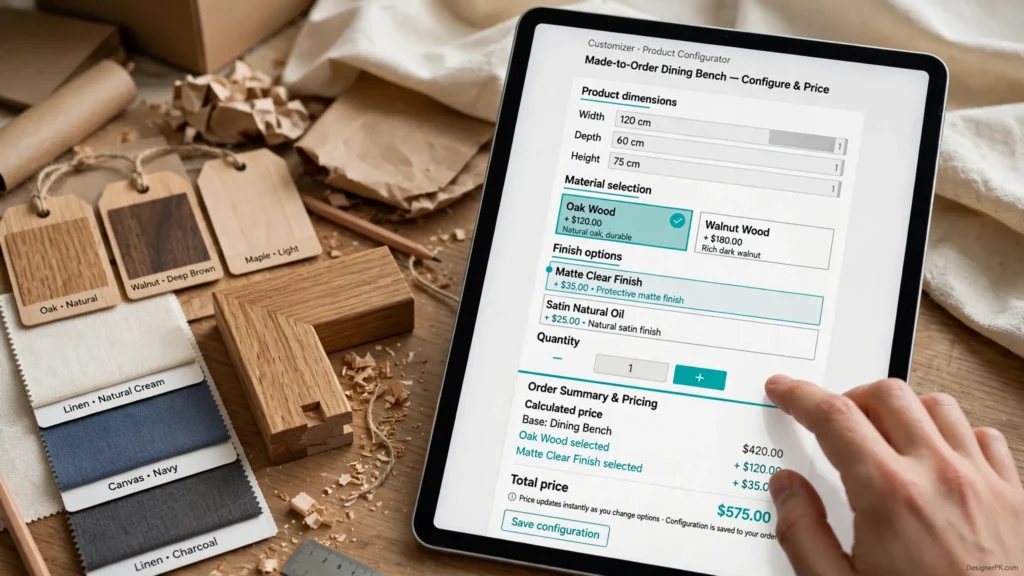
1. Custom Product Pricing and Configuration
Some products require pricing calculations beyond standard WooCommerce product options.
For example, a furniture business may calculate prices using dimensions, materials, finishes, and additional features. A printing company might determine pricing based on paper type, quantity, printing specifications, and delivery requirements.
A custom WooCommerce plugin can implement this functionality by:
- Collecting the required product configuration options.
- Validating customer selections on the server.
- Calculating prices using defined business rules.
- Displaying the calculated price before purchase.
- Preserving configuration details in the cart and order.
- Making relevant information available to authorized store administrators.
Server-side validation is particularly important because prices and product configurations submitted through frontend JavaScript must not be trusted without verification.
2. Custom WooCommerce Checkout Development
Some online stores need checkout functionality that is not available through their existing configuration.
Depending on the requirements, a custom extension may introduce:
- Additional customer information fields.
- Conditional fields based on product or shipping selections.
- Specialized delivery instructions.
- Business-specific checkout validation.
- Custom billing and shipping information handling.
- Additional order-processing requirements.
Checkout customization requires careful compatibility testing because WooCommerce supports different checkout implementations.
Some stores use the traditional shortcode-based checkout, while others use the newer WooCommerce Checkout Blocks experience.
An extension designed exclusively for the traditional checkout may not work with Checkout Blocks. Developers should use the appropriate extension interfaces for the checkout technology installed on the website.
If your store is experiencing checkout problems, our guide to troubleshooting a WooCommerce checkout that is not working covers related technical issues.
3. Custom Order Management and Business Workflows
Some businesses need additional order-processing steps beyond the standard WooCommerce order lifecycle.
A custom plugin can introduce internal approval workflows, specialized order statuses, fulfillment notifications, administrative controls, and integrations with external operational systems.
For example, a business selling customized products may require an internal approval step before an order moves into production.
The plugin can manage the additional workflow while preserving WooCommerce order information and using supported events and interfaces to coordinate related operations.
4. Payment, Shipping, and Inventory Integrations
WooCommerce stores may need connections with external payment providers, shipping applications, inventory management platforms, and accounting systems.
These integrations should use the supported interfaces provided by WooCommerce and the relevant third-party services.
Payment-related development should account for:
- Secure communication with the payment provider.
- Authentication and webhook verification.
- Payment authorization and transaction status handling.
- Failed requests and temporary service interruptions.
- Duplicate webhook delivery and repeated notifications.
- Appropriate handling of refunds and order updates.
A successful frontend redirect does not automatically confirm that a payment has been completed. The transaction status must be verified through the payment provider’s supported process.
5. WooCommerce High-Performance Order Storage (HPOS) Compatibility
High-Performance Order Storage (HPOS) changes how WooCommerce stores order information. It introduces dedicated order storage rather than relying exclusively on the traditional WordPress posts and post metadata approach used by older WooCommerce implementations.
This distinction matters when developing custom WooCommerce extensions. Plugins that directly depend on legacy order database tables may encounter compatibility problems when HPOS is enabled.
For new development, use WooCommerce CRUD objects and supported APIs to retrieve and update order information instead of relying on direct database queries against legacy order storage.
Important development considerations include:
- Review the extension’s HPOS compatibility requirements.
- Use supported WooCommerce order objects and data stores.
- Test order creation, retrieval, updates, and status handling.
- Verify compatibility with the store’s actual HPOS configuration.
- Test related integrations and third-party extensions.
Before deployment, review the official WooCommerce HPOS documentation and verify that the extension follows the applicable compatibility requirements.
Businesses planning specialized e-commerce functionality can explore our WordPress and WooCommerce development services.
WordPress Plugin Architecture, Security, and Performance
A professional WordPress plugin should be designed around its responsibilities, data requirements, security boundaries, and maintenance needs. Implementing PHP functions that produce the expected output is only one part of the development process.
For a reliable solution, developers must consider how the plugin interacts with WordPress, WooCommerce, external applications, databases, and the website’s existing infrastructure.
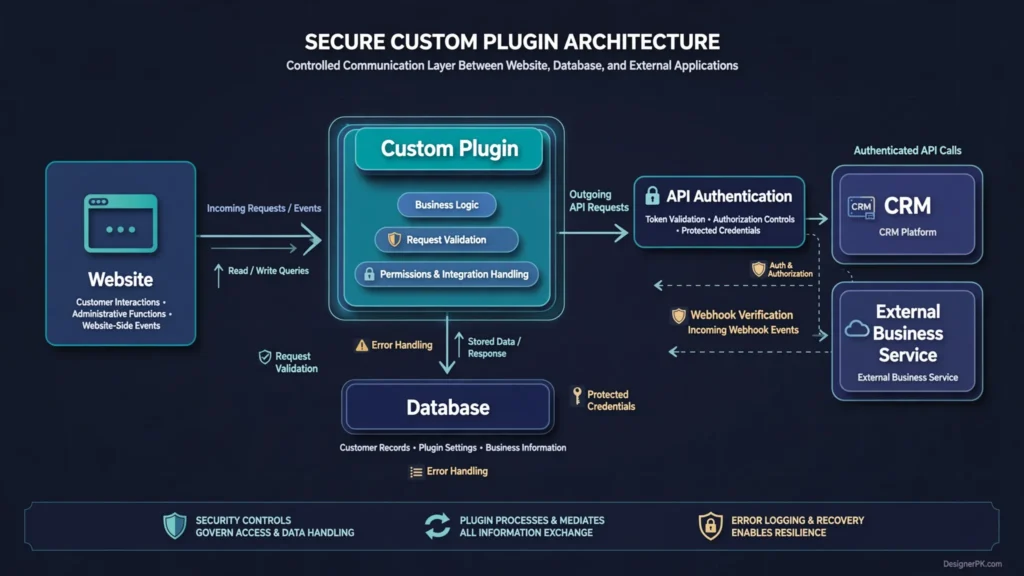
PHP and WordPress Plugin Architecture
PHP is the primary server-side programming language used in traditional WordPress plugin development. A well-organized plugin separates different responsibilities rather than placing all functionality into one large file.
Depending on project complexity, the architecture may include:
- Main plugin file: Handles plugin initialization and registration.
- Business logic: Implements the rules and operations required by the plugin.
- Administrative components: Manage settings, configuration, and backend interfaces.
- Frontend components: Provide website interfaces and supporting assets.
- REST API controllers: Manage communication with external applications.
- Database components: Handle structured information and storage operations where necessary.
- Error handling: Records relevant failures and supports troubleshooting.
For larger projects, PHP namespaces, autoloading, clear interfaces, and dependency management can make the codebase easier to understand and maintain.
Using version control and following WordPress coding standards also helps developers track changes and maintain a consistent development structure.
WordPress Hooks, Filters, and Supported APIs
WordPress provides established extension points that allow plugins to interact with platform functionality.
Using documented hooks and supported APIs generally reduces unnecessary dependencies on internal implementation details and makes custom functionality easier to maintain through platform updates.
For example, a plugin that responds to a WooCommerce order event should use the appropriate documented integration interface rather than modifying WooCommerce core files.
The same principle applies to user permissions, administrative settings, database operations, and REST API development.
Database Design and Information Management
Not every custom plugin needs its own database table. WordPress already provides established storage mechanisms for settings, posts, post metadata, user metadata, and other information.
A dedicated database table may be appropriate when a plugin needs to manage structured information that does not fit existing WordPress storage mechanisms efficiently.
Before selecting a storage method, evaluate:
- The structure and expected volume of stored information.
- How frequently records will be created, updated, or retrieved.
- Appropriate database indexes for frequently queried fields.
- Safe database operations using WordPress-supported interfaces.
- Data ownership and cleanup during plugin removal.
- Database upgrade and migration requirements.
- Backup and recovery considerations.
For WooCommerce order information, use supported CRUD interfaces rather than assuming that order records always reside in traditional WordPress post tables.
API Authentication and Reliable Request Processing
External integrations need more than a successful HTTP request. A reliable implementation must account for authentication, authorization, request validation, and the possibility that a remote service may become temporarily unavailable.
Depending on the integration, authentication may involve API credentials, OAuth 2.0, WordPress application passwords, or another mechanism supported by the connected application.
Important implementation considerations include:
- Use the authentication method supported by the external application.
- Store credentials securely and restrict access to them.
- Validate incoming requests and external API responses.
- Configure appropriate request timeouts.
- Respect external API rate limits.
- Handle temporary failures without losing important business information.
- Record useful diagnostic information without exposing sensitive credentials.
Idempotency is also important for operations that may be retried. An integration should prevent repeated delivery of the same event from creating duplicate records, orders, or transactions.
Read our technical guide on adding idempotency keys to the WordPress REST API.
Security and Data Protection
Security should be incorporated into plugin architecture from the beginning. Custom plugins may process customer information, account details, order records, and external API credentials, so every operation needs appropriate validation, access controls, and data-handling rules.
Important development safeguards include:
- Input validation and sanitization: Validate submitted information and process it according to its intended data type and purpose.
- Output escaping: Escape displayed information according to its HTML, attribute, JavaScript, or other output context.
- Capability checks: Verify that users have permission to perform privileged operations.
- Nonce verification: Use WordPress nonces for appropriate administrative and form-submission actions.
- Prepared database queries: Follow safe database query practices when custom SQL is necessary.
- Credential protection: Avoid exposing API secrets and sensitive tokens in frontend JavaScript or publicly accessible files.
- Webhook verification: Verify incoming requests using the authentication or signature mechanism supported by the sending service.
- Access restrictions: Limit access to customer records and sensitive administrative information.
WordPress nonces help protect against certain request-forgery scenarios, but they are not a replacement for authentication or authorization.
For implementation guidance, consult the official WordPress security documentation.
Plugin Performance and Compatibility
A custom plugin should perform only the processing required for its functionality. Unnecessary database queries, repeated external API requests, excessive frontend scripts, and inefficient background operations can affect website performance.
During development, consider:
- Database query efficiency and indexing.
- Unnecessary processing during regular page requests.
- Appropriate caching opportunities.
- Background processing for longer-running operations.
- External API request frequency and timeout behavior.
- Frontend scripts and styles loaded on unrelated pages.
- Scheduled tasks and their execution requirements.
Compatibility testing should cover the website’s WordPress and PHP versions, active theme, installed plugins, and relevant WooCommerce functionality.
For larger projects, staging environments and regression testing help identify conflicts before changes reach the live website.
A plugin should be evaluated not only by whether its features work, but also by how reliably it operates within the complete website environment.
Our Custom WordPress Plugin Development Process
A successful plugin project begins with a clear understanding of the business requirement. Before development starts, the functionality, technical dependencies, user permissions, integration requirements, and maintenance expectations should be established.
At DesignerPK, we use a structured development approach to define project requirements and identify technical considerations before implementation.
-
1. Requirement Analysis and Project Discovery
We begin by understanding what the plugin needs to accomplish. This includes reviewing the existing problem, expected functionality, user roles, website configuration, and limitations of the current setup.
For integration projects, we also identify the external applications involved, available API documentation, authentication requirements, and information that needs to move between systems.
The objective is to establish a clear development scope before selecting the technical implementation.
-
2. Technical Planning and Plugin Architecture
After reviewing the requirements, we determine how the functionality should be implemented.
This may involve selecting appropriate WordPress hooks, designing database structures, planning REST API endpoints, identifying authentication requirements, and evaluating existing plugins or third-party dependencies.
For WooCommerce projects, we also consider checkout architecture, order handling, and HPOS compatibility where applicable.
-
3. Custom Plugin Development
Once the scope and technical approach are established, development begins.
We organize the plugin around its intended responsibilities and implement the required functionality using supported WordPress and WooCommerce interfaces.
Depending on the project, this may include administrative settings, frontend components, business logic, database operations, external API communication, and automation triggers.
-
4. Testing and Quality Assurance
The plugin is tested against the agreed requirements before deployment.
Depending on its functionality, testing may cover:
- Feature behavior and expected user interactions.
- Form validation and user permissions.
- API authentication and response handling.
- Database operations and data integrity.
- Error handling and external service failures.
- WooCommerce compatibility and order processing.
- Interactions with the active theme and other plugins.
For more complex projects, automated tests and regression testing can help identify problems before release.
-
5. Deployment and Integration
After testing, the plugin is prepared for deployment to the production website.
We recommend using a staging environment first, taking an appropriate backup, reviewing configuration requirements, and checking existing website functionality after deployment.
For integrations, deployment should also include verification of API credentials, webhook configurations, scheduled tasks, and communication with external applications.
-
6. Documentation and Ongoing Maintenance
The final stage involves documenting relevant functionality, configuration requirements, and integration dependencies.
An ongoing maintenance arrangement can cover WordPress and WooCommerce updates, compatibility changes, security improvements, bug fixes, and future feature requests.
Clear documentation and access to the plugin’s source code also make it easier for another qualified developer to take over maintenance when necessary.
What Should You Include in a Custom Plugin Development Brief?
Clear project requirements help developers understand the expected functionality and estimate the work more accurately.
Before requesting a custom WordPress plugin development quote, prepare the following information:
- Business objective: Explain the problem the plugin should solve and why existing website functionality is insufficient.
- Required functionality: List the features, business rules, and expected user interactions.
- User roles: Identify administrators, customers, employees, managers, and other users who will access the functionality.
- Integration requirements: Mention any CRM, payment gateway, ERP, inventory platform, or external API involved.
- Existing website setup: Provide relevant WordPress, WooCommerce, PHP, theme, and plugin information.
- Reference examples: Share screenshots, workflow diagrams, or examples of similar functionality.
- Data requirements: Explain what information needs to be collected, stored, synchronized, or displayed.
- Maintenance expectations: Clarify whether ongoing support, future improvements, documentation, and compatibility updates are required.
If the project involves an external API, its documentation and available test credentials can help clarify the integration scope. Production credentials should be shared through an appropriate secure process rather than ordinary public messages.
How to Prepare for a Development Consultation
Before discussing the project with a developer, describe the current workflow and the outcome you expect.
For example, instead of simply requesting a CRM integration, explain which customer information should be synchronized, when synchronization should occur, which system owns the information, and what should happen if an API request fails.
This information makes technical discussions more productive and helps identify integration limitations before development begins.
How to Choose a Custom WordPress Plugin Developer in Karachi
Choosing a WordPress plugin developer involves more than comparing project quotations. The right development partner should understand WordPress architecture, identify potential technical risks, and translate your business requirements into functionality that remains maintainable after launch.
Whether you are hiring a developer in Karachi or considering an international development provider, evaluate their technical knowledge, development practices, communication, and approach to ongoing support.
1. Evaluate WordPress and PHP Development Knowledge
Ask how the developer approaches plugin architecture, PHP development, WordPress hooks, database operations, and application security.
A capable developer should be able to explain why a particular implementation suits your project instead of simply promising to deliver the requested features.
For complex projects, discuss code organization, PHP namespaces, version control, database migrations, and how custom functionality will remain separate from WordPress core files.
2. Check WooCommerce and API Integration Capabilities
If your project involves e-commerce, check whether the developer understands WooCommerce order handling, checkout customization, payment workflows, and HPOS compatibility.
For API integration projects, ask how they manage:
- API authentication and credential protection.
- Data mapping between connected applications.
- Failed requests and temporary service interruptions.
- Webhook verification and repeated event delivery.
- API rate limits and request timeouts.
- Error logging, investigation, and recovery.
These considerations help distinguish a basic API connection from an integration designed to support everyday business operations.
3. Review Code Quality and Documentation Practices
A custom plugin should remain understandable and maintainable even if its original developer is no longer available.
Ask about code organization, documentation, version control, and how another developer could take over the project.
Clarify ownership and delivery arrangements for the source code, configuration documentation, and third-party dependencies used in the solution.
4. Understand the Testing and Compatibility Process
Discuss how the developer tests a plugin before deployment. Important questions include:
- Is a staging environment used before production deployment?
- How are conflicts with existing plugins investigated?
- Are the required WordPress and PHP versions tested?
- Are WooCommerce checkout and HPOS requirements considered where applicable?
- How are integration failures and unexpected API responses handled?
- Is there a defined process for resolving problems discovered after launch?
5. Look for Clear Communication and Project Scope
A reliable development partner should explain what the proposed scope includes, which external dependencies are required, what information they need from you, and how changes to the requirements will be handled.
Before approving a project, clarify the deliverables, testing responsibilities, deployment arrangements, documentation, source-code ownership, and post-launch support.
At DesignerPK, our custom plugin development and API integration services support businesses that need tailored WordPress functionality, connected applications, and automated workflows.
Best Practices for Developing Maintainable WordPress Plugins
Long-term plugin reliability depends on how the code is structured, how external dependencies are managed, and how the functionality responds to platform updates. Applying sound development practices from the beginning helps reduce compatibility issues and makes future improvements easier.
Keep Business Logic Independent of WordPress Core
Implement custom functionality through a dedicated plugin rather than modifying WordPress core files. Use documented hooks, filters, and APIs to integrate with the platform.
This approach keeps business-specific functionality separate from WordPress updates and makes the codebase easier to maintain or transfer to another developer.
Evaluate Third-Party Dependencies Carefully
Before introducing an external library or plugin, evaluate whether it is actively maintained, compatible with your technical environment, appropriately licensed, and necessary for the project.
Unnecessary dependencies can increase update requirements and introduce compatibility or security risks. Prefer established WordPress interfaces when they provide the functionality your plugin needs.
Build for WooCommerce Compatibility
WooCommerce extensions should use supported data-handling interfaces rather than depending on internal implementation details.
For order-related functionality, use WooCommerce CRUD objects and account for High-Performance Order Storage (HPOS). Test order creation, retrieval, updates, and related workflows with the storage configuration used by the target store.
Make External Integrations Resilient
API integrations should account for network interruptions, expired credentials, rate limits, timeouts, and repeated webhook delivery.
Implement appropriate error handling, structured logging, controlled retries, and idempotency for operations that must not execute more than once for the same event.
For practical implementation guidance, read our article on building reliable, idempotent WordPress publishing workflows with n8n.
Prevent Unnecessary Performance Overhead
Review how frequently the plugin executes database queries, loads frontend assets, communicates with external services, and processes background tasks.
For operations that do not require an immediate response, background processing may be preferable to making visitors wait for an external API request to finish.
Load JavaScript and CSS only where the plugin’s functionality requires them, and evaluate database queries under realistic usage conditions.
For broader optimization guidance, see our article on improving WordPress website speed.
Establish an Ongoing Maintenance Plan
A custom plugin should have a defined maintenance process covering WordPress and PHP compatibility, WooCommerce updates, security improvements, and changes to external API integrations.
Maintenance should also include reviewing relevant error logs, checking critical business workflows, maintaining backups, and addressing problems identified after deployment.
Our guide to WordPress website maintenance explains the broader responsibilities involved in keeping a website reliable.
Privacy and Data Security in Custom WordPress Plugin Development
Custom WordPress plugins may handle customer records, account information, order details, business documents, and API credentials. Their implementation should protect this information throughout collection, processing, storage, and communication with external services.
Important security considerations include:
- Limit data collection: Collect and store only the information necessary for the plugin’s intended functionality.
- Implement access controls: Use WordPress user capabilities and permission checks to restrict administrative operations and sensitive records.
- Secure API credentials: Protect authentication tokens and secret keys. Never expose them in frontend JavaScript or publicly accessible files.
- Use HTTPS: Protect information transmitted between WordPress and external applications through encrypted connections.
- Verify incoming webhooks: Authenticate webhook requests using the verification mechanism supported by the sending service.
- Apply appropriate data retention: Define how long customer information and integration records should remain stored.
- Protect error logs: Avoid recording passwords, access tokens, payment information, or unnecessary personal details.
- Secure development environments: Restrict access to staging and production websites and maintain appropriate backups.
For integrations involving CRMs, payment providers, and other business applications, ensure that each connected system receives only the information required for its specific operation.
US businesses should also evaluate applicable federal and state privacy requirements based on the types of personal information collected, their business activities, and the locations of their customers.
For implementation guidance, consult the official WordPress security documentation.
Frequently Asked Questions About Custom WordPress Plugin Development
How much does custom WordPress plugin development cost in Karachi?
The cost depends on the required functionality, development complexity, database requirements, external integrations, and testing scope. A small feature extension generally requires less work than a custom business application involving WooCommerce, CRM synchronization, or multiple APIs. Request a project-specific estimate based on clearly defined requirements.
How long does it take to develop a custom WordPress plugin?
The development timeline depends on the number of features, technical architecture, integration requirements, and testing responsibilities. A simple functionality extension and a complex business workflow have significantly different scopes. A realistic timeline can be established after reviewing the requirements.
Can a custom WordPress plugin integrate with external APIs?
Yes. A custom plugin can communicate with external applications through their supported APIs. Common integrations include CRM platforms, payment gateways, inventory systems, accounting software, and marketing applications. The implementation should include appropriate authentication, request validation, error handling, and secure data processing.
Can you customize an existing WordPress plugin instead of building a new one?
Yes. If an existing plugin provides suitable extension points, developers can add functionality through documented hooks, filters, APIs, or separate integration components. Directly modifying third-party plugin files should generally be avoided because updates may overwrite custom changes.
Can a custom WordPress plugin extend WooCommerce checkout?
Yes. Custom WooCommerce extensions can introduce additional checkout fields, conditional validation, specialized customer requirements, and business-specific checkout workflows. The implementation must account for the checkout technology used by the store, including compatibility with WooCommerce Checkout Blocks where applicable.
Can custom WordPress plugins support WooCommerce HPOS?
Yes. Developers can build HPOS-compatible extensions by using supported WooCommerce CRUD interfaces and following its compatibility requirements. Plugins that directly depend on legacy order database tables may require modifications to work correctly with HPOS.
Can a WordPress plugin connect my website to a CRM?
Yes. A custom plugin can synchronize selected customer information, leads, order details, and status updates with a CRM through its supported API. The integration should account for authentication, data mapping, duplicate prevention, and failed synchronization attempts.
Can WordPress plugins automate business processes using n8n?
Yes. WordPress plugins can communicate with n8n through webhooks and APIs. For example, a form submission or WooCommerce order event can trigger an automation that updates a CRM, sends notifications, or coordinates other connected applications.
Will a custom WordPress plugin slow down my website?
Not necessarily. Performance depends on the plugin’s architecture, database queries, external requests, background processing, and frontend assets. Efficient implementation and testing under realistic conditions help identify and reduce unnecessary performance overhead.
Who maintains a custom WordPress plugin after development?
Maintenance responsibilities should be agreed upon before development begins. The original developer, another qualified developer, or a designated maintenance provider can handle compatibility updates, security improvements, bug fixes, and additional features. Source code access and technical documentation make future maintenance easier.
Can I hire a WordPress plugin developer in Karachi for an international project?
Yes. Businesses can work with Karachi-based developers on international projects remotely. Clear project requirements, communication arrangements, delivery milestones, access permissions, and maintenance responsibilities help establish an effective working relationship.
What information should I provide when requesting a plugin development quote?
Describe the required functionality, business workflow, current WordPress setup, WooCommerce requirements, user roles, and any external applications involved. API documentation, screenshots, and examples of the expected workflow can also help developers evaluate the technical scope.
Build Custom WordPress Functionality That Supports Your Business
Custom WordPress plugin development is a practical option when existing plugins cannot accommodate your business requirements, specialized WooCommerce functionality, or external application integrations.
A successful solution should follow WordPress development standards, protect business information, handle errors reliably, and remain maintainable as your website evolves.
Whether you need a dedicated WordPress plugin, a WooCommerce extension, CRM integration, custom REST API functionality, or n8n workflow automation, the first step is identifying the problem and defining the functionality required to solve it.
DesignerPK provides custom WordPress plugin development and API integration services for businesses seeking tailored website functionality and connected business systems.
Looking for a Custom WordPress Plugin Developer in Karachi?
Need specialized WordPress functionality, a custom WooCommerce extension, CRM integration, or automated business workflows? DesignerPK can help evaluate your requirements and identify an appropriate development approach.
Share your project requirements to discuss the functionality, technical scope, and development options for your website.
Contact DesignerPK for a Custom Development Quote